pulstran
A sequence of pulses.
| Library |
|
Arguments
Input arguments
# d — offset
+
vector string | a two-column matrix
Details
The offset removed from the vector values t, defined as a real vector. You can apply an optional gain to each deferred evaluation by specifying an argument d as a two-column matrix with the offset defined in column 1 and the corresponding gain in column 2. If d set as a string vector, the values are interpreted only as delays.
# func — continuous function
+
"rectpuls" | "gauspuls" | "tripuls"
Details
A continuous function used to generate a sequence of pulses based on its samples, defined as "rectpuls", "gauspuls" or "tripuls".
#
fs —
sampling
rate
1 (by default) | the real scalar
Details
The sampling frequency in Hz, set as a real scalar.
# intfunc — interpolation method
+
"linear" (by default) | "nearest" | "next" | "previous" | "pchip" | "cubic" | "v5cubic" | "makima" | "spline"
Details
The interpolation method specified as one of the options shown in the table.
| Method | Description | Continuity | Comments |
|---|---|---|---|
|
Linear interpolation. The interpolated value at the query point is based on linear interpolation of values at neighboring grid points in each corresponding dimension. This is the default interpolation method. |
|
|
|
Nearest neighbor interpolation. The interpolated value at the query point is the value at the nearest point in the sampling grid. |
Intermittent |
|
|
Interpolation to the next neighbor. The interpolated value at the query point is the value at the next point in the selection grid. |
Intermittent |
|
|
Interpolation by the previous neighbor. The interpolated value at the query point is the value at the previous point in the selection grid. |
Intermittent |
|
|
Piecewise cubic shape-preserving interpolation. The interpolated value at the query point is based on piecewise cubic interpolation of values at neighboring grid points while preserving the shape. |
|
|
|
Cubic convolution used in Engee. |
|
The points should be evenly distributed |
|
Akim’s modified interpolation by cubic Hermite polynomials. The interpolated value at the query point is based on a piecewise linear function of polynomials of degree no higher than the third. Akim’s formula has been modified to prevent emissions. |
|
|
|
Spline interpolation using "not-a-knot" conditions. The interpolated value at the query point is based on cubic interpolation of values at neighboring grid points in each corresponding dimension. |
|
|
Output arguments
# y — pulse sequence
+
vector
Details
A sequence of pulses generated by a function, returned as a vector.
Examples
Periodic rectangular pulse
Details
In this example, a pulse sequence is generated using a standard rectangular pulse of unit width. The repetition rate is 0.5 Hz, the duration of the signal — 60 c, and the sampling rate — 1 kHz. Gain factor — sinusoid with frequency 0.05 Hz.
import EngeeDSP.Functions: pulstran, rectpuls

t = 0:1/1e3:60
d = [0:2:60 sin.(2π*0.05*(0:2:60))]
y = pulstran(t, d, rectpuls)

plot(t, y, xlabel="Time (s)", ylabel="Waveform", legend=false)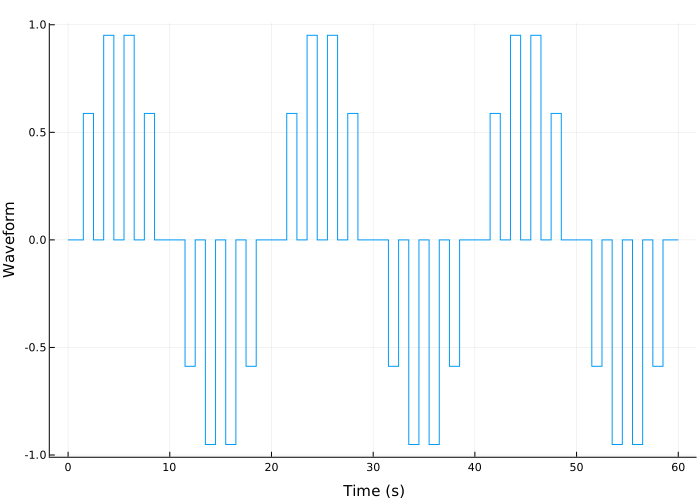
Asymmetric sawtooth signal
Details
In this example, an asymmetric sawtooth signal with a repetition rate is generated. 3 Hz. The width of the sawtooth signal is 0.2 c, and the shift coefficient — 1. The duration of the signal is 1 c, and the sampling rate — 1 kHz. Let’s plot the pulse sequence.
import EngeeDSP.Functions: tripuls, pulstran

fs = 1e3
t = 0:1/1e3:1
d = 0:1/3:1
x = tripuls(t, 0.2, -1)
y = pulstran(t, d, x, fs)

plot(t, y, xlabel="Time (s)", ylabel="Waveform", legend=false)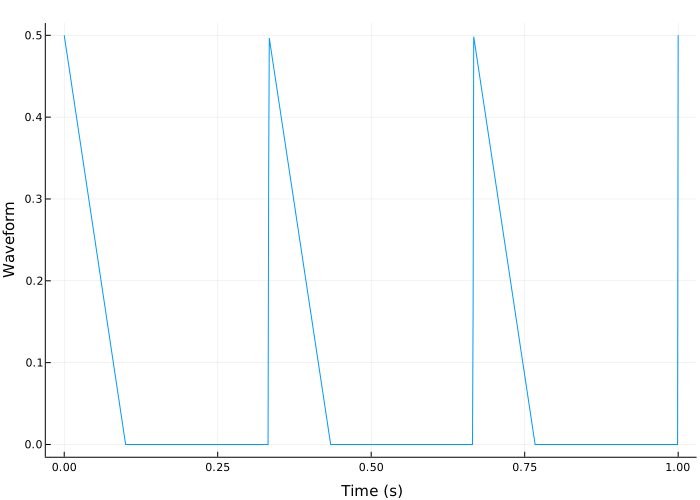
Changing the interpolation method using a custom pulse
Details
Let’s write a function that generates a custom exponentially decaying sawtooth signal with a frequency of 0.25 Hz. The generating function has a second input argument, which specifies one value of the sawtooth frequency and the attenuation coefficient. Let’s display the generated pulse with the sampling frequency 0.1 kHz during 1 seconds, with frequency and attenuation factor equal to 50.
import EngeeDSP.Functions: sawtooth

fnx = (x, fn) -> sawtooth.(2π * fn * 0.25 * x) .* exp.(-2 * fn * x.^2)

fs = 100
t = 0:1/fs:1

pp = fnx(t, 50)

plot(t, pp, legend=false)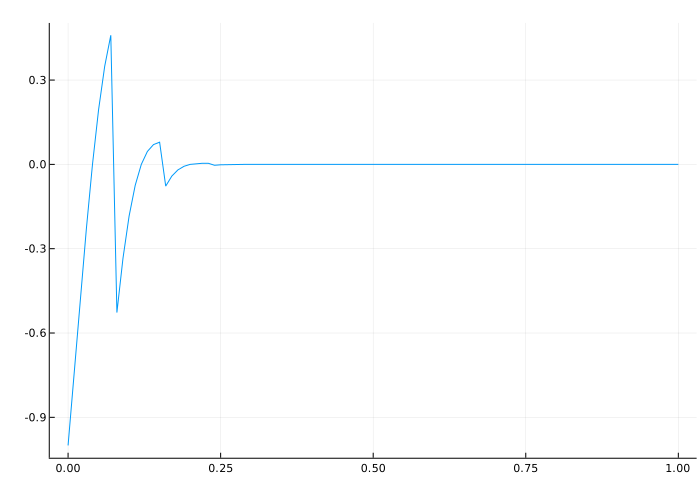
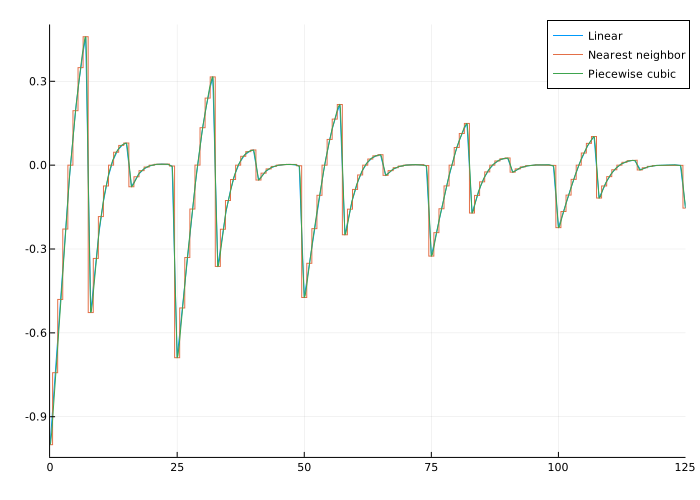
Using the function pulstran to generate a sequence of user pulses. The sequence is sampled with frequency 0.1 kHz during 125 seconds. The pulses appear every 25 seconds and have an exponentially decreasing amplitude.
We will specify the generated pulse as a prototype. We will generate three pulse sequences using the standard linear interpolation method, nearest neighbor interpolation and piecewise cubic interpolation. Let’s compare the pulse sequences on the same graph.
import EngeeDSP.Functions: pulstran

d = [0:25:125 exp.(-0.015*(0:25:125))]
ffs = 100
tp = 0:1/ffs:125

fnx = (x, fn) -> sawtooth.(2π * fn * 0.25 * x) .* exp.(-2 * fn * x.^2)
pp = fnx(tp, 50)

r = pulstran(tp, d, pp)
y = pulstran(tp, d, pp, "nearest")
q = pulstran(tp, d, pp, "pchip")

plot(tp, r, label="Linear", xlims=(0, 125))
plot!(tp, y, label="Nearest neighbor")
plot!(tp, q, label="Piecewise cubic")