Exploring the contents of the Engee file space
The project demonstrates a way to visualize the entire amount of data that is stored in your file space in Engee.
Uploading and analyzing the results
Install the library for building complex graphs:
Pkg.add("PlotlyJS")
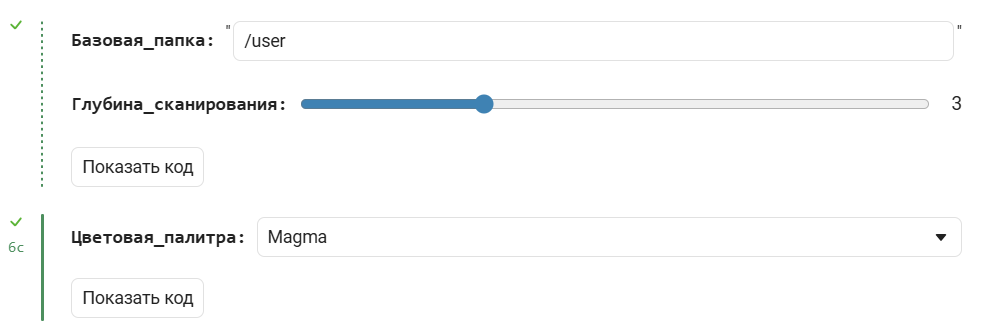
In the next cell, the parameters of the scanning algorithm of the selected directory are set (Base folder), it is scanned to the specified depth (Scan depth), and a Treemap graph is displayed according to the selected palette (Color palette).
const DT = let
    include("$(@__DIR__)/DirTreeMap.jl")
    DirTreeMap
end

Базовая_папка = "/user" # @param {type:"string",placeholder:"/user"}
Глубина_сканирования = 3 # @param {type:"slider",min:1,max:8,step:1}
data = DT.scan_directory(Базовая_папка; max_depth = Глубина_сканирования, follow_symlinks = false);
Цветовая_палитра = "Viridis" # @param [    "Viridis", "Cividis", "Inferno", "Magma", "Plasma","Blues", "Greens", "Greys", "Reds", "Purples", "Oranges","YlGnBu", "YlOrRd", "BuGn", "PuBu", "RdBu", "RdYlBu", "RdYlGn","PiYG", "PRGn", "BrBG", "PuOr", "Twilight", "HSV", "IceFire","Jet", "Rainbow", "Hot", "Earth", "Electric"]
DT.build_treemap(data; title = "Расход диска: $Базовая_папка", colorscale = Цветовая_палитра)
There is a button next to the graph <svg width="24" height="24" viewBox="0 0 24 24" fill="none" xmlns="http://www.w3.org/2000/svg "><g clip-path="url(#clip0_28322_63971)"><path fill-rule="evenodd" clip-rule="evenodd" d="M8.33474 5.98644C7.88842 5.56507 7.88842 4.88188 8.33474 4.4605L11.3135 1.64815C11.6989 1.28432 12.3011 1.28432 12.6865 1.64815L15.6653 4.4605C16.1116 4.88188 16.1116 5.56507 15.6653 5.98644C15.219 6.40782 14.4953 6.40782 14.049 5.98644L13 5V7.92099C13 8.51691 12.6312 9 12 9C11.3688 9 11 8.51691 11 7.92099V5L9.95098 5.98644C9.50467 6.40782 8.78105 6.40782 8.33474 5.98644Z"fill="currentColor"></path><path fill-rule="evenodd" clip-rule= "evenodd" d="M15.6653 18.0136C16.1116 18.4349 16.1116 19.1181 15.6653 19.5395L12.6865 22.3518C12.3011 22.7157 11.6989 22.7157 11.3135 22.3519L8.33473 19.5395C7.88842 19.1181 7,88842 18.4349 8.33473 18.0136C8.78105 17.5922 9.50467 17.5922 9.95098 18.0136L11 19V16.079C11 15.4831 11.3688 15 12 15C12.6312 15 13 15.4831 13 16.079V19L14.049 18.0136C14.4953 17.5922 15.219 17.5922 15.6653 18.0136Z" fill="currentColor"></path><path d="M5 13C4.71667 13 4.479 12.904 4.287 12.712C4.095 12.52 3.99934 12.2827 4 12C4 11.7167 4.096 11.479 4.288 11.287C4.48 11.095 4.71734 10.9993 5 11H19C19.2833 11 19.521 11.096 19.713 11.288C19.905 11.48 20.0007 11.7173 20 12C20 12.2833 19.904 12.521 19.712 12.713C19.52 12.905 19.2827 13.0007 19 13H5Z" fill="currentColor"></path></g>< defs><clipPath id="clip0_28322_63971"><rect width="24" height="24" fill="white"></rect></clipPath></defs></svg> - click it to expand the graph to the maximum available vertical size.
When opened in Engee, the above code is displayed as a form for entering parameters of the following type: