Range Doppler Response
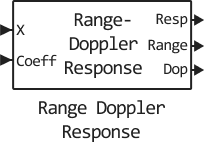
The Doppler range response.
blockType: RangeDopplerResponse
|
Path in the library: |
Description
Block Range Doppler Response calculates a map of the Doppler range of the input signal. The output response is a matrix, the rows of which are range elements, and the columns are Doppler intervals.
Ports
Entrance
X — input signal
complex column vector K by 1 | the complex matrix K on L | a complex array of K by N by L
The input signal.
The number of samples for the first dimension of the input matrix can be changed to simulate a change in the length of the signal. A change in size can occur, for example, in the case of a pulse waveform with a variable pulse repetition rate.
When using pulse signals, the length of the signal may vary. Then you can apply only the option Matched filter the Range method processing parameter.
Data types: Float16, Float32, Float64, Int8, Int16, Int32, Int64, UInt8, UInt16, UInt32, UInt64
Support for complex numbers: Yes
XRef — pass reference signal:q[<br>] complex column vector K by 1
A reference signal specified as a column vector with the same number of rows as X. This argument can be set with single or double precision.
Data types: Float16, Float32, Float64, Int8, Int16, Int32, Int64, UInt8, UInt16, UInt32, UInt64
Coeff — coefficients of the matched pass filter:q[<br>] complex column vector
Coefficients of the matched filter, specified as a complex column vector. This argument can be set with single or double precision.
Data types: Float16, Float32, Float64, Int8, Int16, Int32, Int64, UInt8, UInt16, UInt32, UInt64
PRF — pulse repetition rate
positive scalar
The pulse repetition rate, set as a positive scalar. The PRF must be less than or equal to the sampling frequency specified in the SampleRate property divided by the length of the first measurement of the input signal X. This argument can be set with single or double precision.
Dependencies
To use this argument, set the PRFSource property to Input port.
Data types: Float16, Float32, Float64, Int8, Int16, Int32, Int64, UInt8, UInt16, UInt32, UInt64
Output
Resp — response of the Doppler range
the complex matrix M by N | array M by N by P
The response of the Doppler range in X, returned as a complex-valued matrix of M to P or an array of M to N to P. The values of P and M depend on the syntax. N has the same value as for the input argument X.
Data types: Float16, Float32, Float64, Int8, Int16, Int32, Int64, UInt8, UInt16, UInt32, UInt64
Range — range values according to the grid of pass ranges:q[<br>] the valid column vector is M by 1
Values of the range at which the Doppler response range is estimated. Here rnggrid is a column vector of length M.
Data types: Float16, Float32, Float64, Int8, Int16, Int32, Int64, UInt8, UInt16, UInt32, UInt64
Dop — Doppler sampling
the valid column vector is M by 1
Doppler samples or velocity samples, at which the response of the Doppler range is estimated. Here dopgrid — column vector of length P. Does it contain dopgrid Doppler or velocity samples, depends on the property DopplerOutput.
Data types: Float16, Float32, Float64, Int8, Int16, Int32, Int64, UInt8, UInt16, UInt32, UInt64
Parameters
Range processing method — pass range processing method:q[<br>] Matched filter (by default) | FFT
The range processing method specified as Matched filter or FFT.
-
Matched filter— The unit applies a matched filter to the incoming signal. This approach is usually used for pulsed signals, when the matched filter is a temporary feedback characteristic of the transmitted signal. -
FFT— The unit applies the FFT to the input signal. This approach is commonly used for FMCW and linear FM pulse signals.
Data types: Float16, Float32, Float64, Int8, Int16, Int32, Int64, UInt8, UInt16, UInt32, UInt64
Signal propagation speed — signal propagation speed, m/s
3e8 (default) | positive scalar
The propagation velocity of the signal in the form of a real positive scalar. The default value is the speed of light.: 3e8 m/s.
The units of measurement are meters per second.
Data types: Float16, Float32, Float64, Int8, Int16, Int32, Int64, UInt8, UInt16, UInt32, UInt64
Source of pulse repetition frequency — source of pulse repetition frequency
Auto | Property | Input port
The pulse repetition rate source is set as:
-
Auto— Automatic pulse repetition rate (PRF) calculation. The PRF is the sampling frequency of the signal divided by the number of lines in the input port signal, X. -
Property— set the pulse repetition rate using the PRF parameter. -
Input port— Specify the PRF using the PRF input port.
Use the parameter Property or Input port if the pulse repetition rate cannot be determined from the duration of the signal, as is the case with range capture data.
Data types: Float16, Float32, Float64, Int8, Int16, Int32, Int64, UInt8, UInt16, UInt32, UInt64
Pulse repetition frequency of the input signal — pulse repetition frequency of the input signal, Hz
positive scalar
The pulse repetition rate of the input signal, set as a positive scalar. PRF must be less than or equal to the sampling rate divided by the number of input lines. If the length of the signal is variable, then the maximum possible number of input lines should be used instead.
Dependencies
To use this parameter, set the Source of pulse repetition frequency parameter to Property.
Data types: Float16, Float32, Float64, Int8, Int16, Int32, Int64, UInt8, UInt16, UInt32, UInt64
Inherit sample rate — inherit the sample rate of
enabled (by default) | turned off
Check the box to inherit the sampling rate from higher-level blocks. Otherwise, set the sampling rate using the Sample rate (Hz) parameter.
Sample rate — sampling rate of the signal, Hz
positive scalar
Set the sampling frequency of the signal (in hertz) as a positive scalar. This parameter appears only if the Inherit sample rate option is not selected.
Data types: Float16, Float32, Float64, Int8, Int16, Int32, Int64, UInt8, UInt16, UInt32, UInt64
Source of FFT length in Doppler processing — source of FFT length in Doppler processing
Auto (default) | Property
Specify how the block determines the length of the FFT used in Doppler processing. The values of this parameter are:
|
The length of the FFT is equal to the number of input lines. |
|
The FFT length in Doppler processing parameter of this block sets the length of the FFT. |
Data types: Float16, Float32, Float64, Int8, Int16, Int32, Int64, UInt8, UInt16, UInt32, UInt64
Doppler processing window — Doppler processing window
No | Hamming | Chebyshev | Hann | Kaiser | Taylor
Set the window used for Doppler processing using one of the following values: No, Hamming, Chebyshev, Hann, Kaiser, Taylor.
Data types: Float16, Float32, Float64, Int8, Int16, Int32, Int64, UInt8, UInt16, UInt32, UInt64
Doppler sidelobe attenuation level — Doppler processing window
Kaiser | Chebyshev | Taylor | positive scalar
This parameter appears only if the Doppler window is set to Kaiser, Chebyshev or Taylor. Set the attenuation level of the side lobes as a positive scalar in decibels.
Data types: Float16, Float32, Float64, Int8, Int16, Int32, Int64, UInt8, UInt16, UInt32, UInt64
Doppler output — output signal of the Doppler region
Frequency | Speed
Specify the output signal of the Doppler region as Frequency or Speed.
|
Doppler shift, in hertz. |
|
The radial velocity corresponding to the Doppler shift, in meters per second. |
Data types: Float16, Float32, Float64, Int8, Int16, Int32, Int64, UInt8, UInt16, UInt32, UInt64
Signal carrier frequency — the carrier frequency of the signal, Hz
scalar
This parameter appears only if the Doppler output parameter is set to Speed. Set the carrier frequency in hertz as a scalar.
Data types: Float16, Float32, Float64, Int8, Int16, Int32, Int64, UInt8, UInt16, UInt32, UInt64
FM sweep slope — FM band sweep slope, Hz/c
scalar
This parameter appears only when setting the Range processing method to FFT. Set the slope of the FM band scan in hertz per second as a scalar.
Data types: Float16, Float32, Float64, Int8, Int16, Int32, Int64, UInt8, UInt16, UInt32, UInt64
Dechirp input signal — enabling decryption of input signals
enabled (by default) | turned off
Select this option so that the block performs the decryption operation of the input signal. Uncheck this box to indicate that the input signal has already been decrypted and no decryption operation is required.
Dependencies
To use this parameter, set the Range processing method parameter to FFT.
Source of FFT length in range — source of FFT length
Auto (default) | Property
The source of the FFT length used to process decrypted signals in the range is set as Auto or Property.
-
Auto— The length of the FFT is equal to the length of the fast time measurement of the input data cube. -
Property— Specify the length of the FFT using the FFT length in range processing parameter.
Dependencies
To use this parameter, set the Range processing method parameter to FFT.
FFT length in range processing — processing of the FFT length range
a positive integer
This parameter appears only if the Range processing method parameter is set to FFT, and for the parameter Source of FFT length in range processing – the value Property. Set the length of the FFT in the range area as a positive integer.
Data types: Float16, Float32, Float64, Int8, Int16, Int32, Int64, UInt8, UInt16, UInt32, UInt64
Range processing window — processing of the FFT length range
None | Hamming | Chebyshev | Hann | Kaiser | Taylor
Specify the window used to process the range using one of the following values: None, Hamming, Chebyshev, Hann, Kaiser, Taylor.
If you set this parameter to Taylor, then the generated Taylor window will have four almost permanent side lobes adjacent to the main lobe.
Dependencies
To use this parameter, set the Range processing method parameter to FFT.
Data types: Float16, Float32, Float64, Int8, Int16, Int32, Int64, UInt8, UInt16, UInt32, UInt64
Set reference range at center — sets the range of values in the center of the grid of pass ranges:q[<br>] enabled (by default) | turned off
Set the range of values in the center of the range grid, set as included or turned off. By checking this box, you can set a range of values in the center of the range grid. Otherwise, the range of values is set to the beginning of the range grid.
Data types: Float16, Float32, Float64, Int8, Int16, Int32, Int64, UInt8, UInt16, UInt32, UInt64
Range sidelobe attenuation level — attenuation level of the side lobes of the
30 (default) | scalar
The attenuation level of the side lobes in the form of a positive scalar.
This attenuation applies only to windows. Chebyshev, Kaiser or Taylor. The units of measurement are dB.
Dependencies
To use this parameter, set the Range processing method parameter to FFT, and for the Range processing window parameter , the value Chebyshev, Kaiser or Taylor.
Reference range — range of values of the range grid, m
a non-negative scalar
The range of values of the range grid, specified as a non-negative scalar.
-
If the Range processing method parameter is set to
Matched filter, then the range of values is set to the beginning of the range grid. -
If you set the Range processing method parameter to
FFT, then the range of values depends on the setting of the Set reference range at center checkbox.-
If the Set reference range at center checkbox is selected, the range of values will be set in the center of the range grid.
-
If the Set reference range at center checkbox is not checked, the reference range is set to the beginning of the range grid.
-
The units of measurement are meters.
Example: 1000.0
Data types: Float16, Float32, Float64, Int8, Int16, Int32, Int64, UInt8, UInt16, UInt32, UInt64