RITM-CANFD RX
Receiving CAN and CAN FD messages.
blockType: SubSystem
|
Path in the library: |
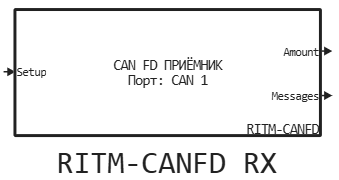
Description
| To work with the block, install/update the support package RITM blocks. |
Block RITM-CANFD RX accepts classic CAN frames and CAN FD frames via a single CAN FD socket. Field ProtocolMode The output bus shows the format of the actually received frame. If there is no message at the current step, the block sets the zero values of the output bus fields and returns 0 the output is Amount.
Message Filter
The filter is applied in the operating system before sending the message to the model. The message is accepted if the condition is met:
CAN_ID & Mask == Filter_ID & Mask
The zero bit in Mask excludes the corresponding bit of the identifier from verification, a single bit requires matching with Filter ID. To receive all messages, set 0 for the parameters Filter ID: and Mask:.
Ports
Input
#
Setup
—
the handle of the configured interface
scalar
Details
Connect this input to the output of the unit RITM-CANFD Setup, which configures the same physical port.
| Data types |
|
| Complex numbers support |
No |
Output
#
Amount
—
number of messages received
scalar
Details
The number of messages available at the output of Messages at the current calculation step.
| Data types |
|
| Complex numbers support |
No |
#
Messages
—
array of received messages
the tire
Details
Array of accepted tires CAN_FD_MESSAGE_BUS. The first Amount elements contain the frames calculated in the current step. The length of the array is set by the parameter Максимальное число сообщений:.
| Data types |
|
| Complex numbers support |
No |
Parameters
Параметры:
#
Интерфейс CAN: —
the port for receiving messages
CAN 1 | CAN 2 | CAN 3 | CAN 4 | CAN 5 | CAN 6 | CAN 7 | CAN 8
Details
Select the same port that is specified in the connected unit. RITM-CANFD Setup.
| Values |
|
| Default value |
|
| Program usage name |
|
| Tunable |
No |
| Evaluatable |
Yes |
# Максимальное число сообщений: — message limit per step
Details
Sets the maximum number of messages read from the system buffer in one step and the length of the bus array at the output of Messages. The working frame buffer has a fixed size and is not allocated dynamically during the calculation step.
| Default value |
|
| Program usage name |
|
| Tunable |
No |
| Evaluatable |
Yes |
# Шаг расчёта, с: — admission period
Details
Sets the block calculation step in seconds. Meaning −1 means an inherited step.
| Default value |
|
| Program usage name |
|
| Tunable |
No |
| Evaluatable |
Yes |
Фильтр:
# Filter ID: — filter ID
Details
Sets the identifier value for filtering received messages at the operating system level.
| Default value |
|
| Program usage name |
|
| Tunable |
No |
| Evaluatable |
Yes |
# Mask: — id filter mask
Details
Sets the ID bits involved in filtering. To disable the filter, set 0 for the parameters Filter ID: and Mask:.
| Default value |
|
| Program usage name |
|
| Tunable |
No |
| Evaluatable |
Yes |