HDL Counter (Discrete)
Forward and countdown over a set range of numbers.
blockType: SubSystem
|
Path in the library: |
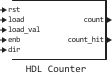
Description
Block HDL Counter simulates a counter operating in the Free-running, Count limited and Modulo A hardware counter that supports signed and unsigned integers and fixed-point data types. The counter outputs its value for the current time.
The counter counts from the initial value to the threshold value based on the parameter values. Counter type, Count to value, and Word length. The type of counter output depends on the parameters Counter output data is, Word length, and Fraction length.
Ports
Input
#
rst
—
reset signal
scalar
Details
The input signal is used to determine when the counter is reset by the unit.
| Data types |
|
| Complex numbers support |
No |
#
load
—
download signal
scalar
Details
Download input signal. When the logical input comes in 1, the counter accepts the value received on the load_val port.
| Data types |
|
| Complex numbers support |
No |
#
load_val
—
the loading signal at the logical 1 on the load port
scalar
Details
A signal to write to the counter when a logical load is applied to the load port. 1.
| Data types |
|
| Complex numbers support |
No |
#
enb
—
activation signal
scalar
Details
An input signal that determines whether the counter should count from the previous value.
-
When this signal is equal to
1The counter continues counting up or down depending on the direction. -
When this signal is equal to
0, the counter retains the previous value.
| Data types |
|
| Complex numbers support |
No |
#
dir
—
invoice direction signal
scalar
Details
An input signal that determines whether to count up or down. This port is associated with the parameter Step value to determine the direction of the invoice.
-
Meaning
1– by default, which causes the counter to increase. Parameter value Step value it is added to the current counter value to calculate the next value. -
Meaning
0– reduces the counter. Parameter value Step value It is subtracted from the current counter value to calculate the next value.
| Data types |
|
| Complex numbers support |
No |
Output
#
count
—
current counter value
scalar
Details
The current counter value, set as a scalar.
| Data types |
|
| Complex numbers support |
No |
#
count_hit
—
indicator of the counter reaching the limit value
scalar
Details
The counter limit indicator, returned as a scalar with a Boolean value.
-
Meaning
1indicates that the counter has reached its limit. -
Meaning
0indicates that the counter has not reached its limit.
This port will output correct values only when a logical error arrives at the dir port. 1 otherwise, the output values may be incorrect.
| Data types |
|
| Complex numbers support |
No |
Parameters
Parameters
#
Counter type —
tag type
Free running | Count limited | Modulo
Details
The behavior of the counter, which determines which hardware counter to model: free-running, limited, or modular. Set as:
-
Free running(default) – the counter continues to increase or decrease by the parameter value. Step value before the reset. -
Count limited– the counter increases or decreases by the parameter value Step value until it becomes exactly equal to the parameter value. Count to value. If the value is Step value such that the score value will not be exactly equal to Count to value, then it can continue counting up to the threshold value, which is determined by the parameter Word length. -
Modulo– the counter increases or decreases by the parameter value Step value, until it reaches the value of the parameter Count to value. If the value is Step value such that the counter value is not exactly equal to Count to value, then the counter convolves to a value that is determined by the value of the convolution step.
| Values |
|
| Default value |
|
| Program usage name |
|
| Tunable |
No |
| Evaluatable |
Yes |
# Initial value — counter value after reset
Details
The value that the counter is reset to.
| Default value |
|
| Program usage name |
|
| Tunable |
No |
| Evaluatable |
Yes |
# Step value — the step value for the invoice
Details
The value added to the counter at each countdown.
| Default value |
|
| Program usage name |
|
| Tunable |
No |
| Evaluatable |
Yes |
# Count to value — the threshold value of the counter
Details
When using the mode Count limited if the counter value is exactly equal to the parameter value Count to value, then the account starts over with the value Initial value.
If the account value exceeds Count to value, then the counter continues counting up to the threshold value, which depends on the parameter Word length.
When using the mode Modulo if the counter reaches the value Count to value, the counter is restarted from a value that is determined by the value of the convolution step.
Dependencies
To use this parameter, set for the parameter Counter type meaning Count limited or Modulo.
| Default value |
|
| Program usage name |
|
| Tunable |
No |
| Evaluatable |
Yes |
#
Count from —
the rule for calculating the initial value of the counter
Initial value | Specify
Details
Select the rule according to which the initial value of the counter will be selected, to which the counter will return after reaching the threshold value. This rule applies to counter modes. Count limited and Free-running. In the mode Modulo After reaching the threshold value, the counter can take a convolution step value that differs from the initial counter value.
-
If the mode is selected
Specify, parameter Count from value It is the initial value after the counter reaches the threshold value.
| Values |
|
| Default value |
|
| Program usage name |
|
| Tunable |
No |
| Evaluatable |
Yes |
# Count from value — the initial value of the counter
Details
The value of the counter after it reaches the threshold value, when for the parameter Count from the value is set Specify.
| Default value |
|
| Program usage name |
|
| Tunable |
No |
| Evaluatable |
Yes |
#
Counter output data is —
the sign of the output data
Unsigned | Signed
Details
Determines the sign of the input data.
| Values |
|
| Default value |
|
| Program usage name |
|
| Tunable |
No |
| Evaluatable |
Yes |
# Word length — tag word length
Details
The number of bits, including the signed bit, for an integer counter; the length of an integer part of the fixed-point data.
If the parameter value is Counter output data is set to the mode Unsigned, then the minimum possible value is Word length equally 1; in the mode Signed the minimum possible value is 2. The maximum possible parameter value Word length equally 125.
| Default value |
|
| Program usage name |
|
| Tunable |
No |
| Evaluatable |
Yes |
# Fraction length — fractional counter length
Details
The length of the fractional part for a fixed-point data type.
| Default value |
|
| Program usage name |
|
| Tunable |
No |
| Evaluatable |
Yes |