HDL FIFO (Discrete)
Storing a sequence of input samples in a first—in-first-out (FIFO) register.
blockType: SubSystem
|
Path in the library: |
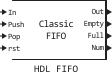
Description
Block HDL FIFO stores a sequence of input samples in the FIFO register (first in, first out). The data written first to the FIFO register is released first. The implementation of the block is similar in functionality and behavior to the FIFO block in hardware platforms.
Ports
Input
#
In
—
data entry signal
scalar
Details
The signal for entering data into the block.
When writing data to a block, the newest data is placed at the end of the register. The block records the subsequent data after this record.
| Data types |
|
| Complex numbers support |
Yes |
#
Push
—
recording control signal
scalar
Details
When the value arrives on this port 1, the block places the data from the In port at the end of the FIFO register.
| Data types |
|
| Complex numbers support |
No |
#
Pop
—
reading control signal
scalar
Details
When the value arrives on this port 1, the block unloads the first element from the FIFO register and holds this value on the Out port.
| If two or more control input ports are triggered at the same time step, the Pop signal is read first, and then the Push signal is written. |
| Data types |
|
| Complex numbers support |
No |
#
rst
—
reset control signal
scalar
Details
When the reset port receives the value 1, it resets the outputs of the Empty, Full and Num block HDL FIFO.
| Data types |
|
| Complex numbers support |
No |
Output
#
Out
—
data output signal
scalar
Details
The data output signal from the FIFO block. When performing a read operation from the FIFO, the data that was first written to the FIFO register is extracted from the FIFO and held at the output.
| Data types |
|
| Complex numbers support |
Yes |
#
Empry
—
empty register indication signal
scalar
Details
The control signal output from the FIFO is equal to 1 when there is no data in the FIFO register and it is impossible to perform a read operation.
| Data types |
|
| Complex numbers support |
No |
#
Full
—
singal indication of register fullness
scalar
Details
The control signal output from the FIFO, which is 1 when the FIFO register is full and cannot accept more data.
| Data types |
|
| Complex numbers support |
No |
#
Num
—
number of entries
scalar
Details
The amount of data that is currently in the FIFO register.
-
Num increases by
1for each data that you write to the FIFO. -
Num decreases by
1for every data that you read from the FIFO.
| Data types |
|
| Complex numbers support |
No |
Parameters
Main group
# Register size — number of entries
Details
Specify the number of records that can contain a FIFO register.
The minimum value for Register size – 4.
| Default value |
|
| Program usage name |
|
| Tunable |
No |
| Evaluatable |
Yes |
#
Mode —
Operating mode
Classic | FWFT
Details
Specify the FIFO operation mode.
Using the mode FWFT you can look ahead and see the data at the front of the FIFO queue without having to perform a read operation. Mode FWFT it is especially useful when you apply back pressure with AXI4-Stream interfaces.
| Values |
|
| Default value |
|
| Program usage name |
|
| Tunable |
No |
| Evaluatable |
Yes |
# The ratio of output sample time to input sample time — sampling rate factor
Details
Specify the ratio of the sampling period at the output to the sampling period at the input.
By default, this ratio is 1, which means that the In and Push inputs and Out and Pop outputs operate at the same sampling rate.
The inputs and outputs can operate with different sampling periods. Use a positive integer or 1/N, where N – a positive integer. For example, if you enter 1/2, then the sampling period of the outputs will be two times less than the sampling period of the inputs, that is, the outputs will work faster. The signals of the ports Full, Empty and Num operate at a higher speed.
| Default value |
|
| Program usage name |
|
| Tunable |
No |
| Evaluatable |
Yes |
#
Push onto full register —
overflow condition on the Push port
Ignore | Warning | Error
Details
Specify how the block should react when writing to the filled FIFO.
| Values |
|
| Default value |
|
| Program usage name |
|
| Tunable |
No |
| Evaluatable |
Yes |
#
Pop empty register —
overflow condition on the Pop port
Ignore | Warning | Error
Details
Specify how the block should react to reading from an empty FIFO.
| Values |
|
| Default value |
|
| Program usage name |
|
| Tunable |
No |
| Evaluatable |
Yes |
# On empty register indicator port (Empty) — empty register display port
Details
Select this option to enable the empty register display port.
This port outputs 1 when the FIFO register is empty, and 0 when the FIFO contains one or more data records.
| Default value |
|
| Program usage name |
|
| Tunable |
No |
| Evaluatable |
Yes |
# On full register indicator port (Full) — register fullness indication port
Details
Select this option to enable the register fill indication port.
This port outputs 1 when the FIFO register is full.
| Default value |
|
| Program usage name |
|
| Tunable |
No |
| Evaluatable |
Yes |
# On number of register entries port (Num) — the port of information about the number of entries in the register
Details
Select this option to enable the port of information about the number of entries in the register.
This port outputs the amount of data that is currently available in the FIFO queue.
| Default value |
|
| Program usage name |
|
| Tunable |
No |
| Evaluatable |
Yes |
# On local reset port (rst) — local reset port
Details
Select this option to enable the additional local reset port rst.
| Default value |
|
| Program usage name |
|
| Tunable |
No |
| Evaluatable |
Yes |
Signal settings
#
Data type —
data type
Float64 | Float32 | Float16 | Int8 | UInt8 | Int16 | UInt16 | Int32 | UInt32 | Int64 | UInt64 | Int128 | UInt128 | Bool | Fixed-point
Details
Specify the data type. Set as:
-
Float64 -
Float32 -
Float16 -
Int8 -
UInt8 -
Int16 -
UInt16 -
Int32 -
UInt32 -
Int64 -
UInt64 -
Int128 -
UInt128 -
Bool -
Fixed-point
| Values |
|
| Default value |
|
| Program usage name |
|
| Tunable |
No |
| Evaluatable |
Yes |
# Data fixed-point type — fixed-point data type
Details
Specify the fixed-point data type.
| Default value |
|
| Program usage name |
|
| Tunable |
No |
| Evaluatable |
Yes |
#
Signal type —
signal type
Real | Complex
Details
Specify the type of signal. Set as:
-
Real -
Complex
| Values |
|
| Default value |
|
| Program usage name |
|
| Tunable |
No |
| Evaluatable |
Yes |
# Sample time — sampling period
Details
The sampling period, set as a positive number.
| Default value |
|
| Program usage name |
|
| Tunable |
No |
| Evaluatable |
Yes |
Algorithms
FIFO write operation
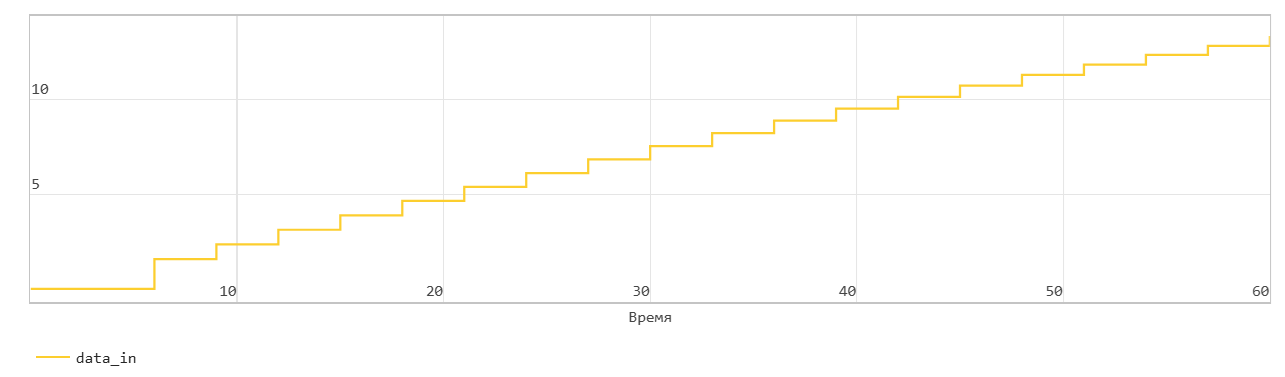
This picture shows the write operation. The Push input port acts as an enabling signal for the write operation. In the figure, data_in indicates this signal.
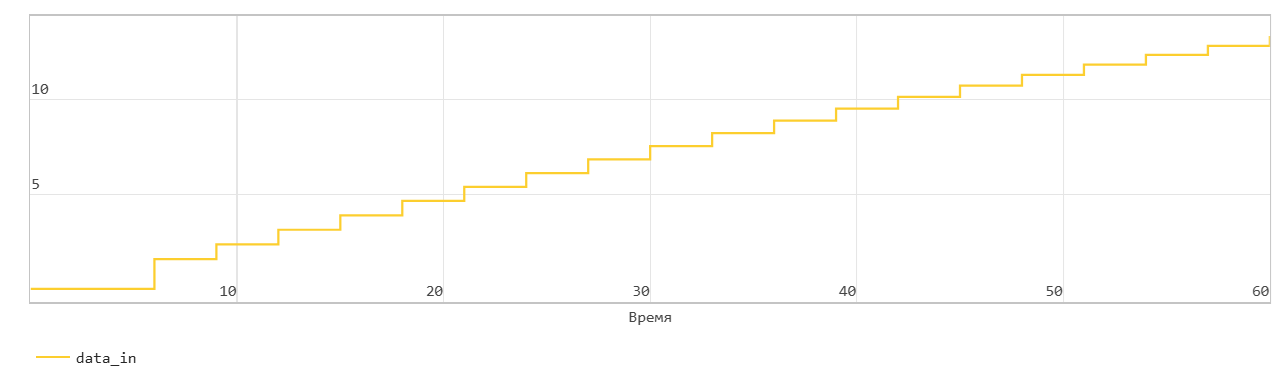
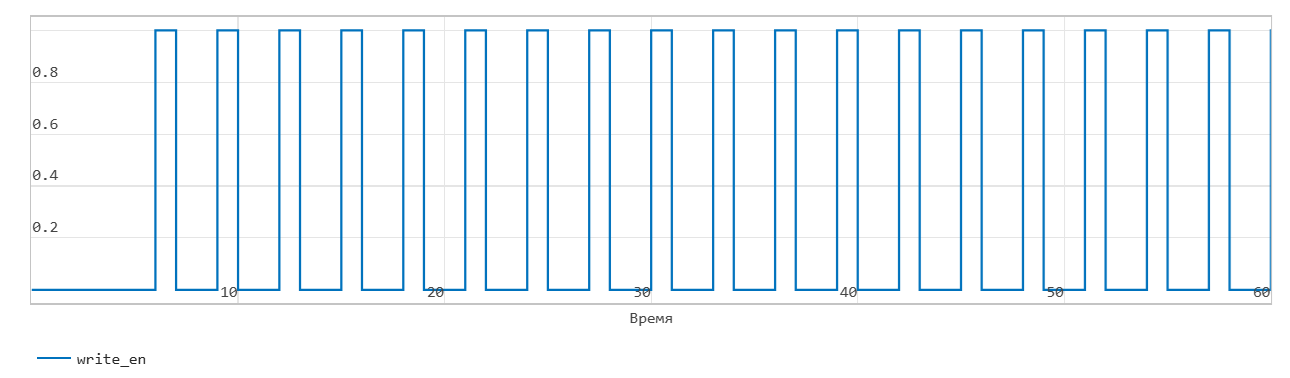
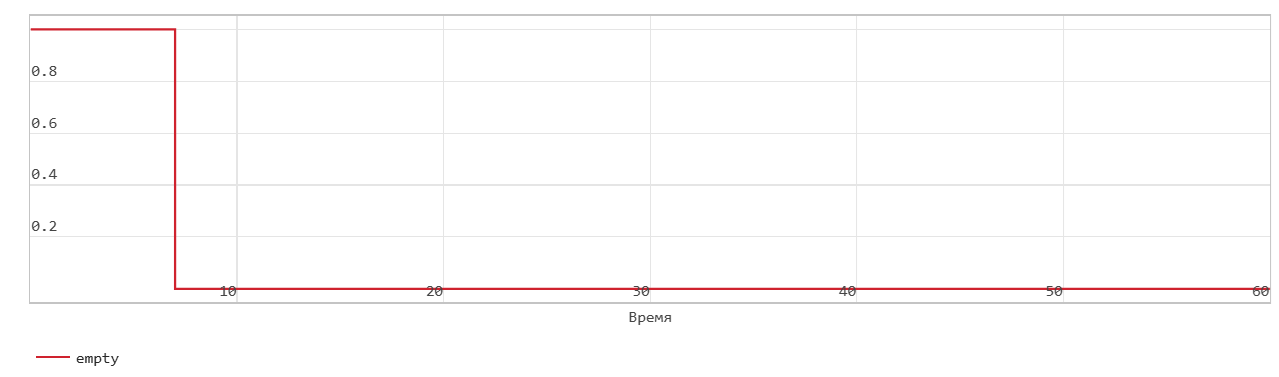
When the signal data_in is equal to 0, the block does not write data to the FIFO, but sets the Empty flag.
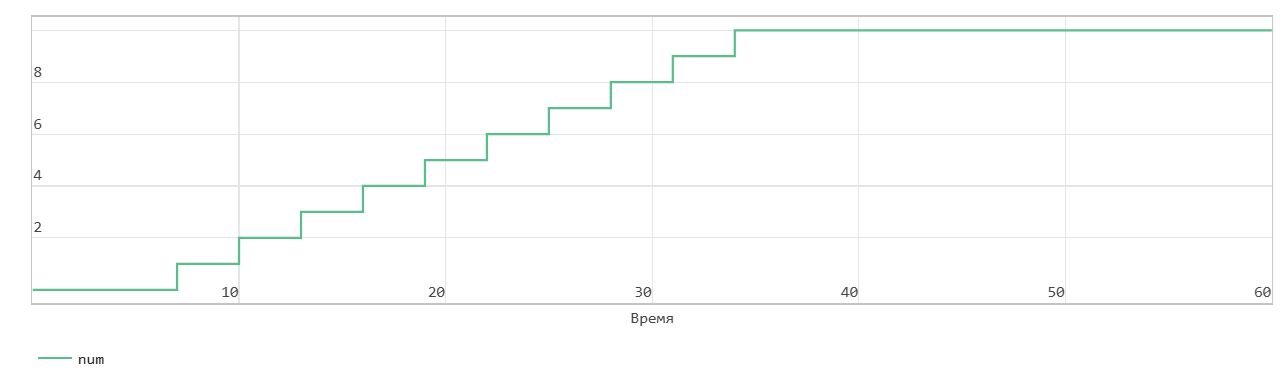
When the data_in signal becomes equal 1, the block translates the din signal on the In input port to the end of the FIFO register in the next time step. The Num signal indicates the amount of data in the FIFO register. Each time you write data to the FIFO, the Num signal increases by 1. At the time step 6 data_in is equal to 1. In the next time step, data_in is equal to 7, data is written to FIFO. The Num signal increases by 1, and the Empty flag is canceled.
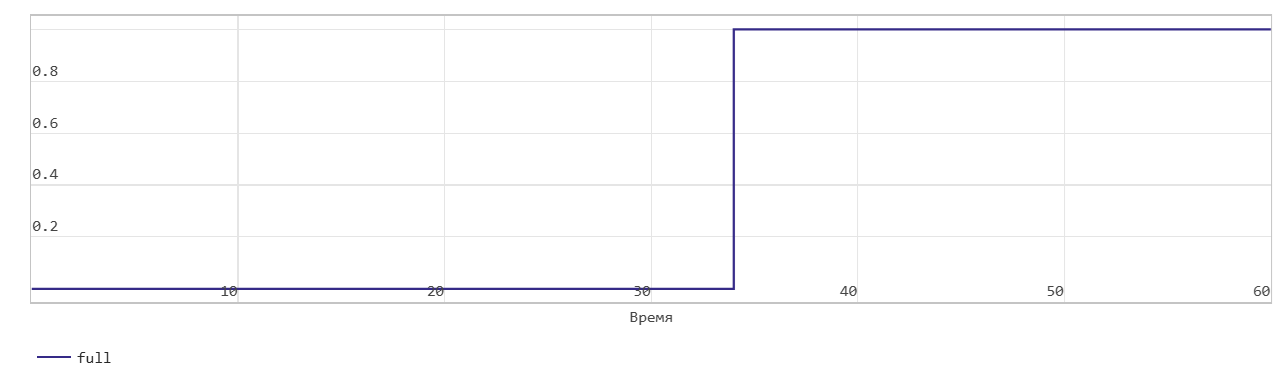
This FIFO uses the register size specified by the Register size parameter. By default, the register size is 10. In the figure, when the Num signal becomes equal 10 at the time step 34, the Full signal is given. After the Full signal becomes equal 1 if you write more data to the FIFO, the block generates a warning.
Classic FIFO read operation
This picture shows the read operation. The Pop input port acts as an enabling signal for the read operation. In the figure, read_en indicates this signal.
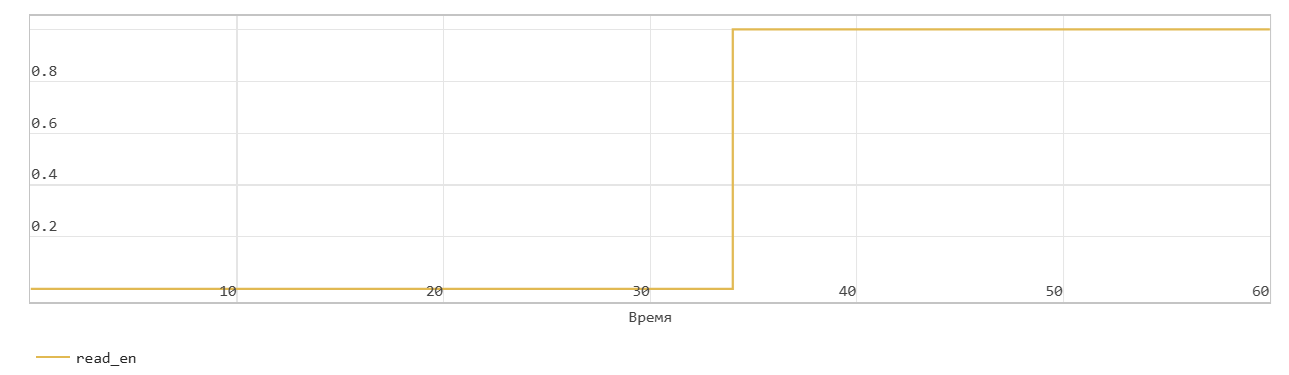
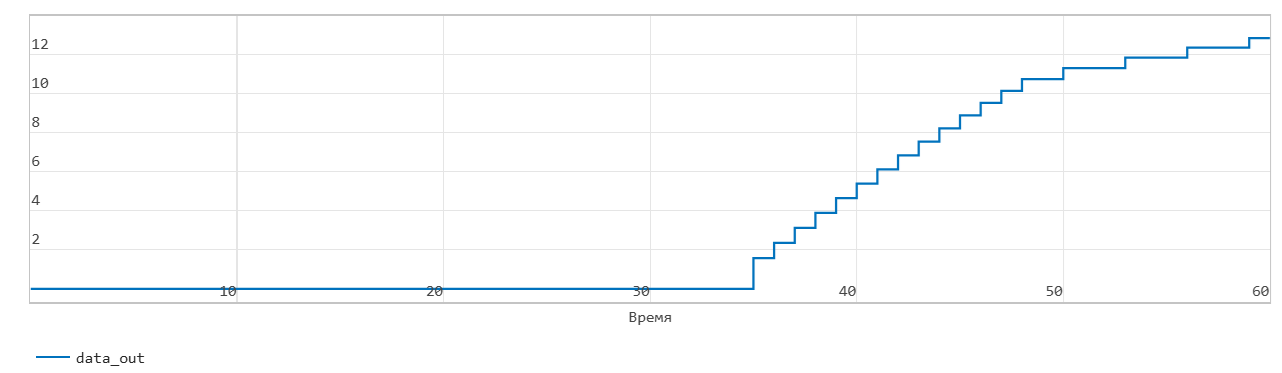
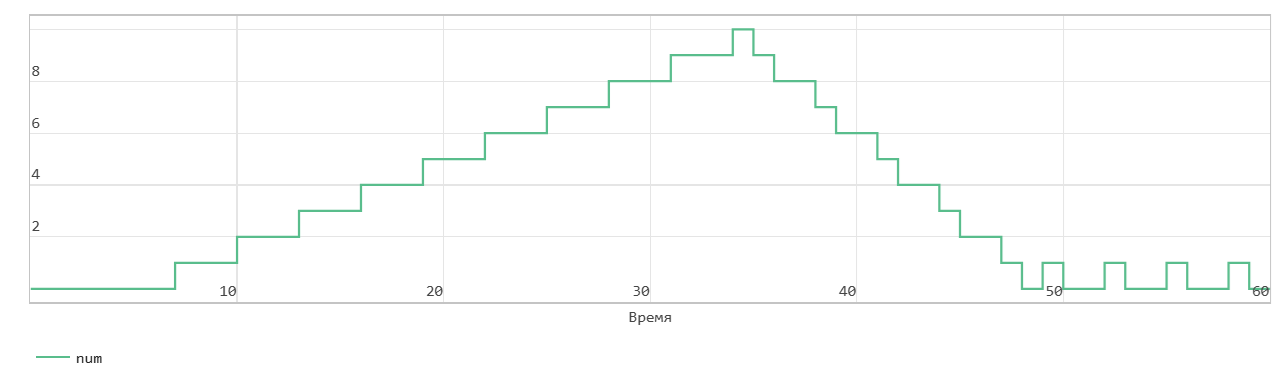
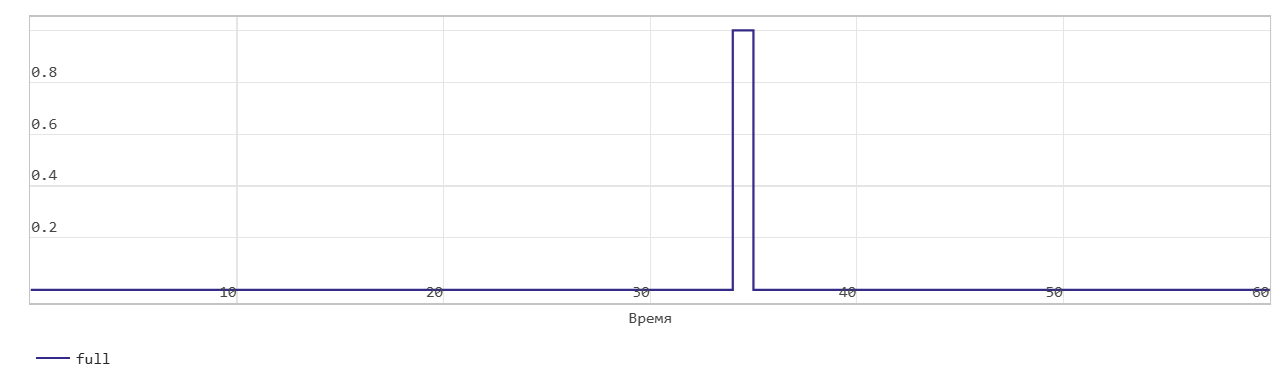
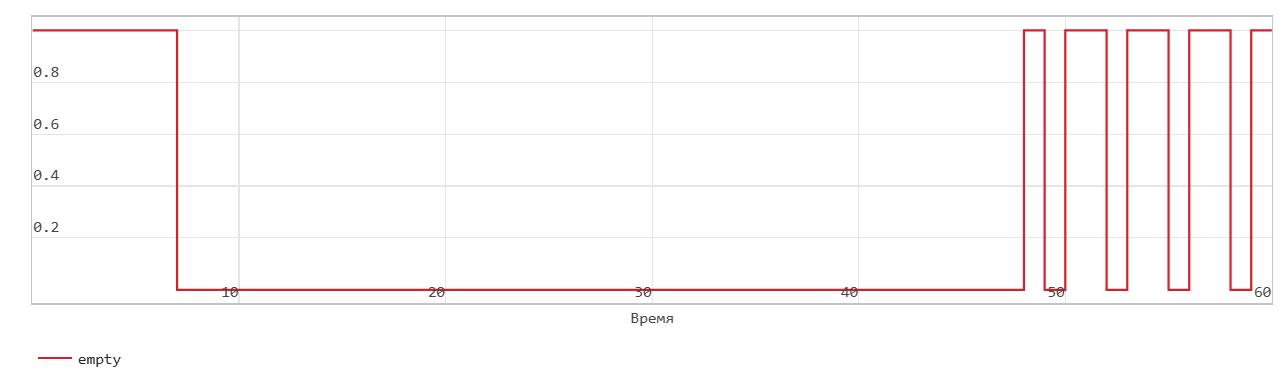
The figure shows that when the read_en signal is 1 at the time step 34 the dout signal outputs the oldest record in the FIFO in the next time step 35. The Full flag is unchecked, the Num signal is reduced by 1 starting from the time step 35 as the data is read from the FIFO.
When the Num signal becomes equal 0, the Empty signal is given. After the Empty signal becomes equal 0 if you read more data from the FIFO, the block generates a warning.
The operation of writing the first word via FIFO
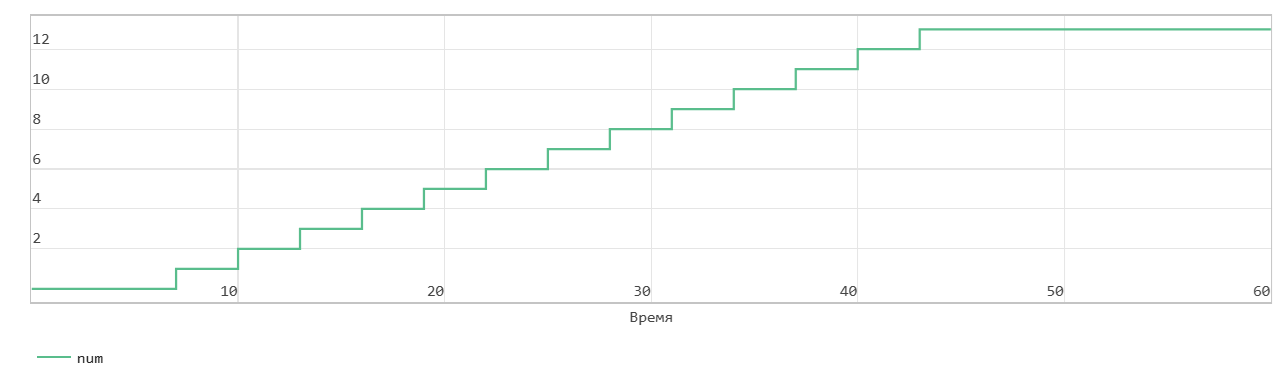
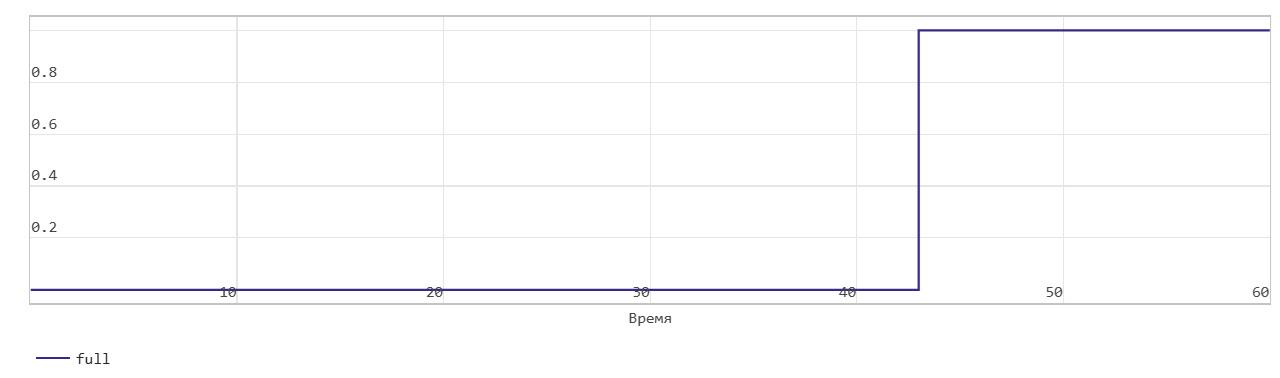
This figure shows the recording operation when the Mode parameter is set to FWFT. The Push input port acts as an enabling signal for the write operation. In the figure, write_en indicates this signal.
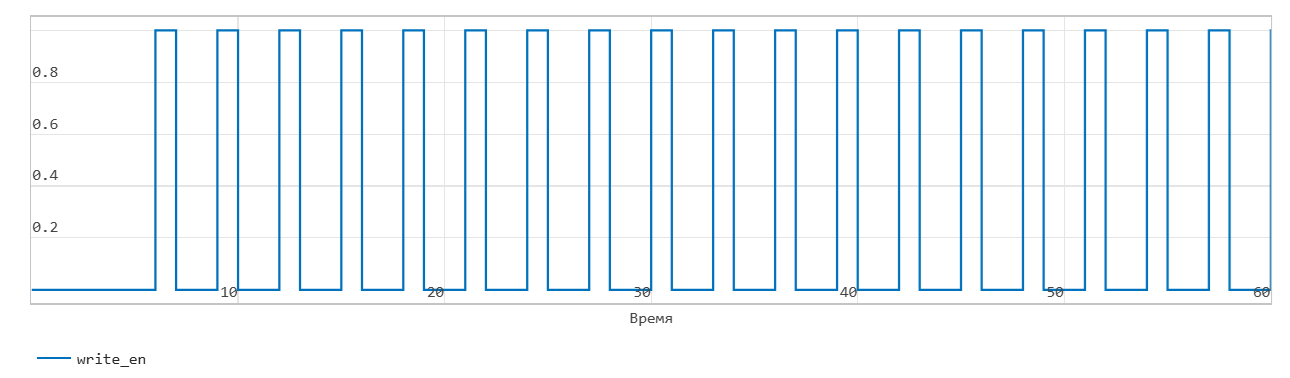
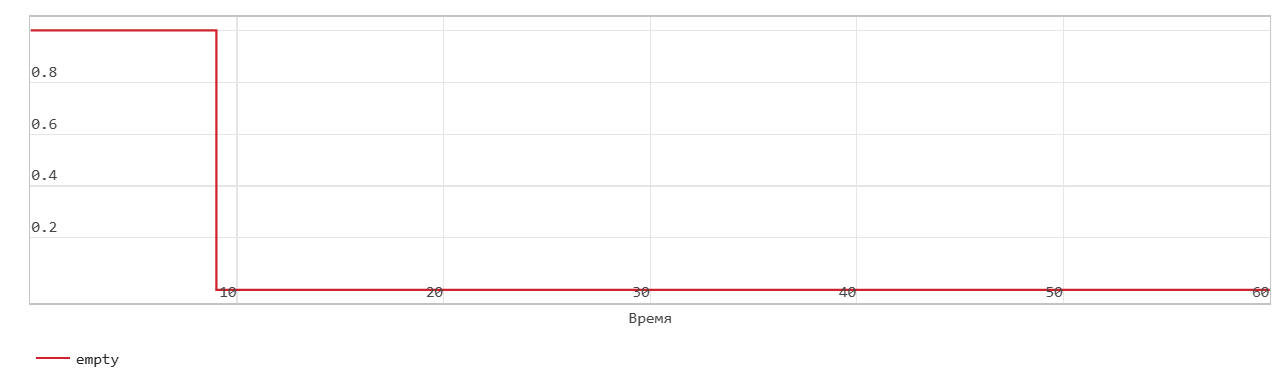
When the write_en signal is equal to 0, the block does not write data to the FIFO and sets the Empty flag.
When the write_en signal becomes equal 1, the block translates the value of the din signal on the input port In to the end of the FIFO register in the next time step. The Num signal indicates the amount of data in the FIFO register. Each time you write data to the FIFO, the Num signal increases by 1. At the time step 6, write_en is equal to 1. In the next time step 7, data is written to FIFO. The Num signal increases by 1, and the Empty flag is canceled.
FIFO uses the register size specified by the Register size parameter. By default, the register size is 10. In the figure, when the Num signal becomes equal 13 at the time step 43, the Full signal is given. In FWFT mode, the FIFO can store more 3 values beyond their set size. After the Full signal becomes equal 1 if you write more data to the FIFO, the block generates a warning.
FIFO read operation with first-word transition
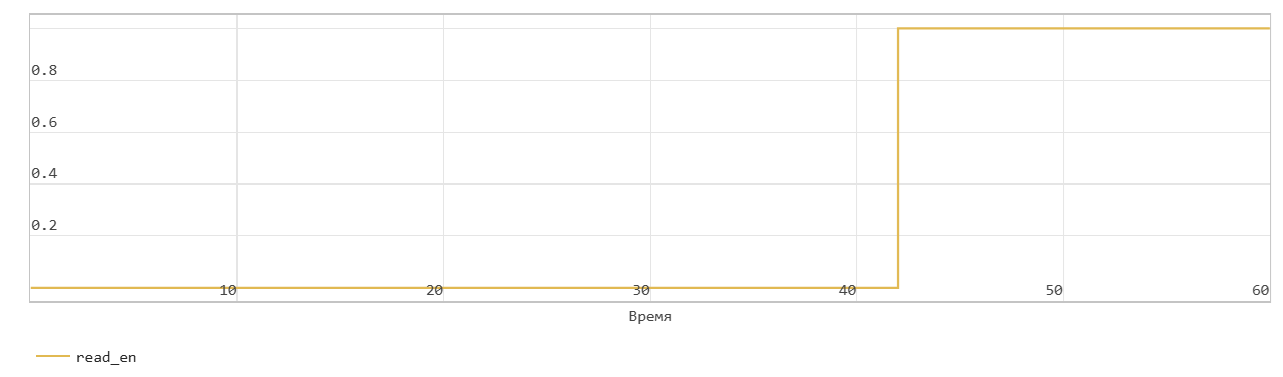
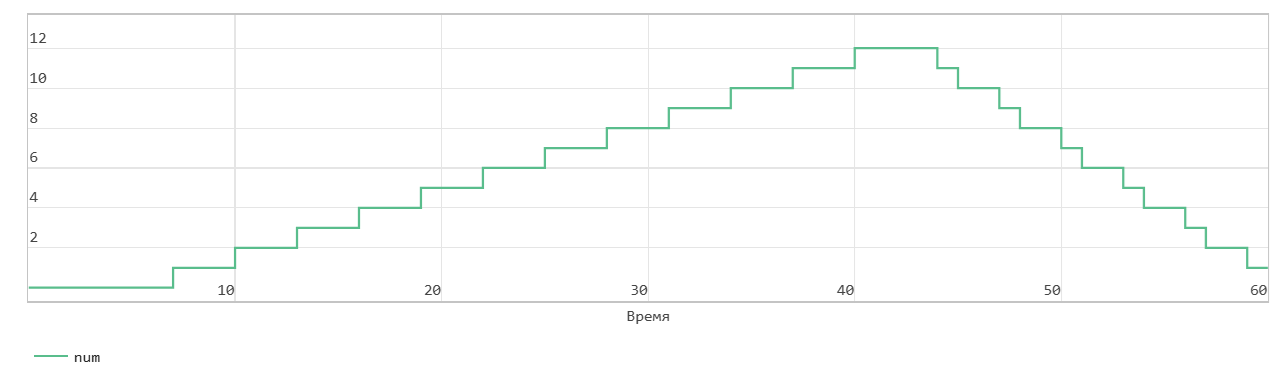
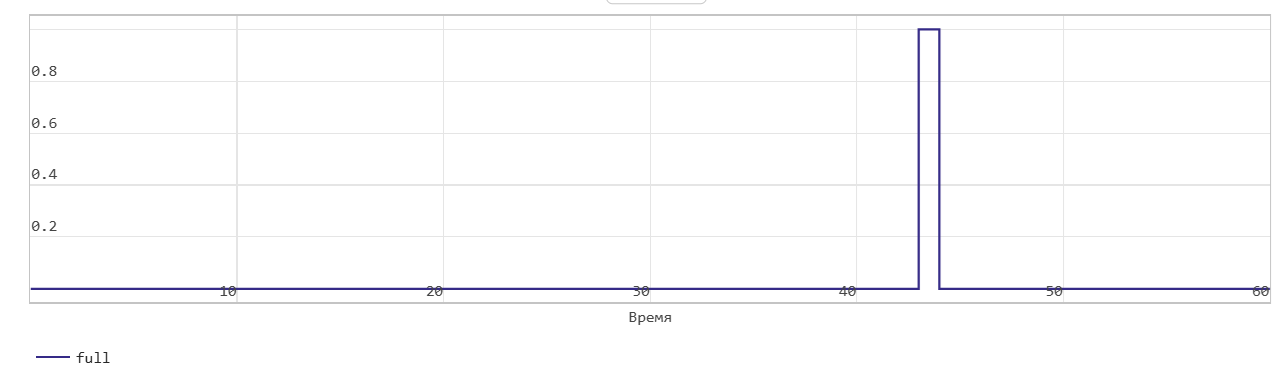
This figure shows the reading operation when the Mode parameter is set to FWFT. The Pop input port acts as an enabling signal for the read operation. In the figure, read_en indicates this signal.
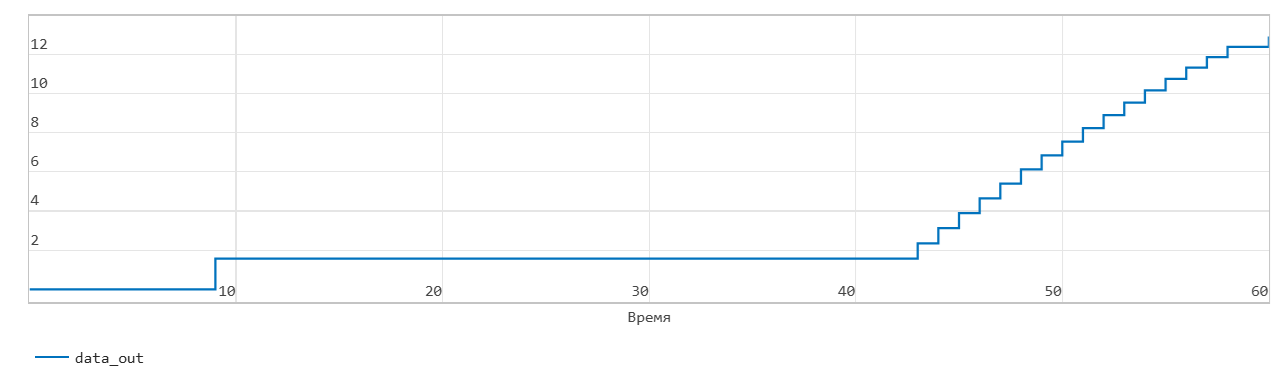
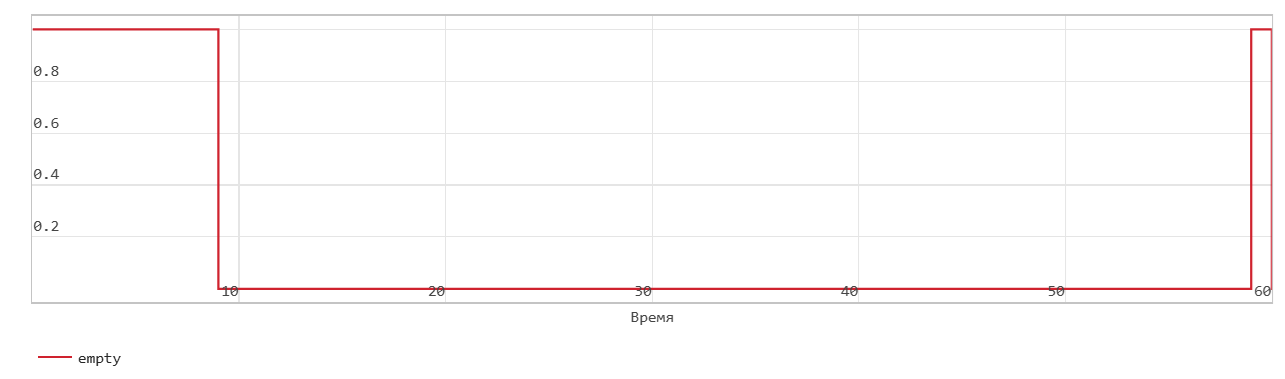
In FWFT mode, the first value that you write to the FIFO gets to the output signal Out.
In the figure, read_en becomes equal to 1 at the time step 42 The FIFO reads the first value of the data out signal in the time step 9. You can use this opportunity to look ahead and see the data that was first written to the FIFO.
When the Num signal becomes equal 0, the Empty signal is given. After the Empty signal becomes equal 0 if you read more data from the FIFO, the block generates a warning.