CAN Unpack
Extracts individual signals from CAN messages.
blockType: CANUnpack
|
Path in the library: |
Description
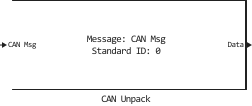
Block CAN Unpack Decompresses the CAN message into signal data using the specified output parameters at each time step. The data is output as separate signals.
|
Ports
Input
#
CAN Msg
—
CAN input message
the tire
Details
This unit has one input port: CAN Msg. The unit accepts the specified input CAN messages and decompresses them into signals on separate outputs.
| Data types |
|
| Complex numbers support |
No |
Output
#
Data
—
the output signal from the CAN message
vector
Details
The unit has one output port by default. The number of output ports is dynamic and depends on the number of signals specified for the block. For example, if a message contains four signals, then the block can have four output ports.
For signals set in the mode CANdb specified signals, the type of output data for CAN signals — Float64.
For signals set in the mode raw data, the type of output data for CAN signals — UInt8.
| Data types |
|
| Complex numbers support |
No |
#
CAN ID
—
ID of the CAN message
scalar
Details
Outputs the ID of the CAN message.
Dependencies
To use this port, check the box Output identifier.
| Data types |
|
| Complex numbers support |
No |
#
Timestamp
—
message timestamp
scalar
Details
Displays the timestamp of the message. This value indicates the number of seconds from the start of the simulation after which the message was received.
Dependencies
To use this port, check the box Output timestamp.
| Data types |
|
| Complex numbers support |
No |
#
Error
—
the presence of an error in the message
scalar
Details
Displays information about the presence of an error in the message. Output value 1 on this port, it indicates that the incoming message is an error frame. If the output value is 0, then there is no mistake.
Dependencies
To use this port, check the box Output error.
| Data types |
|
| Complex numbers support |
No |
#
Remote
—
status of the remote frame message
scalar
Details
Displays the status of the remote frame message.
Dependencies
To use this port, check the box Output remote.
| Data types |
|
| Complex numbers support |
No |
#
Length
—
message length in bytes
scalar
Details
Outputs the length of the message in bytes.
Dependencies
To use this port, check the box Output length.
| Data types |
|
| Complex numbers support |
No |
#
Status
—
message receipt status
scalar
Details
Displays the status of receiving the message. The status is equal to 1 if the block has received a new message, and 0 if not.
Dependencies
To use this port, check the box Output status.
| Data types |
|
| Complex numbers support |
No |
Parameters
Main
#
Data is output as —
select the data signal
raw data | CANdb specified signals
Details
-
raw data— output data in the form of a vectorUInt8. When this option is selected, the message parameters are specified. This option opens only one output port.The conversion formula:
where — the decompressed signal value, and — scaled signal value.
-
CANdb specified signals— the message parameters are set in a dbc file, which must be specified in the parameter CANdb file. After uploading the file, the parameter appears in the block parameters Message list, which contains a list with all the messages specified in the file and corresponding to the CAN standard (CAN and CAN-FD messages can be stored in one file).After selecting a message from the list, all other fields of the block parameters are automatically filled in. These fields are read-only.
| Values |
|
| Default value |
|
| Program usage name |
|
| Tunable |
No |
| Evaluatable |
No |
# CANdb file — dbc file
Details
Select the dbc file to work in the mode CANdb specified signals.
Dependencies
To use this parameter, set for the parameter Data is output as meaning CANdb specified signals.
| Default value |
|
| Program usage name |
|
| Tunable |
No |
| Evaluatable |
No |
#
Message list —
the list of messages in the dbc file
String
Details
The list of messages in the dbc file that comply with the CAN standard.
Dependencies
To use this parameter, set for the parameter Data is output as meaning CANdb specified signals.
| Default value |
|
| Program usage name |
|
| Tunable |
No |
| Evaluatable |
No |
#
Name —
name of the CAN message
String
Details
Specify the name of the CAN message.
This option is available if for the parameter Data is output as value selected raw data. If for the parameter Data is output as value selected CANdb specified signals, then this parameter is read-only.
| Default value |
|
| Program usage name |
|
| Tunable |
No |
| Evaluatable |
No |
#
Identifier type —
the type of the CAN message identifier
Standard (11-bit identifier) | Extended (29-bit identifier)
Details
Specify whether the CAN message identifier is standard or extended. By default, the standard type is used. The standard identifier is an 11-bit identifier, while the extended identifier is a 29-bit identifier.
This option is available if for the parameter Data is output as value selected raw data. If for the parameter Data is output as value selected CANdb specified signals, then this parameter is read-only.
| Values |
|
| Default value |
|
| Program usage name |
|
| Tunable |
No |
| Evaluatable |
No |
#
CAN Identifier —
ID of the CAN message
Real number
Details
Specify the ID of the CAN message. This number must be a positive integer from 0 before 2047 for the standard identifier and from 0 before 536870911 for the extended identifier.
This option is available if for the parameter Data is output as value selected raw data. If for the parameter Data is output as value selected CANdb specified signals, then this parameter is read-only.
| Default value |
|
| Program usage name |
|
| Tunable |
No |
| Evaluatable |
Yes |
#
Length (bytes) —
length of the CAN message
Real number
Details
Specify the length of the CAN message from 0 before 8 bytes.
This option is available if for the parameter Data is output as value selected raw data. If for the parameter Data is output as value selected CANdb specified signals, then this parameter is read-only.
| Default value |
|
| Program usage name |
|
| Tunable |
No |
| Evaluatable |
Yes |
Output ports
Main
#
Output identifier —
use the CAN ID port
Logical
Details
Select this option to use the CAN ID port to output the CAN message identifier.
| Default value |
|
| Program usage name |
|
| Tunable |
No |
| Evaluatable |
No |
#
Output timestamp —
use the Timestamp port
Logical
Details
Check this box to use the Timestamp port to output the timestamp of the message.
| Default value |
|
| Program usage name |
|
| Tunable |
No |
| Evaluatable |
No |
#
Output error —
use the Error port
Logical
Details
Select this option to use the Error port to display information about the presence of an error in the message.
| Default value |
|
| Program usage name |
|
| Tunable |
No |
| Evaluatable |
No |
#
Output remote —
use the Remote port
Logical
Details
Select this option to use the Remote port to display the status of the remote frame message.
| Default value |
|
| Program usage name |
|
| Tunable |
No |
| Evaluatable |
No |
#
Output length —
use the Length port
Logical
Details
Select this option to use the Length port to output the length of the message in bytes.
| Default value |
|
| Program usage name |
|
| Tunable |
No |
| Evaluatable |
No |
#
Output status —
use the Status port
Logical
Details
Select this option to use the Status port to display the status of receiving a message.
| Default value |
|
| Program usage name |
|
| Tunable |
No |
| Evaluatable |
No |