Monostable Flip-Flop
A monostable trigger on the front, back, or front and rear edges.
blockType: SubSystem
|
Path in the library: |
Description
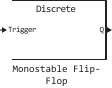
Block Monostable Flip-Flop (monostable multivibrator) generates one output pulse of a given duration when an external trigger signal is received. The external trigger is a logic signal. Pulse generation is initiated when a change in the state of this signal is detected. Change detection can be performed by:
-
the front front;
-
the back front;
-
the front or back edge.
When the output is in the state 1 («truth»), changing the external trigger signal has no effect.
The principle of operation of a monostable trigger is shown in the following figure:

Ports
Input
#
Trigger
—
trigger signal
scalar
Details
The trigger input signal is in the form of 0 or 1.
| Data types |
|
| Complex numbers support |
I don’t |
Output
#
Q
—
Output signal
scalar
Details
The output signal is in the form of 0 or 1.
| Data types |
|
| Complex numbers support |
I don’t |
Parameters
Main group
#
Change detection —
changing the trigger signal
Rising edge | Falling edge | Either edge
Details
A method for detecting a change in the trigger signal to generate an output pulse.
| Values |
|
| Default value |
|
| Program usage name |
|
| Evaluatable |
Yes |
# Initial output — the initial value of the trigger output signal
Details
The initial value of the trigger output signal.
| Default value |
|
| Program usage name |
|
| Evaluatable |
Yes |
# Pulse duration (s) — duration of the output pulse
Details
The duration of the output pulse in seconds.
| Default value |
|
| Program usage name |
|
| Evaluatable |
Yes |
# Sample time — the interval between the calculation steps
Details
The sampling period of the block. During execution, the block produces output data and, if necessary, updates its internal state.
To work in discrete time, set the parameter Sample time a positive value. To work in continuous time mode, set the parameter Sample time meaning 0.
| Default value |
|
| Program usage name |
|
| Evaluatable |
Yes |