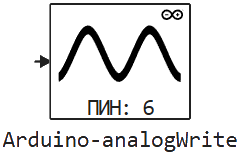
Arduino-analogWrite
Creating an analog signal.
blockType: CFunction
|
Path in the library: |
Description
| To work with the block, install/update the support package. equipment. |
Block Arduino-analogWrite It sends an analog signal to the pin if it supports an analog pin, otherwise it sends a PWM.
Ports
Input
#
IN_1
—
Digital voltage level
scalar
Details
The value for setting the voltage to the specified channel number.
-
For analog outputs, the bit depth is by default —
8bit, that is, the value of the output voltage varies uniformly from0before255. -
True analog output when using DAC-enabled pins.
-
PWM on pins with timer capabilities (TIM). In the case of PWM signal output, the input defines the duty cycle period as the value between
0(completely off) and255(the signal is given constantly). -
Switching GPIO to
HIGHorLOWdepending on the requested value:HIGHif>127, otherwiseLOW, for digital pins without the possibility of PWM signal output.
| Data types |
|
| Complex numbers support |
I don’t |
Parameters
Main group
# Номер канала — pin number to change
Details
The pin to which the voltage is applied.
| Default value |
|
| Program usage name |
|
| Tunable |
No |
| Evaluatable |
Yes |
# Шаг расчёта: — the period for invoking the block
Details
Specify the interval between the calculation steps as a non-negative number. To inherit the calculation step, set this parameter to −1.
| Default value |
|
| Program usage name |
|
| Tunable |
No |
| Evaluatable |
Yes |