Arduino-serialWrite
Sending data to the serial port.
blockType: CFunction
|
Path in the library: |
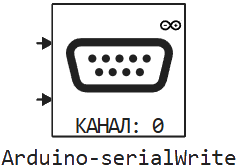
Description
| To work with the block, install/update the support package. equipment. |
Block Arduino-serialWrite It is used to send data to the serial port.
| To use this block, you must first configure the channel corresponding to the one used in the block. To set up the channel, use the block Arduino-serialSetup. |
Parameters
Main group
#
Номер канала: —
available channels to use
0 | 1 | 2 | 3
Details
A list of available channels to use. This number determines which object (Serial, Serial1, … correspond to the numbers 0,1, …) will be used for initialization.
| Values |
|
| Default value |
|
| Program usage name |
|
| Tunable |
No |
| Evaluatable |
Yes |
# Размер буфера: — the size of the buffer being sent
Details
The maximum size of the buffer of the sent data.
| Default value |
|
| Program usage name |
|
| Tunable |
No |
| Evaluatable |
Yes |
# Шаг расчёта: — the period for which the block will be called
Details
Specify the interval between the calculation steps as a non-negative number. To inherit the calculation step, set this parameter to −1.
| Default value |
|
| Program usage name |
|
| Tunable |
No |
| Evaluatable |
Yes |