Filter (CE)
The RF filter model.
blockType: SubSystem
|
Path in the library: |

Description
Block Filter (CE) simulates two types of RF filters:
-
Butterworth filters have the most flat amplitude—frequency response (frequency response) in the passband and are monotonous in general; this smoothness is achieved by reducing the steepness of the decline;
-
Chebyshev filters — Chebyshev filters of the first kind have frequency response pulsations of the same magnitude in the passband and monotonic in the delay band.
To filter complex RF broadband signals in Engee, use the block Filter (IB).
Parameters
Main group
#
Design method: —
filter design method
Butterworth | Chebyshev
Details
The filter modeling method, defined as:
-
Butterworth— simulates a Butterworth filter with the type specified in the parameter Filter type:, and the model specified in the parameter Implementation:; -
Chebyshev— simulates a Chebyshev filter with the type specified in the parameter Filter type:, and the model specified in the parameter Implementation:.
| Values |
|
| Default value |
|
| Program usage name |
|
| Tunable |
No |
| Evaluatable |
Yes |
#
Filter type: —
filter response type
Lowpass | Highpass | Bandpass | Bandstop
Details
The type of filter response, set as:
-
Lowpass— simulates a low-pass filter, the design method of which is specified in the parameter Design method:; -
Highpass— simulates a high-pass filter, the design method of which is specified in the parameter Design method:; -
Bandpass— simulates a bandpass filter, the design method of which is specified in the parameter Design method:; -
Bandstop— simulates a notch filter, the design method of which is specified in the parameter Design method:.
| Values |
|
| Default value |
|
| Program usage name |
|
| Tunable |
No |
| Evaluatable |
Yes |
#
Implementation: —
realization
LC Tee | LC Pi
Details
The implementation specified as:
-
LC Tee— simulation of an analog filter using a concentrated LC Tee structure, if for the parameter Design method: the value is setButterworthorChebyshev; -
LC Pi— simulation of an analog filter using a concentrated LC Pi structure, if for the parameter Design method: the value is setButterworthorChebyshev.
By default for the parameter Implementation: the value is set
LC Tee for the Butterworth or Chebyshev filter.
| Due to causal relationships, a delay equal to half the duration of the pulse response is taken into account for both reflected and transmitted signals. This delay will degrade the filter performance if the source and load resistances differ from the values specified in the filter parameters. |
| Values |
|
| Default value |
|
| Program usage name |
|
| Tunable |
No |
| Evaluatable |
Yes |
# Implement using filter order — enable implementation using filter order
Details
Check this box to implement the filter order manually.
| Default value |
|
| Program usage name |
|
| Tunable |
No |
| Evaluatable |
Yes |
# Filter order: — filter order
Details
The filter order, set as a scalar in the range [2, 60]. If for the parameter Filter type: value selected Lowpass or Highpass, specify the number of concentrated reactive elements. If for the parameter Filter type: value selected Bandpass or Bandstop specify twice as many elements (L and C).
|
For Chebyshev filters of even order, the resistance ratio is to implement the Tee network and to implement the Pi network. where
|
Dependencies
To use this option, check the box Implement using filter order.
| Default value |
|
| Program usage name |
|
| Tunable |
No |
| Evaluatable |
Yes |
# Passband frequency: — bandwidth frequency of low- and high-pass filters
Details
The bandwidth frequency for low-pass and high-pass filters, set as a scalar in Hz. The default value of this parameter depends on the selected parameter value. Filter type:. The default values are shown in this table.
| Filter type: | Default bandwidth frequency value |
|---|---|
|
|
|
|
Dependencies
To use this parameter, set for the parameter
Filter type: meaning Lowpass or Highpass.
| Default value |
|
| Program usage names |
|
| Tunable |
No |
| Evaluatable |
Yes |
# Passband frequencies: — bandwidth frequencies for bandpass filters
Details
The bandwidth frequencies for bandpass filters, specified as a two-element vector in Hz. This option is not available for notch filters.
Dependencies
To use this parameter, set for the parameter
Filter type: meaning Bandpass or Bandstop.
| Default value |
|
| Program usage names |
|
| Tunable |
No |
| Evaluatable |
Yes |
# Passband attenuation (dB): — bandwidth attenuation
Details
Bandwidth attenuation, specified as a scalar in dB. For bandpass filters, this value is applied equally to both edges of the bandwidth.
| Default value |
|
| Program usage name |
|
| Tunable |
No |
| Evaluatable |
Yes |
# Stopband frequency: — the frequency of the delay band of low- and high-pass filters
Details
The frequency of the delay band for low- and high-pass filters, set as a scalar in Hz. The default value of this parameter depends on the selected parameter value. Filter type:. The default values are shown in this table.
| Filter type: | Default delay band frequency value |
|---|---|
|
|
|
|
Dependencies
To use this option, uncheck the box. Implement using filter order and set for the parameter
Filter type: meaning Lowpass or Highpass.
| Default value |
|
| Program usage names |
|
| Tunable |
No |
| Evaluatable |
Yes |
# Stopband attenuation (dB): — attenuation in the delay band
Details
The attenuation in the delay band, set as a scalar in dB. For notch filters, this value is applied equally to both edges of the delay band.
Dependencies
To use this parameter, set for the parameter
Filter type: meaning Bandstop.
| Default value |
|
| Program usage name |
|
| Tunable |
No |
| Evaluatable |
Yes |
# Source impedance (Ohm): — input resistance of the source
Details
The input resistance of the source, set as a scalar in ohms.
| Default value |
|
| Program usage name |
|
| Tunable |
No |
| Evaluatable |
Yes |
# Load impedance (Ohm): — output load resistance
Details
The output load resistance, set as a scalar in ohms.
| Default value |
|
| Program usage name |
|
| Tunable |
No |
| Evaluatable |
Yes |
Additional Info
Frequency characteristics
Details
| Filter type: | Frequency response | Designations |
|---|---|---|
|
|
— bandwidth frequency — frequency of the delay band — bandwidth attenuation @ — attenuation in the delay band @ |
|
|
|
|
|
— bandwidth frequencies — frequency of the delay band — attenuation in the bandwidth at specified bandwidth frequencies — attenuation in the delay band at the specified delay band frequencies |
|
|
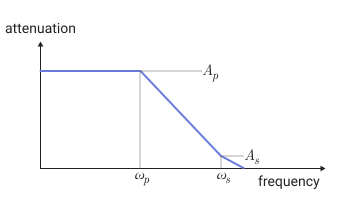
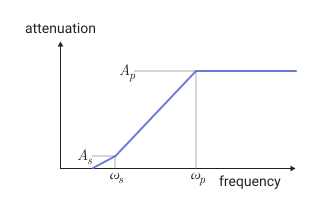
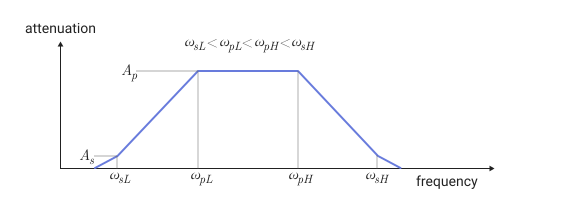
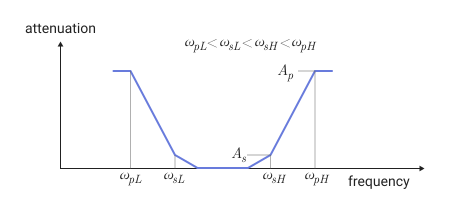
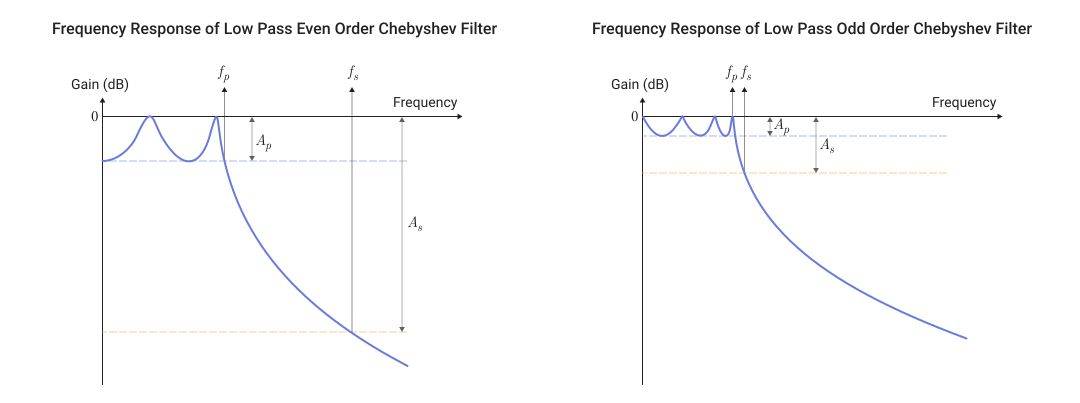
Filter definition parameters and design tips
Details
The table shows all the parameters necessary for the correct design of each filter.
Lowpass |
Highpass |
Bandpass |
Bandstop |
|
|---|---|---|---|---|
|
Order, , |
Order, , |
Order, , |
Order, , |
, , , |
, , , |
, , , |
, , , |
|
|
Order, , |
Order, , |
Order, , |
Order, , |
, , , |
, , , |
, , , |
, , , |
The following designations are used in this table:
-
— bandwidth frequency;
-
— attenuation in the bandwidth / unevenness in the bandwidth;
-
— frequency of the delay band;
-
— attenuation in the delay band / unevenness in the delay band.
| The unevenness (ripple) in the bandwidth or delay is analyzed as attenuation in the bandwidth or delay, respectively. |
Additional design tips
Details
Additional design tips.
Lowpass |
Highpass |
Bandpass |
Bandstop |
|
|---|---|---|---|---|
|
Order, , Auxiliary (numerator polynomial 21) |
Order, , Auxiliary (numerator polynomial 21, Wx) |
Order, , Auxiliary (Wx) |
|
|
Order, , Auxiliary (numerator polynomial 21) |
Order, , Auxiliary (fourth power of the numerator 21, Wx) |
||
Literature
-
Kendall Su, Analog Filters, Second Edition.
-
Louis Weinberg, Network Analysis and Synthesis, Huntington, New York: Robert E. Krieger Publishing Company, 1975.
-
Larry D. Paarmann, Design and Analysis of Analog Filters, A Signal Processing Perspective with MATLAB® Examples, Kluwer Academic Publishers, 2001.
-
Michael G. Ellis, SR., Electronic Filter Analysis and Synthesis, Norwood, MA: Artech House, 1994.
-
Anatol I. Zverev, Handbook of Filter Synthesis, Hoboken, NJ: John Wiley & Sons, 2005.