Variable Attenuator (CE)
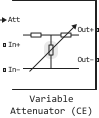
The model of the variable attenuator.
blockType: SubSystem
|
Path in the library: |
Description
Block Variable Attenuator (CE) attenuates the signal power by a preset factor, known as _ input loss_ in dB. Using the block Variable Attenuator (CE), you can change the attenuation of the input signal Engee during the simulation. Usually, the unit adjusts the impedance of the RF circuit at the input and output ports. Attenuators can be used to attenuate the power of the incoming signal in order to protect RF circuits.
The block icon Variable Attenuator (CE) It is dynamic and displays the current state of the applied noise parameter. This table shows how the block icon changes depending on the parameter status. Simulate noise.
| The flag Simulate noise installed | The flag Simulate noise not installed |
|---|---|
|
|

Ports
Input
#
Att
—
control signal, dB
scalar
Details
The control signal Engee, set as a scalar. Represents the _ introduced losses_ in dB.
| Data types |
|
| Complex numbers support |
No |
Conserving
#
In+
—
The input signal
electricity
Details
The electrical port connected to the input signal.
| Program usage name |
|
#
In−
—
The input signal
electricity
Details
The electrical port connected to the input signal.
| Program usage name |
|
#
Out+
—
The output signal
electricity
Details
The electrical port connected to the output signal.
| Program usage name |
|
#
Out−
—
The output signal
electricity
Details
The electrical port connected to the output signal.
| Program usage name |
|
Parameters
Parameters
# Minimum attenuation, dB — the lowest value of insertion loss or attenuation
Details
The lowest value of insertion loss or attenuation applied to the signal, given as a scalar, in dB.
| Default value |
|
| Program usage name |
|
| Tunable |
No |
| Evaluatable |
Yes |
# Maximum attenuation, dB — the highest value of insertion loss or attenuation
Details
The highest value of insertion loss or attenuation applied to the signal, given as a scalar, in dB.
| Default value |
|
| Program usage name |
|
| Tunable |
No |
| Evaluatable |
Yes |
# Input impedance, Ohm — input impedance
Details
The input impedance of the attenuator, given as a scalar, in Ohms.
| Default value |
|
| Program usage name |
|
| Tunable |
No |
| Evaluatable |
Yes |
# Output impedance, Ohm — Output impedance
Details
The output impedance of the attenuator, given as a scalar, in ohms.
| Default value |
|
| Program usage name |
|
| Tunable |
No |
| Evaluatable |
Yes |
# Simulate noise — thermal noise simulation
Details
Check this box to simulate thermal noise in the attenuator. Then in the block Configuration (CE) also check the box Simulate noise. Both checkboxes are set By default.
This parameter defines a current noise source with a one-sided power density equal to in A2/Hz, where
-
— Boltzmann constant;
-
— parameter value Temperature, K in the block Configuration (CE).
| Default value |
|
| Program usage name |
|
| Tunable |
No |
| Evaluatable |
Yes |