Belt Pulley
|
Page in progress. |
A belt drive element in which the friction belt covers the circumference of the pulley.
blockType: Engee1DMechanical.Transmission.BeltPulley
|
Path in the library: |
Description
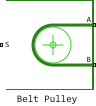
Block Belt Pulley It is a pulley wrapped with a flexible ideal, flat or wedge-shaped belt. When setting for the parameter Belt type values Ideal - No slip the belt does not slip relative to the pulley surfaces. Additionally, linear movement of the pulley can be enabled.
The block takes into account the friction between the flexible belt and the pulley surface. The tensioner slips when the load exceeds the friction force. The unit takes into account the centrifugal load on the flexible belt, the inertia of the pulley and the friction in the bearings.
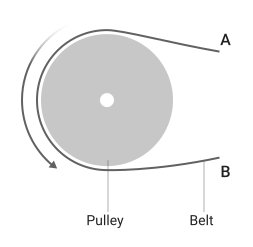
The ends of the belt can move both in one direction and in the opposite direction.
The block equations relate the power transfer between the belt branches, as well as between the pulley and the belt. The same calculation is used for the master and the slave branches. Without sufficient tension, the friction force is not sufficient to transfer power between the pulley and the belt.
The model works correctly when both ends of the belt are in tension. When assembling the model, make sure that tension is maintained throughout the simulation by adding mass to at least one of the ends of the belt or adding a tensioner. Use the variable view window to make sure that all the springs attached to the belt are in tension.
For the parameter Friction model you can set the value Modal to use modal parameterization for the pulley. Choose a modal parameterization for greater numerical stability. To use this parameter, set for the parameter Belt type meaning Flat belt or V-belt.
Block Belt Pulley uses a composite block implementation Fundamental Friction Clutch to create conditions for modal parameterization.
The equations
For any parameter value Friction model The block’s equations refer to the following quantities:
-
— belt direction sign. If for the parameter Belt direction the value is set
Ends move in same directionThen . Otherwise ; -
— the relative velocity between the belt and the periphery of the pulley. if for the parameter Belt type the value is set
Ideal - No slip; -
— linear speed of the branch A;
-
— linear speed of the branch B;
-
— the linear velocity of the pulley in its center. If the check box Pulley translation removed, the block limits the value by value ;
-
— angular velocity of the contact surface of the pulley;
-
— the radius of the pulley;
-
— belt centrifugal force;
-
— the force acting through the center of gravity of the pulley. When the checkbox is selected Inertia, includes the force due to the acceleration of the pulley mass;
-
— running weight of the belt;
-
— the friction force between the pulley and the belt;
-
— the force acting along the branch A;
-
— the force acting along the B branch;
-
— girth angle;
-
— the torque of the pulley.
Kinematic constraints between pulley and belt:
If for the parameter Belt type the value is set V-belt or Flat belt and the checkbox is set Centrifugal force, then the centrifugal force will be equal to:
If you check the box Pulley translation, the equation of the balance of forces will take the form:
To calculate , block:
-
smooths it out with the help . You can increase smoothing by increasing , and reduce anti-aliasing by lowering ;
-
saturates the values above .
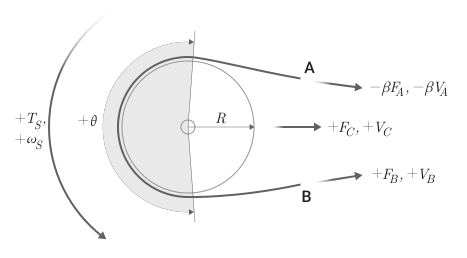
According to the accepted notation system, if for the parameter Belt direction the value is set Ends move in opposite direction, a positive rotation at port S results in a negative displacement at port A and a positive displacement at port B.
To use the parameter Friction model, set for the parameter Belt type meaning Flat belt or V-belt.
_ Continuous friction_
If for the parameter Friction model the value is set Continuous The block equations refer to the following quantities:
-
— parameter value Contact friction coefficient;
-
— instantaneous value of the coefficient of friction;
-
— parameter value Velocity threshold;
-
— viscous bearing damping;
-
— parameter value Force threshold.
The instantaneous coefficient of friction is a function of relative velocity:
where the hyperbolic tangent function provides numerical stability, guaranteeing a smooth and continuous output signal for zero crossings .
For a wedge-shaped belt, the block calculates the value of contact friction using the angle of the pulley groove:
where
-
— effective coefficient of friction;
-
— the angle of the pulley groove.
For a flat belt .
The threshold value of the friction velocity determines the width of the area in which the coefficient of friction varies from zero to a steady maximum. The threshold value of the friction velocity determines the velocity at which the hyperbolic tangent is 0.999. The lower this value, the steeper the change. .
The block defines the effect of friction on the force at the ends of the belt as
this corresponds to the Euler equation for rope friction across a cylinder, also known as the Euler-Eitelwein equation. The torque acting on the pulley is
where if for the parameter Belt type the value is set Ideal - No slip. Otherwise:
modal friction
For a wedge-shaped belt, the unit calculates the values of static and kinetic friction using the angle of the pulley groove:
where
-
— parameter value Static friction coefficient;
-
— effective coefficient of static friction;
-
— parameter value Kinetic friction coefficient;
-
— effective coefficient of kinetic friction;
-
— the angle of the pulley groove.
For a flat belt , and .
If for the parameter Friction model the value is set Modal, the block calculates the maximum static friction force before the start of slipping as
where — the maximum amount of force due to static friction, and — the force caused by the tension at the end of the pulley with the highest tension force. As in the case of , the block uses for smoothing . To increase or decrease anti-aliasing , increase or decrease the parameter value Force threshold.
The block smoothly saturates a value greater than or equal to :
When slipping:
where — coefficient of kinetic friction. The unit solves the problem of torque balance using
and
where Engee registers how fundamental_clutch.T.
Assumptions and limitations
-
The block assumes no pliability along the entire length of the belt.
-
The block assumes that both ends of the belt maintain sufficient tension throughout the simulation.
-
The block considers the movement of the center of the pulley as flat, where the pulley moves along the bisector of the angle of girth of the pulley. The speed of the center And the power only the component along this line of movement is taken into account.
-
The Eitelwein equation for belt friction neglects the effect of pulley displacement on friction.
Ports
Conserving
#
C
—
linear speed of the pulley center
translational mechanics
Details
A non-directional port associated with the movement of the pulley. The pulley moves in the plane and along the bisector of the girth angle of the pulley. When the relative velocity is positive, the center of the pulley moves.
Dependencies
To use this port, check the box Pulley translation.
| Program usage name |
|
#
A
—
linear speed of the end of the belt A
translational mechanics
Details
A non-directional port associated with the linear velocity of the end of belt A.
| Program usage name |
|
#
B
—
linear speed of belt end B
translational mechanics
Details
A non-directional port connected to the linear velocity of the end of belt B.
| Program usage name |
|
#
S
—
angular velocity of pulley shaft
rotational mechanics
Details
A non-directional port related to the angular velocity of the pulley shaft.
| Program usage name |
|
Parameters
Belt
#
Belt type —
belt parameterization
Ideal - No slip | Flat belt | V-belt
Details
Choosing the type of belt. The type of belt affects the slip conditions:
-
Ideal - No slip— parameterization of an ideal belt that does not slip relative to the pulley. -
Flat belt— parameterization of a belt with a rectangular cross-section. -
V-belt— parameterization of the wedge-shaped belt.
| Values |
|
| Default value |
|
| Program usage name |
|
| Evaluatable |
No |
#
Belt mass per unit length —
running weight
kg/m
Details
The contribution of centrifugal force, defined by linear density, expressed as mass per unit length.
Dependencies
To use this parameter, set for the parameter Belt type meaning Flat belt or V-belt and a flag Centrifugal force.
| Units |
|
| Default value |
|
| Program usage name |
|
| Evaluatable |
Yes |
# Maximum tension — threshold tension parameter
Details
The ability to set the maximum tension. If you select this option, and the belt tension at any of its ends reaches or exceeds the value set for the parameter Belt maximum tension, the simulation will stop and give an error.
| Default value |
|
| Program usage name |
|
| Evaluatable |
No |
#
Belt maximum tension —
threshold value of maximum tension
N | nN | uN | mN | kN | MN | GN | dyn | lbf | kgf
Details
The maximum allowable tension for each belt. When the tension at either end of the belt reaches or exceeds this value, the simulation stops and generates an error.
Dependencies
To use this option, check the box Maximum tension.
| Units |
|
| Default value |
|
| Program usage name |
|
| Evaluatable |
Yes |
# Centrifugal force — the option of accounting for centrifugal force
Details
An option to account for the effect of centrifugal force. If you check this box, the centrifugal force will reach approximately 90% of the force value at each end of the belt.
Dependencies
To use this parameter, set for the parameter Belt type meaning Flat belt or V-belt.
| Default value |
|
| Program usage name |
|
| Evaluatable |
No |
# Number of V-belts — number of straps
Details
The number of wedge-shaped straps.
The block rounds non-integer values to the nearest integer. Increasing the number of straps increases the effective mass per unit length and the maximum allowable tension.
Dependencies
To use this parameter, set for the parameter Belt type meaning V-belt.
| Default value |
|
| Program usage name |
|
| Evaluatable |
Yes |
#
Belt direction —
the initial relative direction of movement of the belt end
Ends move in same direction | Ends move in opposite direction
Details
The relative direction of translational motion of one end of the belt relative to the other.
| Values |
|
| Default value |
|
| Program usage name |
|
| Evaluatable |
No |
#
V-belt sheave angle —
pulley groove angle
rad | deg | rev | mrad | arcsec | arcmin | gon
Details
The angle of the pulley groove for the wedge-shaped belt.
Dependencies
To use this parameter, set for the parameter Belt type meaning V-belt.
| Units |
|
| Default value |
|
| Program usage name |
|
| Evaluatable |
Yes |
Contact
#
Initial state —
initial condition of the pulley
Unlocked | Locked
Details
The ability to initialize the simulation with the pulley locked or unlocked.
Dependencies
To use this parameter, set for the parameter Friction model meaning Modal.
| Values |
|
| Default value |
|
| Program usage name |
|
| Evaluatable |
No |
#
Velocity threshold —
contact threshold value
m/s | mm/s | cm/s | km/s | m/hr | km/hr | in/s | ft/s | mi/s | ft/min | mi/hr | kn
Details
The relative velocity required to achieve the peak value of kinetic friction in contact. The threshold value of the friction velocity increases the numerical stability of the simulation, ensuring the continuity of the force when changing the direction of velocity.
Dependencies
To use this parameter, set for the parameter Belt type meaning Flat belt or V-belt.
| Units |
|
| Default value |
|
| Program usage name |
|
| Evaluatable |
Yes |
#
Wrap angle —
belt contact angle with pulley
rad | deg | rev | mrad | arcsec | arcmin | gon
Details
The radial contact angle between the belt and the pulley.
Dependencies
To use this parameter, set for the parameter Belt type meaning Flat belt or V-belt.
| Units |
|
| Default value |
|
| Program usage name |
|
| Evaluatable |
Yes |
# Kinetic friction coefficient — coefficient of kinetic friction
Details
Belt friction when slipping.
Dependencies
To use this parameter, set for the parameter Friction model meaning Modal.
| Default value |
|
| Program usage name |
|
| Evaluatable |
Yes |
# Static friction coefficient — coefficient of static friction
Details
Belt friction while maintaining static contact.
Dependencies
To use this parameter, set for the parameter Friction model meaning Modal.
| Default value |
|
| Program usage name |
|
| Evaluatable |
Yes |
# Contact friction coefficient — coefficient of contact friction
Details
The coefficient of Coulomb friction between the belt and the pulley surface.
Dependencies
To use this parameter, set for the parameter Friction model meaning Continuous.
| Default value |
|
| Program usage name |
|
| Evaluatable |
Yes |
#
Friction model —
choosing the friction method
Continuous | Modal
Details
The possibility of parameterization of continuous or modal friction.
Dependencies
To use this parameter, set for the parameter Belt type meaning Flat belt or V-belt.
| Values |
|
| Default value |
|
| Program usage name |
|
| Evaluatable |
No |
#
Force threshold —
force threshold value
N | nN | uN | mN | kN | MN | GN | dyn | lbf | kgf
Details
The relative force required to achieve the peak value of kinetic friction in contact.
Dependencies
To use this parameter, set for the parameter Belt type meaning Flat belt or V-belt.
| Units |
|
| Default value |
|
| Program usage name |
|
| Evaluatable |
Yes |
Pulley
#
Pulley radius —
pulley radius
m | um | mm | cm | km | in | ft | yd | mi | nmi
Details
The radius of the pulley.
| Units |
|
| Default value |
|
| Program usage name |
|
| Evaluatable |
Yes |
# Inertia — moment of inertia of rotation
Details
The possibility of parameterizing the moment of inertia of rotation using the initial velocity.
| Default value |
|
| Program usage name |
|
| Evaluatable |
No |
#
Pulley initial translation velocity —
initial translational speed of the pulley
m/s | mm/s | cm/s | km/s | m/hr | km/hr | in/s | ft/s | mi/s | ft/min | mi/hr | kn
Details
The initial translational speed of the pulley.
Dependencies
To use this option, check the boxes Pulley translation and Inertia.
| Units |
|
| Default value |
|
| Program usage name |
|
| Evaluatable |
Yes |
#
Pulley inertia —
inertia of the pulley
kg*m^2 | g*m^2 | kg*cm^2 | g*cm^2 | lbm*in^2 | lbm*ft^2 | slug*in^2 | slug*ft^2
Details
The moment of inertia of the pulley rotation.
Dependencies
To use this option, check the box Inertia.
| Units |
|
| Default value |
|
| Program usage name |
|
| Evaluatable |
Yes |
#
Bearing viscous friction coefficient —
viscous friction of bearings
N*m*s/rad | mN*m*s/rad | kN*m*s/rad | kgf*m*s/rad | lbf*ft*s/rad
Details
Viscous friction associated with the bearings holding the pulley axis.
| Units |
|
| Default value |
|
| Program usage name |
|
| Evaluatable |
Yes |
# Pulley translation — an option that allows you to simulate the linear motion of the pulley
Details
The ability to simulate the movement of the pulley. Checking this box activates the C port.
| Default value |
|
| Program usage name |
|
| Evaluatable |
No |
#
Pulley mass —
pulley weight
kg | mg | g | t | lbm | oz | slug
Details
The mass of the pulley for calculating inertia.
Dependencies
To use this option, check the boxes Pulley translation and Inertia.
| Units |
|
| Default value |
|
| Program usage name |
|
| Evaluatable |
Yes |
#
Pulley initial rotational velocity —
the initial speed of rotation of the pulley
rad/s | deg/s | rad/min | deg/min | rpm | rps
Details
The initial speed of rotation of the pulley.
Dependencies
To use this option, check the box Inertia.
| Units |
|
| Default value |
|
| Program usage name |
|
| Evaluatable |
Yes |