Foster Thermal Model
Heat transfer through a semiconductor module.
blockType: AcausalElectricPowerSystems.Passive.Thermal.FosterModel
|
Path in the library: |

Description
| Block Foster Thermal Model It is a continuous dynamic model of temperature reduction at ports from before . This unit does not determine the specific heat flow in port B. This model cannot be extended with additional blocks. To determine the specific heat flow in port B and expand the model with additional blocks, use the block Cauer Thermal Model and select the parameter Parameterize Cauer model using Foster coefficient data. |
Block Foster Thermal Model It represents heat transfer through a semiconductor module. The figure below shows an equivalent circuit for Foster Thermal Model of the fourth order, where — the transition temperature in the semiconductor, — the temperature of the substrate or the environment.

Foster’s thermal model contains one or more thermal elements. The figure shows an equivalent circuit for one element of the Foster thermal model.
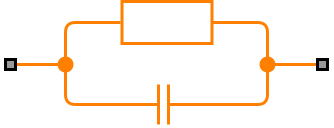
The number of thermal elements is equal to the order of modeling. Scalar block parameters are used for the first-order model. For the model -th order used string vectors of length . Other terms describing Foster’s thermal model are:
-
Fractional scheme
-
The PI model
The defining equations for the element of the first-order Foster thermal model are:
Where
-
— heat capacity;
-
— thermal time constant;
-
— thermal resistance;
-
— heat flow through the material;
-
— the temperature difference between the layers of the material.
Initial conditions
You can initialize the model in a stable state or set the initial temperatures of the nodes. To initialize the block in a stable state, select the check box Start from steady state. To set the initial temperatures of the nodes and enable the section Initial Targets, uncheck the box Start from steady state. The temperature of the first node corresponds to the temperature in port A.
Variables
Use a group of parameters Initial Targets to set the priority and initial target values for the block parameter variables before modeling. For more information, see Configuring physical blocks using target values.
Ports
Conserving
#
A
—
the left side of the junction in a semiconductor
warm
Details
The thermal port connected to the left side of the junction in the semiconductor.
| Program usage name |
|
#
B
—
the right side of the junction in a semiconductor
warm
Details
The thermal port connected to the right side of the junction in the semiconductor.
| Program usage name |
|
Parameters
Parameters
#
Thermal resistance data —
values of thermal resistances
K/W
Details
Values of thermal resistances a semiconductor module, specified as a vector.
| Units |
|
| Default value |
|
| Program usage name |
|
| Evaluatable |
Yes |
#
Thermal time constant data —
thermal time constants
s | ns | us | ms | min | hr | d
Details
Values of thermal time constants a semiconductor module, specified as a vector.
| Units |
|
| Default value |
|
| Program usage name |
|
| Evaluatable |
Yes |
# Start from steady state — initializing the model in steady mode
Details
Specify whether the block needs to be initialized in stable mode.
| Default value |
|
| Program usage name |
|
| Evaluatable |
No |