pspectrum
Analysis of signals in the frequency and time-frequency domains.
| Library |
|
Syntax
Function call
-
p,f,t = pspectrum(___,Name,Value)— sets additional parameters using name-value arguments. The values of such arguments include the frequency resolution band and the percentage of overlap between adjacent segments.
Arguments
Input arguments
# x — input signal
+
vector | the matrix
Details
An input signal specified as a vector or matrix.
If x has an uneven sampling, then the function pspectrum interpolates the signal onto a uniform grid to calculate spectral estimates. The function uses linear interpolation and assumes that the sampling period is equal to the median of the differences between neighboring time points. To support a signal with uneven sampling, the median and average time intervals must satisfy the condition
| Data types |
|
| Support for complex numbers |
Yes |
#
fs —
sampling
rate
2π (by default) | a positive numeric scalar
Details
The sampling rate, set as a positive numeric scalar.
# t — time values
+
vector
Details
Time values set as a vector representing the time interval between counts.
# type — the type of the calculated spectrum
+
"power" (by default) | "spectrogram" | "persistence"
Details
The type of calculated spectrum, specified as "power", "spectrogram" or "persistence":
-
"power"— calculation of the power spectrum of the input signal. Use this value to analyze the frequency composition of a stationary signal. For more information, see Calculating the spectrum. -
"spectrogram"— calculation of the spectrogram of the input signal. Use this value to analyze changes in the frequency composition of the signal over time. For more information, see Calculation of the spectrogram. -
"persistence"— calculation of the power spectrum of the input signal with light inertia. Use this value to visualize the fraction of time during which a certain frequency component is present in the signal. For more information, see Calculation of the spectrum of light inertia.
Values "spectrogram" and "persistence" They do not support multi-channel input signal.
|
Name-value input arguments
Specify optional argument pairs as Name,Value, where Name — the name of the argument, and Value — the appropriate value. Name-value arguments should be placed after other arguments, but the order of the pairs does not matter.
Use commas to separate the name and value, and Name put it in quotation marks.
# FrequencyLimits — the boundaries of the frequency range
+
[0 fs/2] (by default) | two-element numeric vector
Details
The boundaries of the frequency range, defined as a pair separated by a comma, consisting of "FrequencyLimits" and a two -element numeric vector:
-
If the input data contains time information, then the frequency range is expressed in Hz.
-
If the input data does not contain time information, then the frequency range is expressed in normalized units of rad/count.
The default function is pspectrum calculates the spectrum over the entire Nyquist range:
-
If the specified frequency range contains a region beyond the Nyquist range,
pspectrumcuts off this range. -
If the specified frequency range is completely outside the Nyquist range,
pspectrumreturns an error.
For more information about the Nyquist range, see Calculating the spectrum.
If x has an uneven sampling, then the function pspectrum linearly interpolates the signal onto a uniform grid and determines the effective sampling rate equal to the inverse median of the differences between neighboring time points. Express "FrequencyLimits" through the effective sampling rate.
# FrequencyResolution — frequency resolution band
+
a real numeric scalar
Details
The frequency resolution band, defined as a pair separated by a comma, consisting of "FrequencyResolution" and a real numeric scalar, expressed in Hz if the input data contains time information, or in normalized units of rad/count otherwise. This argument cannot be set at the same time as "TimeResolution". The default value of this argument depends on the size of the input data. For more information, see Calculation of the spectrogram.
# Leakage — spectral leakage
+
0.5 (by default) | a real numeric scalar
Details
Spectral leakage, defined as a comma-separated pair consisting of "Leakage" and a real numeric scalar from 0 before 1. Argument "Leakage" controls the attenuation of the side lobes of the Kaiser window relative to the width of the main lobe, balancing between improved resolution and reduced leakage:
-
The high leakage value makes it possible to distinguish closely spaced tones, but masks neighboring weak tones.
-
A small leakage value allows you to detect weak tones near stronger tones, but blurs out nearby frequencies.
# MinThreshold — lower bound for non-zero values
+
-Inf (by default) | the real scalar
Details
The lower bound for non-zero values, set as a pair separated by a comma, consisting of "MinThreshold" and a real scalar. Function pspectrum implements "MinThreshold" different depending on the value of the argument type:
-
"power"or"spectrogram"— functionpspectrumsets the zero value for those elementsp, for which"MinThreshold". Ask"MinThreshold"in dB. -
"persistence"— functionpspectrumsets the zero value for those elementspwhich are less than the value"MinThreshold". Ask"MinThreshold"in the range of0before100%.
# NumPowerBins — the number of power intervals for the light inertia spectrum
+
256 (default) | an integer
Details
The number of power intervals for the light inertia spectrum, specified as a comma-separated pair consisting of "NumPowerBins" and an integer from 20 before 1024.
# OverlapPercent — overlap between adjacent segments
+
the real scalar
Details
The overlap between adjacent segments for a spectrogram or a light inertia spectrum, defined as a comma-separated pair consisting of "OverlapPercent" and a real scalar in the interval [0, 100). The default value of this argument depends on the spectral window. For more information, see Calculation of the spectrogram.
# Reassign — reassignment parameter
+
false (by default) | true
Details
A reassignment parameter specified as a comma-separated pair consisting of "Reassign" and a logical value. If this parameter is set to true, function pspectrum improves the accuracy of spectral estimates localization by performing time and frequency reassignment. The reassignment method allows you to obtain periodograms and spectrograms that are easier to read and interpret. This method reassigns each spectral estimate to the center of its bin energy rather than the geometric bin center. This method provides accurate localization of FM signals and pulses.
# TimeResolution is the time resolution of a spectrogram or a spectrum of light inertia
+
the real scalar
Details
The time resolution of a spectrogram or light inertia spectrum is defined as a comma-separated pair consisting of "TimeResolution" and a real scalar, expressed in seconds if the input data contains time information, or an integer number of samples otherwise. This argument controls the duration of the segments used to calculate the short-term power spectra that form estimates of the spectrogram or the spectrum of light inertia. Argument "TimeResolution" cannot be specified at the same time as "FrequencyResolution". The default value of this argument depends on the size of the input data and, if it has been set, the frequency resolution. For more information, see Calculation of the spectrogram.
# TwoSided — two-way spectral estimation
+
false | true
Details
A two-way spectral estimate, defined as a pair separated by a comma, consisting of "TwoSided" and a logical value:
-
If this parameter is set to
true, the function calculates centered two-way spectral estimates in the range . If the input data contains time information, the estimates are calculated in the range , where — effective sampling rate. -
If this parameter is set to
false, the function calculates one-sided spectral estimates in the Nyquist range . If the input data contains time information, the estimates are calculated in the range , where — effective sampling rate. To maintain full power, the function multiplies the power by2on all frequencies except0and Nyquist frequencies. This value is only applicable for real signals.
Unless otherwise specified, the argument "TwoSided" by default, it takes the value false for real input signals and the value true for complex input signals.
# out — type of output data
+
:data (by default) | :plot
Details
Type of output data:
-
:data— the function returns data; -
:plot— the function returns a graph.
Output arguments
# p — spectrum
+
vector | the matrix
Details
The spectrum returned as a vector or matrix. The type and size of the spectrum depend on the value of the argument type:
-
"power"—pcontains an estimate of the power spectrum of each signal channelx. In this casephas a size of , where — lengthf, and — number of signal channelsx. Functionpspectrumscales the spectrum in such a way that if the frequency composition of the signal exactly falls within the interval, its amplitude in this interval is equal to the true average signal power. For example, the average power of a sine wave is equal to half the square of the amplitude of the sine wave. -
"spectrogram"—pcontains an estimate of the short-term, time-localized power spectrumx. In this casephas a size of , where — lengthf, and — lengtht. -
"persistence"—pIt contains percentages of the probability that the signal contains components of a given power level at a given time and frequency. In this casephas a size of , where — lengthpwr, and — lengthf.
# f — frequencies of the spectrum
+
vector
Details
The frequencies of the spectrum returned as a vector. If the input signal contains time information, then f contains frequencies expressed in Hz. If the input signal does not contain time information, then the frequencies are expressed in normalized units of rad/count.
# t — time values of the spectrogram
+
vector | DateTime array
Details
Time values of the spectrogram, returned as a vector of time values in seconds. If the input data does not contain time information, then t contains the numbers of the counts. Argument t It contains time values corresponding to the centers of the data segments used to calculate estimates of the short-term power spectrum.
If the input data of the function is pspectrum is a numeric vector sampled at specified time points specified by a numeric array or array DateTime Then t it has the same type and format as the input time values.
# pwr — values of the power spectrum of light inertia
+
vector
Details
The power values of the light inertia spectrum returned as a vector.
Additional Info
Calculating the spectrum
Details
To calculate the signal spectrum, the function pspectrum It finds a compromise between the spectral resolution achieved over the entire length of the signal and the performance limitations that arise when calculating large FFTs.:
-
If possible, the function calculates one modified periodogram of the entire signal using the Kaiser window.
-
If it is not possible to calculate one modified periodogram in a reasonable time, the function calculates the Welch periodogram.: it divides the signal into overlapping segments, splits each segment into windows using the Kaiser window, and averages the periodograms of the segments.
spectral window processing
Any physical signal can only be measured over a finite period of time. This fact introduces significant effects into Fourier analysis, which assumes that the signals are either periodic or infinitely long. Spectral window processing, which assigns different weights to different signal samples, systematically takes into account the effects of finite size.
The simplest way to window—analyze a signal is to assume that it is identically zero outside the measurement interval, and all samples are equally significant. This "rectangular window" has intermittent jumps at both ends, resulting in spectral ringing. All other spectral windows are narrowed at both ends to reduce this effect by assigning lower weights to samples near the signal boundaries.
The windowing process always involves a compromise between conflicting goals: improving resolution and reducing leakage.:
-
Resolution is the ability to know exactly how the energy of a signal is distributed in the frequency space. A spectrum analyzer with perfect resolution can distinguish between two different tones (pure sinusoids) present in a signal, regardless of their frequency. Quantitatively, this ability is related to the width of the main window transformation lobe.
-
The problem is that in the final signal, each frequency component projects an energy intensity over the entire frequency range. The amount of leakage in the spectrum can be measured by the ability to isolate a weak tone from noise in the presence of an adjacent strong tone. Quantitatively, this ability is related to the level of the side lobes of the window frequency conversion.
-
The spectrum is normalized in such a way that a pure tone in this bandwidth, if perfectly centered, has the correct amplitude.
The higher the resolution, the higher the leakage, and vice versa. At one end of the range, the rectangular window has the narrowest possible main lobe and the highest possible side lobes. Such a window can distinguish closely spaced tones if their energy intensity is the same, but cannot detect a weaker one if the energy intensity is different. At the other end of the range, the window with high side lobe suppression has a wide main lobe in which close frequencies are smeared.
Function pspectrum uses Kaiser windows for window separation. In Kaiser windows, the proportion of signal energy captured by the main lobe depends mainly on the configurable form factor . Function pspectrum uses form factors ranging from , which corresponds to a rectangular window, up to , where the wide main lobe captures almost the entire spectral energy, which is represented with double precision. Intermediate value it approximates the Hanna window quite closely. For management a name-value argument is used "Leakage". If set for an argument "Leakage" meaning Then and related by the ratio . For more information, see the function description. kaiser.
|
|
|
|
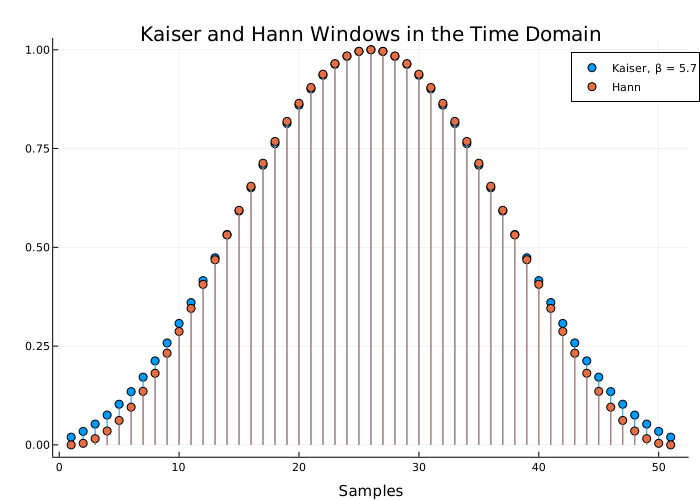
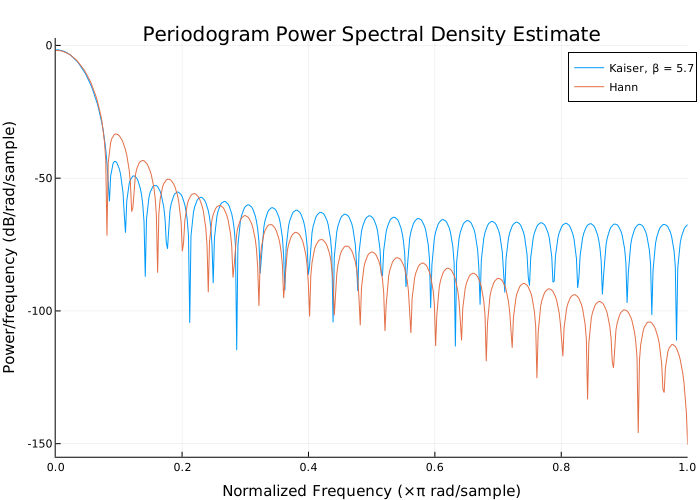
selection of parameters and algorithm
To calculate the signal spectra, the function pspectrum Initially, it defines a resolution band, which measures how close two tones can be placed so that they can be distinguished. The theoretical value of the resolution band is
where
-
The length of the record — this is the duration of the selected signal area in the time domain;
-
— equivalent noise band of the spectral window.
Use a name-value argument
"Leakage"to control the ENBW. The minimum value of the argument corresponds to the Kaiser window with . The maximum value corresponds to the Kaiser window with .
However, in practice, the function pspectrum it may lower the resolution. Reducing the resolution allows you to calculate the spectrum in a reasonable time and display it with a finite number of pixels. For these practical reasons, the smallest bandwidth that can be used is pspectrum, is equal to
where — the bandwidth specified using the argument "FrequencyLimits". If "FrequencyLimits" not specified, function pspectrum uses the sampling rate as . it cannot be changed.
To calculate the signal spectrum, the function selects the larger of the two values, called the _ target resolution band_:
-
If the resolution band matches , then the function
pspectrumcalculates one modified periodogram for the entire signal. The function uses a Kaiser window with a form factor defined by a name-value argument"Leakage". For more information, see the function description.periodogram. -
If the resolution band is equal to , then the function
pspectrumcalculates the Welch periodogram for the signal. Function:-
Divides the signals into overlapping segments.
-
Splits each segment separately using the Kaiser window with the specified form factor.
-
Averages the periodograms of all segments.
The Welch procedure is designed to reduce the variance of the spectrum estimate by averaging different "realizations" of signals received from overlapping areas and using a window to remove redundant data.
-
The length of each segment (or, equivalently, window) is calculated using
where — Nyquist’s frequency. (In the absence of spectrum overlap, the Nyquist frequency is equal to half the effective sampling frequency, defined as the inverse of the median of the differences between neighboring time points. The Nyquist frequency range is for real signals and for complex signals.)
-
The step length is determined by adjusting the initial estimate
so that the first window starts exactly at the first count of the first segment, and the last window ends exactly at the last count of the last segment.
-
Calculation of the spectrogram
Details
To calculate the spectrum of a time-dependent unsteady signal, the function pspectrum divides the signal into overlapping segments, superimposes a Kaiser window on each segment, calculates a short-term Fourier transform, and then combines these transformations into a matrix.
An unsteady signal is a signal whose frequency spectrum changes with time. The spectrogram of an unsteady signal is an estimate of the time evolution of its frequency spectrum. To construct a spectrogram of a non-stationary signal, the function pspectrum performs the following steps:
-
Divides the signal into segments of the same length. The segments should be short enough so that the frequency spectrum of the signal does not change noticeably within the segment. The segments may or may not overlap.
-
Selects each segment into a window and calculates its spectrum to obtain a _ short-term Fourier transform_.
-
Uses segment spectra to construct a spectrogram:
-
If the function is called with output arguments, it combines the spectra into a matrix.
-
If the function is called without output arguments, it displays the power of each spectrum in decibels segment by segment. Displays the amplitudes next to each other as an image with an amplitude-dependent colormap.
-
The function can calculate a spectrogram for single-channel signals only.
dividing the signal into segments
To build a spectrogram, first divide the signal into possibly overlapping segments. Function pspectrum allows you to control the length of segments and the degree of overlap between adjacent segments using name-value arguments "TimeResolution" and "OverlapPercent". If the length and overlap are not specified, the function selects the length based on the total duration of the signal and the percentage of overlap given by the formula
where — equivalent noise band of the spectral window.
The specified time resolution
-
If the signal does not contain time information, specify the time resolution (segment length) in the samples. The time resolution must be an integer greater than or equal to
1and less than or equal to the duration of the signal.If the signal contains time information, specify the time resolution in seconds. The function converts the result into the number of samples and rounds it to the nearest integer less than or equal to this number, but not less than
1. The time resolution must be less than or equal to the duration of the signal. -
Specify the overlap as a percentage of the segment length. The function converts the result into the number of samples and rounds it to the nearest integer less than or equal to the specified number.
_ Default time resolution_
If the time resolution is not specified, the function pspectrum uses the length of the entire signal to select the length of the segments. The function sets the time resolution as counts, where the symbols are denote the upper rounding function, — the length of the signal, and — a divisor that depends on :
| Signal length ( ) | The divider ( ) | Segment length |
|---|---|---|
|
|
|
|
|
|
|
|
|
|
|
|
|
|
|
|
|
|
|
|
|
You can still specify the overlap between adjacent segments. Specifying an overlap changes the number of segments. Segments extending beyond the end point of the signal are padded with zeros.
Consider a seven-count signal [s0 s1 s2 s3 s4 s5 s6]. Because the function divides the signal into two segments of length four when there is no overlap. The number of segments changes as the overlap increases.
| Number of overlapping counts | Resulting segments | ||||||||||||||||||||||||||||||||
|---|---|---|---|---|---|---|---|---|---|---|---|---|---|---|---|---|---|---|---|---|---|---|---|---|---|---|---|---|---|---|---|---|---|
|
|
||||||||||||||||||||||||||||||||
|
|
||||||||||||||||||||||||||||||||
|
|
||||||||||||||||||||||||||||||||
|
|
Function pspectrum complements the signal with zeros if the last segment goes beyond the end point of the signal. The function returns t is a vector of time points corresponding to the centers of the segments.
_ Window of segments and calculation of spectra_
After the function pspectrum divides the signal into overlapping segments, the function overlays a Kaiser window on each segment. The form factor windows and, therefore, leakage can be configured using a name-value argument "Leakage". The function then calculates the spectrum of each segment and combines the spectra to form a spectrogram matrix. To calculate segment spectra pspectrum follows the procedure described in Calculating the spectrum, except that the lower limit of the resolution band is
The spectrum power display
When called without output arguments, the function displays the power of the short-term Fourier transform in decibels using the default Engee color scale. The color scale covers the entire power range of the spectrogram.
Calculation of the spectrum of light inertia
Details
The spectrum of light inertia is a time-frequency representation that shows the percentage of time during which a given frequency is present in a signal. The spectrum of light inertia is a histogram in the space of power and frequency. The longer a certain frequency is present in the signal as it evolves, the higher its percentage of time and, therefore, the brighter or "hotter" its color on the display. Use the spectrum of light inertia to identify signals hidden in other signals.
To calculate the stability spectrum, the function pspectrum performs the following steps:
-
Calculates the spectrogram using the specified values of leakage, time resolution, and overlap. For more information, see Calculation of the spectrogram.
-
Splits the power and frequency values into two-dimensional intervals. (Use a name-value argument
"NumPowerBins"to specify the number of power intervals.) -
Calculates a two-dimensional histogram of the logarithm of the power spectrum for each time value. For each power-frequency interval where the signal energy is present at that moment, increases the corresponding element of the matrix by
1. Summarizes the histograms for all time values. -
Builds a histogram of accumulated values depending on power and frequency, using a color proportional to the logarithm of the histogram values expressed in normalized percentages. It uses half of the smallest possible amplitude to represent zero values.
Literature
-
Harris, Fredric J. «On the Use of Windows for Harmonic Analysis with the Discrete Fourier Transform.» Proceedings of the IEEE®. Vol. 66, January 1978, pp. 51–83.
-
Welch, Peter D. «The Use of Fast Fourier Transform for the Estimation of Power Spectra: A Method Based on Time Averaging Over Short, Modified Periodograms.» IEEE Transactions on Audio and Electroacoustics. Vol. 15, June 1967, pp. 70–73.