spectrogram
A spectrogram using the windowed Fourier transform.
| Library |
|
Syntax
Function call
-
s, f, time, p = spectrogram(_, Name=Value)— uses argumentsName=Valuein addition to any input arguments provided in the previous syntaxes.
Arguments
Input arguments
# x — input signal
+
vector
Details
The input signal is set as a row vector or column vector.
| Типы данных |
|
| Support for complex numbers |
Yes |
# window — window
+
a positive integer | vector
Details
The window value specified as a positive integer, row vector, or column vector. Use window to split the signal into segments:
If the length is x if it cannot be precisely divided into an integer number of segments without overlapping samples, then x it is truncated accordingly.
If you do not specify window Then spectrogram uses the Hamming window in such a way that x It is divided into eight segments with no overlapping counts.
# noverlap — number of intersecting points
+
a non-negative integer
Details
The number of intersecting signal points, set as a non-negative integer.
If you do not specify the value of the argument noverlap, the spectrogram uses a number that gives 50% overlaps between segments. If the segment length is not specified, the function sets the value noverlap an equal , where — the length of the input signal, and the symbols denote rounding down.
#
nfft is
the number of points in the discrete Fourier
transform
a positive integer
Details
The number of points in the discrete Fourier transform, given as a positive integer scalar.
If you do not specify a value for nfft, then the spectrogram will use the value , where , symbols denote rounding up, while:
# freq — normalized/cyclic frequencies
+
the real vector
Input arguments «name-value»
Specify optional argument pairs in the format Name=Value, where Name — the name of the argument, and Value — the appropriate value. Type arguments Name=Value they should be placed after the other arguments, but the order of the pairs does not matter.
#
fs —
sampling
rate
1 Hz (default) | a positive real number
Details
The sampling rate, set as a positive scalar. The sampling rate is the number of samples per unit of time. If the unit of time is seconds, then the sampling frequency is expressed in Hz.
# freqrange is the frequency range of the power spectral density estimate
+
"onesided" | "twosided"
Details
The frequency range for estimating the spectral power density (SPM), given as "onesided" or "twosided".
For signals with real values, the default value is "onesided". For complex signals, the default value is "twosided", and specifying the value "onesided" leads to an error.
-
Meaning
"onesided"— returns a one-way spectrogram of the real input signal.-
If the value of the argument is
nffteven, then the argumentphasnfft/2 + 1rows and is calculated on the interval[0, π]radians to count. -
If the value of the argument is
nfftIf it’s an odd number, thenphas(nfft + 1)/2lines and spacing[0, π)radians to count. If you specifyfs, then the intervals will be respectively[0, fs/2]cycles per unit of time and[0, fs/2)cycles per unit of time.
-
-
Meaning
"twosided"— returns a two-way spectrogram of a real or complex signal. Argumentphasnfftrows and is calculated on the interval[0, 2π)radians to count. If you specify an argumentfs, then the interval will have[0, fs)cycles per unit of time.
# centered — is the frequency range centered
+
false (by default) | true
Details
Enabling the centering of the frequency range, set as false or true.
# spectrumtype — power spectral density scaling
+
"psd" (by default) | "power"
Details
Scaling of the power spectral density (SPM), defined as "psd" or "power".
If the spectrum type is not specified or the value is specified "psd", then the function returns the spectral power density.
Meaning "power" scales each estimate of the power spectral density by the equivalent window noise band. The result is an estimate of the power at each frequency.
# freqloc — frequency display axis
+
"xaxis" (by default) | "yaxis"
Details
The frequency display axis, set as "xaxis" or "yaxis".
-
Meaning
"xaxis"— frequency display on the axis and time on the axis . -
Meaning
"yaxis"— frequency display on the axis and time on the axis .
# OutputTimeDimension — time direction
+
"acrosscolumns" (default) | "downrows"
Details
The time direction of the output data, set as "acrosscolumns" or "downrows". Set this argument to "downrows" if you want the time direction for the output arguments to be displayed in rows, and the frequency direction in columns. Set the value "acrosscolumns" if you want the time direction for the output arguments to be displayed in columns, and the frequency direction in rows.
# out — type of output data
+
:plot (by default) | :data
Details
Type of output data:
If out = :plot, then you can additionally pass parameters to display the total heatmap(). For example, if you call spectrogram(x, c = cgrad([:black, :white], [0.1, 0.3, 0.8])), then the spectrogram will have gray colors instead of the standard ones.
Output arguments
#
s is
the discrete Fourier
transform
the matrix
Details
A discrete Fourier transform returned as a matrix. The time increases across the columns of the matrix s, and the frequency increases line by line, starting from zero.
If the parameter freqrange it matters "onesided", then the spectrogram outputs the values s in the positive Nyquist range and does not retain full power.
|
# time — points in time
+
vector
Details
The time points returned as a vector. Time values in t they correspond to the middle of each segment.
# p is the spectral power density (SPM)
+
the matrix
Details
The SPM or power spectrum returned as a matrix.
-
If
x— a real number, andfreqrangeomitted or set to value"onesided"ThenpIt contains a one-sided modified PSD periodogram or the power spectrum of each segment. The function multiplies the power by2on all frequencies except0and Nyquist frequencies to preserve the overall power. -
If
xis a complex number or iffreqrangeset to the value"twosided"or"centered"ThenpIt contains a two-sided modified PSD periodogram or the power spectrum of each segment. -
If you specify a vector of normalized or cyclic frequencies in
freqThenpIt will contain a modified PSD periodogram or the power spectrum of each segment calculated at the input frequencies.
Examples
Default values for the spectrogram
Details
Generate samples of a signal representing the sum of sinusoids. The normalized frequencies of the sinusoids are rad/countdown and rad/countdown. A sinusoid with a higher frequency has in times the amplitude of the other sine wave.
import EngeeDSP.Functions: spectrogram
N = 1024
n = 0:N-1
w0 = 2pi / 5
x = sin.(w0 * n) .+ 10 * sin.(2 * w0 * n)
Let’s calculate the windowed Fourier transform using the default function parameters. Let’s build a spectrogram.
spectrogram(x,freqloc="yaxis")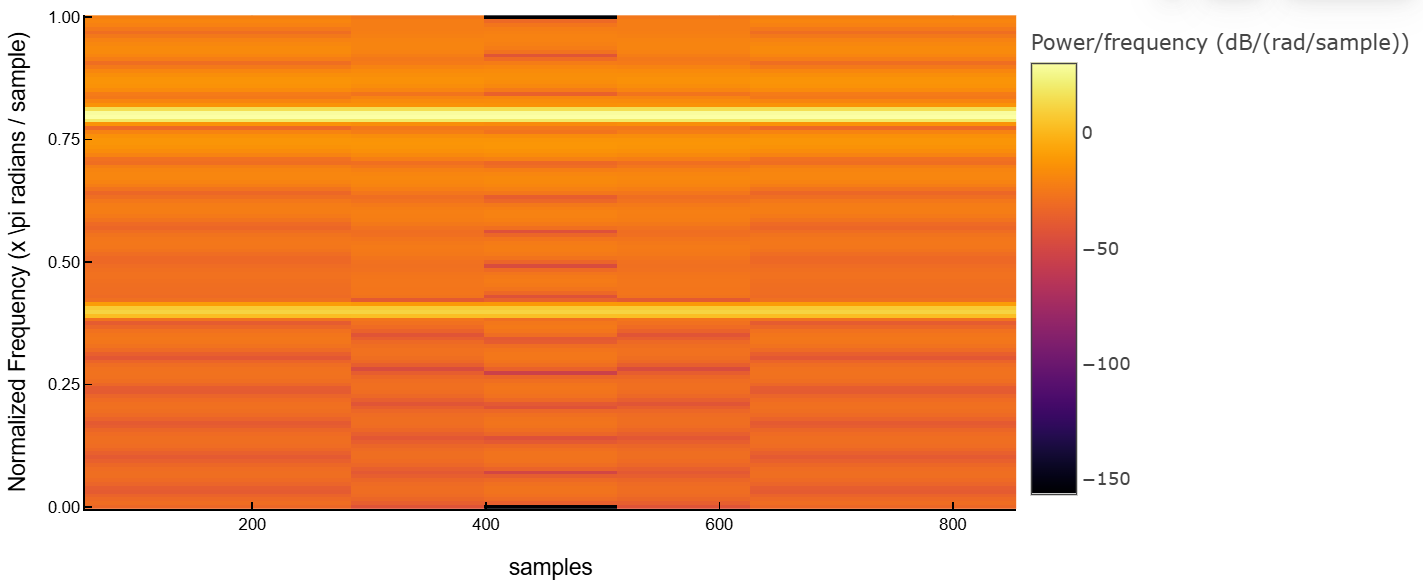
Complex signal spectrogram
Details
Generate 512 frequency modulation samples with sinusoidally varying frequency composition.
Let’s calculate the centered two-way windowed Fourier transform of frequency modulation. Let’s divide the signal into segments by 32 reference points with overlap in 16 counts. Specify 64 discrete Fourier transform points. Let’s build a spectrogram.
import EngeeDSP.Functions: spectrogram
N = 512
n = collect(0:N-1)

x = @. exp(im*pi*sin(8*n/N)*32)
spectrogram(x, 32, 16, 64, centered = true, freqloc="yaxis")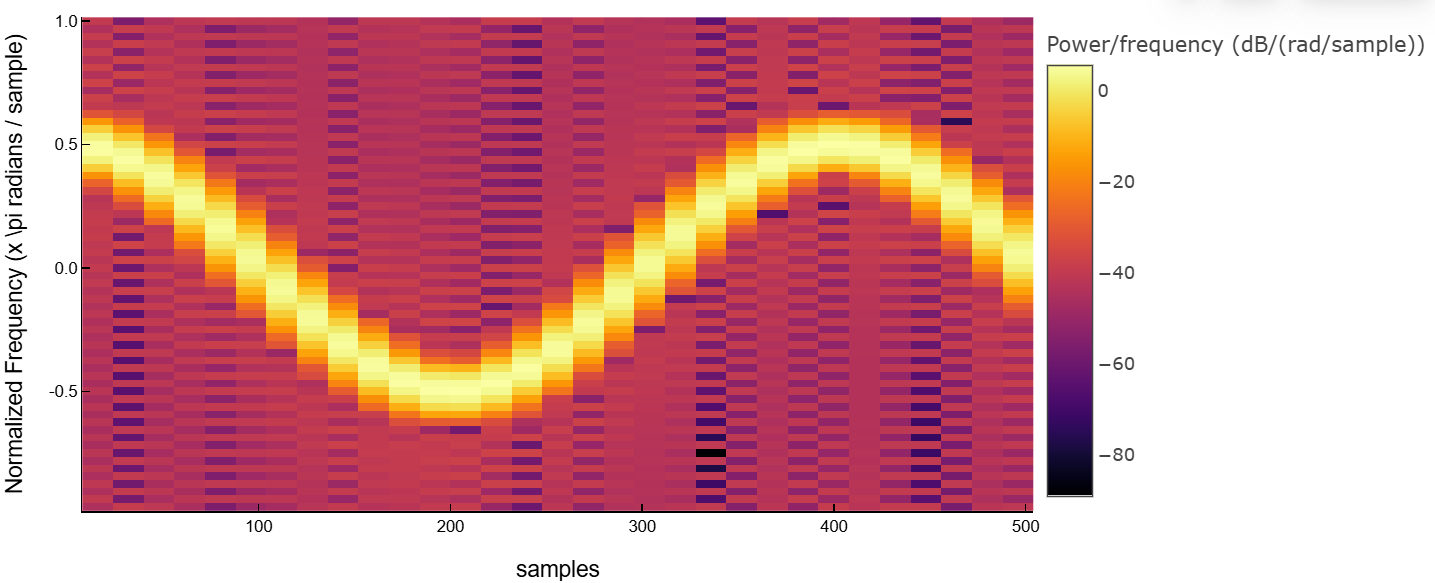
Let’s display the results as data.
spectrogram(x, 32, 16, 64, centered = true, freqloc="yaxis", out=:data)(ComplexF64[-0.004799003568266007 - 0.0505661817205643im 0.04928181142575791 - 0.08168061694423136im … 0.06661413792128079 + 0.005582741943515573im 0.06563897996263357 - 0.03809302080510557im; 0.08251130568172917 - 0.009465091175966937im 0.01113491156754788 + 0.0019301579098507408im … -0.0033130937073331257 + 0.04853476281962177im 0.013263617768417113 + 0.025903864451430003im; … ; -0.009649405525420679 - 0.05239849276178002im 0.04401940995315085 - 0.0914065432314291im … 0.06820937107281076 - 6.325260894440854e-5im 0.06223032913485138 - 0.04414639111404428im; 0.08717673328273712 - 0.01888297777102288im 0.0132333274580263 + 0.0005901735083794213im … 0.002529248964486752 + 0.05007735729089752im 0.017119544189724056 + 0.024263377986849743im], [-3.043417883165112, -2.945243112740431, -2.84706834231575, -2.748893571891069, -2.650718801466388, -2.5525440310417067, -2.4543692606170255, -2.356194490192345, -2.2580197197676637, -2.1598449493429825 … 2.2580197197676637, 2.3561944901923453, 2.454369260617026, 2.5525440310417067, 2.6507188014663883, 2.748893571891069, 2.8470683423157497, 2.9452431127404313, 3.043417883165112, 3.1415926535897936], [2.5464790894703255 5.092958178940651 … 76.39437268410977 78.94085177358009], [3.3313443855835635e-5 0.00011750773553006685 … 5.770022477295285e-5 7.436932913915006e-5; 8.906550573571001e-5 1.6490579693362508e-6 … 3.0558345518866313e-5 1.0935898096347522e-5; … ; 3.665443356386854e-5 0.00013290498623780864 … 6.0074958410346855e-5 7.516942675213517e-5; 0.00010273510683279117 2.2657190730313684e-6 … 3.246341980220297e-5 1.1385977847041683e-5])Additional Info
Windowed Fourier Transform (OPF)
Details
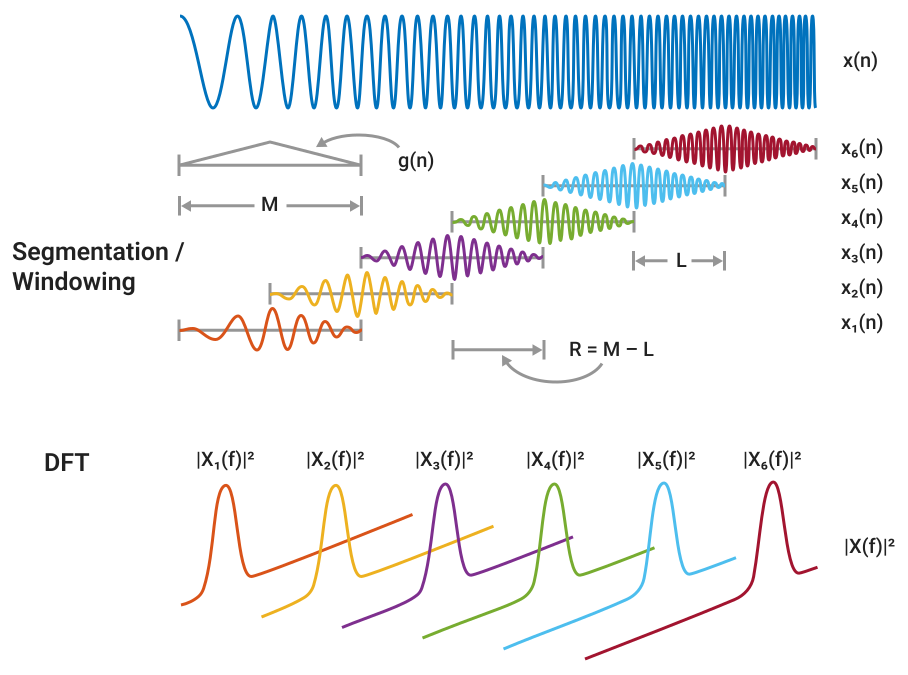
The windowed Fourier transform (OPF) is used to analyze changes in the frequency content of an unsteady signal over time. The value of the square of the OPF is known as the spectrogram of the time-frequency representation of the signal.
The OPF of the signal is calculated by sliding the analysis window lengths based on the signal and the calculation of the discrete Fourier transform (DFT) of each segment of the window data. The window slides over the original signal with an interval of counts, which is equivalent to counts of overlap between adjacent segments. Most window functions taper at the edges to avoid spectral ringing. The DFT of each segment with a window is added to a complex matrix containing the magnitude and phase for each point in time and frequency. The OPF matrix has columns where — signal length , and the symbols denote the rounding down function. The number of rows in the matrix is , the number of DFT points, for centered and two-sided transformations, and an odd number close to , for one-way transformations of real signals.
-th column of the OPF matrix contains a time-centered window data DFT :
If there are zeros in the windowed Fourier transform, its conversion to decibels leads to negative infinite values that cannot be plotted. To avoid this potential difficulty, the function spectrogram adds eps to the windowed Fourier transform when you call it without output arguments.
|
Literature
-
Boashash, Boualem, ed. «Time Frequency Signal Analysis and Processing: A Comprehensive Reference.» Second edition. EURASIP and Academic Press Series in Signal and Image Processing. Amsterdam and Boston: Academic Press, 2016.
-
Chassande-Motin, Éric, François Auger, and Patrick Flandrin. «Reassignment.» In Time-Frequency Analysis: Concepts and Methods. Edited by Franz Hlawatsch and François Auger. London: ISTE/John Wiley and Sons, 2008.
-
Fulop, Sean A., and Kelly Fitz. «Algorithms for computing the time-corrected instantaneous frequency (reassigned) spectrogram, with applications.» Journal of the Acoustical Society of America. Vol. 119, January 2006, pp. 360–371.
-
Oppenheim, Alan V., and Ronald W. Schafer, with John R. Buck. «Discrete-Time Signal Processing.» Second edition. Upper Saddle River, NJ: Prentice Hall, 1999.
-
Rabiner, Lawrence R., and Ronald W. Schafer. «Digital Processing of Speech Signals.» Englewood Cliffs, NJ: Prentice-Hall, 1978.