Artery DO
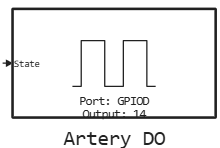
Control of the digital output of the microcontroller.
blockType: CFunction
|
Path in the library: |
Description
| To work with the block, install/update the support package. equipment. |
Block Artery DO It is used to control the digital output of the microcontroller.
Ports
Input
#
State
—
digital output status
scalar
Details
| Data types |
|
| Complex numbers support |
No |
Parameters
Main group
#
Порт: —
microcontroller’s GPIO port
A | B | C | D | E | F | G | H
Details
| Values |
|
| Default value |
|
| Program usage name |
|
| Tunable |
No |
| Evaluatable |
Yes |
#
Вывод: —
GPIO pin number
0 | 1 | 2 | 3 | 4 | 5 | 6 | 7 | 8 | 9 | 10 | 11 | 12 | 13 | 14 | 15
Details
| Values |
|
| Default value |
|
| Program usage name |
|
| Tunable |
No |
| Evaluatable |
Yes |