EDM-Target-Artery
The primary configuration of the project before code generation, compilation, firmware, and model launch.
blockType: SubSystem
|
Path in the library: |
Description
| To work with the block, install/update the support package. equipment. |
Block EDM-Target-Artery It is used for the initial configuration of the project before code generation, compilation, firmware and model launch.
The block is necessary to determine on which hardware (on which target) to run the model. The block only works when the platform is selected Target Hardware:
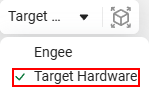
Read more about the Target Hardware platform and how to work with it in the article Running models on target hardware.
Parameters
Настройки проекта
# Модель МК: — The AT32 microcontroller model
Details
The microcontroller model, for example AT32F435ZMT7. Specify auto for automatic detection from the AT32 Workbench project.
| Default value |
|
| Program usage name |
|
| Tunable |
No |
| Evaluatable |
Yes |
#
Программатор: —
programmer for microcontroller detection and firmware
openocd | at-link-console
Details
| Values |
|
| Default value |
|
| Program usage name |
|
| Tunable |
No |
| Evaluatable |
Yes |
# Путь к тулчейну для сборки: — the path to the compiler
Details
The full path to the compiler arm-none-eabi-gcc. Specify auto for automatic search: first, by environment variables (ARM_NONE_EABI_PATH, ARM_GCC_TOOLCHAIN_PATH, GCC_ARM_NONE_EABI_PATH), then in the AT32 IDE paths, then in PATH.
| Default value |
|
| Program usage name |
|
| Tunable |
No |
| Evaluatable |
Yes |
# Путь к утилите для прошивки: — the path to the programmer
Details
The full path to the OpenOCD programmer (openocd.exe) or AT-Link Console (ATLink_Console.exe). Specify auto for automatic search: first, by environment variables (ATLINK_CONSOLE_PATH, AT_LINK_CONSOLE_PATH), then in the AT32 IDE paths, then in PATH.
| Default value |
|
| Program usage name |
|
| Tunable |
No |
| Evaluatable |
Yes |
# Путь к проекту AT Workbench: — the path to the generated project folder
Details
The full path to the AT32 Workbench project folder (for example, AT32F435ZMT7_WorkBench), containing CMakeLists.txt and the file .ATWP.
| Default value |
|
| Program usage name |
|
| Tunable |
No |
| Evaluatable |
Yes |
Настройка интерактивного режима
# COM порт: — COM port path or name
Details
COM port path or name:
-
For Linux— the path to the COM port in the file system, for example
/dev/ttyACM0. -
For Windows— the name of the COM port in the system, for example
COM1.
| Default value |
|
| Program usage name |
|
| Tunable |
No |
| Evaluatable |
Yes |
# Резервируемый модуль USART: — the USART module for interactive mode
Details
USART module number (from 1 before 6 for USART and from 4 before 8 for UART). This number must match the number of the module configured in the AT32 Workbench and the COM port number.
| Default value |
|
| Program usage name |
|
| Tunable |
No |
| Evaluatable |
Yes |