Arduino Support Package: Digital inputs and outputs
In this example, we are working with the digital outputs of the Arduino MEGA again, using a dynamic indication on a four-digit seven-segment indicator 5461AS-1. In addition, we will use a digital input to switch the displayed data, and we will implement the edge selection of the input signal using a finite state machine.
Introduction
In the previous examples, we have already considered: programming a seven-segment indicator and dynamic display. In this example, we will combine both models - the digits of the 5461AS indicator will be switched dynamically, displaying the corresponding sequence of ignited segments for each digit.
Since the indicator is four-digit, and the project is being developed on the eve of the New Year 2026, we will implement an indication of the change of year at the touch of a button.
In the example, we also use an Arduino MEGA with digital inputs/outputs: 30-36 for segments, 40-44 for digits, 2 for buttons.
In addition, the circuit will require: a breadboard, a button, 4 330 ohm resistors for discharges, 1 10 kOhm resistor and a 68 nF capacitor for an anti-rattling circuit.
Hardware part
The connection diagram is shown below.
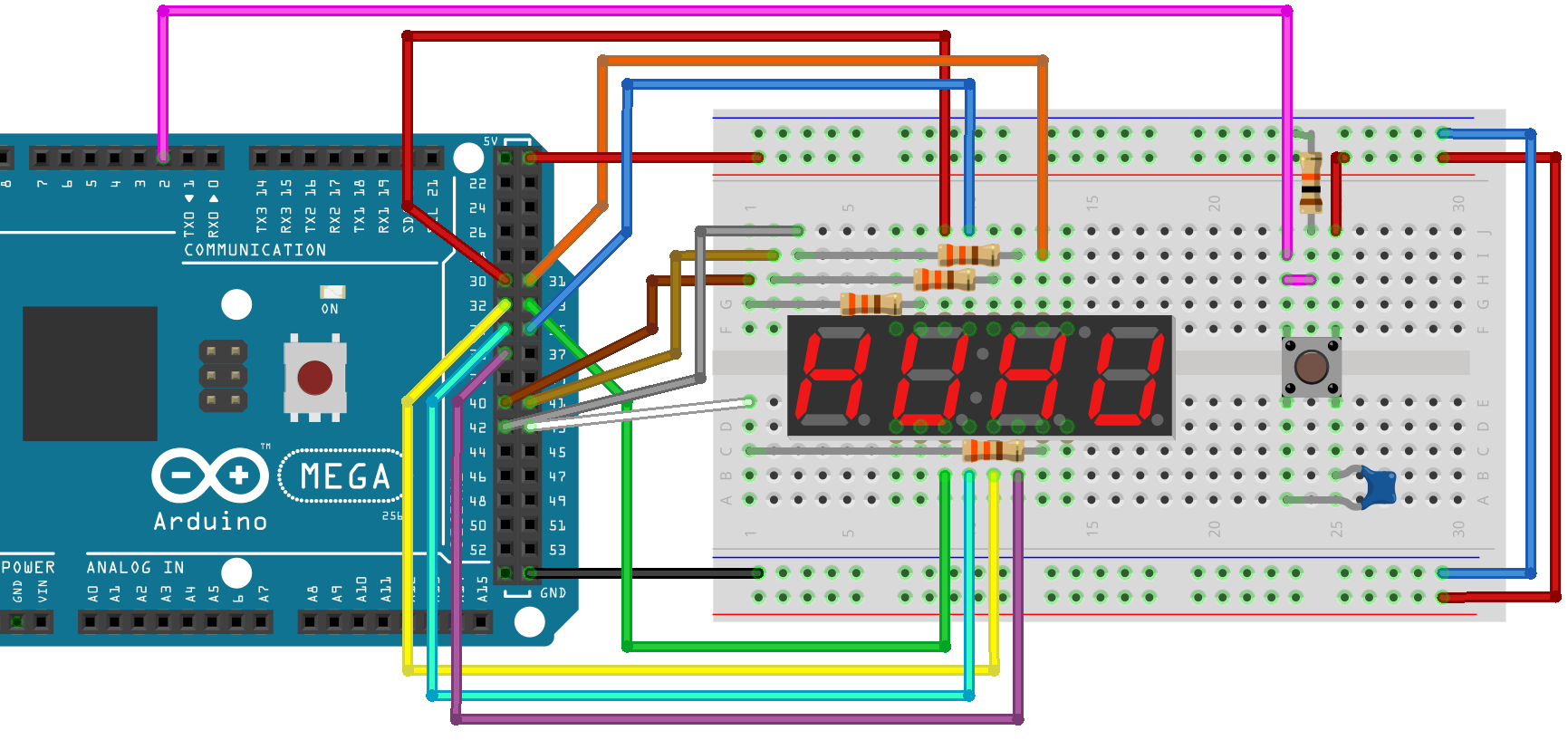
It is convenient to make connections according to the following table:
|
Arduino Pin |
Contact number 5461AS-1 |
Contact Name 5461AS-1 |
The color of the cable in the diagram |
|
2 |
- |
- |
Pink |
|
30 |
11 |
a |
Red |
|
31 |
7 |
b |
Orange |
|
32 |
4 |
c |
Yellow |
|
33 |
2 |
d |
Green |
|
34 |
1 |
e |
Blue |
|
35 |
10 |
f |
Blue |
|
36 |
5 |
g |
Violet |
|
40 |
12 |
D1 |
Brown (after 330 ohms) |
|
41 |
9 |
D2 |
Ocher (through 330 ohms) |
|
42 |
8 |
D3 |
Gray (after 330 ohms) |
|
43 |
6 |
D4 |
White (through 330 ohms) |
|
5V |
- |
- |
Red |
|
GND |
- |
- |
Black |
The example model
The example model is shown in the screenshot below:
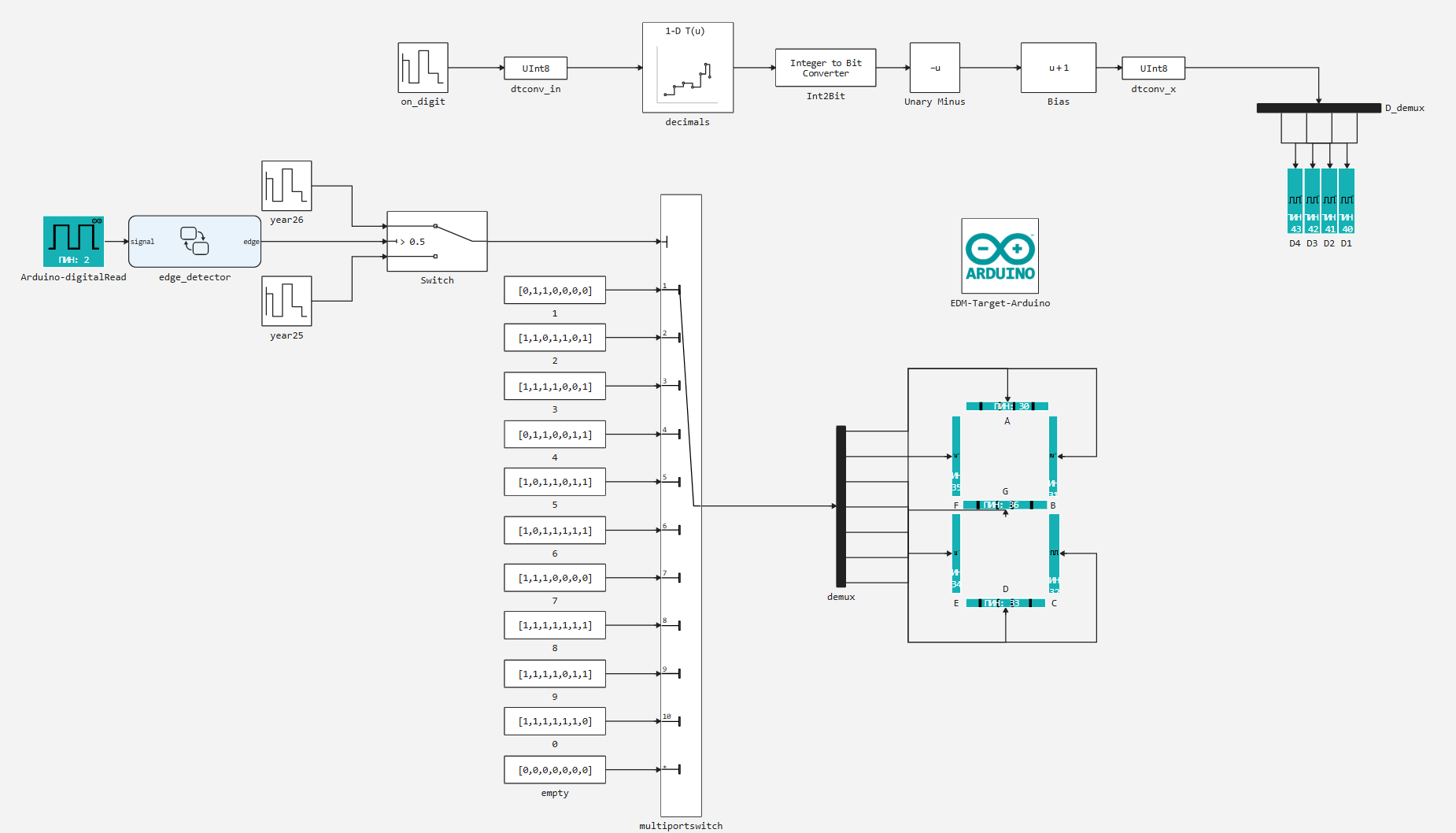
The dynamic display (segment switching) is controlled in the same way as in the example with the [LED matrix] (https://engee.com/community/ru/catalogs/projects/6b153737-49ec-451b-a9b7-a7728410833b ), except that there are only 4 digits switching from the lowest to the highest.
Block on_digit It also determines the number of the ignited discharge, and all segments are extinguished between discharge inclusions. So the sequence in the block is defined this way:
on_digit_data = [1, 0, 2, 0, 3, 0, 4, 0];
The formation of sequences that include segments is implemented similarly to the example with the [seven-segment indicator] (https://engee.com/community/ru/catalogs/projects/arduino-semisegmentnyi-indikator ). Control data for enabling sequence segments in blocks Repeating Sequence Stair, which , according to the switched-on digit indicator, transmit one or another digit to the output for display. The following input data is set in the model:
year25_data = [2, 11, 0, 11, 2, 11, 5, 11];
year26_data = [2, 11, 0, 11, 2, 11, 6, 11];
Here, the vector contains a number 11 - for the switch multiportswitch it is outside the range of input numbers, which causes it to switch to the default input, transferring the sequence to segments. [0, 0, 0, 0, 0, 0, 0].
The signal source for switching input data is the Arduino peripheral unit from the [Arduino - digitalRead] support package (https://engee.com/helpcenter/stable/en/hardware-arduino/arduino-digitalread.html ). The digital input number is set in the block. - 2. Using a finite state machine edge_detector (block Chart) the leading edge of the input signal is selected. That is, when you click on the button, the input data source for the indicator is switched from the block year25 per block year26.
Preparation
Using this block of code, we automate the launch of the Engee server program.Integrations:
import .engee.package as epkg

const PKGNAME = "Engee-Device-Manager"

function epkg_start(pkg::String)
    if !epkg.isinstalled(pkg)
        @info "Package not installed. Installing and Starting..."
        epkg.install(pkg)
        @info "Package is up to date. Starting..."
        # println("Link to connect to the server:\n"*epkg.start(pkg))
    else
        updates = epkg.checkupdates(pkg)
        if isnothing(updates)
            @info "Package is up to date. Starting..."
            # println("Link to connect to the server:\n"*epkg.start(pkg))
        else
            @info "Updates available. Reinstalling and Starting..."
            epkg.update(pkg)
            @info "Package is up to date. Starting..."
            # println("Link to connect to the server:\n"*epkg.start(pkg))
        end
    end
end

epkg_start(PKGNAME)
Also behind the scenes, as usual, let's launch the Engee client program.Let's integrate and connect our device.
Model Execution
Let's run the model in independent mode.
On the record, we can observe that all the embedded functionality:
- dynamic display by digits,
- output of set numerical values into segments,
- switching of displayed data along the leading edge of the input signal
implemented as intended.
Conclusion
In this example, we combined two previous examples of working with Arduino MEGA digital outputs from the support package, dynamic display and output of seven-segment digits. In addition, we added a digital input and implemented the logic of allocating the leading edge of the signal using a finite state machine.