Callbacks
| Do not confuse the callbacks described in this article with library callbacks. DiffEqCallbacks.jl. Read more about working with them in Event Handling and Callback Functions. |
Model Callbacks — these are functions that are called automatically in response to certain events in the model. Callbacks Engee created in a programming language Julia.
To open callbacks, go to the settings window  and click Edit source code
  :
:
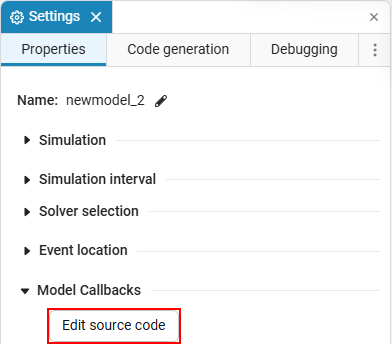
All callbacks are available in the menu that opens. Engee. They are empty by default and do not contain any code.:

All callbacks Engee It can be roughly divided into 4 groups:
|
|
|
|
Description of callbacks
Opening the model
They are used to adjust the behavior of the model before and after opening.
_ Learn more about model opening callbacks_
Callbacks used: PreLoadFunc (opening) and PostLoadFunc (closing).
Description:
-
PreLoadFunc— runs before loading the model.Software control methods cannot be used in the callback of this model, because the model has not yet been loaded. -
PostLoadFunc— performed after loading the model. You can use the model parameters in it, since they are already loaded.
|
Callbacks based on the model opening condition allow:
|
Model Execution
They are used in the simulation process.
_ Learn more about model execution callbacks_
Callbacks used: InitFunc (initialization), StartFunc (launch), PauseFunc (pause), ContinueFunc (execution), StopFunc (stop).
When you start the model and stop the simulation process at least once, all these functions will work.
Description:
-
InitFunc— performed after the compilation stage of the model; -
StartFunc— runs until the first step of the simulation; -
PauseFunc— called in case of a pause during the simulation; -
ContinueFunc— runs in one step when starting the model after a pause; -
StopFunc— it is performed during the shutdown of the simulation process.
Saving the model
Used when saving the model.
_ Learn more about model save callbacks_
Callbacks used: PreSave (before saving), PostSave (after saving)
Description:
-
PreSave— performed before saving the model; -
PostSave— executed after saving the model.
Closing the model
Used when closing the model.
_ Learn more about model closure callbacks_
Callbacks used: CloseFunc (closing)
Description:
-
CloseFunc— executed after the model is closed.
|
Callbacks based on the closure condition of the model allow:
|
Messages in the diagnostic window
In the callback code of the model, you can send messages to model diagnostic window  using the functions:
-
engee.info(msg)— information message; -
engee.warning(msg)— warning message;
These functions only work inside callbacks (masks and models). Collect text through interpolation ("Value = $(x)") or string(…).
|
examples by callback groups
Opening the model (PreLoadFunc, PostLoadFunc):
PreLoadFunc() = begin
    engee.info("Opening model")
end

PostLoadFunc() = begin
    engee.info("Model loaded")
end
Model execution (InitFunc, StartFunc, PauseFunc, ContinueFunc, StopFunc):
InitFunc() = engee.info("Initialization complete")
StartFunc() = engee.info("Simulation started")
PauseFunc() = engee.warning("Simulation paused")
ContinueFunc() = engee.info("Continuing after pause")
StopFunc() = engee.info("Simulation stopped")
Saving the model (PreSave, PostSave):
PreSave() = engee.info("Saving model...")
PostSave() = engee.info("Model saved")
Closing the model (CloseFunc):
CloseFunc() = begin
    try
        # release temporary resources
        engee.info("Resources released, model closed")
    catch e
        engee.warning("Failed to close the model correctly: $(e)")
    end
end| Also see the section about messages in block masks.: Messages in the diagnostic window. |
Example of work
To see an example of how callbacks work, go to link.
For each callback in Engee you can assign a variable. This is convenient to track the triggering depending on the simulation condition, for example, inside the model opening call. PreLoadFunc you can use the code:
# model opening variables
PreL = 1 # runs before loading the model
PostL = 0 # runs after loading the model

# model execution variables
Init = 0 # runs after compiling the model
Start = 0 # runs before the first simulation step
Pause = 0 # called when the simulation is paused
Continue = 0 # runs for one step when the model resumes after a pause
Stop = 0 # runs while stopping the simulation

# model saving variables
PreS = 0 # runs before saving the model
PostS = 0 # runs after saving the model

# model closing variables
Close = 0 # runs after closing the model
This code initializes variables with null values. Variable PreL, associated with opening the model, is equal to one, since its parameters are loaded before and after loading the model (they are always executed). For example, in the model execution callbacks StartFunc you can set a variable Start = 1. If this callback is successful, the value of the variable will change from 0 (not completed) on 1 (completed). You can monitor the execution of callbacks using the variables window.:
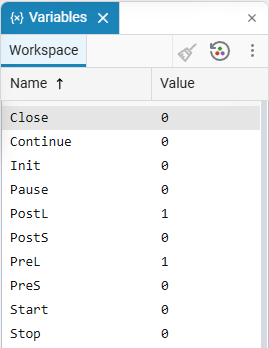
Each time the callback is triggered, the variables are updated, and then their values are output for analysis and debugging of the simulation process.