Operation of the INS block
We will demonstrate how the error simulation unit of the inertial navigation system (INS) works by considering which errors will appear on the trajectory where the vehicle makes a left turn.
Uploading data
Vectors can be stored in any format, in this example they are in a JLD2 or MAT file as separate vectors. Download them from the file:
Pkg.add("JLD2")
using JLD2
@load "leftTurnTrajectory.jld2"
This file contains the following variables:
dt- measurement time step, can be used for sampling (equal to 0.4 s),t- measurement time vector, from 0 to 7.88 secondsvehPos,vehVel,vehAcc,vehOrient,vehAngVel- recording of trajectory parameters: position, velocity, acceleration, angular orientation and angular velocity, each with 198 measurements of 3 parameters.
Let's prepare WorkspaceArray objects, each of which contains a time vector. t and, for each time frame, three coordinates (position, velocity, and acceleration in the Cartesian coordinate system, as well as Euler angles and angular velocity):
using DataFrames
vehPos_wa = WorkspaceArray("vehPos_wa", DataFrame(time = t[:], value = [collect(vec((row))) for row in eachrow(vehPos)]));
vehVel_wa = WorkspaceArray("vehVel_wa", DataFrame(time = t[:], value = [collect(vec((row))) for row in eachrow(vehVel)]));
vehOrient_wa = WorkspaceArray("vehOrient_wa", DataFrame(time = t[:], value = [collect(vec((row))) for row in eachrow(vehOrient)]));
vehAcc_wa = WorkspaceArray("vehAcc_wa", DataFrame(time = t[:], value = [collect(vec((row))) for row in eachrow(vehAcc)]));
vehAngVel_wa = WorkspaceArray("vehAngVel_wa", DataFrame(time = t[:], value = [collect(vec((row))) for row in eachrow(vehAngVel)]));
Launching the model
Our example is accompanied by a model that we will open and run.:
engee.open("$(@__DIR__)/simulate_ins_block.engee")
data = engee.run("simulate_ins_block")
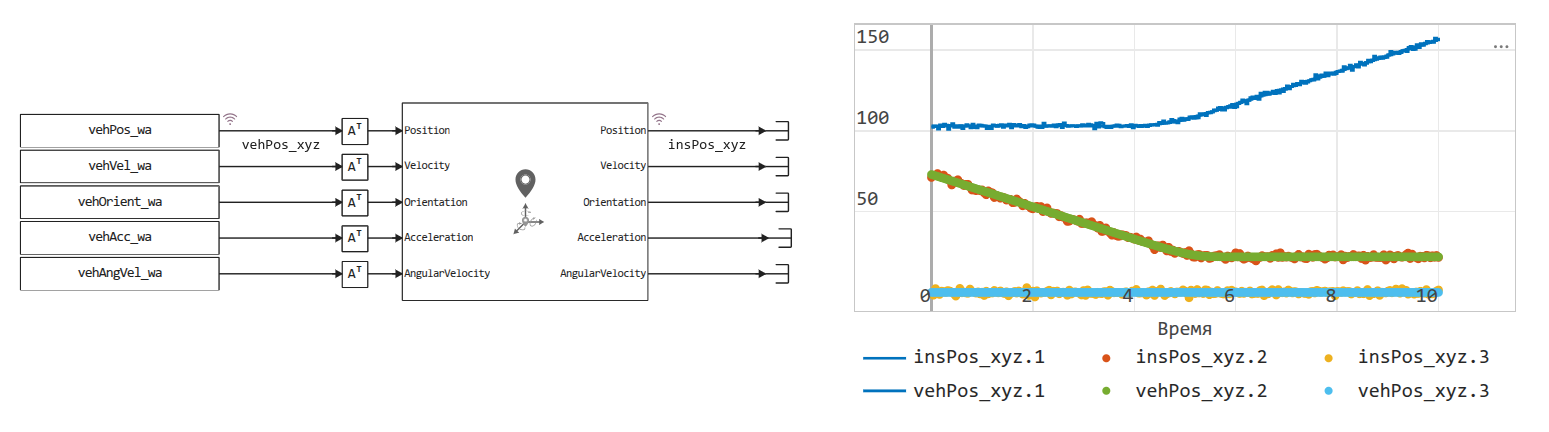
The model consists of two parts: data import, noise reduction using the ANN block, and a graph for displaying the results (also available on the Signal Visualization panel).
Block FromWorkspace it requires a special WorkspaceArray format, the objects of which we created earlier. It greatly simplifies the interpolation and extrapolation of experimental data.
Conclusion
As can be seen from the graphs, the ANN block adds a set amount of measurement noise, although the output data is quite close to the input data.