resample
Resampling evenly or unevenly distributed data with a new fixed sampling rate.
| Library |
|
Syntax
Function call
-
y = resample(x,p,q)— performs re-sampling of the input sequencexwith a sampling rate, inp/qtimes higher than the original one. Functionresampleapplies toxLow-pass smoothing filter with a finite impulse response (FIR) and compensates for the delay introduced by the filter. The function works on the first dimension of the array, the size of which is larger1.
-
y = resample(x,tx)— performs re-sampling of the signal valuesx, measured at time points specified in the vectortx. The function linearly interpolatesxinto a vector of uniformly distributed time points with the same endpoints and number of samples astx. ValuesNaNthey are considered as missing data and are ignored.
-
y = resample(x,tx,fs,p,q)— interpolates the input signal onto an intermediate uniform grid with a sampling step(p/q)/fs. The function then filters the result by increasing its sampling rate bypand reducing byq, which results in the final sampling ratefs. For best results, make sure thatfs × q/pat least twice as much as the highest frequency componentx.
Arguments
Input arguments
# x — input signal
+
vector | the matrix | An N-dimensional array
Details
An input signal specified as a vector, matrix, or N-dimensional array. Argument x may contain the values NaN if there is information about the time. Values NaN They are considered as missing data and excluded from re-sampling.
| Data types |
|
# p is the resampling coefficient
+
a positive integer
Details
The resampling coefficient, set as a positive integer.
| Data types |
|
# q is the resampling coefficient
+
a positive integer
Details
The resampling coefficient, set as a positive integer.
| Data types |
|
# n is the number of the neighboring element
+
10 (by default) | a non-negative integer
Details
The number of the neighboring element, set as a non-negative integer. If n = 0, function resample performs nearest neighbor interpolation. The length of the smoothing FIR filter is proportional to n. Large values n they provide higher accuracy by increasing the calculation time.
| Data types |
|
# beta — Kaiser window shape parameter
+
5 (by default) | positive real scalar
Details
The Kaiser window shape parameter, set as a positive real scalar. Increasing the argument beta expands the main lobe of the window used to build the smoothing filter, and reduces the amplitude of the side lobes of the window.
| Data types |
|
# b — FIR filter coefficients
+
vector
Details
FIR filter coefficients, specified as a vector. The default function is resample designs a filter using the function firls and the Kaiser’s window. When compensating for the delay, the function resample assumes that the input argument is b it has an odd length and a linear phase. For more information, see Low-pass smoothing filter.
| Data types |
|
#
tx —
time
points
a non-negative real vector | DateTime
Details
Time points specified as a non-negative real vector or array DateTime. Argument tx It should increase monotonously, but it does not have to be evenly distributed. tx may contain values NaN. These values are treated as missing data and excluded from resampling. Argument tx let’s say only for the input value x.
| Data types |
|
#
fs —
sampling
rate
positive scalar
Details
The sampling rate, set as a positive scalar. The sampling rate is the number of samples per unit of time. If the unit of measurement of time is seconds, then the sampling frequency is indicated in Hz.
| Data types |
|
# method — interpolation method
+
"linear" (by default) | "pchip" | "spline"
Details
The interpolation method, defined as "linear", "pchip" or "spline":
-
"linear"— linear interpolation; -
"pchip"— piecewise cubic shape-preserving interpolation; -
"spline"— spline interpolation using conditions «not-a-knot» at the ends.
For more information, see the page interp1.
Input arguments «name-value»
# dim — the measurement for which the operation is performed
+
a positive integer scalar
Details
The dimension that the operation is performed on, specified as a positive integer scalar. If the argument is dim not specified, function resample it is performed on the first dimension of the array, the size of which is larger 1.
| Data types |
|
Examples
Re-sampling of a linear sequence
Details
Let’s re-sample a simple linear sequence with a frequency 3/2 from the original 10 Hz. Let’s plot the original sequence and the sequence with repeated sampling in one figure.
import EngeeDSP.Functions: resample

using Plots

fs = 10
t1 = 0:1/fs:1
x = t1

result = resample(x, 3, 2)
y = result.y

t2 = (0:(length(y)-1)) * 2 / (3 * fs)

plot(t1, x,
     seriestype = :scatter,
     marker = :xcross,
     markerstrokecolor = :blue,
     label = "Original",
     xlabel = "Time (s)",
     ylabel = "Signal",
     legend = :topleft)
plot!(t2, y,
      seriestype = :scatter,
      marker = :circle,
      markerstrokewidth = 1,
      markerstrokecolor = :orange,
      markercolor = :white,
      label = "Resampled")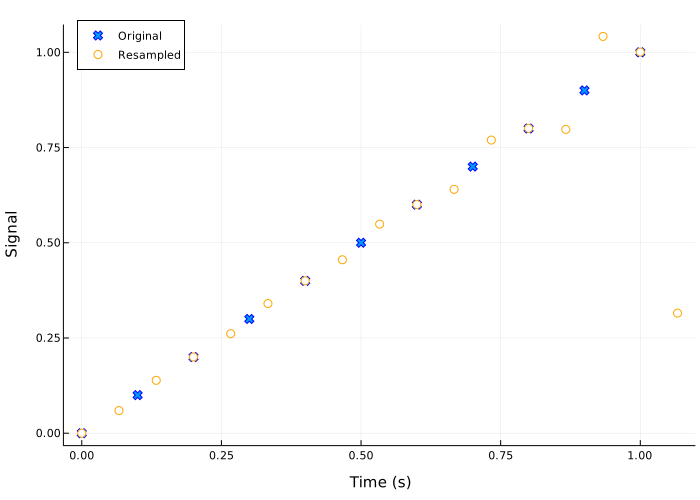
Re-sampling of a multi-channel signal
Details
We will generate a five-channel sinusoidal signal with 100 by counting down. Time increases in columns, and frequency increases in rows. Let’s plot the signal.
import EngeeDSP.Functions: resample

using Plots

p = 3
q = 2

tx = 0:p:300-p

x = [cos.(2π * tx ./ (freq * 100)) for freq in 1:5]
x = hcat(x...)

plot(tx, x,
     marker = :circle,
     markersize = 2,
     linestyle = :dot,
     seriestype = :path,
     title = "Original",
     ylims = (-1.5, 1.5),
     legend = false)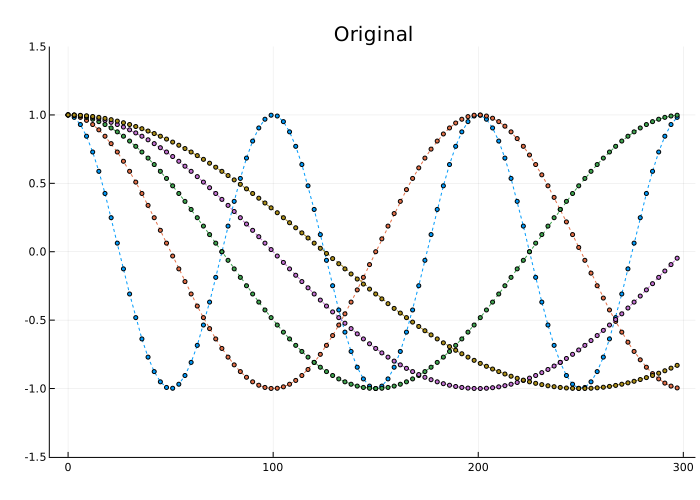
Increase the sampling frequency of the sine wave by 3/2 in the second dimension. Let’s put the re-sampled signal on the graph.
ty = 0:q:300-q
result = resample(x, p, q)
y = result.y

plot(ty, y,
     marker = :circle,
     markersize = 2,
     linestyle = :dot,
     seriestype = :path,
     title = "Upsampled",
     ylims = (-1.5, 1.5),
     legend = false)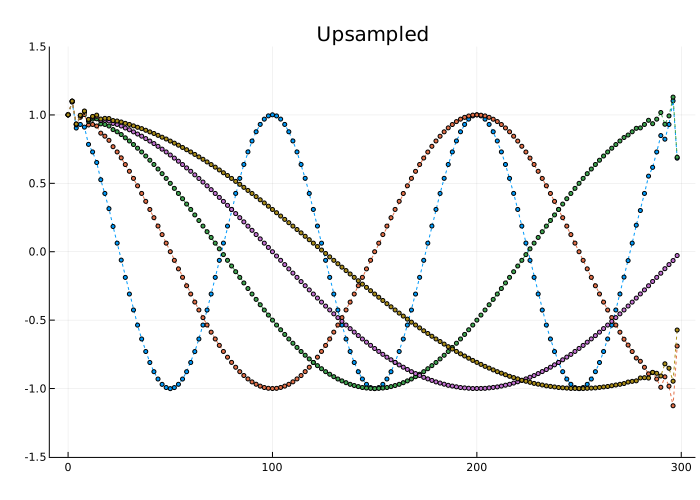
Let’s change the shape of the re-sampled signal so that time passes along the third dimension.
y = reshape(y, 1, size(y, 1), size(y, 2))
y = permutedims(y, [3, 1, 2])
size(y)
(5, 1, 150)Let’s lower the sampling frequency of the signal to the initial one and build a graph.
result_z = resample(y, q, p, Dimension=3)
z = result_z.y
z = dropdims(z, dims=2)

plot(tx, z',
     marker = :circle,
     markersize = 2,
     linestyle = :dot,
     seriestype = :path,
     title = "Downsampled",
     ylims = (-1.5, 1.5),
     legend = false)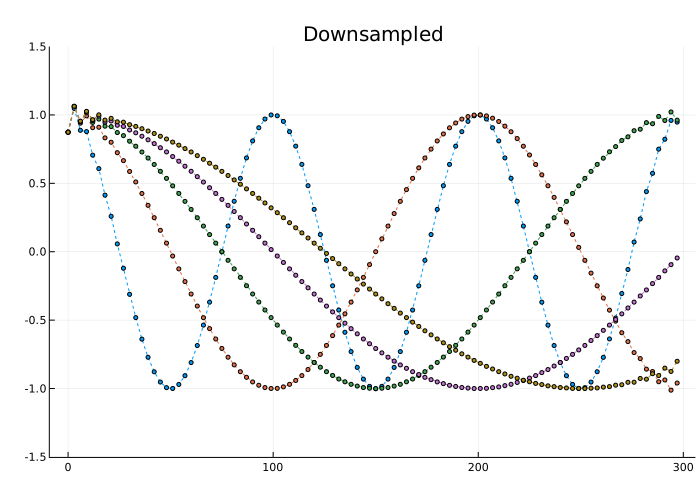
Additional Info
Low-pass smoothing filter
Details
To resample a signal with a rational coefficient p/q function resample calls the function upfirdn, which performs the following actions:
An ideal smoothing filter has a normalized cutoff frequency. rad/count and gain p. To approximate the smoothing filter, the function resample uses the Kaiser window method.
-
The filter order is
2 × n × max(p,q). Meaningnthe default value is10. -
The Kaiser window has a shape parameter
beta, which determines the trade-off between transition width and attenuation in the delay band. Meaningbetathe default value is5. -
The filter coefficients are normalized to account for the window gain.
As an example, we will design an anti-aliasing filter to resample the signal to the sampling frequency, in 3/2 twice the initial value:
p = 3
q = 2
maxpq = max(p, q)

fc = 1 / maxpq
n = 10
order = 2 * n * maxpq
beta = 5

b = fir1(order, fc, kaiser(order + 1, beta))
b = p * b / sum(b)