Training a fully connected multi-layered neural network on corrected data
In this example, we will consider data processing and training based on a neural network model. The sliding window method will be demonstrated to divide the training and test samples into training datasets, and model parameters will be determined to obtain the most accurate predicted values.
Launching the necessary libraries:
Pkg.add(["Statistics", "CSV", "Flux", "Optimisers"])
using Statistics
using CSV
using DataFrames
using Flux
using Plots
using Flux: train!
using Optimisers
Preparation of training and test samples:
Uploading data for model training:
df = DataFrame(CSV.File("$(@__DIR__)/data.csv"));
The data was saved after executing the example /start/examples/data_analysis/data_processing.ipynb.
Formation of a training data set:
The entire dataset was divided into a training and a test sample. The training sample was 0.8 of the total dataset, and the test sample was 0.2.
T = df[1:1460,3]; # definition of the training dataset, the entire dataset of 1825 rows
first(df, 5)
Dividing the vector T into batches of 100 observations in length:
batch_starts = 1:1:1360 # defining a range for a cycle

weather_batches = [] # defining an empty array to record the results of a loop
for start in batch_starts
    dop = T[start:start+99] # the batch is at the current time step
    weather_batches = vcat(weather_batches, dop) # writing a batch to an array
end
A batch is a small data set that can serve as a training set for building a forecasting model. Taken from the initial training set T using the sliding window method.
Sliding window method:
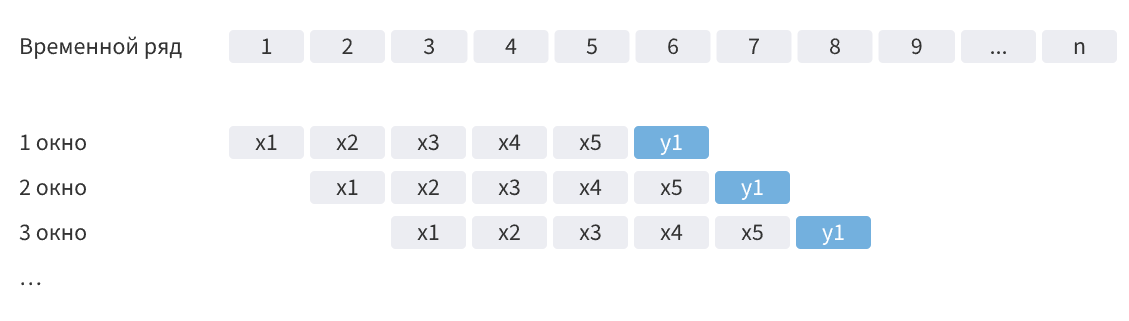
where x is the observation and y1 is the predicted value.
Converting the resulting set into a vector string:
weather_batches = weather_batches'
Changing the shape of the array to match the length of the batch specified above:
weather_batches = reshape(weather_batches, (100,:))
X = weather_batches # redistricting
Defining an array of target values:
Y = (T[101:1460]) # The countdown starts from 101, as the previous 100 observations are used as the initial data.
Y = Y'
Conversion to a format acceptable for processing by a neural network:
X = convert(Array{Float32}, X)
Y = convert(Array{Float32}, Y)
Creating a test dataset:
Dividing the test sample into batches of 100 observations in length:
X_test = df[1461:1820, 3] # defining a test dataset
batch_starts_test = 1:1:261  # defining a range for a cycle

test_batches = [] # defining an empty array to record the results of a loop
for start in batch_starts_test
    dop = X_test[start:start+99] # the batch is at the current time step
    test_batches = vcat(test_batches, dop) # writing a batch to an array
end
test_batches = reshape(test_batches, (100,:)) # changing the shape of the array to match the length of the batch specified above:

X_test = convert(Array{Float32}, test_batches) # conversion to a format acceptable for processing by a neural network
Building and training a neural network:
Defining the architecture of a neural network:
model = Flux.Chain(
    Dense(100 => 50, elu),
    Dense(50 => 25, elu),
    Dense(25 => 5, elu),
    Dense(5 => 1)
)
Defining learning parameters:
# Initializing the optimizer
learning_rate = 0.001f0
opt = Optimisers.Adam(learning_rate)
state = Optimisers.setup(opt, model)  # Creating the initial state

# Loss function
loss(model, x, y) = Flux.mse(model(x), y)
Model training:
loss_history = []
epochs = 200

for epoch in 1:epochs
    # Calculating gradients
    grads = gradient(model) do m
        loss(m, X, Y)
    end

    # Updating the model and status
    state, model = Optimisers.update(state, model, grads[1])

    # Calculation and preservation of losses
    current_loss = loss(model, X, Y)
    push!(loss_history, current_loss)

    # Loss output at each step
    if epoch == 1 || epoch % 10 == 0
        println("Epoch $epoch: Loss = $current_loss")
    end
end
Visualization of changes in the loss function:
plot((1:epochs), loss_history, title="Changing the loss function", xlabel="Era", ylabel="Loss function")
Getting forecast values:
y_hat_raw = model(X_test) # uploading a test sample to the model and getting a forecast
y_pred = y_hat_raw'
y_pred = y_pred[:,1]
y_pred = convert(Vector{Float64}, y_pred)
first(y_pred, 5)
Visualization of predicted values:
days = df[:,1] # formation of an array of days, starting from the first observation
first(days, 5)
Enabling a backend graphics display method:
plotlyjs()
Generating a data set from the initial dataset for comparison:
df_T = df[:, 3]# df[1471:1820, 3]
first(df_T, 5)
Plotting the temperature versus time dependence based on the initial and predicted data:
plot(days, df_T)# plot(days, T[11:end]) #T[11:end]
plot!(days[1560:1820], y_pred)
Since the original dataset has sections in which the missing values have been replaced by linear interpolation, it is difficult to evaluate the performance of a trained neural network model on a straight line.
To do this, real data was uploaded without any gaps.:
real_data = DataFrame(CSV.File("$(@__DIR__)/real_data.csv"));
Plotting the temperature versus time based on real and predicted data:
plot(real_data[1:261,2])
plot!(y_pred)
Let's check the relationship of the obtained values using the Pearson correlation, thus evaluating the accuracy of the obtained model.:
corr_T = cor(y_pred,real_data[1:261,2])
The Pearson correlation coefficient can take values from -1 to 1, where 0 means there is no relationship between the variables, and -1 and 1 mean a close relationship (inverse and direct relationship, respectively).
Conclusions:
In this example, data from temperature observations over the past five years were preprocessed, and the architecture of the neural network, the parameters of the optimizer, and the loss function were determined.
The model was trained and showed a fairly high, but not perfect convergence of the predicted values with the real data. To improve the quality of the forecast, the neural network can be modified by changing the architecture of the layers and increasing the training sample.