Julia: Language features
This article is a concise guide to the basics of the Julia language, based on the principle of "minimum theory — maximum practice." All the material is organized around the code: each section is illustrated with directly working examples, and the text explanations are kept to the necessary minimum. This approach allows you to quickly immerse yourself in the syntax, see typical constructions and immediately start experimenting without being distracted by long descriptions. Julia is famous for her expressiveness and speed, and it's best to get to know her through live code — this is exactly the opportunity provided by the proposed selection. Here you will find examples of working with variables, data types, collections, functions, multiple dispatching, and other key language features.
Variables and assignment
Assigning an integer
x = 100
Using a variable in an expression
x * 5
Reassigning a variable
x = 10 + 10
Julia is a dynamically typed language, a variable can change its type.
x = "Hello World!"
Assignment returns the value of the right-hand side
b=4
a = (b = 2 + 2) * 5
Assignment chains are also possible, and in the example below, all three variables are assigned 10
x = y = z = 10
Unicode is supported in variable names
x1 = 100
● = "Point"
δ = 0.001
Case dependence, myvar and myVar are two different variables.
myvar = 1
MyVar = 2
Forbidden names for variables:
- You can't start with a number: 1x = 100
- Language functions cannot be used as variables: baremodule, begin, break, catch, const, continue, do, else, elseif, end, export, false, finally, for, function, global, if, import, let, local, macro, module, quote, return, struct, true, try, using, while
Behavior with mutable types (arrays)
Important: assignment does NOT create a copy for mutable objects!
a = [1, 2, 3]
b refers to the SAME array as a
b = a
We mutate the array through a and output b, b also sees the change!
a[1] = 42
b
Reconnecting an array
a = [1, 2, 3]
b = a
a = 3.14159
b
a = [1, 2, 3]
b .= a
a = [1, 2, 30]
b
Data types and annotations
Automatic type detection, Float64 is the default type for floating point numbers
x = -2.0
typeof(x)
Int64 is the default type for integers.
x = 2
typeof(x)
x = -2
typeof(x)
Domain error without complex numbers
# sqrt(x) #ERROR
Explicit indication of the complex type. Adding 0im for the complex type
x = -2.0 + 0im
typeof(x)
sqrt(x)
An annotation operator of the type :: checking whether the statement "is an instance" of a given type or not.
(2 + 2)::Int
# (2 + 2)::AbstractFloat #ERROR
(2.0 + 2.0)::AbstractFloat
Type stability check
function fast_sum(arr::Vector{Int})
    s = 0
    for x in arr
        s += x
    end
    return s
end
@code_warntype fast_sum([1,2,3])   # should show Any::Any (or specific types)
# @code_native fast_sum([1,2,3]) # assembly code
Declaring a variable type
x = Complex(-2)
typeof(x)
sqrt(x)
Hierarchy of types:
- Int64 <: Integer <: Real <: Number <: Any
- Float64 <: AbstractFloat <: Real <: Number <: Any
Parametric types
Two-dimensional Int64 array
Array{Int64, 2}
Float64 vector (one-dimensional)
Array{Float64, 1}
Integers
Aliases of system types:
Int - Int64 integer
UInt - UInt64 unsigned integer
10
A leading zero does not make a number octal
0123456789
Automatic bit depth expansion for large numbers is supported.
typeof(10000000000000000000)
typeof(1000000000000000000000000000000000000000)
Unsigned integers (hexadecimal), the size is determined automatically by the number of digits.
x = 0x1              # UInt8 (1 byte)
x = 0x123            # UInt16 (2 bytes)
x = 0x1234567        # UInt32 (4 bytes)
x = 0x123456789abcdef # UInt64 (8 bytes)
x = 0x11112222333344445555666677778888  # UInt128 (16 bytes)
typeof(0xfffffffffffffffffffffffffffffffff)
Julia does NOT check overflow by default - cyclical behavior.
x = typemax(Int64)
x + 1 # overflow!
x + 1 == typemin(Int64)
x = typemax(UInt64)
x + 1
x + 1 == typemin(UInt64)
BigInt Overflow solution
10^19
BigInt(10)^19
Floating-point numbers.
1.0                  # Standard entry
1.                   # You can omit the zero after the dot.
0.5                  # A regular fraction
.5                   # You can omit the zero before the dot.
-1.23                # Negative
E-notation
1e10                 # 1.0e10 = 1.0 × 10^10
2.5e-4               # 0.00025
Float32 can be specified using the suffix f
x = 0.5f0
typeof(x)
2.5f-4
Float16 is implemented through an explicit type assignment
Float16(4.)
Bit representation.
0.0 == -0.0
bitstring(0.0)
bitstring(-0.0)
Arbitrary precision of BigFloat
BigFloat(2.0)^100 / 4
Special values
- -Inf (negative infinity)
- Inf (positive infinity)
typemin(Float64)
typemax(Float64)
Arithmetic with infinities
1 / 0                # Inf
-5 / 0               # -Inf
0 / 0                # NaN
1 / Inf              # 0.0
1 / -Inf             # -0.0
Inf - Inf            # NaN
0 * Inf              # NaN
NaN is not equal to himself
NaN == NaN           # false!
NaN != NaN           # true
NaN < NaN            # false
NaN > NaN            # false
For a correct comparison, it is used isequal
isequal(NaN, NaN) # true - NaN are considered equal
isequal([1 NaN], [1 NaN]) # true - comparing arrays
isequal(-0.0, 0.0) # false - distinguishes between signed zeros!
Machine epsilon
eps(Float64)
eps(1000.)
eps(0.0) # 5.0e-324 - minimum positive
Strings and symbols
Lines
s = "Hello!"
Interpolation
"Interpolation: $s"
"Expression: $(2 + 2)"
string (does not handle escaping)
"String without \n interpolation"
Multi-line lines
multiline = """
    Line
    with hyphenations
    """
Concatenation and repetition
"Hello" * " " * "World"
"Hi"^3
Characters (Char)
c = 'a'
typeof(c)
c+1
Symbols (Symbol)
sym = :my_symbol
typeof(sym)
They are often used as dictionary keys.
Dict(:key => "value")
Structures and abstract types
They are used to create custom types and organize hierarchies.
# Immutable structure
struct Point
    x::Float64
    y::Float64
end
# Mutable structure
mutable struct MPoint
    x::Float64
    y::Float64
end
# The abstract type
abstract type Shape end
struct Circle <: Shape
    radius::Float64
end
struct Rectangle <: Shape
    width::Float64
    height::Float64
end
# Constructors
Point(3.0, 4.0)            # automatic
Collections
Tuples are an immutable structure, faster than arrays.
t = (1, 2, 3)
t[1]
# t[1] = 5 #ERROR
Unpacking tuples
a, b, c = t
Dictionaries (Dict)
d = Dict("a" => 1, "b" => 2)
d["a"]
d["c"] = 3
haskey(d, "a")
keys(d), values(d)
Sets (Set) - removes duplicates
s = Set([1, 2, 2, 3])
1 ∈ s
push!(s, 4)
MISSING and NOTHING
nothing is an analog of null/None (the value is missing)
function f()
    return nothing
end
f() === nothing
missing — missing data (distributed in calculations)
1 + missing
# mean([1, missing, 3]) #ERROR
Check
ismissing(missing)
isnothing(nothing)
Basic operators
Arithmetic operators
1 + 10 - 5           # addition and subtraction
5 * 20 / 10          # multiplication and division
20 \ 10              # reverse division (10/20)
3^3                  # exponentiation
5.5 % -2             # the remainder of the division
Implicit multiplication (numerical factor), Julia allows you to write 2x instead of 2*x
x = 3
2x                   # implicit multiplication
2(x + 1)             # It also works with brackets.
2x^2                 # priority:  above implicit multiplication
2^2x
Logical operators
!true                # false - negation
!false               # true
true && true         # true - logical And (abbreviated)
true && false        # false
false && false       # false
true || true         # true - logical OR (abbreviated)
true || false        # true
false || false       # false
Bitwise operators
~100                 # -101 - bitwise NOTATION (inversion)
121 & 232            # 104 - bitwise and
121 | 232            # 249 - bitwise OR
121 ⊻ 232            # 145 - bit XOR (Unicode character!)
xor(121, 232)        # 145 - the same through the function
~UInt32(121)         # 0xffffff86 - type-preserving inversion
~UInt8(121)          # 0x86 is also a UInt8 result.
Update Operators (in-place)
x = 25
x += 25              # x = x + 25
x *= 2               # x = x * 2
x /= 4               # x = x / 4
x ^= 2               # x = x^2
Update operators can change the data type.
x = 0x01
typeof(x)
x *= 2
typeof(x)
Vectorization
Creating a matrix
x = [1 2 3 4 5; 6 7 8 9 10]
Operator . applies the operation element-by-element, as well as this operator creates a new matrix.
x.^2
x .+ 1               # Each element is + 1
x .- 1               # Each element is 1
x .* 2               # Each element * 2
x ./ 2               # Each element / 2
Point update operators
x = [1 2 3 4 5; 6 7 8 9 10]
Mutates an EXISTING array x by overwriting it.
x .+= 1
Creating a NEW array, x does not change
y = x .+ 1
Comparison operators
2 == 2.0             # true - different types, but equal values
3 == 5               # false
3 != 5               # true
3 < 5                # true
5 > 3                # true
3 <= 3               # true
5 >= 5               # true
Features for Float:
- A positive zero is equal to, but not greater than, a negative one
- Inf is equal to itself and most of all (except NaN)
- -Inf is equal to itself and least of all (except NaN)
- NaN is not comparable to anything
Julia also allows you to write mathematical comparison chains.
10 < 15 <= 20 < 30 == 30 > 20 >= 10 == 10 < 30 != 5
Equivalent to:
(10 < 15) && (15 <= 20) && (20 < 30) && (30 == 30) && (30 > 20) && (20 >= 10) && (10 == 10) && (10 < 30) && (30 != 5)
Point comparisons
x = [1 2 3 4 5; 6 7 8 9 10]
x .<= 3
1 .< x .< 7
Indexation
A = [1 2 3; 4 5 6]          # 2×3 Matrix{Int64}
A[1, 2]                     # 2 (first row, second column)
A[1, :]                     # the first line (1×3)
A[:, 2]                     # second column (2×1)
A[1:2, 1]                   # the first column is like a vector
A[1:2, 1:2]                 # the 2×2 submatrix
Indexing from the end
A[1, end]                   # the last element of the first line
A[end, 1]                   # the last element of the first column
Logical indexing
A[A .> 2] # [4, 5, 6, 3] ( aligns to a vector)
Operator priority
Hierarchy (from highest to lowest):
- Numerical coefficients: 2x (higher than all binary coefficients except ^)
- Exponentiation: ^
- Unary numbers: +x, -x, √x, ...
- Multiplication/division: *, /, \, ÷, %
- Addition/subtraction: +, -
- The Shift: <<, >>, >>>
- Bitwise And: &
- Bitwise XOR: ⊻
- Bitwise OR: |
- Comparisons: ==, !=, <, <=, >, >=
- Type statement: <:
- Logical And: &&
- Logical OR: ||
- The pipe operator: |>
- Assignment: =, +=, -=, and so on.
First x^2=9, then 2*9
x = 3
2x^2
First 2x=6, then 2^6!
2^2x
Control structures
Conditional operator
x = 10
msg = if x > 5
    "More than five"
else
    "Few"
end
The ternary operator
x > 5 ? "Yes" : "No"
Short-circuit evaluation (replacing if)
x > 0 && println("Positive")   # Executed if true
x < 0 || println("Not negative") # Executed if the first one is false
Cycles:
- With a precondition
- With a postcondition
for i in 1:3
    println(i)
end
while x > 0
    x -= 1
end
Iterating through collections
for (i, val) in enumerate(["a", "b", "c"])
    println("$i: $val")
end
Generators and comprehensions
Array Comprehension (creating an array)
squares = [x^2 for x in 1:5]
With the condition
evens = [x for x in 1:10 if x % 2 == 0]
Generator (lazy computation, saves memory), does not create an array in memory, but iterates one element at a time.
gen = (x^2 for x in 1:1000000)
sum(gen)
Functions and multiple dispatching
A short note (one expression)
f(x) = x^2 + 1
f(5)
f(1)
Classic entry (code block)
function g(x, y)
    return x + y
end
Default arguments, key arguments
function greet(name; greeting="Hello", punctuation="!")
    return "$greeting, $name$punctuation"
end
greet("Engee", greeting="Hi")
Anonymous functions
h = x -> x^2
h(4)
Often used in map, filter:
map(x -> x^2, [1, 2, 3])
Multiple Dispatch - the same function behaves differently depending on the data types.
say_hello(name::String) = "Hello, man $name"
say_hello(name::Symbol) = "Hello, robot :$name"

say_hello("Anna")
say_hello(:R2D2)
Launching programs
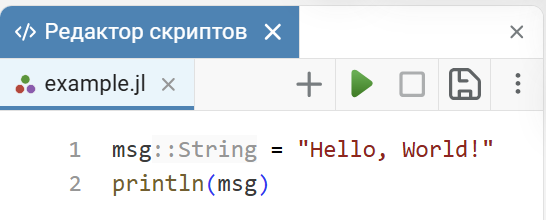
Will execute the file
include("example.jl")
REPL modes
The main mode is julia
2+2
Reference mode (?)
?sqrt
Packet Mode (])
]add DataFrames
]status
Shell mode (;)
;ls
Macros
Macros allow you to generate code and extend syntax; in Julia, they are often used for debugging, time measurement, and optimization.
@show 2 + 2 # outputs the expression and the result
@time sleep(0.1) # measures the execution time
@assert 1 == 1 # checking the condition
macro hello(expr)
    quote
        println("Hi! It's going to happen now:")
        println("  ", $(string(expr)))
        $(esc(expr))
    end
end
@hello 2 + 3 * 5
Modules and namespaces
module MyModule
    export hello, PI
    const PI = 3.14
    hello() = println("Hello from module")
    # not exported
    internal() = println("internal")
end
using .MyModule   # or import MyModule
hello()           # available
# internal() # error, not exported
Error handling
try
    sqrt(-1)
catch e
    println("Caught an error: $e")
finally
    println("This always runs")
end
# Error generation
if x < 0
    error("x must be non-negative")
end
# Custom Exceptions
struct MyError <: Exception
    msg::String
end
# throw(MyError("something went wrong")) #ERROR
Documentation
"""
    square(x)

Returns the square of the number `x`.

# Arguments
- `x': a number (any numeric type)

# Example
```julia
julia> square(5)
25

"""
square(x) = x^2
Conclusion
You went through a concentrated presentation of the basics of Julia, where the focus was not on lengthy explanations, but on visual code snippets. This style allows you not only to read about the language's capabilities, but to immediately see them in action, memorize the syntax and understand the logic of the work. Now you have a compact cheat sheet that you can return to when writing your own programs.