Advanced file management
Let's imagine a situation where we have several datasets that are spread out in folders, and there may also be garbage in the folders (pictures with funny raccoons, text documents). I would like to be able to find the necessary files for later work with them. The problem is that Julia implements only basic work with files - <https://engee.com/helpcenter/stable/ru-en/julia/base/file.html >, which is clearly insufficient for such a task.
In this post, I will make a smarter tool for working with files using a data structure known as a tree.
Creating a tree
Let's make an observation that the structure of directories and files strikingly resembles a tree. Trees in programming are a data structure that describes a special kind of graphs. In such graphs, all nodes except the "root" have one parent.:
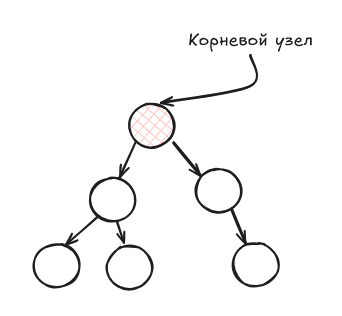
Optimal algorithms for graph traversal and graph modification are known for such graphs, and they are often already implemented. My idea is as follows: to represent the contents of a folder and its subfolders as a tree, each node of which will be a file or folder. Each node will store separately the path, name, extension, date and time of creation and modification, as well as the folder attribute. And in order to organize a tree structure, I will store the "descendants" of this node.:
using Dates

struct FileTreeNode
    path::String
    name::String
    ext::String
    isdir::Bool
    created::DateTime
    modified::DateTime
    children::Vector{FileTreeNode}
end
This way, I will be able to traverse the tree of files and folders much easier and faster than if I were using the Julia standard library.
To get the date and time when the file was created and modified, as well as to get the file name, path, and extension, I will write additional functions:
function get_metadata(path::String)
    st = stat(path)
    created = unix2datetime(st.ctime)
    modified = unix2datetime(st.mtime)
    return created, modified
end

function split_name_ext(path::String)
    name = basename(path)
    base, ext = splitext(name)
    return base, ext
end
Growing a tree
The necessary data structures and auxiliary functions have been created, and you can proceed to the implementation of the directory structure tree.
Let's create a function that will receive the creation and modification time of a file or folder, the name and extensions for a certain path. Next, using readdir we will get a list of files and folders inside the current folder.
We will repeat the same operation for each of the detected folders. That is, our function will call itself. This technique is called recursion.
Let's add one more limitation to our function: the search depth. This restriction will limit the nesting level of folders to crawl and speed up tree building.
As a result of this function, we get a tree node.
function build_tree(path::String; maxdepth=typemax(Int), depth=0)
    is_dir = isdir(path)

    name, ext = split_name_ext(path)
    created, modified = get_metadata(path)
    if is_dir && depth < maxdepth
        entries = readdir(path; join=true)
        children = [
            build_tree(e; maxdepth, depth=depth+1)
            for e in sort(entries)
        ]
    else
        children = FileTreeNode[]
    end

    return FileTreeNode(path, name, ext, is_dir, created, modified, children)
end
Next, we will simplify the task of visualizing the tree using the AbstractTrees.jl library. We will define two new functions for our tree:
- children() - to get the descendants of a tree node
- printnode() - to display the node on the screen
import Pkg
Pkg.add("AbstractTrees")
import AbstractTrees: children, printnode

children(node::FileTreeNode) = node.children

function printnode(io::IO, node::FileTreeNode)

    if node.isdir
        print(io, "📁 ", node.name)
    else
        print(io, "📄 ", node.name, node.ext)
    end
end
Ready! Let's check that the tree is going to:
tree = build_tree(@__DIR__,maxdepth=1)
using AbstractTrees: print_tree
print_tree(tree)
Putting the tree into practice
Let's glue together 3 datasets located in the DataDepot folder.
First, let's see what's in our folder.:
tree = build_tree(joinpath(@__DIR__,"DataDepot"),maxdepth=2)
print_tree(tree)
Then, we will get all *.csv files by bypassing the tree created above.:
function find_files_by_ext(node::FileTreeNode, ext::String,acc=String[])
    if !startswith(ext,".")
        ext = "."*ext
    end
    if isequal(node.ext,ext)
        push!(acc, node.path)
        println("$(acc)")
    end
    for c in node.children
        accchild = find_files_by_ext(c, ext)
        if ~isempty(accchild)
            append!(acc,accchild)

        end
    end
    return acc
end

csv_files = find_files_by_ext(tree,"csv")
Now let's download them and glue them together.:
using CSV
df_v = Vector{DataFrame}()
for f in csv_files
    df = CSV.read(joinpath(pwd(),f),DataFrame)
    println("Read $(nrow(df)) lines from the $f file")
    push!(df_v,df)
end
df_v = reduce(vcat,df_v)
Conclusions
In this publication, we looked at an example of using classical data structures from programming to solve practical engineering problems. In subsequent publications, other programming techniques that facilitate the tasks of technical calculations will be considered.