Calculation of flow distribution in three-phase electric networks using blocks of the physical modeling library Engee
Engee allows the calculation of flow distribution (load flow/power flow) for an alternating current (AC) electrical power transmission system modeled using a three-phase electrical domain Engee. The flow distribution calculation makes it possible to determine voltage modules, voltage phase angles, active power and reactive power of an electrical system in steady state.
For a given steady-state operating point, the flow distribution data shows:
-
Voltage modulus and phase angle of voltage on each bus;
-
Active and reactive generation power for each source feeding the network;
-
The active and reactive power supplied to each load that creates consumption in the network.
This data can be used to determine optimal operating modes or to evaluate the system’s response to hypothetical situations. For example, if the active and reactive capacities in each transmission line are known, it can be determined whether the remaining lines are able to withstand the additional load that occurs when one or more lines are disconnected.
This data can also be used to calculate transmission line losses or system losses and to analyze the overall voltage profile of the network. The study of these characteristics helps determine whether the system requires reactive power compensation to eliminate low voltage levels.
Requirements for the flow distribution calculation model
To determine a steady-state flow distribution solution for a three-phase network, the model must be:
-
It is set to start from the sinusoidal steady state. For more information, see the description of the block. Solver Configuration.
-
All sinusoidal sources must operate at the same frequency.
-
Linear. The blocks must be described by linear systems of equations and have linear characteristics. Thus, models of synchronous and asynchronous machines, transformers with a nonlinear branch of magnetization, and semiconductor elements are not supported.
-
Load-balanced. The level of approximation of the flow distribution calculation depends on how balanced the system is and on the level of harmonics present.
Key blocks for calculating flow distribution
Tires
In an electric power transmission system, a bus is a vertical line connecting elements of the power system, such as generators, loads, and transformers. The tires are represented by a block Busbar in the section Connectors & References.
Three-phase voltage sources
Represent voltage sources using the block Load Flow Source from the library Sources. Block Load Flow Source specifies either an idealized voltage source or a current-dependent voltage source. The source can include a series resistance (impedance), or it can act as a source for a swing, PV or PQ type bus.
The priority of model accuracy is the use of machine blocks
To ensure the accuracy of the model, rather than the speed of the simulation, represent voltage sources using blocks. synchronous machines. For modeling synchronous machines, the library Electromechanical → Synchronous provides blocks Synchronous Machine Model 2.1, Synchronous Machine Round Rotor, Synchronous Machine Salient Pole and Simplified Synchronous Machine.
Performing a flow distribution calculation
To analyze the flow distribution data for a three-phase transmission system model in Engee compatible with starting from steady- state sinusoidal mode:
-
Parameterize the voltage sources.
At the beginning of the flow distribution calculation, the variables of the equations corresponding to losses in transmission lines are unknown. While unknown variables are being calculated, the tires balance losses by giving or absorbing active and reactive power. For each node with a voltage source Load Flow Source there are four variables:
-
— active power;
-
— reactive power;
-
— tension;
-
— phase angle.
Two variables are known, and two are unknown. Which variables are known and which are unknown depends on the block configuration. Load Flow Source. You can use more than one type of nodes in one model. The following options are available:
-
Swing bus — balancing (basic/swing/slack/reference) node. The voltage is set in the node (typical value
1O.E.), voltage angle accepted as equal0°, and the values of the active and reactive The capacities are unknown and are calculated during the steady state calculation. -
PV bus — the generator unit. The voltage module is set in the node and the value of the generated active power , and the voltage angle and reactive power They are unknown and are calculated during the steady state calculation.
-
PQ bus — load node. The node is set to be active and reactive power, and the voltage module and the voltage angle They are unknown and are calculated during the steady state calculation.
If your model contains blocks of synchronous machines, specify the bus type and initial values for each block using a group of parameters. Initial Conditions. The available target parameter values depend on whether the block is configured for Swing bus, PV bus or PQ bus. In the parameter group Initial Conditions:
-
Set for the parameter Initialization option meaning
Set targets for load flow variables. -
Select the bus for the parameter Source type.
-
Specify the values for the corresponding bus parameter.
-
-
Configure each block Busbar:
-
Set for the parameter Number of connections meaning
2,3or4. -
In blocks Busbar set the voltage and frequency so that they match the preset values of the connected units.
-
To view the flow distribution data using the block Scope, open access to additional measuring ports on the unit Busbar:
-
To open ports V and δ, install Measurement ports in the value
Yes; -
To open ports P and Q, install Measurement ports in the value
Yes.Connect the blocks Busbar.
-
-
-
Configure the block Solver Configuration. Enable the option Start simulation from steady state.
-
Run the simulation.
After the simulation, the results of the flow distribution calculation can be viewed:
-
In the signal recording data in Engee, which the model outputs to the workspace Engee;
-
In the table Physical variables
 displayed by clicking the Open list of physical variables button located in Settings → Debugging → Recording signals.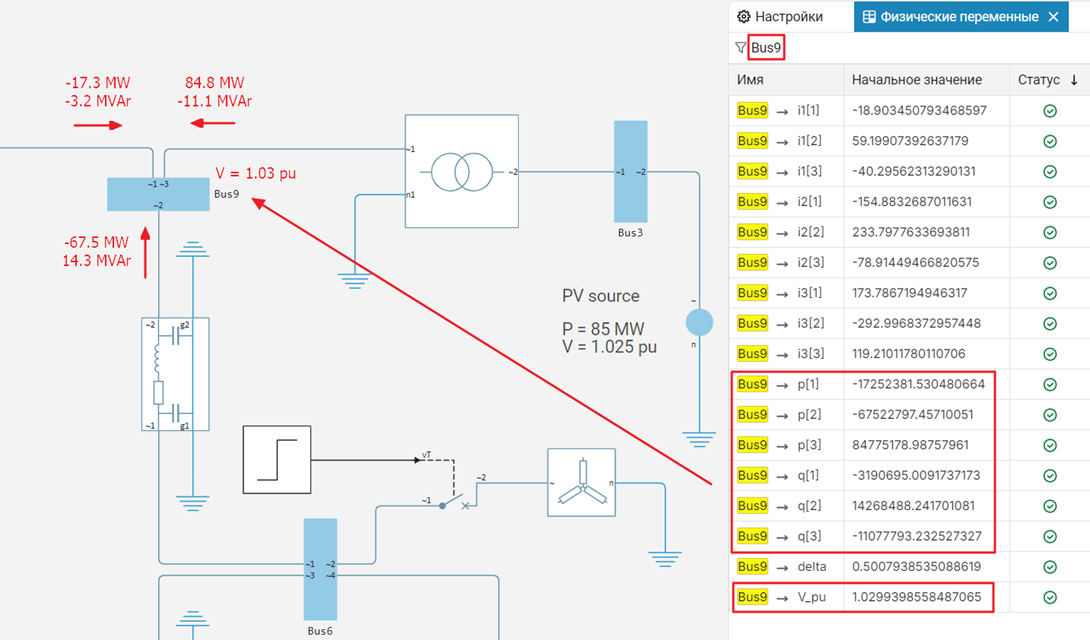
-
Fixing the problems of flow distribution calculation and initialization
If problems arise when calculating the flow distribution, apply the following measures. Step-by-step (incremental) testing of the flow distribution model helps to avoid setting non-physical calculation requirements.
Internal resistance Load Flow Source
Adding the internal resistance of the source for the block Load Flow Source when set in the parameter Source type meaning Swing bus, PV bus or PQ bus it may interfere with the convergence of initialization. To eliminate convergence problems, use one of the methods:
-
Ignore the internal resistance of the source.
-
Simulate the internal resistance externally relative to the block Load Flow Source.
Transient process in the excitation circuit or initial acceleration of the rotor
When initializing the block of the synchronous flow analysis machine, the block calculates all the flow variables transformed by the Park and the mechanical variables for the steady state. However, incorrect initialization of the automatic voltage regulator (ARV) or regulator can lead to a transient process in the excitation circuit or initial acceleration of the rotor. To solve these problems:
-
Determine the initial values of the torque and excitation voltage.
-
Perform a flow distribution analysis using the approximate values of the ARP and regulator parameters, as well as their settings.
-
Save the following flow analysis results displayed in the next block Busbar:
-
Voltage value;
-
Phase angle;
-
Generated active power;
-
Generated reactive power.
-
-
For a block of synchronous machines in the parameter group Initial Conditions set for the parameter Initialization option meaning
Set real power, reactive power, terminal voltage, and terminal phase. -
Set the following parameters using the values from the flow distribution calculation results:
-
Terminal voltage magnitude;
-
Terminal voltage angle;
-
Active power generated;
-
Reactive power generated.
-
-
Output the necessary initial conditions for the ARN and the controller to the workspace Engee. Double-click the machine block and in the tab Utilities Click the button Display Associated Initial Conditions. The relevant data is the voltage of the excitation circuit and the mechanical moment .
-
-
Set the initial conditions for the ARN and the regulator using the calculated values of the initial conditions.