Getting Started with RHYTHM SDR USRP
This article discusses a practical example of integrating the RHYTHM SDR USRP with the Engee development environment, via Engee.Integration, which is a software interface for managing the high-performance software and hardware platform RHYTHM SDR USRP. This platform is based on a combination of the Xilinx Zynq UltraScale+ SNC and the ADRV9009 RF transceiver. It supports operation in a wide range of radio frequencies (from 75 MHz to 6 GHz) with an instantaneous bandwidth of up to 450 MHz, making it an ideal tool for developing and testing modern wireless systems.
The article consistently covers the key aspects of the work:
- Set up a network connection with the RHYTHM SDR USRP.
- The mechanism of network interaction through the library [Engee.Integration](https://engee.com/helpcenter/stable/en/engee-hardware/engee-integrations.html
- Comprehensive health testing of the main functions.
All interaction with the device takes place through a network interface. The architecture of connection and data exchange between key components is the Engee web environment, the Engee utility.Integration on the PC and the SDR USRP itself is shown in the diagram below. As can be seen from the diagram, in this case Targets.RITM_SDR_API It is a software "layer" that allows TCP/IP communication with the SDR USRP system, which, in turn, is connected to a computer with the Engee application pre-installed.Integration.

Connection Setup
Interaction with the RHYTHM SDR USRP is implemented through the Engee library.Integration, which provides functions for working with network connections. There are two options available for users to launch Engee.Integration. The article discusses its application in Windows OS.:
- Graphical interface – launch the application through an executable file
engee-device-manager.exe.
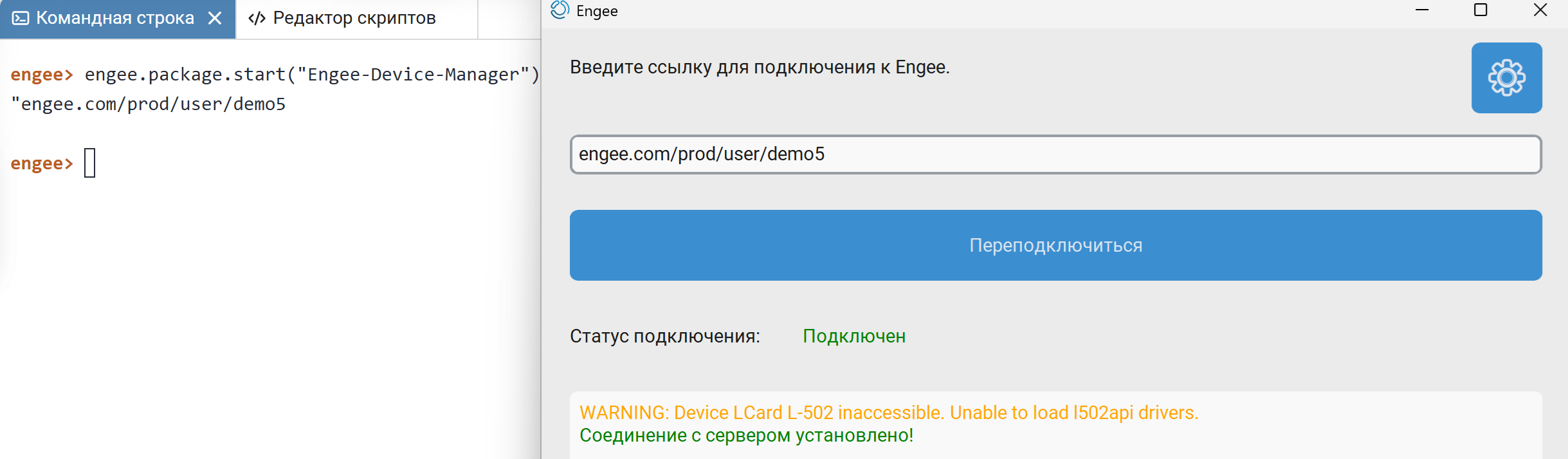
2. Command line – launch from the terminal with the flag -d to get detailed information about the connection: ./engee-device-manager.exe -d.
When using the command line, you must first open a terminal in the program folder or navigate to it. Flag mode -d provides advanced logging, which is useful for debugging a connection. To run, use a command-line shell of a UNIX-like environment, such as Git Bash.

To successfully connect the client to the RHYTHM SDR USRP, you must first set up a physical connection between the PC and the device. This is done in several steps:
- Physical connection: Use an Ethernet cable to connect the PC's network port to the PS ETH port on the debug card.
.png)
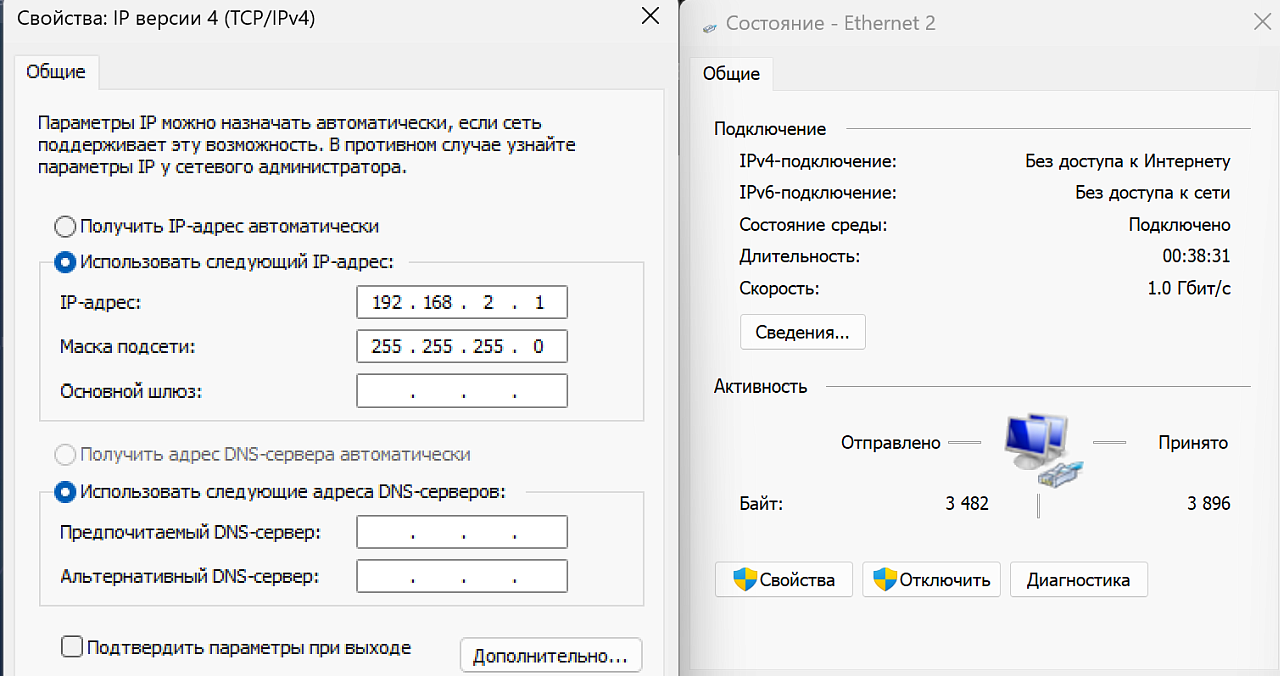
- Network setup on PC: Manually configure the network interface of the PC to which the card is connected by specifying the following parameters:
- IP address: 192.168.2.1;
- subnet mask: 255.255.255.0;
- primary gateway: not required (can be left blank).
- RHYTHM SDR USRP address: By default, the SDR server on RHYTHM SDR USRP waits for connections by IP address
192.168.2.70and the port12345. These values are set as default constants in the client.
Analysis of the main library functions for interaction with the RHYTHM SDR USRP
This test is aimed at demonstrating the operation of the library for RHYTHM SDR USRP support and uses the following set of functions: rf_switch_set_tx_fddtdd_sw1/2, is_ORX_DMA_transfer_end, receive_file_ORX_to_RAM, set_frequency, set_transceiver, set_tx_attenuation, set_ip_core, manual_calibrate_orx, agc_set_mode, get_temperatures, stop_transmission, disconnect.
engee.package.install("Engee-Device-Manager")
engee.package.start("Engee-Device-Manager")
using Main.EngeeDeviceManager.Targets.RITM_SDR_API
import Main.EngeeDeviceManager.Targets.RITM_SDR_API
Initialization of the connection to the SDR server at 192.168.2.70, after which a request for the server software version is executed.
RITM_SDR_API.@log_on
client = RITM_SDR_API.RITMClient("192.168.2.70")
!RITM_SDR_API.connect(client) && (RITM_SDR_API.@logmsg "Connection error"; return);
RITM_SDR_API.@logmsg "Server version: $(RITM_SDR_API.get_version(client))";
RF switching testing: cyclic control of FDD(frequency separation of reception and transmission)/TDD(time separation of reception and transmission) switches, these are SW1 and SW2, respectively.
RITM_SDR_API.rf_switch_set_tx_fddtdd_sw1(client, true)
RITM_SDR_API.rf_switch_set_tx_fddtdd_sw2(client, true)
RITM_SDR_API.rf_switch_set_tx_fddtdd_sw1(client, false)
RITM_SDR_API.rf_switch_set_tx_fddtdd_sw2(client, false)
Checking feedback channels (ORX): monitoring the status of the direct memory access system for the reverse channel (DMA ORX), receiving data in RAM (SDR USRP
result = RITM_SDR_API.is_ORX_DMA_transfer_end(client)
RITM_SDR_API.receive_file_ORX_to_RAM(client, 1, 100)
Configuration of the main parameters: setting the frequency of 2400 MHz, selecting the TX1-transmitter or RX1-receiver path, setting the attenuation of the transmitter.
RITM_SDR_API.set_frequency(client, 2400.0)
RITM_SDR_API.set_transceiver(client, 1, 1)
RITM_SDR_API.set_tx_attenuation(client, "TX1", 5.0)
Working with the IP core: writing the test value to the register.
RITM_SDR_API.set_ip_core(client, "0x80080114", "0x1")
Calibrating ORX1 and configuring AGC
RITM_SDR_API.manual_calibrate_orx(client, "ORX1")
RITM_SDR_API.agc_set_mode(client, 0)
Temperature monitoring:
- RPU (Real-Time Processing Unit) - Temperature sensor on the R5 real-time processor
- TRX (Transmitter-receiver) - temperature sensor on the transceiver
- PL (Programmable Logic) - temperature sensor on FPGA
temps = RITM_SDR_API.get_temperatures(client)
for (dev, temp) in temps
    println("$dev: $(temp)°C")
end
Stop the transmission, close the connection.
RITM_SDR_API.stop_transmission(client)
RITM_SDR_API.disconnect(client);
RITM_SDR_API.close_log();
Conclusion
This article provides an example of integrating the RHYTHM SDR USRP with the Engee development environment. During the work, all key steps were consistently considered: from physically connecting the device to a PC and configuring the network interface to configuring the connection via Engee.Integration.
The end result was the successful implementation of all basic functions, which in practice confirmed the correctness of the connection, the stability of network interaction and the readiness of the client library for full-fledged management of the RHYTHM SDR USRP hardware platform. In particular, the operation of functions such as: rf_switch_set_tx_fddtdd_sw1/2, is_ORX_DMA_transfer_end, receive_file_ORX_to_RAM, set_frequency, set_transceiver, set_tx_attenuation, set_ip_core, manual_calibrate_orx, agc_set_mode, get_temperatures, stop_transmission, disconnect.
Thus, the presented material serves as a ready-made step-by-step guide that allows the engineer to quickly deploy the development environment, establish a stable connection to the device and start working with it.