Creating and connecting a user device in Engee
Introduction
This example discusses creating your own custom device support package for working in Engee via using Engee.Integration.
This approach allows you to extend the standard features of the environment and connect custom logic written in Python.
As a result of following the instructions, a user device will be prepared that:
- connects to Engee through the extension mechanism;
- provides its own methods;
- can be called from scripts and used in the model;
- it is used in the Engee scheme as a custom functional block.
This approach is suitable for tasks where it is necessary:
- implement non-standard device logic;
- enable external computing;
- add methods for reading, writing, and processing data;
- organize your own interface between Python and Engee.
What is a user device?
Custom Support Package устройств in Engee is an extensible object that is described as a Python class and is connected via Engee.Интеграции.
Such a class must be compatible with the infrastructure of the Engee device manager and inherit from the base class.:
BaseDevice
Это дает возможность:
- регистрировать устройство в Engee;
- автоматически обнаруживать его методы;
- вызывать пользовательские функции из среды;
- использовать устройство как источник логики в модели.
Общая структура пакета поддержки
Пакет поддержки состоит из нескольких уровней:
-
Пользовательское устройство
Описывает конкретную логику устройства и его методы. -
Python-модуль на компьютере пользователя
Содержит реализацию класса устройства и его функций. -
Интеграционный слой Engee
Обеспечивает подключение Python-модуля и взаимодействие между Engee и пользовательским кодом.
С практической точки зрения это означает следующее:
- пользователь создает папку устройства;
- внутри размещает Python-файл с реализацией класса;
- затем загружает расширение в Engee;
- после этого может создавать экземпляры устройства и вызывать его методы.
Device class requirements
The user device must be implemented as a class inherited from BaseDevice.
Usually, such a class defines:
-
constructor:
__init__() -
деструктор:
__del__() -
один или несколько пользовательских методов:
custom_method_1()
custom_method_2()
...
custom_method_N()
Именно эти методы затем становятся доступны для вызова из Engee.
Подготовка и структура каталогов
1. Создание каталога расширения
Для начала необходимо подготовить папку расширения, внутри которой будут размещаться пользовательские устройства.
Самый минимальный пример структуры каталогов:
D:\dev_devices\extension\
└── devices\
    └── tofile\
        └── tofile.py
Где:
extension— корневая папка пакета поддержки;devices— каталог пользовательских устройств;tofile— папка конкретного устройства;tofile.py— Python-файл с реализацией класса устройства.
Названия каталогов можно выбирать свои, но их лучше делать короткими и понятными.
Создание Python-класса устройства
2. Базовая реализация пользовательского устройства
Внутри файла tofile.py необходимо создать класс, наследуемый от BaseDevice.
Пример базовой заготовки:
from devices.base_device import BaseDevice

class Tofile(BaseDevice):
    def __init__(self) -> None:
        pass

    def __del__(self) -> None:
        pass
This minimal structure already allows Engee to detect a user class as a device.
3. Adding custom methods
After creating the class, you need to define the methods that should be called from Engee.
You can implement custom functions, for example:
- getting the result of a utility function;
- calculation of the expression;
- Getting the host's time;
- writing the value to a file.
Below is a typical version of a class with several methods.
from devices.base_device import BaseDevice
import time

class Tofile(BaseDevice):
    def __init__(self) -> None:
        pass

    def __del__(self) -> None:
        pass

    def solve_equation(self, x: float, y: float, z: float) -> float:
        return x * y - z

    def get_host_time(self) -> str:
        host_time = time.localtime()
        return str(host_time)
4. Реализация метода записи числа в файл
Одной из практичных функций пользовательского устройства для моделирования является запись данных в файл.
Для этого можно добавить метод следующего вида:
from devices.base_device import BaseDevice

class Tofile(BaseDevice):
    def __init__(self) -> None:
        pass

    def __del__(self) -> None:
        pass

    def write_number(self, file_path:str, number:float) -> str:
        try:
            with open(file_path, 'a', encoding='utf-8') as f:
                f.write(f"{number}\n")
            return "OK"
        except Exception as e:
            return  f"{e}"
Что делает этот метод
Метод write_number(...):
- принимает путь к файлу;
- принимает число;
- открывает файл в режиме добавления;
- записывает значение в новую строку;
- возвращает строковый результат выполнения.
Это удобный шаблон для простого обмена данными между моделью Engee и локальной файловой системой.
Connecting the support package in Engee
5. Creating a connection script
After preparing the Python module, you need to connect the extension to Engee.
To do this, the service namespaces are imported and the extension is loaded.
using Main.EngeeDeviceManager.Devices.UTILS
using Main.EngeeDeviceManager.UTILS_API
module_path = "D:\\dev_devices\\extension";
utils = UTILS.Utils()
UTILS_API.loadExtension(utils, module_path)
What does this code do?
module_path = "D:\\dev_devices\\extension";
Задает путь к корневой папке пакета поддержки.
utils = UTILS.Utils()
Создает вспомогательный объект, необходимый для загрузки расширения.
UTILS_API.loadExtension(utils, module_path)
Подключает пользовательский пакет поддержки к Engee.
После успешного выполнения этой команды пользовательское устройство становится доступным для использования в среде.
6. Перезапуск менеджера устройств Engee
После загрузки расширения рекомендуется перезапустить или повторно инициализировать соответствующий компонент Engee, чтобы среда заново обнаружила новые устройства.
Для этого используется команда:
engee.package.start("Engee-Device-Manager")
Проверка успешного подключения
7. Открытие окна состояния подключения
После загрузки расширения необходимо проверить, что Engee успешно обнаружил пользовательское устройство.
Признаками успешного подключения являются сообщения следующего типа:
- соединение с сервером установлено;
- класс найден;
- класс наследуется от
BaseDevice; - методы класса обнаружены;
- типы аргументов и возвращаемых значений корректно распознаны;
- расширение успешно загружено.
What is important to check in the logs
After downloading the extension, you need to make sure that Engee has correctly recognized:
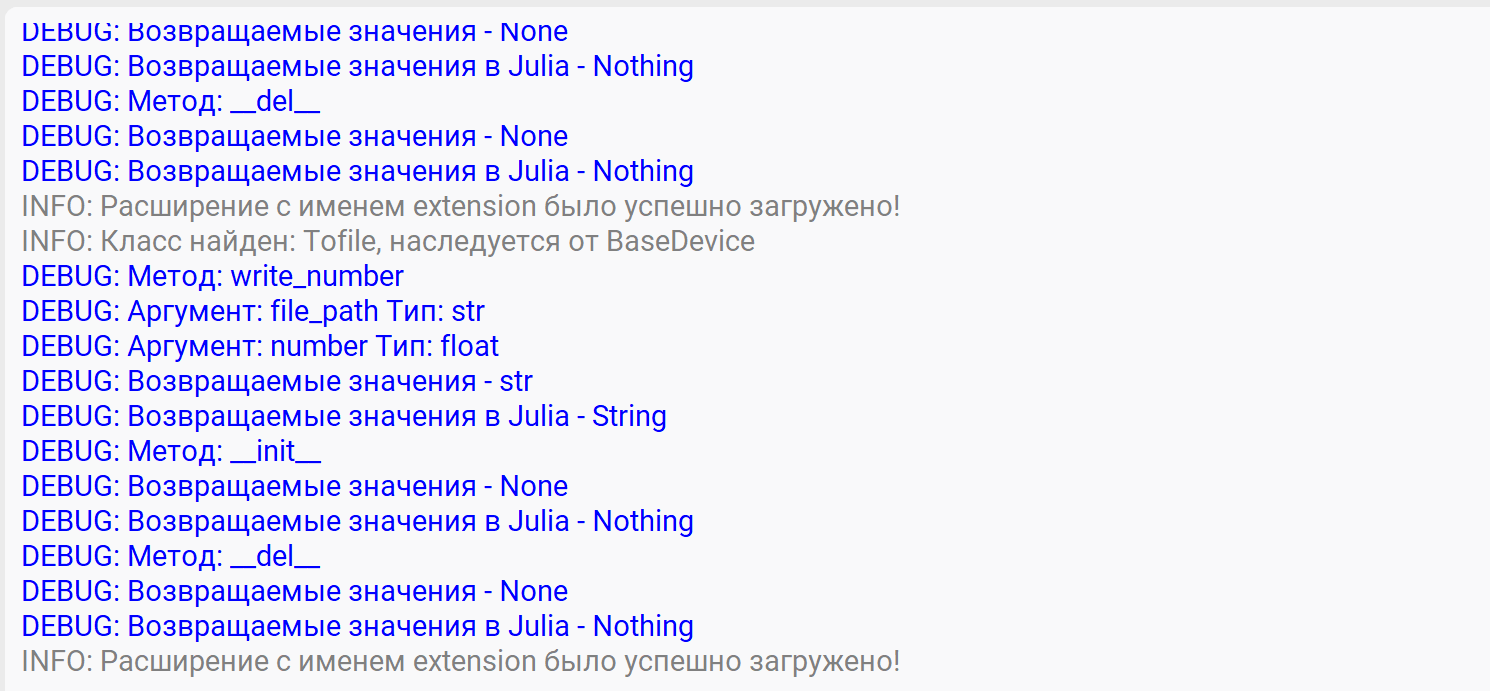
Device class, for example:
Class found: Tofile, inherited from BaseDevice
Методы устройства, например:
Method: write_number
Method: __init__
Method: __del__
Аргументы метода, например:
Argument: file_path Type: str
Argument: number Type: float
Возвращаемый тип, например:
Return values: str
Если эти данные отображаются корректно, значит пакет поддержки загружен правильно и устройство готово к использованию.
Использование устройства в скрипте Engee
8. Создание экземпляра пользовательского устройства
После загрузки расширения можно создать экземпляр пользовательского класса.
Пример:
myfile = TOFILE.Tofile()
Здесь:
myfile— экземпляр пользовательского класса;TOFILE— пространство или модуль пользовательского устройства;Tofile()— конструктор класса.
После выполнения этой команды создается рабочий экземпляр устройства, методы которого можно вызывать из Engee.
9. Calling custom methods
After creating an instance, you can call device methods directly.
For example:
myfile.write_number("D:\\dev_devices\\extension\\test.txt", 3.1415)
After execution, a number will be written to the specified file. 3.1415.
Using a user device in a model
10. Creating a custom support package block
After successfully connecting the device, you can use it in the Engee model.
To do this, add the following code to the Engee Function block:
package_dir = "/internal_persistent_vol/support_packages/locations/Engee-Device-Manager/EngeeDeviceManager.jl"

include("$(package_dir)/src/EngeeDeviceManager.jl")


using .EngeeDeviceManager
using .EngeeDeviceManager.Devices.TOFILE

struct Block <: AbstractCausalComponent
    myfile::TOFILE.Tofile
    function Block()
      myfile = TOFILE.Tofile()
      new(myfile)
    end
end

function (c::Block)(t::Real, number)
  c.myfile.write_number(path,number)
end

function terminate!(c::Block)
  return nothing
end
number - значение, которые мы будем получать из входного порта
path - параметр, получаемый из маски блока.
Модель примера будет выглядеть следующим образом:
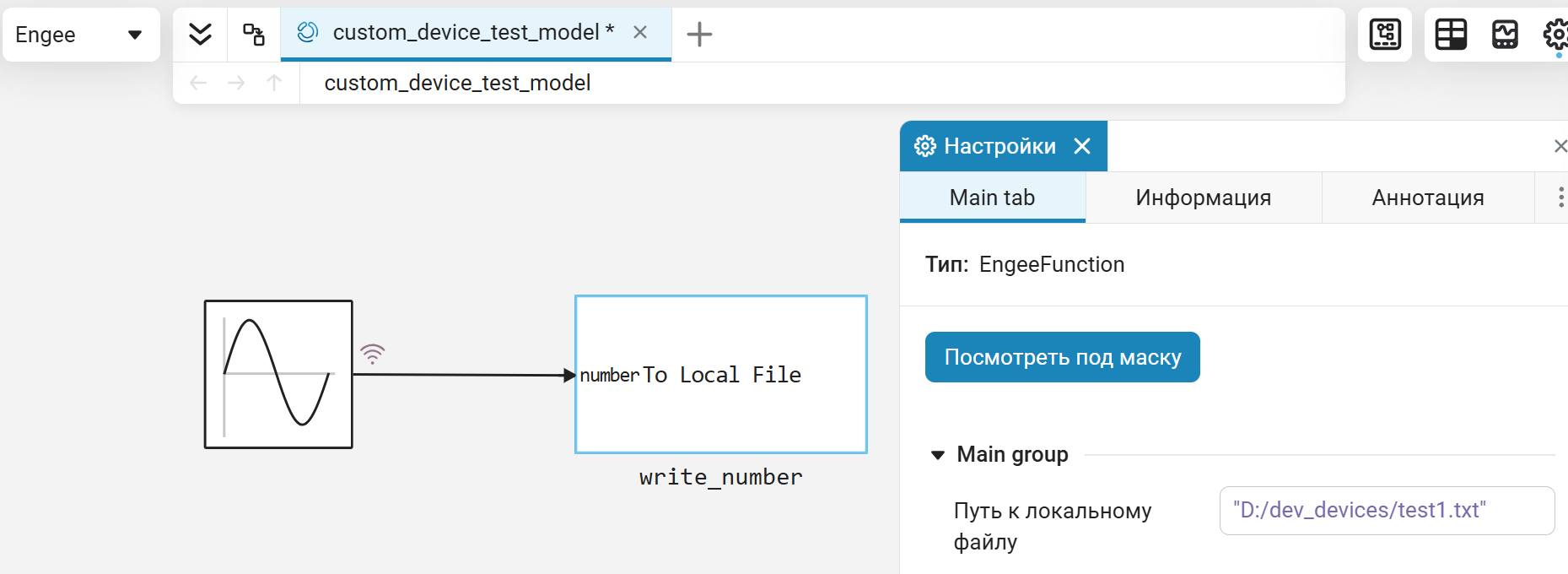
В маске блока укажем путь файла, в который будут записаны значения из модели.
11. Результаты выполнения модели
After launching the model in the specified PC directory, we will receive the file test1.txt with sinusoid values. The file can be downloaded and analyzed in the script:
function TxtToVec(Path::String)
    txt = open(io->read(io, String), Path);
    data_str = "[" * replace(txt, "\n" => ",") * "]";
    return eval(Meta.parse(data_str))
end

txt_content = TxtToVec("$(@__DIR__)/test1.txt");

gr(format=:png)
plot(txt_content)
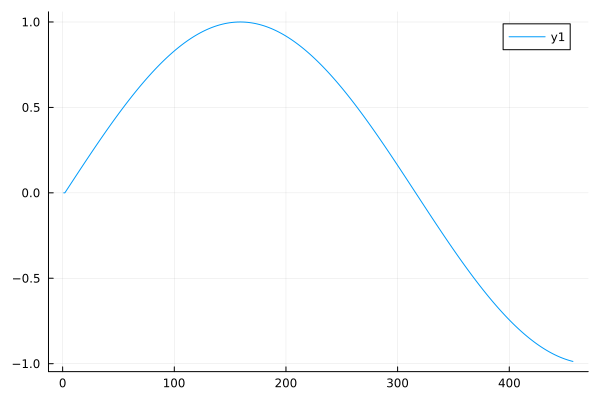
The graph of values from the file is clearly sinusoidal in nature with the specified parameters, therefore, all the necessary data is written to the file. Now the custom support package block can be included in the custom block library, for example tofile.nglib.
Practical recommendations
1. Follow the simple class structure
It is better to start with a minimal set.:
__init____del__- 1-2 custom methods
After checking the functionality, you can gradually expand the functionality.
2. Explicitly specify the types of arguments
It is mandatory to specify the types of input parameters and the return value, for example:
def write_number(self, file_path: str, number: float) -> str:
```</span>

This provides a data type definition between the package methods in Python and the Julia interface in Engee.

---
3. Handle exceptions
If the method interacts with files, external resources, or calculations, it is useful to add try/except so that errors do not lead to an emergency shutdown.
4. Start with simple tests.
Before integrating into the model, it is convenient to check first:
- creating an instance of the class;
- calling the method;
- the return value.
And only then connect the device to the operating circuit.
Conclusion
As a result of following this instruction, a custom device for Engee is created, implemented in Python and connected via Engee.Integration.
The completed setup allows you to:
- Create custom device classes;
- add custom methods;
- connect Python logic to Engee;
- use the extension in scenarios and models;
- Integrate non-standard functionality into the workflow.
This mechanism is convenient to use as a basis for:
- File sharing;
- External computing;
- interactions with equipment;
- integration with custom libraries;
- implementation of specialized application logic.