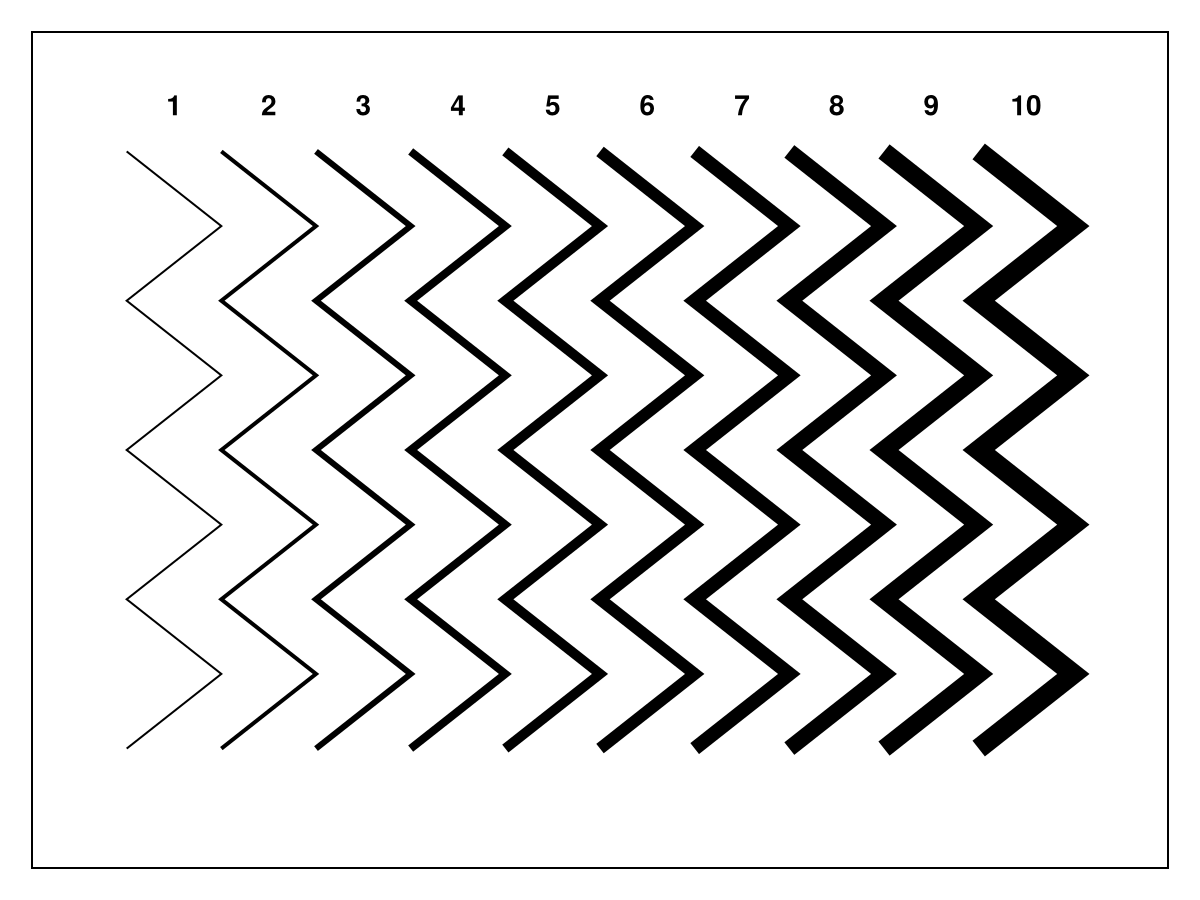
线条
|
该页面正在翻译中。 |
#
<无翻译>*马基科。线条*-Function
lines(positions)
lines(x, y)
lines(x, y, z)
为以下每个元素创建连通线图 (x,y,z), (x,y) 或 职位.
南 值显示为行中的间隙。
地块类型
绘图类型别名 线条 功能是 线条.
处理glmakie中的轮廓工件
在GLMakie中,3d线图可以根据线段的渲染顺序生成轮廓伪影。 目前有几种方法可以缓解这个问题,但它们都是有代价的:
-
fxaa=真将禁用线段的本机抗锯齿,并使用fxaa代替。 这导致不太详细的线条。 -
透明度=真将在一定程度上禁用深度测试,导致所有线条都被渲染而没有工件。 然而,这条线总是会有一定程度的透明度。 -
透支=真将完全禁用深度测试(读取和写入)的情节,删除工件。 然而,这将改变线段的z顺序,并允许稍后渲染的绘图显示在线条图的顶部。
using GLMakie
ps = rand(Point3f, 500)
cs = rand(500)
f = Figure(size = (600, 650))
Label(f[1, 1], "base", tellwidth = false)
lines(f[2, 1], ps, color = cs, fxaa = false)
Label(f[1, 2], "fxaa = true", tellwidth = false)
lines(f[2, 2], ps, color = cs, fxaa = true)
Label(f[3, 1], "transparency = true", tellwidth = false)
lines(f[4, 1], ps, color = cs, transparency = true)
Label(f[3, 2], "overdraw = true", tellwidth = false)
lines(f[4, 2], ps, color = cs, overdraw = true)
f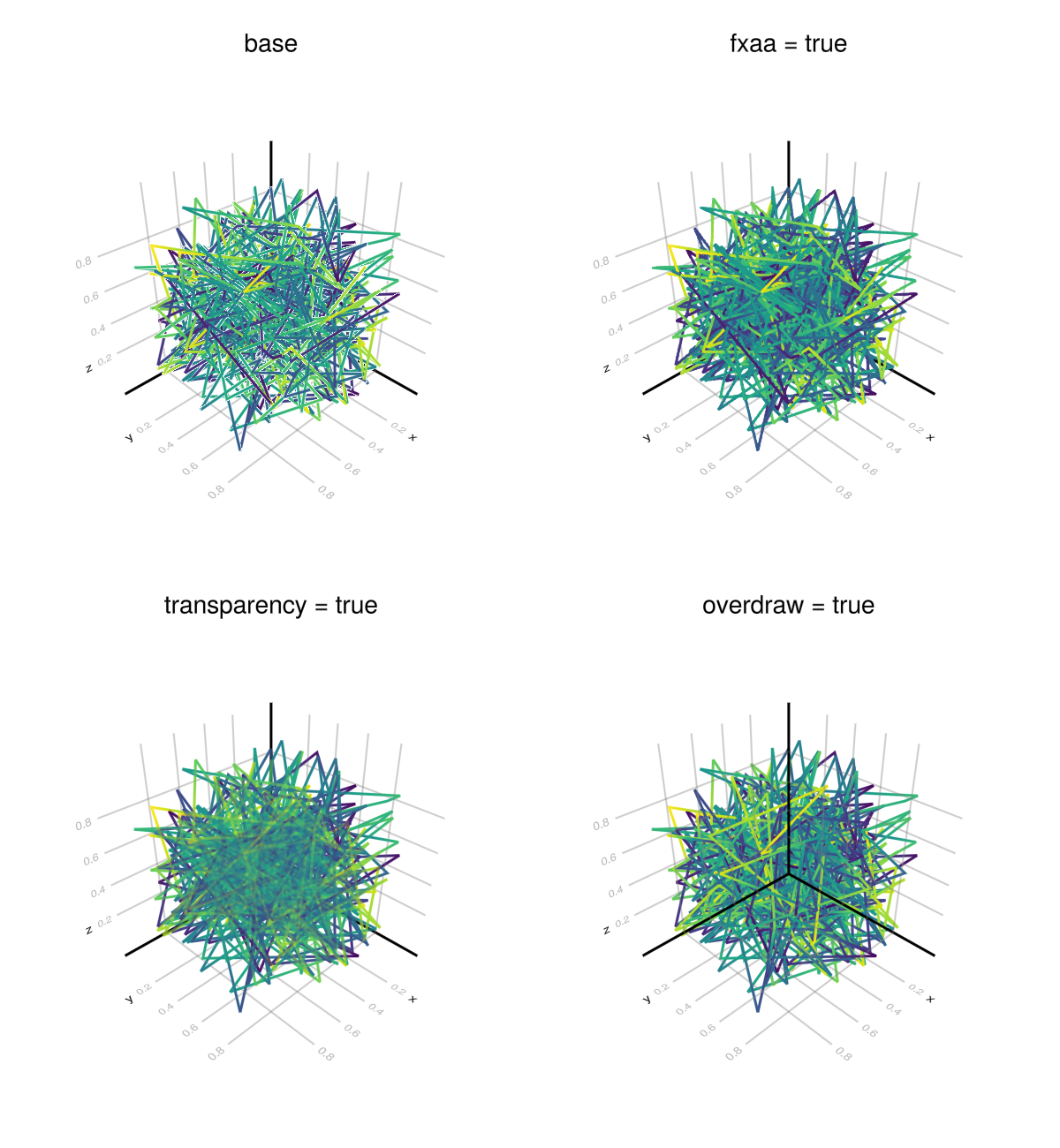
属性
夹式飞机
默认值为 自动的
剪辑平面提供了一种在3D空间中进行剪辑的方法。 您可以设置最多8个向量 平面3f 飞机在这里,后面的情节将被裁剪(即变得不可见)。 默认情况下,剪辑平面继承自父绘图或场景。 您可以删除父 夹式飞机 通过传递 平面3f[].
颜色
默认值为 @继承linecolor
using CairoMakie
fig = Figure()
ax = Axis(fig[1, 1], yautolimitmargin = (0.1, 0.1), xautolimitmargin = (0.1, 0.1))
hidedecorations!(ax)

lines!(ax, 1:9, iseven.(1:9) .- 0; color = :tomato)
lines!(ax, 1:9, iseven.(1:9) .- 1; color = (:tomato, 0.5))
lines!(ax, 1:9, iseven.(1:9) .- 2; color = 1:9)
lines!(ax, 1:9, iseven.(1:9) .- 3; color = 1:9, colormap = :plasma)
lines!(ax, 1:9, iseven.(1:9) .- 4; color = RGBf.(0, (0:8) ./ 8, 0))
fig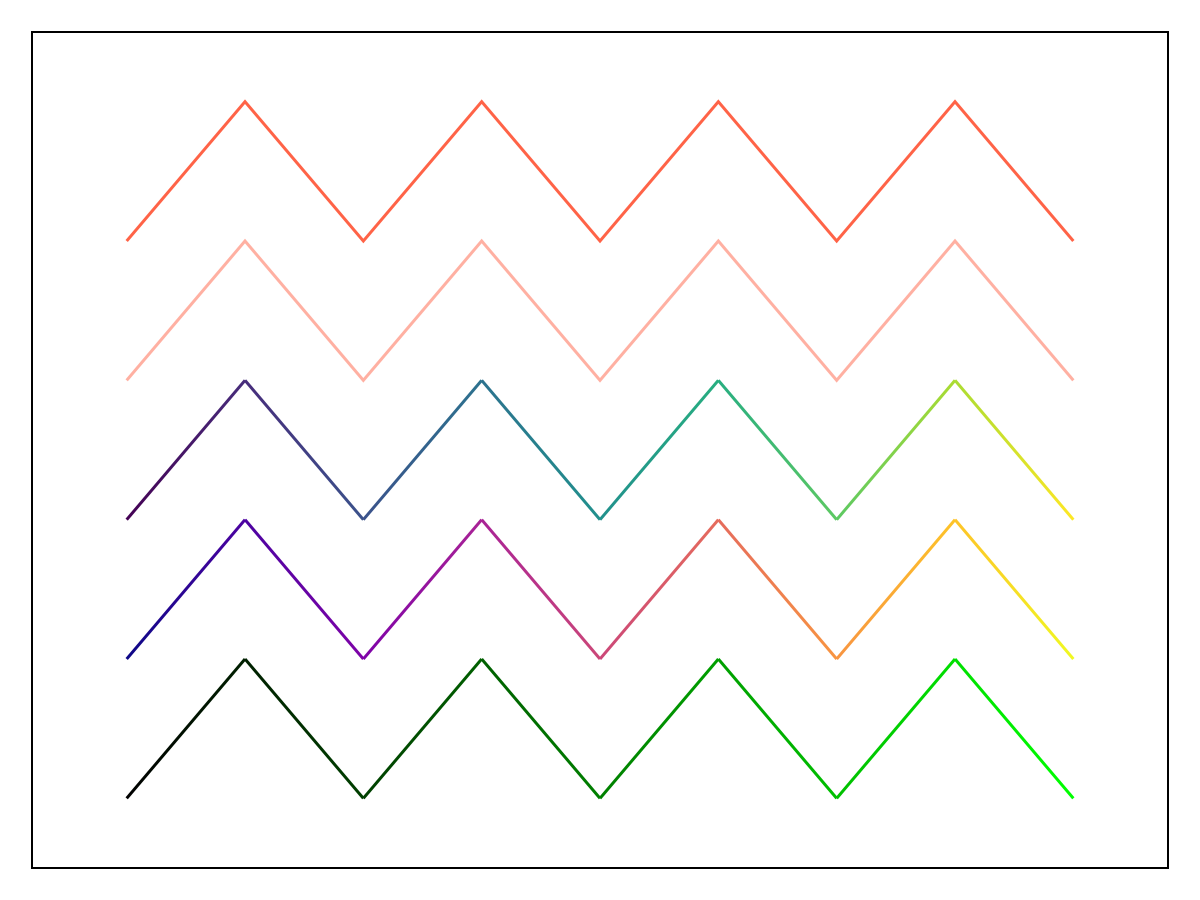
颜色表
默认值为 @继承colormap:viridis
设置为数字采样的颜色表 颜色s. PlotUtils.cgrad(。..), 麦琪反向(any_colormap) 也可以使用,或者来自ColorBrewer或PlotUtils的任何符号。 要查看所有可用的颜色渐变,您可以调用 麦琪可用_gradients().
联合式,联合式
默认值为 @继承joinstyle
using CairoMakie

fig = Figure()
ax = Axis(fig[1, 1], yautolimitmargin = (0.05, 0.15))
hidedecorations!(ax)

joinstyles = [:miter, :bevel, :round]
for (i, joinstyle) in enumerate(joinstyles)
    x = (1:3) .+ 5 * (i - 1)
    ys = [[0.5, 3.5, 0.5], [3, 5, 3], [5, 6, 5], [6.5, 7, 6.5]]
    for y in ys
        lines!(ax, x, y; linewidth = 15, joinstyle, color = :black)
    end
    text!(ax, x[2], ys[end][2], text = ":$joinstyle",
        align = (:center, :bottom), offset = (0, 15), font = :bold)
end

text!(ax, 4.5, 4.5, text = "for angles
below miter_limit,
:miter == :bevel",
    align = (:center, :center))

fig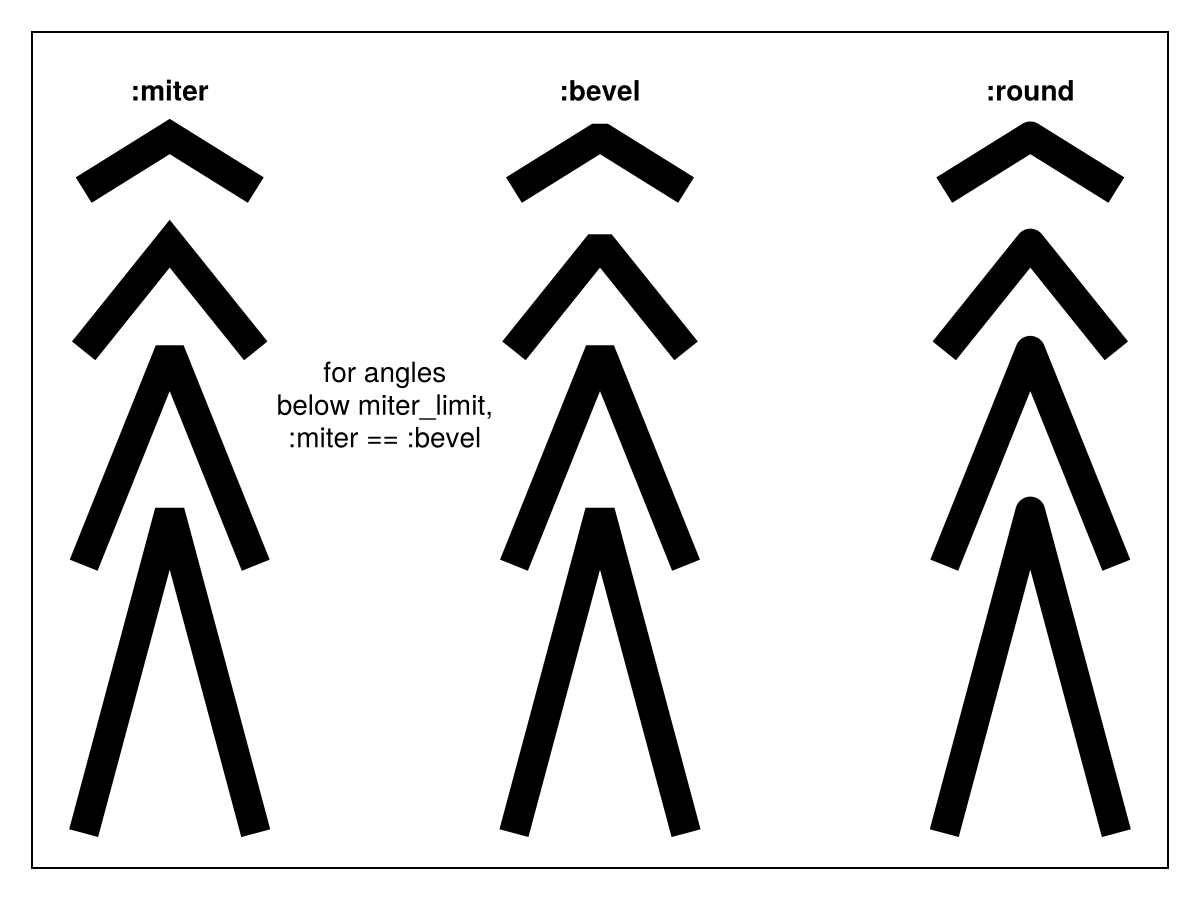
n.线形,线形
默认值为 @继承linecap
using CairoMakie
fig = Figure()
ax = Axis(fig[1, 1], yautolimitmargin = (0.2, 0.2), xautolimitmargin = (0.2, 0.2))
hidedecorations!(ax)

linecaps = [:butt, :square, :round]
for (i, linecap) in enumerate(linecaps)
    lines!(ax, [i, i]; color = :tomato, linewidth = 15, linecap)
    lines!(ax, [i, i]; color = :black, linewidth = 15, linecap = :butt)
    text!(1.5, i, text = ":$linecap", font = :bold,
        align = (:center, :bottom), offset = (0, 15))
end
fig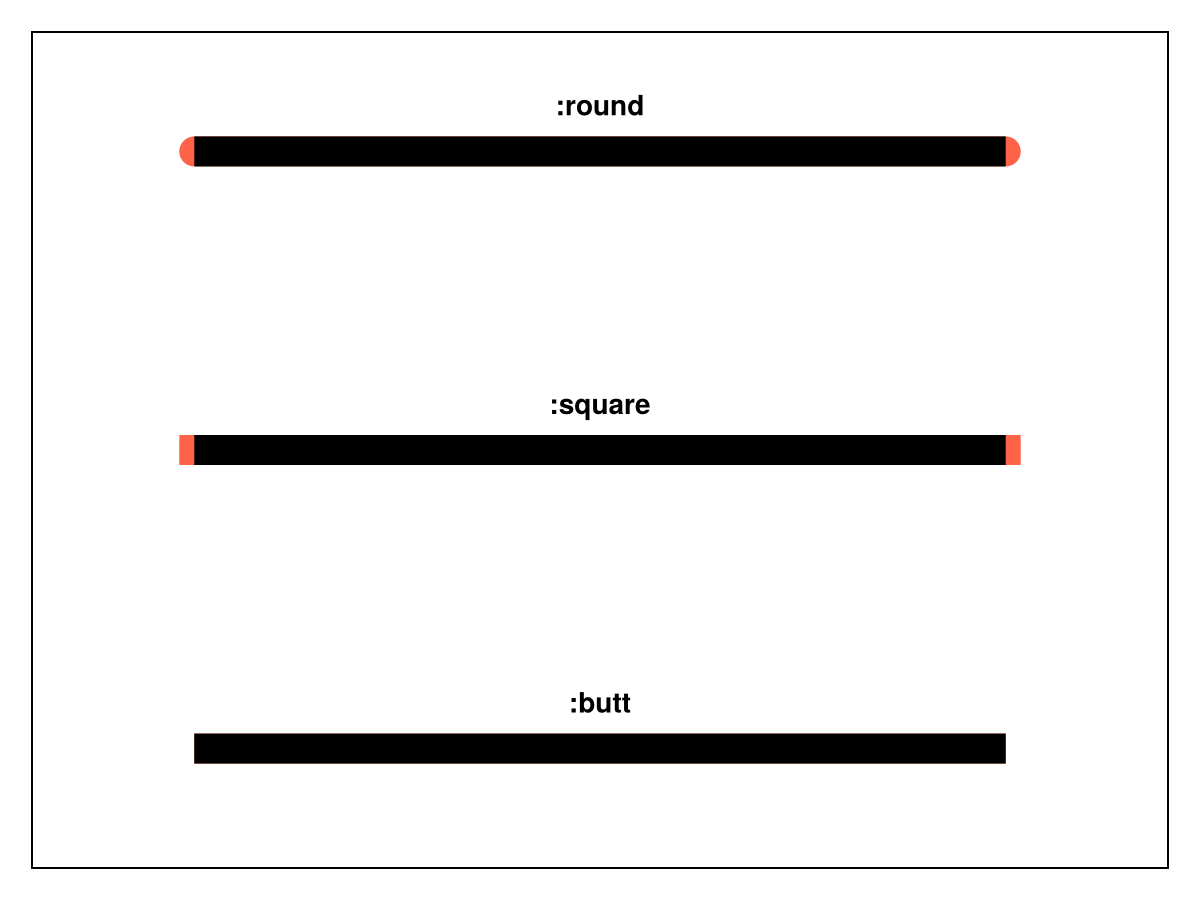
林泳,林泳
默认值为 什么都没有
设置线条的破折号图案。 选项是 :固体 (相当于 什么都没有), :点, :短跑, :dashdot 和 :dashdotdot. 这些也可以在带有间隙样式修饰符的元组中给出,或者 :正常, :密集 或 :松. 例如, (:点,:松) 或 (:dashdot,:密集).
对于自定义模式,请查看 麦琪林泳,林泳.
</无翻译>
using CairoMakie
linestyles = [:solid, :dot, :dash, :dashdot, :dashdotdot]
gapstyles = [:normal, :dense, :loose, 10]
fig = Figure()
with_updates_suspended(fig.layout) do
    for (i, ls) in enumerate(linestyles)
        for (j, gs) in enumerate(gapstyles)
            title = gs === :normal ? repr(ls) : "$((ls, gs))"
            ax = Axis(fig[i, j]; title, yautolimitmargin = (0.2, 0.2))
            hidedecorations!(ax)
            hidespines!(ax)
            linestyle = (ls, gs)
            for linewidth in 1:3
                lines!(ax, 1:10, fill(linewidth, 10); linestyle, linewidth)
            end
        end
    end
end
fig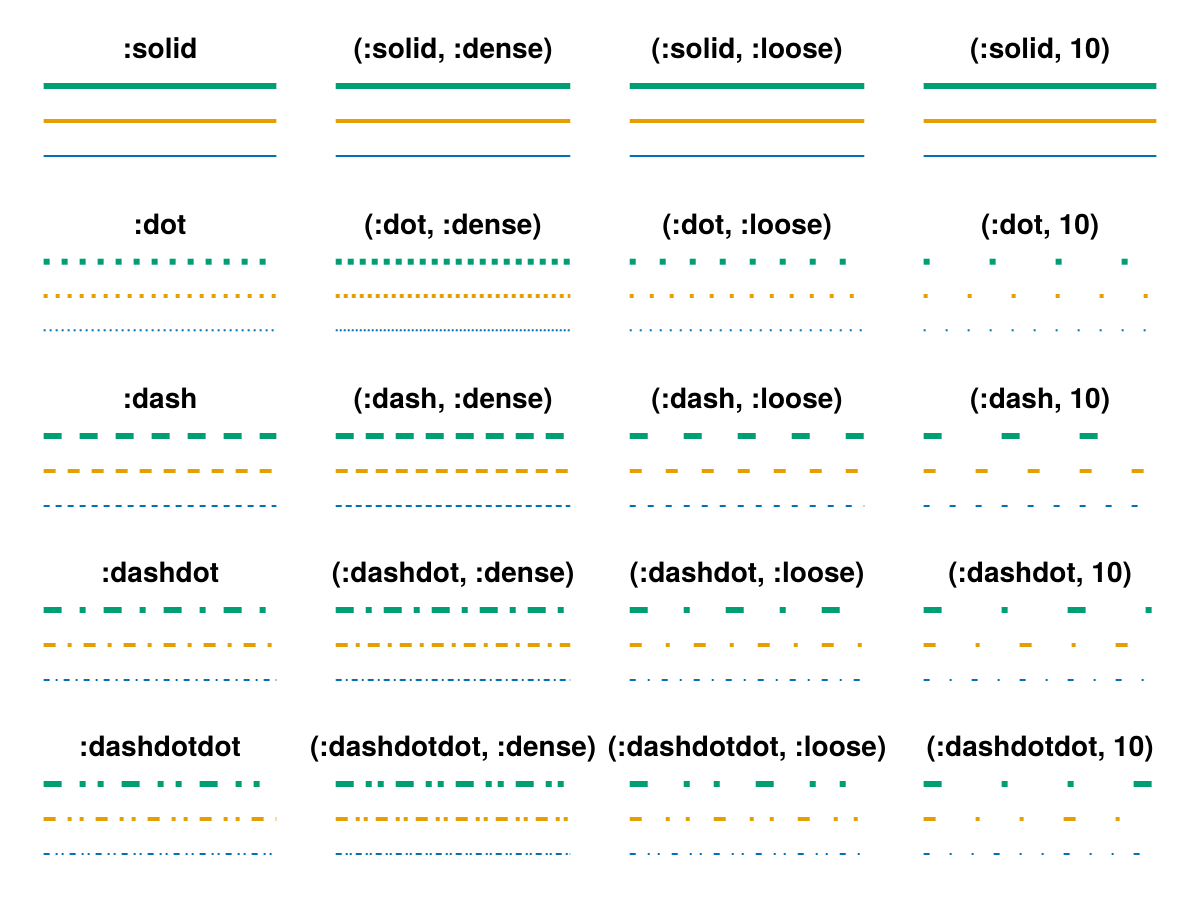
using CairoMakie
fig = Figure()
patterns = [
    [0, 1, 2],
    [0, 20, 22],
    [0, 2, 4, 12, 14],
    [0, 2, 4, 6, 8, 10, 20],
    [0, 1, 2, 4, 6, 9, 12],
    [0.0, 4.0, 6.0, 9.5],
]
ax = Axis(fig[1, 1], yautolimitmargin = (0.2, 0.2))
for (i, pattern) in enumerate(patterns)
    lines!(ax, [-i, -i], linestyle = Linestyle(pattern), linewidth = 4)
    text!(ax, (1.5, -i), text = "Linestyle($pattern)",
        align = (:center, :bottom), offset = (0, 10))
end
hidedecorations!(ax)
fig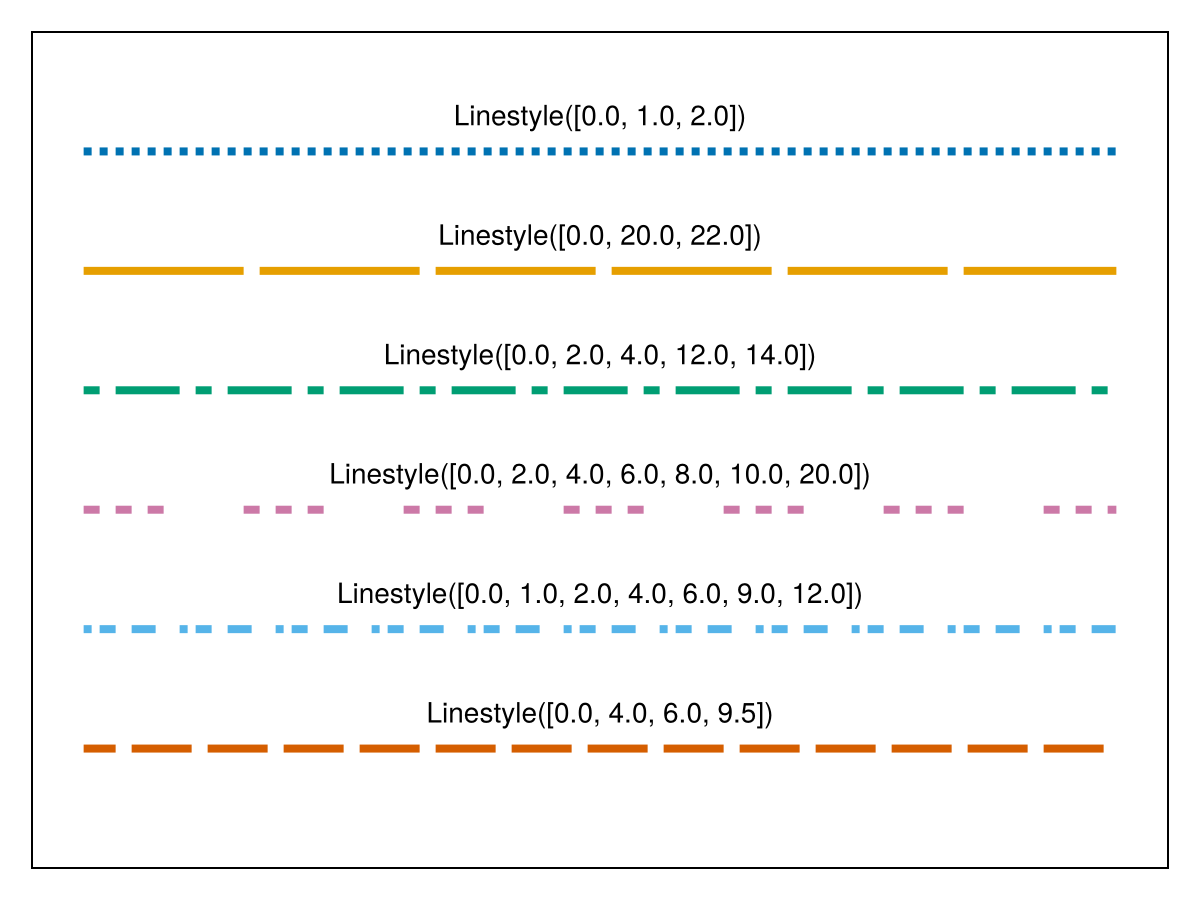
线宽
默认值为 @继承线宽
using CairoMakie
fig = Figure()
ax = Axis(fig[1, 1], yautolimitmargin = (0.2, 0.2), xautolimitmargin = (0.1, 0.1))
hidedecorations!(ax)

for linewidth in 1:10
    lines!(ax, iseven.(1:9) .+ linewidth, 1:9; color = :black, linewidth)
    text!(ax, linewidth + 0.5, 9; text = "$linewidth", font = :bold,
        align = (:center, :bottom), offset = (0, 15))
end
fig