Code Generator Features
Internal functions in the generated code
Code Generator Engee supports virtual and atomic subsystems for code generation. Virtual subsystems serve only for the visual hierarchy in the model, while atomic subsystems represent a single execution unit (or function in the generated code). Configuration in subsystem parameters Treat as atomic unit allows you to make a subsystem virtual or atomic.
All calculations inside virtual subsystems are embedded (inline) directly into the code of the enclosing subsystem or model. This can improve the performance of the generated code, but degrade readability and traceability to the model.
All calculations inside atomic subsystems are generated in a separate function with the subsystem name. This function is then called automatically in the code of the underlying subsystem or model. This can improve the readability and traceability of the generated code to the model, but degrade performance.
For example, turn RollMode from the model autopilot_roll.engee (see Code generation example) to the atomic subsystem:
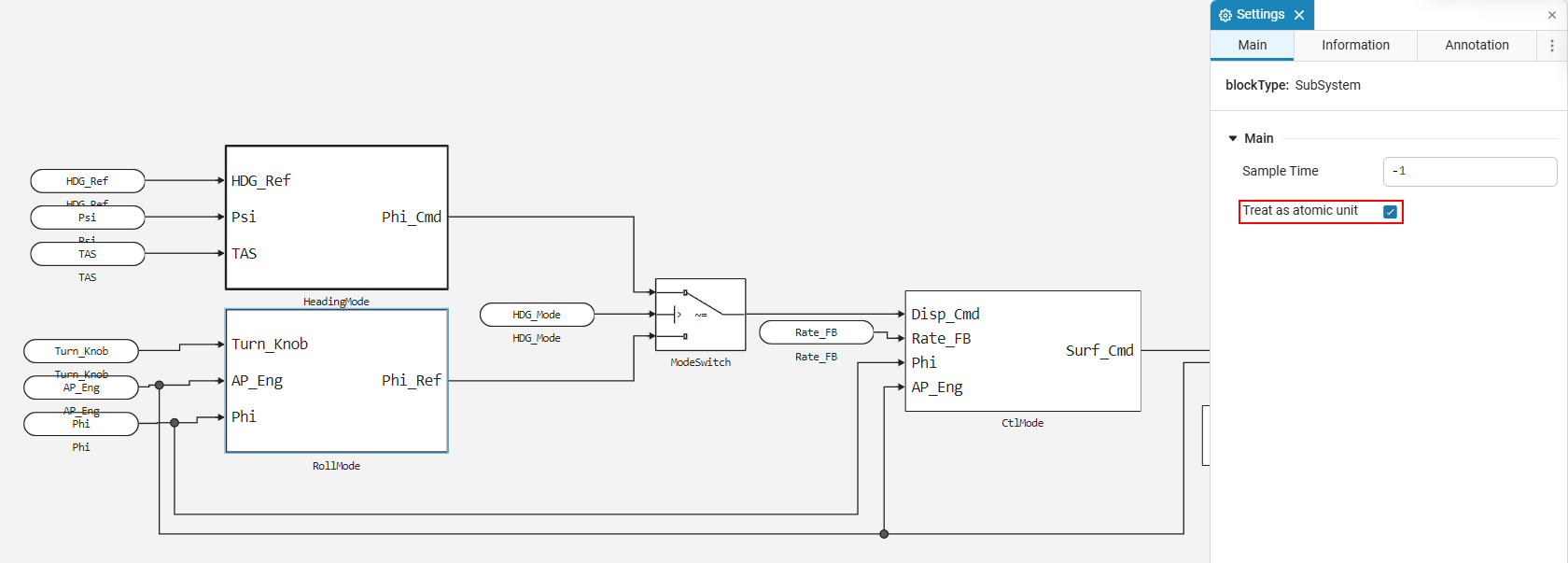
Save the model and generate the code again. The generated code now has a function named RollMode (corresponding to the subsystem name in the model). This function is called inside the function autopilot_roll_step, which represents the code of the enclosing model. Function RollMode declared as static and, thus, is an internal function of this model.
|
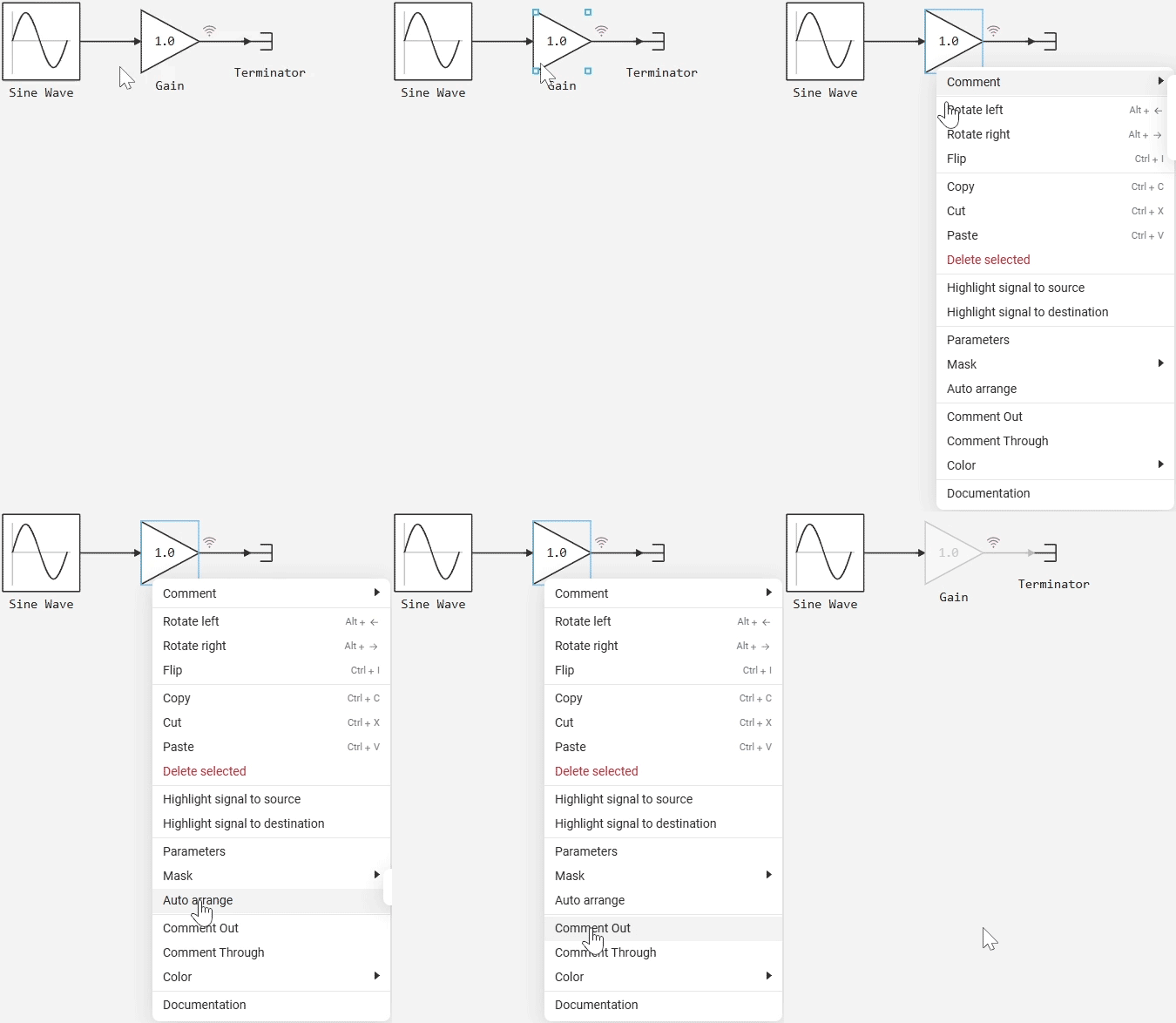
The code generator ignores disabled blocks, and the associated code is not created.
|
Parameters in the generated code
Parameters in the model blocks
In the model blocks, the parameters can be set:
-
In the form of numbers (for example,
0.2); -
In the form of expressions (for example,
0.2 + 0.7); -
In the form of variable names from the workspace Engee (for example,
Kp).
In the generated code, the parameters are embedded (inline) with the values specified in the model.:
-
Simple numerical values are added to the code «As it is», and no additional actions are required;
-
Expressions consisting only of numbers can be simplified (constant folding), and the calculated numeric value will get into the code.;
|
Configurable parameters
By default, the rule applies: any reference to a variable (for example, Kp) or an expression containing a variable (for example, Kp + 1) makes the parameter configurable and puts it in modelname_P — regardless of the setting Inlined/Tunable. In the mode Tunable in modelname_P all parameters are included, including numeric literals.
Some block parameters can be made configurable (tunable) so that they can be changed after code generation. These parameters are stored in the structure modelname_P which looks like this:
-
If the parameter is set via a variable name (for example,
Kp), then its name is saved in the structure:struct P_modelname_T_ { double Kp; }; -
If the parameter is set as an expression with a variable (for example,
Kp + 1), then the name of the parameter in the block is used (for example,Amplitude):struct P_modelname_T_ { double Amplitude; };
In all cases, the parameters in the structure are modelname_P they are filled with calculated values available from the model, for example:
P_modelname_T modelname_P = {
    0.5 // Значение параметра
};|
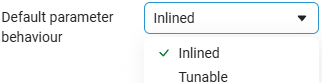
Using the option Default parameter behaviour in settings window
|
example: mode Inlined, the amplitude is set by a variable a
When choosing Inlined and the block parameter Amplitude = a:
-
The field in will appear in the code.
modelname_P(for example,double a;or the name of the field by the parameter label, if the expression is used witha); -
File
model_data.cgets the original valueafrom the workspace; -
The * value itself will not be fixed, it can be changed without reassembling.
This is the expected behavior: a reference to a variable is interpreted as «customizable».
Parameters of masked blocks
If the block has mask, then its parameters are processed based on the selected mode «Default parameter behaviour». Two modes are available:
-
Mode Inlined — masked parameters, if possible, are embedded in the generated code as numeric values.
-
If a masked parameter is used as part of an expression (that is, operations or functions are applied to it), a custom parameter with the name of the type is generated for the corresponding block property.
Block Name_Property. -
If the masked parameter is inserted directly (without additional calculations), then it is inserted into the code as a numerical constant.
-
However, the other rules remain the same: variables from the workspace (which are not mask parameters) are considered configurable parameters, and numeric literals and simple numeric expressions are embedded in the code.
-
-
Mode Tunable — each parameter of each block (including parameters of masked blocks) turns into a separate configurable parameter.
-
Even simple numerical values are not embedded in the code, but are stored as fields of the structure.
modelname_P(for example, the amplitude parameter of a sinusoidal signal will become a fieldSineWave_Amplitude). -
For variables from the workspace, the rule remains the same: one variable corresponds to one field of the structure (even if it is used in different blocks).
-
|
For each instance of the masked block, its parameters are processed separately. For example, two different masked blocks with the parameter
|
Naming rules for variables in the generated code
Code Generator Engee It uses a single mechanism for forming the names of all entities of the model: blocks, subsystems, parameters, temporary variables, and the model itself. The approach is based on a consistent («on the fly») name generation, where previously created names have a higher priority and no longer change. This approach ensures the stability and predictability of variable naming.
Basic naming principles:
-
Any name must be a valid C language identifier.
-
Invalid characters (spaces, Cyrillic letters, special characters, emojis) are deleted or replaced with underscores.
-
If a correct conversion is not possible, the name of the block type or subsystem is used.
-
Names must be unique in their scope — suffixes are added in case of collisions.
_1,_2,_3… -
Names are generated sequentially, and previously created names take precedence.
-
Conflicts are resolved in favor of the first name encountered.
|
If you want the variable name in the generated code to exactly match the block name, then give the block a name that is the correct identifier of the C language. In this case, names starting with |
Rules for name conversion:
-
If the block name is the correct identifier for the C code, the generator tries to keep it unchanged.
-
If the block name is in English (Latin letters, numbers, and signs), then
-replaced by, spaces and other characters are deleted, and letters, numbers andsaved. -
If the block name is in Russian (Cyrillic), then the generated code uses
BlockTypeand the numeric suffix from the original name (if any).
The code generator guarantees the uniqueness of the generated names, even if the model contains blocks with the same names (for example, in different non-atomic subsystems). If the same names occur in the code, the generator adds suffixes. _1, _2, _3 and so on — this way the names remain unique.
Conversion example:
-
MyBlock→MyBlock -
Sine Wave-1→SineWave_1 -
Entrance 1→Inport1 -
Gain factor-42→Gain42
The blocks are named according to the following rules:
-
The block name from the model is used if it is valid.
-
Invalid characters are replaced or deleted.
-
If the name cannot be normalized, the block type is used (for example,
Gain,Step). -
If the names match, the number suffixes are automatically added.
Example:
| The name in the model | The name in the code |
|---|---|
Gain |
Gain |
Gain (the second in the subsystem) |
Gain_1 |
Invalid |
Gain_2 |
Gain-1 |
Gain_1_1 |
Subsystem naming rules:
-
Name normalization is performed in the same way as for blocks.
-
If the subsystem is atomic, its name becomes the name of the generated C function.
-
If there is a name conflict, suffixes are added.
-
If the name cannot be corrected, the subsystem type name is used (
Subsystem).
Example:
| The name in the model | Name in the code (function) |
|---|---|
Subsystem |
Subsystem |
Aaaab |
Aaaab |
Subsystem |
Subsystem_1 |
unaccountable-1 |
___1 |
Naming of configurable parameters (modelname_P) is based on the type of parameter source:
If the parameter is set to a workspace variable:
-
The variable name is used unchanged.
-
One variable corresponds to one field, even if it is used in several blocks.
double Kp;
double x;
If the parameter is set directly in the block:
-
The scheme is used
Block_name Properties. -
If the block name is incorrect, it is used
Block_name Type. -
If there is a name conflict, suffixes are added.
_1,_2, …
Example:
double MySine_Amplitude;
double SineWave_Amplitude_1;
double Step_Time;
Formation of temporary variables within functions:
-
They are created automatically and sequentially.
-
The names of temporary variables do not overlap with the names of blocks and parameters.
-
They are adjusted to valid Si identifiers.
-
They are used exclusively within the scope of the function.
Example:
double tmp_3;Interfaces of the generated code and integration into the external development environment
Interfaces of the generated code
The external interfaces of the generated code can be seen in the generated file. modelname.h. External interfaces include functions and structures for working with generated code.:
-
modelname_init— is a model initialization function — must be called once; -
modelname_step— is the entry point to the model and contains the algorithm of the model — must be called periodically in accordance with the step of calculating the model; -
modelname_U— the structure contains the external input ports of the model; -
modelname_Y— the structure contains the external output ports of the model; -
modelname_S— the structure contains the internal states of the model; -
modelname_P— the structure contains configurable model parameters.
Integration into an external development environment
To use the functions and structures of the generated file modelname.h in the external code (written manually), you need to do the following:
-
Attach the generated header file:
#include "modelname.h" -
Organize a single call to the generated function
initin yourmain:modelname_init(); -
Organize a periodic call to the generated function
stepin yourmainwith the right step:modelname_step(); -
Organize the transfer of input and output data to and from the function
step:/* Устанавливаем значения входов */ modelname_U.input1 = 42; /* Вызываем функцию step */ modelname_step(); /* Можно использовать modelname_Y.output1 */
Generated files
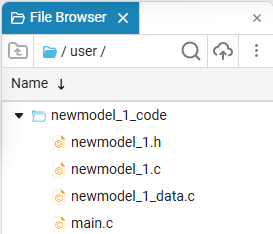
After building the model in Engee and generating its code (using the command engee.generate_code() or buttons Generate code  ) automatically generated files are created that contain the implementation of the model in the C language. Below is a description of these files and their purpose.
-
modelname.h— a header file that describes the external interfaces of the model. It includes the functions and structures necessary to work with the model from external code (for more information, see above). The process of connecting these functions and structures to an external application is also described in the section above. -
modelname.c— a file with the implementation of the logic of the model. It contains definitions of all variables and the implementation of key functions of the model.:-
init()— initialization function that sets the initial values of variables and model states; -
step()— the main computational function. Performs the calculation of one simulation step and updates the output values; -
term()— the shutdown function of the model.
-
-
model_data.c— a file with the initial initialization of the model parameters. It sets the values of all the configurable parameters that are used when executing the model. For example:-
Signal amplitude and frequency;
-
Phase, offset;
-
The number of samples and other parameters.
These global parameters are configurable and can be changed while the executable code is running. This allows you to flexibly control the behavior of the model without having to reassemble the logic or edit the main functions.
In the mode Inlined in model_data.conly parameters specified through variables or expressions with variables are included; numeric literals and purely numeric expressions are not written there (they are embedded in the code).
-
-
main.c— a file with an example of using the model. This is the main executable file that shows how to initialize and invoke a model from a C program. Contains:-
init()— the initialization function of the model, called once before starting work; -
step()— the main computational function that performs one step of calculating the model. It is usually called periodically, according to the specified integration step.; -
term()— the shutdown function of the model.File
main.cIt does not contain an algorithm for the operation of the model, but only demonstrates how to correctly launch and manage its execution in an application with C code support.main.cIt should be used as a template for integrating the model into user projects.
-
Supported data types
The data types in the generated code correspond to the data types in the model Engee.
If the user has not specified the data type in the model, then a double-precision floating-point data type corresponding to the type is used. double in C. For logical operations or calculations that generate Boolean results (true (1) or false (0)), the data type is used boolean, corresponding to an eight-bit unsigned data type in Si.
To display data types in the model, in settings window  in the tab «Debugging» enable the option Data types. in the tab «Debugging» enable the option Data types.
|
Vectorization
The code generator supports vector data types in models, including vectors and matrices. Standard loops are generated in the code for vector operations. for without calling specific BLAS or LAPACK functions.
Complex numbers
The code generator supports complex data types in models. For complex types, the types from the standard header file are used. <complex.h>.
Multi-frequency models
Models Engee They can be multi-frequency, that is, they contain several different sampling frequencies. Applying blocks Rate Transition, as well as by setting the parameter Sample Time blocks and subsystems, the user can control which calculation step blocks or groups of blocks work with.
Code Generator Engee supports code generation for multi-frequency models. To do this, the blocks are grouped by frequency, and the user can control how these different frequencies are represented in the generated code.
Customization Multirate code generation allows you to control the mode of operation of the generated code for a multi-frequency model. Singletasking the code allows you to generate a single function step for the model. Multitasking the code allows you to generate several functions step for the model, each of which corresponds to a specific sampling rate in the model.
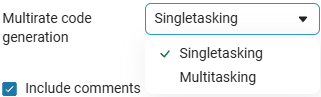
Singletasking the code contains conditions (in the form if) inside the generated function step, which wrap calls of slower frequencies in the model. Function step It contains blocks operating at the base frequency of the model (the fastest frequency). From the custom binding, it is enough to provide a function call step at the same time, the scheduling of calls of slower frequencies and the exchange of information between frequencies is carried out automatically in the generated code itself.
Multitasking code contains several functions step_N in the generated code, each of which corresponds to its frequency in the model. Function step_0 corresponds to the fastest frequency in the model (base frequency), the function step_1 a second slower frequency, and so on. It is required to provide a function call from the custom binding step_N with the necessary calculation steps. Data interactions between different frequencies are provided automatically in the generated code itself.
Comments in the generated code
By default, the generated code contains comments that allow you to trace the code to the blocks in the model.
Customization Include comments in the panel Code generation they allow you to manage comments in the generated code and, if necessary, disable them completely.
Code verification
Verification refers to the generation of a verification model with a block C Function, whose simulation results must match the simulation results of the original model with the same input data.
Block C Function it can be created automatically to verify the generated code. To do this, check the box Generate verification script in the settings window  :
:
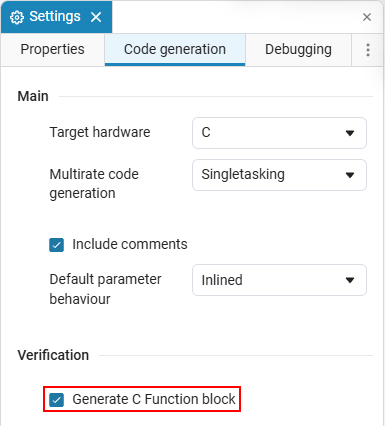
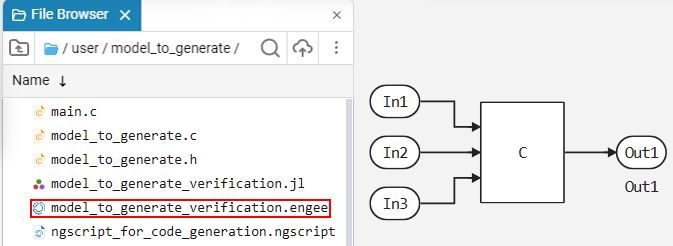
The next time the code is generated (via the interface, context menu, or command generate_code) in the directory ouput_dir the file will appear modelname_verification.jl (if the directory does not exist, it will be created automatically). This file will contain a script that can be executed in the script editor (by double-clicking)  or the command line
  :
:
include("path/to/verification.jl")The script will create a model Engee with a name modelname_verification.engee and a block C Function, which uses the generated code:
In Engee code generation in the Verilog language is also available. For more information, see the article Verilog (HDL) code generation.
Code generation based on custom templates
Engee supports code generation based on custom templates (for more information, see the article Code generation based on custom templates).
Managing signal names
The code generator uses the names of the signals specified by the user in the model to make the generated code clearer and easier to match with the model. For example:
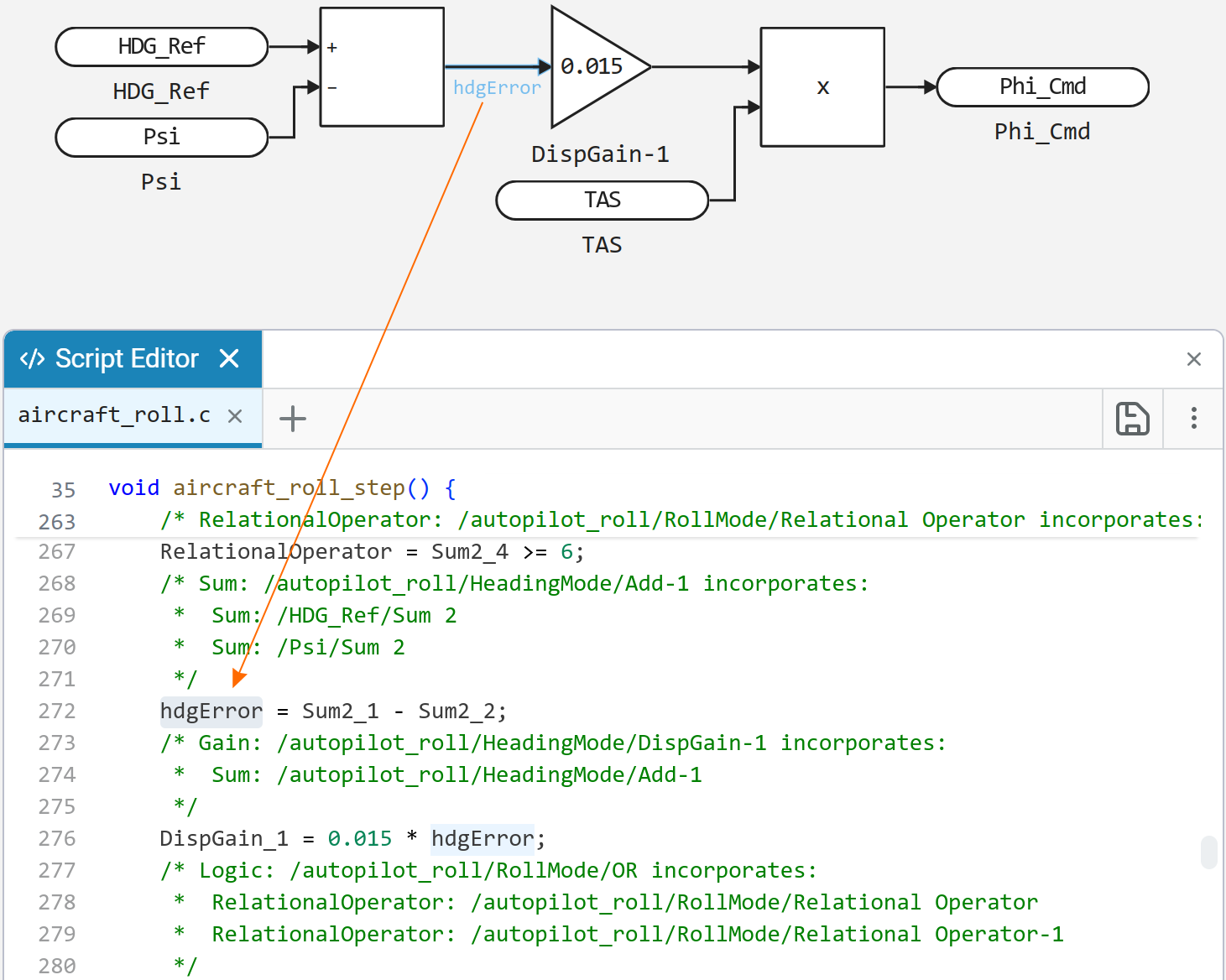
If the signal (block output) has a name, then the generated code will use the same variable name for this signal. This is only possible if the signal has not been optimized and does not contain characters that are not supported in the C code.