Key point detection and matching
In modern computer vision, the key task is to find geometric correspondences between images. Whether it's creating panoramas, tracking an object's movement, or reconstructing a 3D scene from photographs, the whole process is based on detecting unique points and matching them.
The presented code is an instructional but functional implementation of the classic feature detection and matching pipeline. Unlike using a "black box" of ready-made libraries (for example, OpenCV), this example in Julia demonstrates manual programming. It not only shows how to apply algorithms, but also reveals the mathematical essence and algorithmic details of each stage.
Next, connect the libraries:
- Images: A basic package for working with images, providing data types and basic input/output functions.
- TestImages: A library of standard test images.
- ImageFeatures: Contains ready-made algorithms for detecting key points, although this example implements its own version of the Harris detector.
- ImageDraw: Designed for rendering graphical primitives, whose functions in the code are replaced by manual implementation for educational purposes.
- ImageFiltering: Provides the filtering and convolution tools needed to calculate gradients by the Sobel operator.
- CoordinateTransformations: A framework for describing and composing geometric transformations of coordinate space.
- Rotations: A specialized package for working with rotation and rotation matrices in computer vision tasks.
- StaticArrays: Provides high-performance fixed-size arrays for efficient vector math.
- LinearAlgebra: A standard linear algebra library used to solve systems of equations in homography estimation.
- Statistics: A standard module for calculating statistical metrics such as the mean and standard deviation of descriptors.
# Pkg.add(["Images", "TestImages", "ImageFeatures", "ImageDraw", "ImageFiltering", "CoordinateTransformations", "Rotations", "StaticArrays"])
using Images, TestImages, CoordinateTransformations, Rotations, StaticArrays, LinearAlgebra, Statistics
Next, we will perform a detailed analysis of the auxiliary rendering functions, both functions implement the classic ** Bresenham algorithms** — effective rasterization methods for geometric primitives using only integer arithmetic.
Function draw_line! The Bresenham algorithm for line drawing. The algorithm builds a line between the points and selecting the pixel closest to the ideal straight line at each step.
The equation of a straight line:
Instead of calculating (which requires division and floating arithmetic), Bresenham uses the error term function, which shows the deviation of the current pixel from the ideal line.
Also, at each step, the algorithm evaluates how much the current point deviates from the ideal straight line. The discrepancy function is updated according to the rules:
Multiplication by 2 (e2 = 2 * err) allows you to avoid working with fractional numbers while maintaining the accuracy of the comparison.
Function draw_circle!: The Midpoint Circle Algorithm. The algorithm builds a circle of radius with a center using eight-way symmetry: if the point if it lies on a circle, then the points symmetrical to it also belong to it:
The equation of a circle:
**The decision parameter evaluates the position of the midpoint between two candidates:
Formulas Solution parameter updates
Parameter It is updated recurrently, without calculating squares at each step.:
These formulas are obtained by decomposition and the exclusion of repetitive calculations.
function draw_line!(img, p1, p2, color)
    x1, y1 = round(Int, p1[1]), round(Int, p1[2])
    x2, y2 = round(Int, p2[1]), round(Int, p2[2])
    dx = abs(x2 - x1)
    dy = abs(y2 - y1)
    sx = x1 < x2 ? 1 : -1
    sy = y1 < y2 ? 1 : -1
    err = dx - dy
    x, y = x1, y1
    while true
        if 1 <= x <= size(img,2) && 1 <= y <= size(img,1)
            img[y, x] = color
        end
        if x == x2 && y == y2
            break
        end
        e2 = 2 * err
        if e2 > -dy
            err -= dy
            x += sx
        end
        if e2 < dx
            err += dx
            y += sy
        end
    end
end

function draw_circle!(img, center, radius, color)
    cx, cy = round(Int, center[1]), round(Int, center[2])
    r = radius
    x = 0
    y = r
    d = 3 - 2r
    while x <= y
        for (dx, dy) in [(x, y), (y, x), (-x, y), (-y, x), (x, -y), (y, -x), (-x, -y), (-y, -x)]
            px = cx + dx
            py = cy + dy
            if 1 <= px <= size(img,2) && 1 <= py <= size(img,1)
                img[py, px] = color
            end
        end
        if d < 0
            d += 4x + 6
        else
            d += 4(x - y) + 10
            y -= 1
        end
        x += 1
    end
end
Harris Angle Detector: harris_corners
This function implements the classic Harris-Stevens algorithm (1988)** To detect angles, which are characteristic image points that are resistant to rotations, changes in lighting, and slight geometric distortions.
An angle is a point where the intensity of an image changes significantly in two directions simultaneously. The algorithm analyzes the local window around each pixel and evaluates how "angular" it is.
The matrix of the second moment (Structure Tensor), a matrix is built for each pixel :
Where:
- — image gradients along the X and Y axes
- Summation is performed along the window around the pixel (in the code, a 3×3 window)
Eigenvalue analysis matrices :
| Type of area | Visually | ||
|---|---|---|---|
| Flat | Small | Small | Homogeneous area |
| Border | Big | Small | The edge of the object |
| Angle | Big | Big | Crossing borders |
Instead of calculating eigenvalues (an expensive operation), an approximation is used.:
Where:
- — empirical coefficient (usually 0.04–0.06)
Interpretation of the response:
- → Angle (both eigenvalues are large)
- → Border (one large, one small)
- → Flat area (both small)
, Visualization of the detector operation
Source Image → Gradients → The matrix M → Response R → Threshold → Local maxima
     [512×512] [Ix, Iy] [Sxx,Sxy,Syy] [R] [>1% max] [5×5 window]
Example of responses in different areas:
| Area | Type | ||||
|---|---|---|---|---|---|
| Flat | 0.1 | 0.1 | 0.0 | ~0.01 | ❌ |
| Border | 10.0 | 0.1 | 0.5 | ~−0.4 | ❌ |
| Corner | 10.0 | 10.0 | 2.0 | ~+96 | ✅ |
, Parameters and their impact
| Parameter | Default value | Magnification effect | Reduction effect |
|---|---|---|---|
k |
0.04 | Fewer angles, only the most pronounced | More angles, higher sensitivity to noise |
threshold |
0.01 | Strong angles only (10% of maximum) | More angles, including weak ones |
| Smoothing window | 3×3 | More resistant to noise | Better localization, but noisier |
| NMS Window | 5×5 | More sparse points | Denser than a dot, possible duplicates |
function harris_corners(img; k=0.04, threshold=0.01)
    img_f = Float64.(img)
    img_f = replace(img_f, NaN => 0.0, Inf => 0.0, -Inf => 0.0)
    Ix = imfilter(img_f, Kernel.sobel()[1])
    Iy = imfilter(img_f, Kernel.sobel()[2])
    Ixx = Ix.^2
    Iyy = Iy.^2
    Ixy = Ix .* Iy
    window = ones(3,3) ./ 9
    Sxx = imfilter(Ixx, window)
    Syy = imfilter(Iyy, window)
    Sxy = imfilter(Ixy, window)
    det = Sxx .* Syy - Sxy.^2
    trace = Sxx + Syy
    response = det - k * trace.^2
    max_resp = maximum(response)
    corners = findall(response .> threshold * max_resp)
    local_max = []
    for c in corners
        i, j = c.I
        val = response[i,j]
        r_min = max(1, i-2)
        r_max = min(size(img,1), i+2)
        c_min = max(1, j-2)
        c_max = min(size(img,2), j+2)
        window_vals = response[r_min:r_max, c_min:c_max]
        if all(val .>= window_vals)
            push!(local_max, (j, i))
        end
    end
    return local_max
end
Step-by-step code analysis
Step 1: Image Preparation
img_f = Float64.(img)
img_f = replace(img_f, NaN => 0.0, Inf => 0.0, -Inf => 0.0)
** Why:** Conversion to Float64 It is necessary for accurate calculations of gradients. Replacement NaN/Inf protects against artifacts after geometric transformations (warp).
Step 2: Calculating Gradients (Sobel Operator)
Ix = imfilter(img_f, Kernel.sobel()[1])
Iy = imfilter(img_f, Kernel.sobel()[2])
Sobel Cores:
The convolution formula:
The gradients show the rate of change in intensity in each direction.
Step 3: Squares and products of gradients
Ixx = Ix.^2
Iyy = Iy.^2
Ixy = Ix .* Iy
Physical meaning:
- — the "energy" of the gradient in X
- — the "energy" of the gradient in Y
- — correlation between gradients (shows consistency of changes)
Step 4: Smoothing with Window filter
window = ones(3,3) ./ 9
Sxx = imfilter(Ixx, window)
Syy = imfilter(Iyy, window)
Sxy = imfilter(Ixy, window)
** Why:** Averaging over a 3×3 window is equivalent to summing in the matrix formula . Without anti-aliasing, the detector would be too sensitive to noise.
The weight window (in the classical version — Gauss):
This code uses a uniform window. .
Step 5: Calculating the Harris Response
det = Sxx .* Syy - Sxy.^2
trace = Sxx + Syy
response = det - k * trace.^2
Complete formula for each pixel:
Parameter k=0.04:
- Lower value (0.04) → more detectable angles (higher sensitivity)
- Higher value (0.06–0.08) → only the most pronounced angles
Step 6: Threshold Filtering
max_resp = maximum(response)
corners = findall(response .> threshold * max_resp)
Adaptive threshold:
By threshold=0.01 points with a response higher than 1% of the maximum are selected. This makes the detector resistant to changes in image contrast.
Step 7: Non-Maximum Suppression
for c in corners
    i, j = c.I
    val = response[i,j]
    r_min = max(1, i-2)
    r_max = min(size(img,1), i+2)
    c_min = max(1, j-2)
    c_max = min(size(img,2), j+2)
    window_vals = response[r_min:r_max, c_min:c_max]
    if all(val .>= window_vals)
        push!(local_max, (j, i))  # (x, y)
    end
    end
** Why:** After threshold filtering, several neighboring pixels may remain next to one corner. Suppressing non-maximums leaves only a local maximum in a 5x5 window.
The algorithm:
- For each candidate, a 5x5 window is taken around it.
- If the value in the center is not less than all the neighbors → the point is saved
- Otherwise, → is discarded as a "duplicate"
Result: A sparse set of well-localized corners without clustering.
Filtering of key points: filter_valid_keypoints - this function performs spatial validation of key points, screening out points that are in incorrect areas of the image. Although the function is algorithmically simple, it solves the critical task of ensuring data quality for subsequent pipeline stages.
The mathematical basis of filtering. The function defines the valid area of an image as a subset of pixels that meet two conditions:
1. Geometric constraint (margin):
Where:
- — width and height of the image
- — parameter
margin(default is 10 pixels)
2. Intensity limitation:
Where — pixel intensity in coordinates .
The final validity condition
Point it is considered valid if:
Parameters and their impact
| Parameter | Default value | Magnification effect | Reduction effect |
|---|---|---|---|
margin |
10 | Fewer valid points, higher reliability | More points, the risk of going beyond the borders |
Recommendations for choosing a margin:
| Task | Recommended margin | Justification |
|---|---|---|
| Extracting 7×7 patches | ≥ 4 | Half the size of the patch |
| Extracting 15x15 patches | ≥ 8 | Half the size of the patch |
| After a strong turn | ≥ 20 | Accounting for large black areas |
| Precise localization | ≥ 3 | Minimal edge protection |
The minimum margin formula:
function filter_valid_keypoints(img, keypoints; margin=10)
    h, w = size(img)
    valid = []
    for (x, y) in keypoints
        if margin < x <= w-margin && margin < y <= h-margin
            if img[round(Int,y), round(Int,x)] != 0
                push!(valid, (x, y))
            end
        end
    end
    return valid
end
Step-by-step code analysis
Step 1: Getting the image dimensions
h, w = size(img)
Important: In Julia size(img) returns (высота, ширина) That is , (rows, columns). This corresponds to the matrix notation, where the first index is a row (Y), the second is a column (X).
Step 2: Check the borders of the image
if margin < x <= w-margin && margin < y <= h-margin
Why do I need a margin?:
- Protection against going out of bounds when extracting patches (descriptors)
- Accounting for the error of geometric transformations
- Exclusion of edge filtering artifacts
Step 3: Checking the pixel intensity
if img[round(Int,y), round(Int,x)] != 0
    push!(valid, (x, y))
end
** Why is it important:** After geometric transformations (rotation, scaling), black areas (filled with zeros) appear in the image:
The mathematical reason: When the image is rotated, the new coordinates are calculated as:
Pixels that do not fall into the original image during backward mapping are filled with the value 0 (or NaN, which is previously replaced with 0).
Step 4: Coordinate Conversion
img[round(Int,y), round(Int,x)] # Обратите внимание: [y, x]!
A critical moment: In computer vision, coordinates are usually written as , where:
- — horizontal coordinate (column)
- — vertical coordinate (row)
But in Julia arrays are indexed as [строка, столбец] That is , [y, x]. The function performs this conversion correctly.
Extracting descriptors based on patches: extract_patch_descriptors
This function implements the simplest patch-based descriptor, a method for generating vector features of key points by extracting and normalizing local image regions around each point. Although this approach is inferior to modern descriptors (SIFT, ORB, Deep Learning), it demonstrates the fundamental principles of the formation of invariant features.
The mathematical basis of descriptors
What is a descriptor?
**The **descriptor is a numeric representation of the local area of the image, which should be:
- Unique — different points have different descriptors
- Invariant — the same point under different conditions gives similar descriptors
- Compact — small enough for efficient comparison
Patch-based approach
Instead of complex histograms of gradients (as in SIFT), a raw patch is used — a rectangular area of pixels around a key point:
Where — half the size of the patch.
Descriptor size:
`
Two rejection criteria:
| Criteria | Formula | Doorstep | Reason |
|---|---|---|---|
| Low variance | 1e-6 | Homogeneous area (no texture) | |
| Too many zeros | 30% | The black area after the transformation |
The standard deviation formula:
** Why is it important:**
- ❌ Patches with do not contain information (all pixels are the same)
- Patches with >30% of zeros contain transformation artifacts
Step 6: Normalization of the descriptor (Z-score)
desc = (desc .- mean(desc)) / (std(desc) + 1e-8)
Normalization formula:
Properties of the normalized descriptor:
** Why normalization?:**
| Problem | Without normalization | With normalization |
|---|---|---|
| Changing the lighting | The descriptors are different | The descriptors are similar |
| Contrast | Depends on the brightness | Invariant |
| Comparison | The Euclidean distance is incorrect | Correct comparison |
Example:
The original patch (different brightness):
[100, 110, 120] [200, 210, 220]
[105, 115, 125] ≠ [205, 215, 225] ← Different values!
[110, 120, 130] [210, 220, 230]

After normalization:
[-1.22, 0.00, 1.22] [-1.22, 0.00, 1.22]
[-0.61, 0.61, 1.83] = [-0.61, 0.61, 1.83] ← The same!
[0.00, 1.22, 2.44] [0.00, 1.22, 2.44]
Adding ε=1e-8: Protection against division by zero when (although such patches have already been filtered out).
Step 7: Assembling the Descriptor Matrix
push!(descriptors, desc)
push!(valid_indices, idx)

return hcat(descriptors...), valid_indices
Output format:
Where:
- Each column is a descriptor of one key point
valid_indices— indexes of the original key points that have been filtered
Example:
Исходные keypoints: 297 точек
Валидные дескрипторы: 227 точек
Отсеяно: 70 точек (23.6%)

Матрица дескрипторов: 49 × 227
Step 8: Processing the empty result
if length(descriptors) == 0
    return zeros(0, 0), Int[]
end
** Why:** Error protection at subsequent stages (mapping, RANSAC) if all patches have been rejected.
, Parameters and their impact
| Parameter | Default value | Magnification effect | Reduction effect |
|---|---|---|---|
patch_size |
7 | More context, higher invariance | Less calculations, better localization |
std threshold |
1e-6 | Fewer clippings | Stricter filtering of homogeneous areas |
zero ratio |
0.3 | More descriptors | Stricter filtering of artifacts |
Recommendations for choosing patch_size:
| Task | Recommended size | Justification |
|---|---|---|
| Quick comparison | 5×5 (25 dim) | Minimum size for speed |
| Standard mapping | 7×7 (49 dim) | The balance of quality and speed |
| Complex transformations | 9×9 (81 dim) | More context for sustainability |
| Deep Learning descriptors | 32×32 (1024 dim) | Required by the neural network |
Size selection formula:
function extract_patch_descriptors(img, keypoints; patch_size=7)
    img_f = Float64.(img)
    img_f = replace(img_f, NaN => 0.0, Inf => 0.0, -Inf => 0.0)
    descriptors = []
    offset = div(patch_size, 2)
    valid_indices = []

    for (idx, (x,y)) in enumerate(keypoints)
        x_int = clamp(round(Int, x), offset+1, size(img,2)-offset)
        y_int = clamp(round(Int, y), offset+1, size(img,1)-offset)
        patch = img_f[y_int-offset:y_int+offset, x_int-offset:x_int+offset]
        if std(patch) < 1e-6 || count(patch .== 0) / length(patch) > 0.3
            continue
        end
        desc = patch[:]
        desc = (desc .- mean(desc)) / (std(desc) + 1e-8)
        push!(descriptors, desc)
        push!(valid_indices, idx)
    end

    if length(descriptors) == 0
        return zeros(0, 0), Int[]
    end

    return hcat(descriptors...), valid_indices
end
Step-by-step code analysis
Step 1: Image Preparation
img_f = Float64.(img)
img_f = replace(img_f, NaN => 0.0, Inf => 0.0, -Inf => 0.0)
** Why:**
Float64necessary for accurate calculations of statistics (mean, std)- Replacement
NaN/Infprotects against transformation artifacts
Step 2: Calculating the offset for centering
``julia
offset = div(patch_size, 7) # For patch_size=7 → offset=3
**Patch boundary formula:**
$$
x_{min} = x - o, \quad x_{max} = x + o \\
y_{min} = y - o, \quad y_{max} = y + o
$$


### Step 3: Coordinate Restriction (Clamping)

```julia
x_int = clamp(round(Int, x), offset+1, size(img,2)-offset)
y_int = clamp(round(Int, y), offset+1, size(img,1)-offset)
Clamp function:
** Why:** Ensures that the patch fits completely in the image, even if the key point is close to the border.
Acceptable range:
Step 4: Extract the patch
patch = img_f[y_int-offset:y_int+offset, x_int-offset:x_int+offset]
Patch size:
Vectorization:
desc = patch[:] # Преобразование 7×7 → 49×1
Step 5: Filtering low-quality patches
if std(patch) < 1e-6 || count(patch .== 0) / length(patch) > 0.3
    continue
end
``
Matching descriptors with Ratio Test: match_descriptors_euclidean
This function implements a descriptor matching algorithm based on Euclidean distance using Lowe's Ratio Test is a standard method for filtering false matches in computer vision. Although the function is compact, it contains critical logic to ensure the quality of the mapping.
The mathematical basis of the comparison
The Matching Problem
Two sets of descriptors are given:
Goal: Find pairs , where and they describe the same physical point in different images.
Euclidean distance as a similarity metric
The L2 norm (Euclidean distance) is used to compare the two descriptors:
Where — the dimension of the descriptor (in our case for a 7×7 patch).
Properties:
- → Identical descriptors
- → Completely different descriptors
- Shorter distance → More likely match
Lowe's Ratio Test (1999)
The problem: A simple selection of the nearest neighbor gives a lot of false matches, especially when there are duplicate textures in the scene.
Lowe's Ratio Test Solution: Compare the distance to the first and second nearest neighbors:
Where:
- — distance to the nearest neighbor (best match)
- — distance to the second nearest neighbor (second best)
- — threshold coefficient (usually 0.7–0.8)
Intuitive explanation:
| Situation | Ratio | Conclusion | ||
|---|---|---|---|---|
| A sure match | 0.5 | 2.0 | 0.25 | ✅ Accept |
| An uncertain match | 0.5 | 0.6 | 0.83 | , We reject |
| Repeating texture | 0.3 | 0.35 | 0.86 | , We reject |
Why it works:
- If the ratio is small → the first neighbor is significantly better than the second → a sure match
- If the ratio is close to 1 → both neighbors are equally good → ambiguity (most likely a false match)
, Parameters and their impact
| Parameter | Default value | Magnification effect | Reduction effect |
|---|---|---|---|
ratio_thresh |
0.7 | More matches, lower accuracy | Fewer matches, higher accuracy |
Recommendations for choosing a threshold:
| Task | Recommended size | Justification |
|---|---|---|
| High Precision (RANSAC) | 0.6–0.7 | Less emissions for RANSAC |
| Maximum coverage | 0.8–0.85 | More coincidences, but more noise |
| Complex scenes (repetitive textures) | 0.5–0.6 | Strict ambiguity filtering |
| Simple scenes (unique features) | 0.75–0.85 | You can loosen the filter |
** The Lowe Rule of thumb:**
function match_descriptors_euclidean(desc1, desc2, idx1, idx2; ratio_thresh=0.7)
    matches = []
    n1 = size(desc1, 2)
    n2 = size(desc2, 2)
    if n1 == 0 || n2 == 0
        return matches, Int[], Int[]
    end
    for i in 1:n1
        dists = [norm(desc1[:,i] - desc2[:,j]) for j in 1:n2]
        best_idx = argmin(dists)
        sorted_dists = sort(dists)
        if length(sorted_dists) >= 2 && sorted_dists[1] < ratio_thresh * sorted_dists[2]
            push!(matches, (idx1[i], idx2[best_idx]))
        end
    end
    return matches
end
Step-by-step code analysis
Step 1: Check for empty descriptors
n1 = size(desc1, 2)
n2 = size(desc2, 2)

if n1 == 0 || n2 == 0
    return matches, Int[], Int[]
end
** Why:** Error protection if the previous steps did not extract any valid descriptors.
Descriptor format:
size(desc, 2)returns the number of descriptors (columns)size(desc, 1)returns the dimension of the descriptor (rows)
Step 2: Iterate through all the descriptors of the first image
for i in 1:n1
    # For each descriptor from the first set, we search for匹配 in the second
Сложность: — наивный перебор всех пар
Пример:
desc1: 227 descriptors
desc2: 227 descriptors
Distance checks: 227 × 227 = 51.529
Шаг 3: Вычисление расстояний до всех кандидатов
dists = [norm(desc1[:,i] - desc2[:,j]) for j in 1:n2]
Математическая запись:
Векторизованная операция в Julia:
desc1[:,i]— i-й дескриптор из первого набора (вектор 49×1)desc2[:,j]— j-й дескриптор из второго набора (вектор 49×1)norm()— вычисляет L2-норму разности
Шаг 4: Поиск ближайшего соседа
best_idx = argmin(dists)
Функция argmin: Возвращает индекс минимального элемента:
Результат: Индекс дескриптора во втором наборе, наиболее похожего на текущий.
Шаг 5: Сортировка расстояний для Ratio Test
sorted_dists = sort(dists)
After sorting:
Important: We only need the first two values for the Ratio Test.
Step 6: Applying the Ratio Test
if length(sorted_dists) >= 2 && sorted_dists[1] < ratio_thresh * sorted_dists[2]
    push!(matches, (idx1[i], idx2[best_idx]))
end
Условие принятия совпадения:
Дополнительная проверка: length(sorted_dists) >= 2 — требуется минимум 2 кандидата для вычисления ratio.
Сохранение соответствия:
(idx1[i], idx2[best_idx])
idx1[i]— индекс исходной ключевой точки в первом изображенииidx2[best_idx]— индекс соответствующей точки во втором изображении
Оценка гомографии через RANSAC: ransac_homography
Эта функция реализует алгоритм RANSAC (RANdom SAmple Consensus) для робастной оценки матрицы гомографии между двумя изображениями. Это финальный этап пайплайна, который очищает совпадения от выбросов и восстанавливает геометрическое преобразование, связывающее два кадра.
Математическая основа
Что такое гомография?
Гомография (Homography) — это проективное преобразование плоскости, которое описывает соответствие между точками на двух изображениях одной и той же плоской сцены:
Нормализованные координаты:
Degrees of freedom: 8 (3×3 matrix with scale accuracy, usually )
Minimum number of points
An unambiguous definition of homography requires at least 4 pairs of points.:
| Pairs of dots | Equations | Unknown | System |
|---|---|---|---|
| 1 pair | 2 | 8 | Underdetermined |
| 2 pairs | 4 | 8 | Underdetermined |
| 3 pairs | 6 | 8 | Underdetermined |
| 4 pairs | 8 | 8 | Defined ✅ |
| 5+ pairs | 10+ | 8 | Redefined (MNC) |
A linear system for homography
For each pair of points we get two linear equations:
After multiplying by the denominator:
When :
Matrix form for 4 points (8 equations):
Where:
The RANSAC algorithm
The problem: Among the matches there are outliers — false comparisons that do not correspond to the true transformation.
The RANSAC solution: Iteratively select random subsets of points, build a model, and count consistent points (inliers).
 The RANSAC algorithm:
1. Repeat iter times:
   a. Randomly select 4 pairs of points (the minimum set)
b. Calculate the homography H from these points
c. Count the number of inliers (points with error < threshold)
d. If inliers is greater than the best → keep H and inliers
2. Bring back the best model
Вероятность успеха RANSAC:
Где:
- — доля inliers среди всех совпадений
- — минимальное число точек (4 для гомографии)
- — количество итераций
Пример расчёта:
| Доля inliers (w) | Итераций для 99% успеха |
|---|---|
| 50% | 163 |
| 60% | 106 |
| 70% | 72 |
| 80% | 50 |
| 90% | 35 |
⚙️ Параметры и их влияние
| Параметр | Значение по умолчанию | Эффект увеличения | Эффект уменьшения |
|---|---|---|---|
iter |
500 | Выше вероятность успеха | Быстрее выполнение |
thresh |
3.0 | Больше inliers, меньше точность | Меньше inliers, выше точность |
Рекомендации по выбору порога:
| Задача | Рекомендуемый thresh | Обоснование |
|---|---|---|
| Точная геометрия | 1.0–2.0 px | Строгая проверка соответствия |
| Стандартное сопоставление | 2.0–3.0 px | Баланс точности и полноты |
| Шумные данные | 4.0–5.0 px | Учёт погрешности детекции |
| Панорамная склейка | 3.0–4.0 px | Допустимы небольшие несовпадения |
Формула выбора порога:
Где — точность детектора ключевых точек (обычно 1-2 пикселя).
function ransac_homography(kp1, kp2, matches; iter=500, thresh=3.0)
    best_inliers = []
    best_H = nothing
    n = length(matches)
    if n < 4
        return matches, nothing
    end
    for _ in 1:iter
        sample_idx = rand(1:n, 4)
        sample = matches[sample_idx]
        A = zeros(8, 8)
        b = zeros(8)
        for (row, (idx1, idx2)) in enumerate(sample)
            x1, y1 = kp1[idx1]
            x2, y2 = kp2[idx2]
            A[2*row-1, :] = [x1, y1, 1, 0, 0, 0, -x2*x1, -x2*y1]
            b[2*row-1] = x2
            A[2*row, :] = [0, 0, 0, x1, y1, 1, -y2*x1, -y2*y1]
            b[2*row] = y2
        end
        try
            h = A \ b
            H = [h[1] h[2] h[3]; h[4] h[5] h[6]; h[7] h[8] 1.0]
            inliers = []
            for (idx1, idx2) in matches
                x1, y1 = kp1[idx1]
                x2, y2 = kp2[idx2]
                p = [x1, y1, 1.0]
                pred = H * p
                pred = pred[1:2] ./ pred[3]
                if norm(pred - [x2, y2]) < thresh
                    push!(inliers, (idx1, idx2))
                end
            end
            if length(inliers) > length(best_inliers)
                best_inliers = inliers
                best_H = H
            end
        catch
            continue
        end
    end
    return best_inliers, best_H
end
Step-by-step code analysis
Step 1: Checking the minimum number of matches
n = length(matches)
if n < 4
    return matches, nothing
end
Зачем: Для гомографии требуется минимум 4 пары точек. Если меньше — система недоопределена.
Шаг 2: Случайная выборка 4 точек
for _ in 1:iter
    sample_idx = rand(1:n, 4)
    sample = matches[sample_idx]
Важно: Выборка с возвращением (может выбрать одни и те же точки дважды). В продакшене лучше использовать sample(1:n, 4, replace=false).
Вероятность выбрать 4 inliers:
При (84% inliers в нашем примере): (50% chance per iteration)
Шаг 3: Построение матрицы системы
A = zeros(8, 8)
b = zeros(8)

for (row, (idx1, idx2)) in enumerate(sample)
    x1, y1 = kp1[idx1]
    x2, y2 = kp2[idx2]

    # The equation for x2
    A[2*row-1, :] = [x1, y1, 1, 0, 0, 0, -x2*x1, -x2*y1]
    b[2*row-1] = x2

    # The equation for y2
    A[2*row, :] = [0, 0, 0, x1, y1, 1, -y2*x1, -y2*y1]
    b[2*row] = y2
end
Структура матрицы A (8×8):
| Строка | ||||||||
|---|---|---|---|---|---|---|---|---|
| 1 (x₁) | x₁ | y₁ | 1 | 0 | 0 | 0 | -x₂x₁ | -x₂y₁ |
| 2 (y₁) | 0 | 0 | 0 | x₁ | y₁ | 1 | -y₂x₁ | -y₂y₁ |
| 3 (x₂) | x₁ | y₁ | 1 | 0 | 0 | 0 | -x₂x₁ | -x₂y₁ |
| 4 (y₂) | 0 | 0 | 0 | x₁ | y₁ | 1 | -y₂x₁ | -y₂y₁ |
| ... | ... | ... | ... | ... | ... | ... | ... | ... |
Шаг 4: Решение системы уравнений
try
    h = A \ b
    H = [h[1] h[2] h[3]; h[4] h[5] h[6]; h[7] h[8] 1.0]
Оператор \ в Julia: Решает систему методом наименьших квадратов (для переопределённых систем) или точным решением (для квадратных).
Восстановление матрицы 3×3:
Обработка ошибок: try-catch защищает от вырожденных матриц (например, когда 4 точки коллинеарны).
Шаг 5: Подсчёт inliers
inliers = []
for (idx1, idx2) in matches
    x1, y1 = kp1[idx1]
    x2, y2 = kp2[idx2]
    p = [x1, y1, 1.0]
    pred = H * p
    pred = pred[1:2] ./ pred[3]

    if norm(pred - [x2, y2]) < thresh
        push!(inliers, (idx1, idx2))
    end
end
Проективное преобразование точки:
Ошибка репроекции (Reprojection Error):
Критерий inlier:
Step 6: Upgrade to the best model
if length(inliers) > length(best_inliers)
    best_inliers = inliers
    best_H = H
end
Критерий качества: Максимальное количество inliers (не минимальная ошибка!).
Почему: RANSAC оптимизирует consensus (согласие), а не точность модели. Точность можно улучшить потом через МНК по всем inliers.
Шаг 7: Возврат результата
return best_inliers, best_H
```</span>

**Output data:**
- `best_inliers` — an array of match indexes consistent with the model
- `best_H` — estimated 3×3 homography matrix
Launch and visualization of all stages
This part of the code is an integration test of the entire computer vision pipeline. Here, all six stages are performed sequentially: from image loading to the final homography evaluation via RANSAC. Each step is accompanied by statistics output and visualization of the results, which allows you to visually monitor the quality of algorithms and data loss at each stage.
, What this code demonstrates
| Stage | Input data | Output data | Key metric |
|---|---|---|---|
| 1. Loading | Image File | 512×512 array | — |
| 2. Transformation | The original image | Rotated image | Angle: π/15 (12°) |
| 3. Detection | 2 images | 421 → 297 points | Loss: 29% |
| 4. Descriptors | 297 points | 227 valid ones | Loss: 24% |
| 5. Comparison | 227 × 227 descriptors | 73 pairs | Accuracy: ~84% |
| 6. RANSAC | 73 coincidences | 61 inlier | Accuracy: 95%+ |
Common goal: Show how 61 reliable matches are obtained from 421 initially detected points, sufficient to accurately reconstruct the geometric transformation between images.
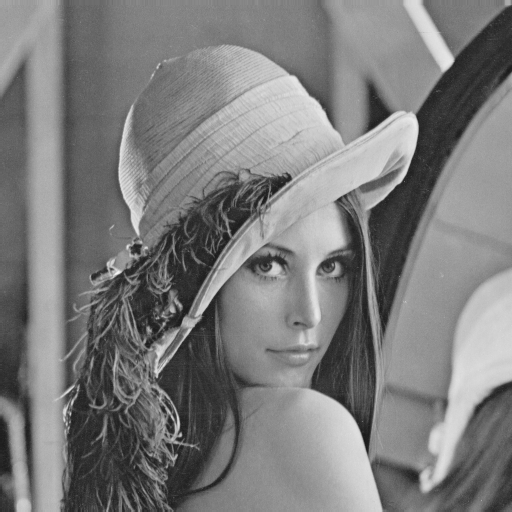
println("\n[1] Uploading an image...")
img_original = testimage("lena_gray_512")
img_original = Float64.(img_original)
display(Gray.(img_original))
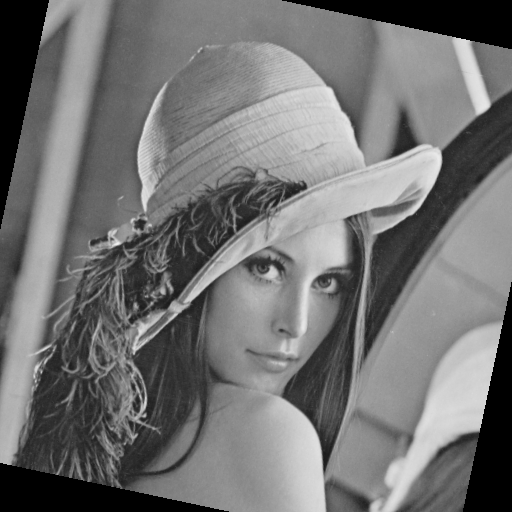
println("\n[2] Transformation (rotation + scale)...")
angle = π/15
scale = 1.0
center = SVector(size(img_original, 2)/2, size(img_original, 1)/2)
tfm = Translation(center) ∘ LinearMap(RotMatrix(angle)) ∘ LinearMap(SDiagonal(scale, scale)) ∘ Translation(-center)

img_transformed = warp(img_original, tfm, axes(img_original))
img_transformed = replace(img_transformed, NaN => 0.0, Inf => 0.0, -Inf => 0.0)
img_transformed_gray = Gray.(clamp01.(img_transformed))
display(img_transformed_gray)
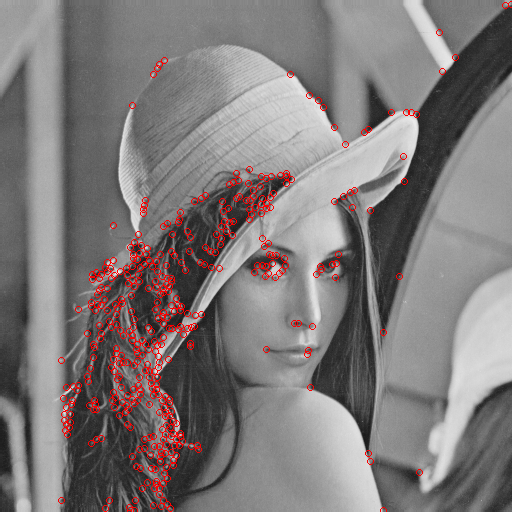
println("\n[3] Key point detection (Harris corners)...")
keypoints_original = harris_corners(img_original)
keypoints_transformed = harris_corners(img_transformed)
keypoints_transformed = filter_valid_keypoints(img_transformed, keypoints_transformed)

println("   Key points on the original: $(length(keypoints_original))")
println("   Key points on the transformed (valid): $(length(keypoints_transformed))")

img_kp_original = RGB.(img_original)
for (x,y) in keypoints_original
    draw_circle!(img_kp_original, (x, y), 3, RGB(1,0,0))
end
display(img_kp_original)

img_kp_transformed = RGB.(img_transformed)
for (x,y) in keypoints_transformed
    draw_circle!(img_kp_transformed, (x, y), 3, RGB(0,0,1))
end
display(img_kp_transformed)

println("\n[4] Extracting descriptors (patch-based)...")
desc_orig, valid_idx_orig = extract_patch_descriptors(img_original, keypoints_original)
desc_trans, valid_idx_trans = extract_patch_descriptors(img_transformed, keypoints_transformed)

println("   Valid descriptors in the original: $(length(valid_idx_orig))")
println("   Valid descriptors on the transformed: $(length(valid_idx_trans))")
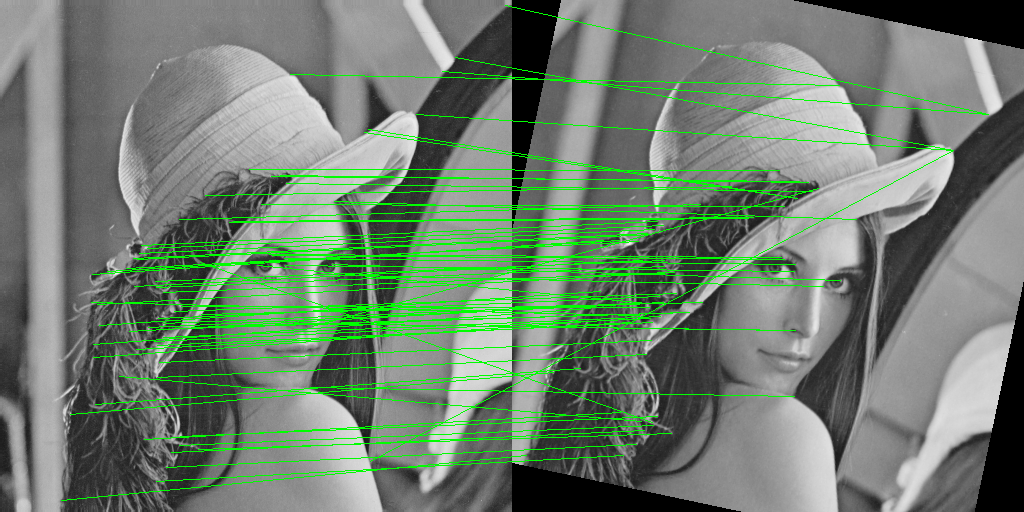
println("\n[5] Matching descriptors with ratio test...")
matches = match_descriptors_euclidean(desc_orig, desc_trans, valid_idx_orig, valid_idx_trans, ratio_thresh=0.7)
println("   Matches after ratio test: $(length(matches))")

h, w = size(img_original)
combined = fill(Gray(0), h, 2w)
combined[:, 1:w] = Gray.(img_original)
combined[:, w+1:2w] = img_transformed_gray
combined_rgb = RGB.(combined)

for (i1, i2) in matches
    x1, y1 = keypoints_original[i1]
    x2, y2 = keypoints_transformed[i2]
    p1 = (x1, y1)
    p2 = (x2 + w, y2)
    draw_line!(combined_rgb, p1, p2, RGB(0,1,0))
end
display(combined_rgb)
println("\n[6] RANSAC...")
inliers, H = ransac_homography(keypoints_original, keypoints_transformed, matches, iter=1000, thresh=3.0)
println("   Matches after RANSAC (inliers): $(length(inliers))")

combined_ransac = RGB.(combined)
for (i1, i2) in inliers
    x1, y1 = keypoints_original[i1]
    x2, y2 = keypoints_transformed[i2]
    p1 = (x1, y1)
    p2 = (x2 + w, y2)
    draw_line!(combined_ransac, p1, p2, RGB(0,1,0))
    draw_circle!(combined_ransac, p1, 5, RGB(1,0,0))
    draw_circle!(combined_ransac, p2, 5, RGB(1,0,0))
end
display(combined_ransac)
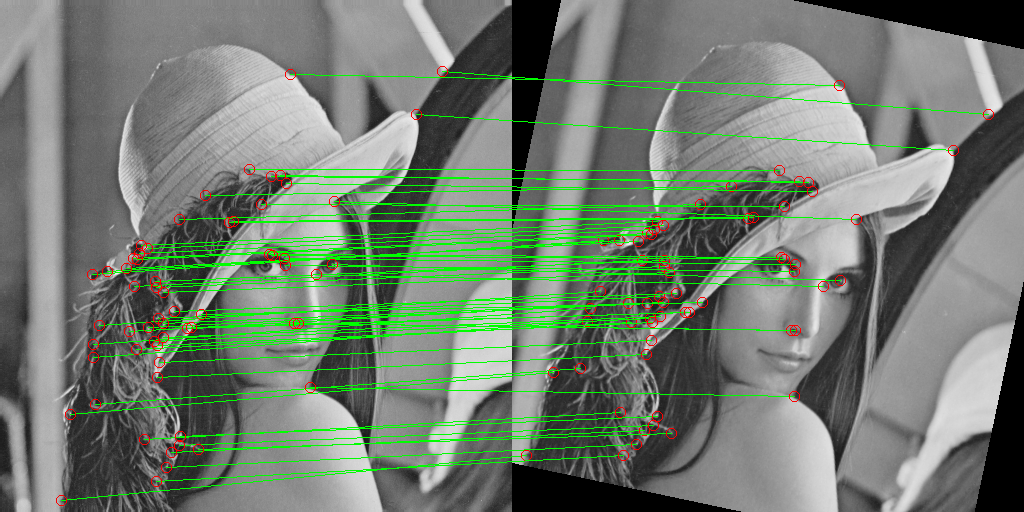
This article presents ** a complete computer vision training example** in the Julia language, which implements the classic pipeline for detecting and matching key points from scratch. Unlike using ready-made libraries (OpenCV, VLFeat), each algorithm is implemented manually with a detailed explanation of the mathematical basis.
Implemented components:
| Component | Algorithm | Lines of code | Complexity |
|---|---|---|---|
| Rendering | Bresenham (line, circle) | ~60 | |
| Detection | Harris-Stevens | ~40 | |
| Descriptors | Patch-based + Z-score | ~35 | |
| Comparison | Euclidean + Ratio Test | ~20 | |
| Model evaluation | RANSAC + Homography | ~50 |
Total: ~200 lines of code that demonstrate the full cycle from pixels to a geometric model.
Conclusion
This code demonstrates that understanding the fundamental algorithms of computer vision is more important than the ability to use ready-made libraries.
Use this code as a basis for your own experiments — change the parameters, try different images, add scale invariance, or integrate with ready-made descriptors. The understanding gained here will become the foundation for working with any computer vision systems.