Image classification using a convolutional neural network
In this project, we are training a convolutional neural network to classify images of several classes. At the output, we get a trained algorithm that takes an image as input and returns a prediction of the class to which it may belong.
Let's prepare the environment
We will install the necessary packages and configure the environment to display static graphs. In case of problems with libraries, run the command EngeePkg.purge(), which will eliminate all packages from your system except the system ones and will allow you to install the necessary packages without compatibility problems.
# Installing the necessary packages
Pkg.add(["Flux", "BSON", "ImageTransformations"])
gr();
The training data is located in several folders in the "training data" directory. Folder names are read from the file system and become class names. We also indicate where the examples for classification (with unknown labels) are located.
DATA_DIR = "$(@__DIR__)/training data";
UNKNOWN_DIR = "$(@__DIR__)/unknown";
Model training and validation
In this project, we will train a convolutional model of the following type from scratch:

In the script train.jl The functions that carry out are collected:
- Uploading images from class folders, resizing to 128x128, normalization
- Calculating the imbalance of classes (how many forks, how many spoons)
- Division of data into train/test (stratified, 75%/25%)
- ** Model Assembly** — convolutional network with BatchNorm and Dropout
- Balanced batches — so that in each butch had both classes equally
- Augmentation — doubling samples in the dataset by reflection and highlighting
- Learning cycle — forward pass, loss calculation, backward pass, weight update
- Quality assessment — accuracy, precision, recall on the test
- Early stopping — stop if there are no improvements 8 epochs
- Saving the best model
include("$(@__DIR__)/_scripts/train.jl")
model, classes = train_model(DATA_DIR; epochs=25, batch_size=16, lr=0.0005, test_split=0.25);
After training, we will transform how the model behaves. The script performs the following steps:
-
Loading the model, metadata, and unknown images — The network architecture, weights, class names, and number of examples in each class of the training set are extracted from the BSON file, and the model is switched to evaluation mode. The specified folder is scanned, each image is reduced to a size of 128×128, normalized to the range [-1, 1] and converted to the tensor format W×H×C
-
Classification of each image — the tensor is fed to the input of the model, the output logits are converted into probabilities via softmax, the class with the maximum probability and the corresponding confidence are determined, and the grouping by classes
-
Sorting by confidence and statistics output — Within each class, images are sorted from the most confident predictions to the least confident. Number of predicted images, percentage of total, average, maximum and minimum confidence
-
Bias analysis — comparison of the percentage of predictions of each class with the percentage of this class in the training set, indicator output
include("$(@__DIR__)/_scripts/visualize.jl")
results = classify_and_visualize(UNKNOWN_DIR);
We will classify all the images from the "unknown" folder and output up to 10 images for each class.
include("$(@__DIR__)/_scripts/simple_mosaic.jl")
plot(create_simple_mosaic(UNKNOWN_DIR))
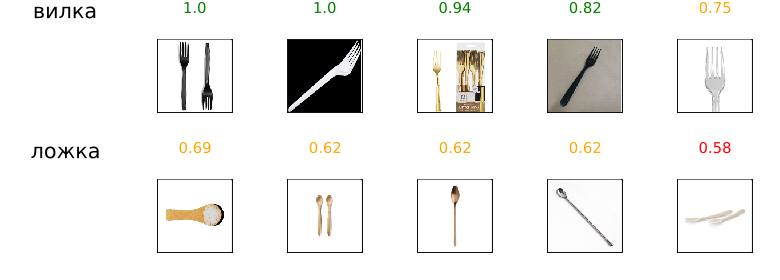
The following script allows you to reopen the trained model, predict the class for all files from the catalog of unlabeled examples, and output the results to a table.
include("$(@__DIR__)/_scripts/predict_to_csv.jl")
predict_to_csv(UNKNOWN_DIR, confidence_threshold=0.6, output_csv="$(@__DIR__)/predictions.csv")
Conclusion
The project has built the foundation for a simple task: arrange images in several folders and train a classifier that will allow you to distribute images from a second folder with unknown objects into the same classes.
The results presented in the example are obtained using a neural network that has gone through dozens of iterations of the learning process. To get a good classification algorithm, you need to vary hyperparameters, study the dataset, change the duration of training, the topology of the neural network (more layers, turn on or off batch normalization, etc.), the size of the batches or the optimizer, remove the barrier of premature shutdown, or simply change the settings of the random number generator.