Environment for manual adjustment of the PID controller
In this project, we suggest that you use a minimalistic environment to configure the PID controls for the graphical model of the system.
Description of the system
There is a model defined as a transfer function of the following type:
The task is to find the parameters of the PID controller at which the system satisfactorily performs a single step action.
Solution Steps
If this model is solved in the model editor, but does not demonstrate the parameters of the transition process that we are interested in, it's time to move on to the next stage and try to roughly select the parameters manually.
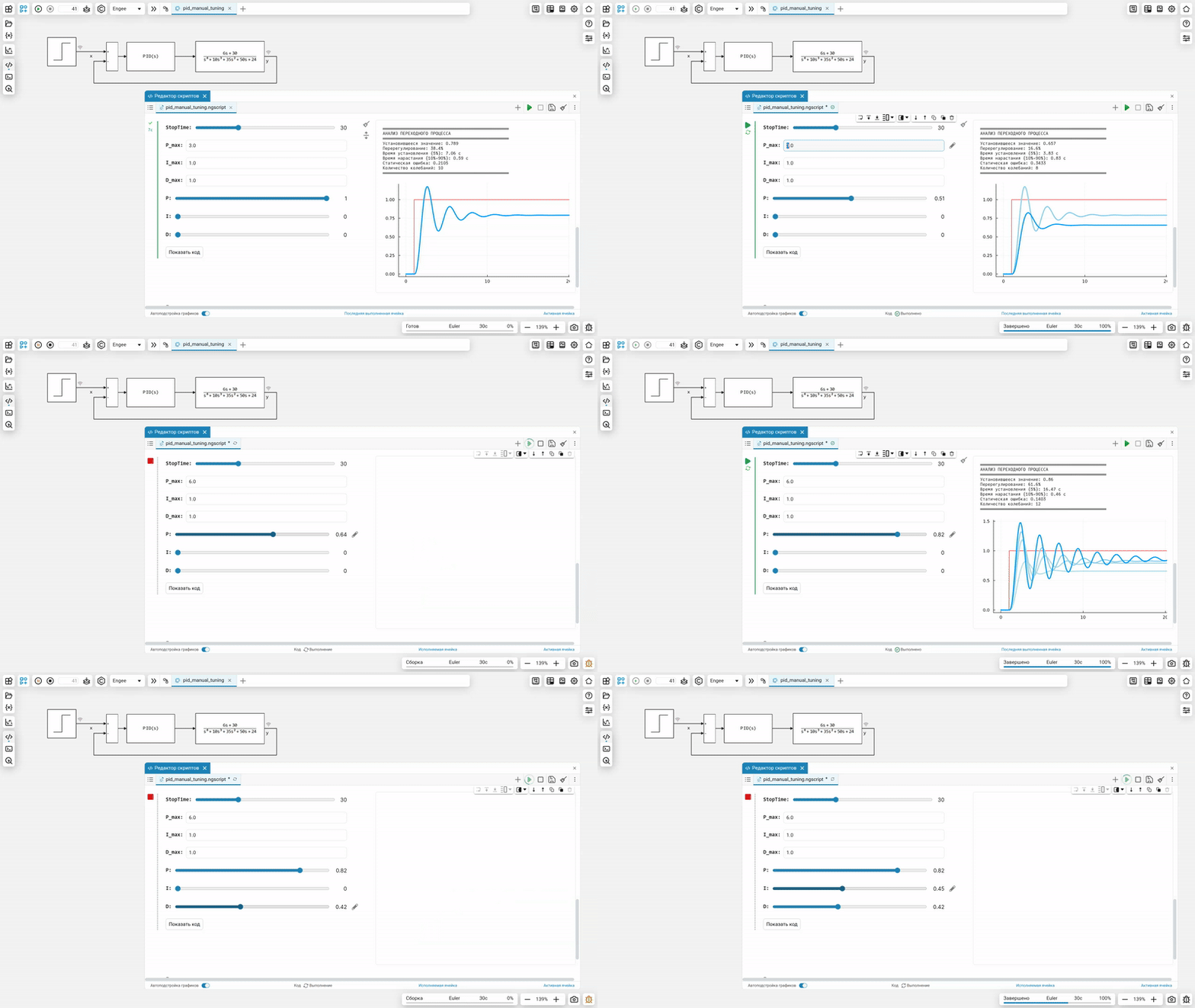
Since we obviously do not know the scale of the necessary parameters, in this example, each parameter of the PID controller is selected using two numbers.:
-
maximum value (unlimited),
-
Proportional coefficient (from 0 to 1)
This method provides some compromise between convenience and the breadth of the selected parameters. Without making modifications to the program code, the designer can set any scale of the regulator coefficients, and then smoothly select a more accurate value using a stepless regulator.
gr()
engee.open("pid_manual_tuning.engee")
using DataFrames, Statistics
all_runs = DataFrame[];
colors = [1, "skyblue", "lightblue", "powderblue", "lightblue1"];
> The code of the next cell can be hidden by double-clicking on the form with controls. In addition, it is convenient to place the cell output to the right of the parameter input form (button <svg width="16" height="16" viewBox="0 0 18 18" fill="none" xmlns="http://www.w3.org/2000/svg "><path fill-rule="evenodd" clip-rule="evenodd" d="M0 3.9C0 3.40294 0.436522 3 0.975 3L17.025 3C17.5635 3 18 3.40294 18 3.9C18 4.39706 17.5635 4.8 17.025 4.8L0.975 4.8C0.436522 4.8 0 4.39706 0 3.9Z" fill="#141519"></path><path fill-rule="evenodd" clip-rule="evenodd" d="M0 0.9C0 0.402944 0.436522 0 0.975 0L17.025 0C17.5635 0 18 0.402944 18 0.9C18 1.39706 17.5635 1.8 17.025 1.8L0.975 1.8C0.436522 1.8 0 1.39706 0 0.9Z" fill="#141519"></path><path fill-rule="evenodd" clip-rule="evenodd" d="M1.95 9.17075V16.0976H16.05V9.17075H1.95ZM1.5 7.26831C0.671573 7.26831 0 7.9235 0 8.73173V16.5366C0 17.3448 0.671573 18 1.5 18H16.5C17.3284 18 18 17.3448 18 16.5366V8.73172C18 7.9235 17.3284 7.26831 16.5 7.26831H1.5Z" fill="#141519"></path></svg>).
StopTime = 30 # @param {type:"slider",min:0,max:100,step:1}

P_max = 6.0 # @param {type:"number",placeholder:"1.0"}
I_max = 1.0 # @param {type:"number",placeholder:"1.0"}
D_max = 1.0 # @param {type:"number",placeholder:"1.0"}

P = 0.09 # @param {type:"slider",min:0,max:1,step:0.01}
I = 0.91 # @param {type:"slider",min:0,max:1,step:0.01}
D = 0 # @param {type:"slider",min:0,max:1,step:0.01}

engee.set_param!("pid_manual_tuning/ПИД-регулятор", "P"=>P*P_max, "I"=>I*I_max, "D"=>D*D_max)
engee.set_param!("pid_manual_tuning", "StopTime"=>StopTime)

# Run the model and get the results.
data = engee.run("pid_manual_tuning")
x = collect(data["x"])
y = collect(data["y"])

# Delete the last item if the list is full.
pushfirst!(all_runs, y)
if length(all_runs) > 5 pop!(all_runs); end;

# Analysis of the last transition process
if length(all_runs) > 0
    last_run = all_runs[1]
    time_data = last_run.time
    value_data = last_run.value

    # We determine the steady-state value (the last 10% of the data)
    steady_state_idx = Int.(collect((round(0.9 * length(value_data)):length(value_data))))
    steady_state_value = mean(value_data[steady_state_idx])

    # Defining the initial value
    initial_value = value_data[1]

    # Target value (we take it from the task)
    target_value = x.value[end]  # assuming that x is the assignment

    # We find the maximum deviation (overshoot)
    max_overshoot = maximum(value_data)
    overshoot_percentage = abs((max_overshoot - steady_state_value) / (target_value - initial_value)) * 100

    # Installation time (5%)
    tolerance = 0.05 * abs(target_value - initial_value)
    settling_time = nothing

    for i in length(value_data):-1:1
        if abs(value_data[i] - steady_state_value) > tolerance
            settling_time = time_data[i]
            break
        end
    end

    # Rise time (10%-90%)
    rise_time_10 = nothing
    rise_time_90 = nothing

    threshold_10 = initial_value + 0.1 * (steady_state_value - initial_value)
    threshold_90 = initial_value + 0.9 * (steady_state_value - initial_value)

    for i in 1:length(value_data)
        if value_data[i] >= threshold_10 && rise_time_10 === nothing
            rise_time_10 = time_data[i]
        end
        if value_data[i] >= threshold_90 && rise_time_90 === nothing
            rise_time_90 = time_data[i]
            break
        end
    end

    rise_time = rise_time_90 - rise_time_10

    # We display the results of the analysis
    println("═"^50)
    println("ANALYSIS OF THE TRANSITION PROCESS")
    println("═"^50)
    println("Установившееся значение: $(round(steady_state_value, digits=3))")
    println("Перерегулирование: $(round(overshoot_percentage, digits=1))%")

    if settling_time !== nothing
        println("Время установления (5%): $(round(settling_time, digits=2)) с")
    else
        println("Setup time: the process has not been established")
    end

    if rise_time !== nothing && rise_time_10 !== nothing
        println("Время нарастания (10%-90%): $(round(rise_time, digits=2)) с")
    end

    # Static error (if any)
    static_error = abs(target_value - steady_state_value)
    if static_error > 1e-6
        println("Статическая ошибка: $(round(static_error, digits=4))")
    else
        println("Static error: missing")
    end

    # Number of fluctuations
    peaks = 0
    for i in 2:length(value_data)-1
        if value_data[i] > value_data[i-1] && value_data[i] > value_data[i+1] &&
           value_data[i] > steady_state_value
            peaks += 1
        end
    end
    println("Количество колебаний: $peaks")

    println("═"^50)
end

# Output the graphs
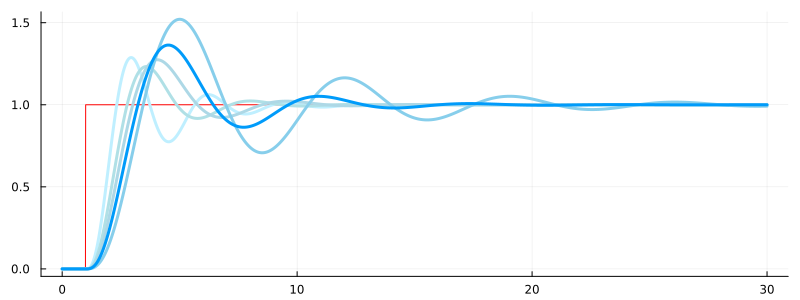
plot(x.time, x.value, c=:red, lw=1, size=(800,300), leg=false)
for i in length(all_runs):-1:1
    plot!(all_runs[i].time, all_runs[i].value, c=colors[i], lw=3)
end
plot!()
How it works
Conclusion
We have implemented a relatively rough method for manually selecting coefficients, which will allow you to adjust the parameters for a nonlinear, physical, linear or linearized system. The most cited method is the Ziegler-Nichols coefficient selection, and it could be implemented using the environment we created.