Engee documentation
Notebook

Performance comparison of Julia and Matlab ensemble methods

Introduction

Modern machine learning tasks require not only high model accuracy, but also efficient use of computing resources. The choice of tools directly affects the speed of development and training time, which is especially critical when working with large amounts of data and ensemble methods known for their resource intensity.

Ensemble methods are machine learning methods that combine several basic models (for example, decision trees) to produce a more accurate and stable forecast than each model individually.

This example provides a comparative analysis of three approaches to learning a classification model based on a random forest.:

  • using the MLJ and DecisionTree libraries on Julia,
  • as well as the fitcensemble functions in the plug-in Matlab core.

All methods solve the same problem of binary classification on synthetic data, which allows an objective comparison of their performance.

Importing libraries

We will attach the necessary libraries.

In [ ]:
import Pkg 
Pkg.add(["Random", "Distributions", "LinearAlgebra", "Statistics", "DecisionTree", "MLJ", "MLJDecisionTreeInterface"])
using Random, Distributions, LinearAlgebra, Statistics

Data generation

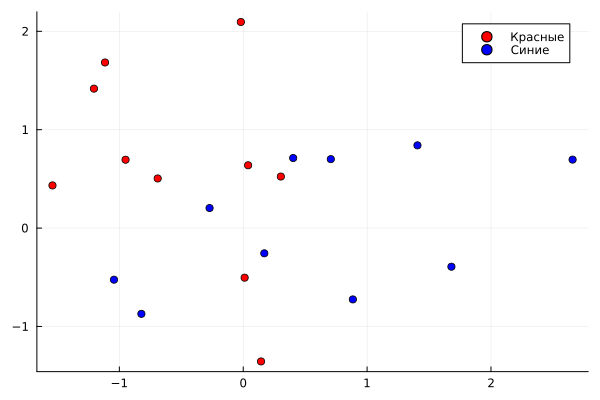
Let's create ten red and ten blue basepoints. Please note that in Julia you can use emoji characters in variable names.

In [ ]:
🔴 = rand(MvNormal([0.0, 1.0], 1.0I), 10)'
🔵 = rand(MvNormal([1.0, 0.0], 1.0I), 10)' 
Warning: detected a stack overflow; program state may be corrupted, so further execution might be unreliable.
Out[0]:
10×2 adjoint(::Matrix{Float64}) with eltype Float64:
  1.68076   -0.39267
 -1.04332   -0.524557
  0.403396   0.711854
  1.40658    0.840808
 -0.271765   0.203544
  0.706984   0.700587
  2.65888    0.695686
 -0.822003  -0.871902
  0.170193  -0.256672
  0.884981  -0.725199

Let's display the base points on the coordinate plane.

In [ ]:
gr()
график1 = scatter(🔴[:, 1], 🔴[:, 2], color=:red, marker=:circle, label="Red", legend=:topright)
scatter!(🔵[:, 1], 🔵[:, 2], color=:blue, marker=:circle, label="Blue")
display(graph1)
No description has been provided for this image

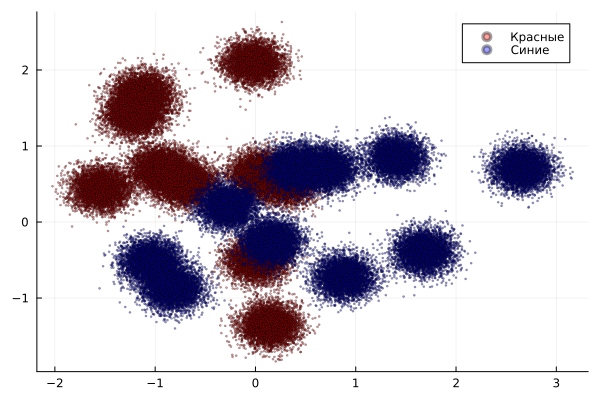
Create 50,000 dots of each color centered at random base points.

In [ ]:
N = 50000

🔴 = 🔴[rand(1:10, N), :] + randn(N, 2) .* sqrt(0.02)
🔵 = 🔵[rand(1:10, N), :] + randn(N, 2) .* sqrt(0.02)

график2  =scatter(🔴[:, 1], 🔴[:, 2], color=:red, marker=:circle, markersize=1, label="Red", alpha=0.36, legend=:topright)
scatter!(🔵[:, 1], 🔵[:, 2], color=:blue, marker=:circle, markersize=1, label="Blue", alpha=0.36)
display(graph2)
No description has been provided for this image

Combine the data and create class labels for the classification task. Create a single vector of labels and assign a -1 label for the blue dots.

In [ ]:
data = [🔴; 🔵] 
tags = ones(2*N) 
labels[N+1:2*N] .= -1
# red 1, blue -1
display(data)
100000×2 Matrix{Float64}:
 -1.17727     0.706835
 -1.57707     0.774681
  0.178602   -1.29926
 -1.01894     1.71275
 -0.0370812  -0.457162
  0.0653013  -0.420637
 -1.09482     1.26002
 -1.60749     0.494051
  0.410089    0.599331
  0.186491   -1.19344
 -0.91909     0.618676
 -1.10581     1.17909
  0.0183241   2.10268
  ⋮          
  0.430693    0.724032
  1.72878    -0.155705
 -1.02294    -0.301795
 -0.722527   -0.963421
  0.0536655  -0.328961
  1.5339     -0.571084
  0.865277   -0.797651
  2.67771     0.722167
 -0.971874   -0.562102
 -0.630223   -0.546642
 -0.179057    0.319442
  0.231351    0.864316

Comparison of classification models

MLJ

Let's train the model using the tools of the MLJ library (Machine Learning in Julia).

In [ ]:
using MLJ, MLJDecisionTreeInterface
tree = @load DecisionTreeClassifier pkg=DecisionTree
time = @elapsed begin
   model = MLJ.fit!(machine(EnsembleModel(model = tree(max_depth=-1), n=100, bagging_fraction=1.0, rng=1234), 
    DataFrame(data, :auto), coerce(ifelse.(labels .== 1.0, 1, 2), Multiclass)))
end

display(model)
println("Training time: ", время, " seconds")
[ Info: For silent loading, specify `verbosity=0`. 
[ Info: Training machine(ProbabilisticEnsembleModel(model = DecisionTreeClassifier(max_depth = -1, …), …), …).
import MLJDecisionTreeInterface ✔
Training ensemble:   3%[=>                                                ]  ETA: 0:00:22
Training ensemble:   5%[==>                                               ]  ETA: 0:00:25
Training ensemble:   7%[===>                                              ]  ETA: 0:00:27
Training ensemble:   8%[====>                                             ]  ETA: 0:00:44
Training ensemble:  10%[=====>                                            ]  ETA: 0:00:40
Training ensemble:  12%[======>                                           ]  ETA: 0:00:37
Training ensemble:  14%[=======>                                          ]  ETA: 0:00:35
Training ensemble:  16%[========>                                         ]  ETA: 0:00:33
Training ensemble:  18%[=========>                                        ]  ETA: 0:00:31
Training ensemble:  20%[==========>                                       ]  ETA: 0:00:30
Training ensemble:  22%[===========>                                      ]  ETA: 0:00:28
Training ensemble:  24%[============>                                     ]  ETA: 0:00:27
Training ensemble:  26%[=============>                                    ]  ETA: 0:00:26
Training ensemble:  28%[==============>                                   ]  ETA: 0:00:25
Training ensemble:  30%[===============>                                  ]  ETA: 0:00:24
Training ensemble:  32%[================>                                 ]  ETA: 0:00:24
Training ensemble:  34%[=================>                                ]  ETA: 0:00:23
Training ensemble:  36%[==================>                               ]  ETA: 0:00:22
Training ensemble:  38%[===================>                              ]  ETA: 0:00:21
Training ensemble:  40%[====================>                             ]  ETA: 0:00:21
Training ensemble:  42%[=====================>                            ]  ETA: 0:00:20
Training ensemble:  44%[======================>                           ]  ETA: 0:00:19
Training ensemble:  46%[=======================>                          ]  ETA: 0:00:19
Training ensemble:  48%[========================>                         ]  ETA: 0:00:18
Training ensemble:  50%[=========================>                        ]  ETA: 0:00:17
Training ensemble:  52%[==========================>                       ]  ETA: 0:00:16
Training ensemble:  54%[===========================>                      ]  ETA: 0:00:16
Training ensemble:  56%[============================>                     ]  ETA: 0:00:15
Training ensemble:  58%[=============================>                    ]  ETA: 0:00:14
Training ensemble:  60%[==============================>                   ]  ETA: 0:00:13
Training ensemble:  62%[===============================>                  ]  ETA: 0:00:13
Training ensemble:  64%[================================>                 ]  ETA: 0:00:12
Training ensemble:  66%[=================================>                ]  ETA: 0:00:11
Training ensemble:  68%[==================================>               ]  ETA: 0:00:10
Training ensemble:  70%[===================================>              ]  ETA: 0:00:10
Training ensemble:  72%[====================================>             ]  ETA: 0:00:09
Training ensemble:  74%[=====================================>            ]  ETA: 0:00:08
Training ensemble:  76%[======================================>           ]  ETA: 0:00:08
Training ensemble:  78%[=======================================>          ]  ETA: 0:00:07
Training ensemble:  80%[========================================>         ]  ETA: 0:00:07
Training ensemble:  82%[=========================================>        ]  ETA: 0:00:06
Training ensemble:  84%[==========================================>       ]  ETA: 0:00:05
Training ensemble:  86%[===========================================>      ]  ETA: 0:00:05
Training ensemble:  88%[============================================>     ]  ETA: 0:00:04
Training ensemble:  90%[=============================================>    ]  ETA: 0:00:03
Training ensemble:  92%[==============================================>   ]  ETA: 0:00:03
Training ensemble:  94%[===============================================>  ]  ETA: 0:00:02
Training ensemble:  96%[================================================> ]  ETA: 0:00:01
Training ensemble:  98%[=================================================>]  ETA: 0:00:01
Training ensemble: 100%[==================================================] Time: 0:00:31

trained Machine; caches model-specific representations of data
  model: ProbabilisticEnsembleModel(model = DecisionTreeClassifier(max_depth = -1, …), …)
  args: 
    1:	Source @591 ⏎ Table{AbstractVector{ScientificTypesBase.Continuous}}
    2:	Source @049 ⏎ AbstractVector{Multiclass{2}}
Training time: 33.510742957 seconds

The training time of the model using MLJ was: 33.51 seconds.

Matlab fitensemble

Let's train the model inside the Matlab core using the function fitcensemble, and measure the execution time.

In [ ]:
using MATLAB

cdata = data
grp = tags
@mput cdata grp N

mat"""
tic
mdl = fitcensemble(cdata, grp, 'Method', 'Bag');
stime = toc;
disp(mdl)
"""
@mget(stime)
println("Training time: ", stime, " seconds")
Warning: detected a stack overflow; program state may be corrupted, so further execution might be unreliable.
>> >> >> >> >> >>   ClassificationBaggedEnsemble
             ResponseName: 'Y'
    CategoricalPredictors: []
               ClassNames: [-1 1]
           ScoreTransform: 'none'
          NumObservations: 100000
               NumTrained: 100
                   Method: 'Bag'
             LearnerNames: {'Tree'}
     ReasonForTermination: 'Terminated normally after completing the requested number of training cycles.'
                  FitInfo: []
       FitInfoDescription: 'None'
                FResample: 1
                  Replace: 1
         UseObsForLearner: [100000x100 logical]


Training time: 29.569731 seconds

The training time of the model using Matlab was: 29.57 seconds.

DecisionTree

Let's train the model using the DecisionTree library tools.

In [ ]:
using DecisionTree
time = @elapsed begin
model = build_forest(labels, data, 2, 100, 1.0, rng=Random.GLOBAL_RNG)
end
display(model)
println("Training time: ", время, " seconds")
Ensemble of Decision Trees
Trees:      100
Avg Leaves: 2290.95
Avg Depth:  30.27
Training time: 6.06898517 seconds

The training time of the model using DecisionTree was: 6.07 seconds. This is the best result studied.

Conclusion

In this study, an ensemble of 100 decision trees was trained on synthetic data. A comparison of the three approaches showed a significant difference in performance.
The Julia DecisionTree native library (6.07 c) demonstrated the best performance, which makes it an excellent choice for high-load tasks and prototyping.
The results confirm that Engee provides significant performance gains compared to Matlab, while maintaining compatibility with its syntax. The presented classification methods are applicable in the tasks of computer vision, predictive analytics, medical diagnostics and financial modeling, where high accuracy and speed of processing large amounts of information are required.