Automatic adjustment of the PID controller
The example shows the automatic setting of the PID controller in the code and in the model.
The model of the thermal chamber
The control object is described by a transfer function
The time constant of 12 s describes the inertia of the heater and the walls, 3 s describes the faster dynamics of the air and the sensor.
Input u — heater power, %,
Output y is the heating temperature, °C.
You need to configure the control so that the transition time is no more than 20 seconds.
Automatic adjustment of the PID controller in the code
using ControlSystems
sys = tf([0.4], [36.0, 15.0, 1.0])
Characteristics of an uncorrected system
plotlyjs() # Interactive graphics backend
p1 = ControlSystems.bodeplot(sys)
t = 0:0.1:100.0
plot(stepinfo(step(feedback(sys), t)))
The cutoff frequency we will determine by the empirical formula
where - the time of the transition process.
wc = round(2.5*pi/20, digits=1)
amplitude_limits = Plots.ylims(p1[1])
Plots.plot!(p1[1], [wc, wc], [amplitude_limits[1], amplitude_limits[2]]; color=:red, linestyle=:dash, label="Желаемая частота 0.4 рад/с")
phase_limits = Plots.ylims(p1[2])
Plots.plot!(p1[2], [wc, wc], [phase_limits[1], phase_limits[2]]; color=:red, linestyle=:dash, label="" )
Setting up the PID controller
using EngeeControlSystems
c, info = pidtune(sys, :pidf, :parallel, wc)
Characteristics of the adjusted system
Wzam = feedback(c*sys) # A closed system
t = 0:0.1:100.0
plot(stepinfo(step(Wzam, t)))
Wraz = c*sys # An open system
ControlSystems.marginplot(sys)
ControlSystems.marginplot!(Wraz)
Automatic adjustment of the PID controller in the model
engee.addpath(@__DIR__)

if "demo_frd_pid_tune" in [m.name for m in engee.get_all_models()]
    m = engee.open( "demo_frd_pid_tune" )
else
    m = engee.load( "demo_frd_pid_tune.engee" )
end
engee.set_param!("demo_frd_pid_tune/ПИД-регулятор", "P"=>"1", "I"=>"0", "D"=>"0", "N"=>"100") # Default parameters of the PID controller
results1 = engee.run(m, verbose=true)
t = results1["tc_setpoint"].time;
tc_setpoint = results1["tc_setpoint"].value;
tc_temperature = results1["tc_temperature"].value;
tc_disturbance  = results1["tc_disturbance"].value;
tc_control = results1["tc_control"].value;
plot(layout=@layout([a; b; с]), legend=:outertopright)
plot!(t, tc_setpoint, subplot=1, ylabel="t, °C", w = 2, label="Desired temperature", linecolor =:blue)
plot!(t, tc_temperature, subplot=1, ylabel="t, °C", w = 2, label="Heating temperature", linecolor =:red)
plot!(t, tc_disturbance, subplot=2, ylabel="t, °C", w = 2, label="External disturbances", linecolor =:green)
plot!(t, tc_control, subplot=3, xlabel="Time, c", ylabel="t, °C", w = 2, label="Control signal", linecolor =:green)
The main drawback of the initial setup is a large static error. To eliminate it, it is necessary to use a PID controller. The application Frequency response adjustment of the PID controller is used to automatically adjust the coefficients of the PID controller.
Setting up the PID controller
Open the settings of the PID controller unit and click the Configure button. After a while, the application opens ** Setting the PID controller by frequency response**. When opened, the application receives the block parameters: the type of PID controller (P, I, PI, PID, etc.), the shape of the PID controller (parallel, ideal), the sampling period, as well as methods for integrating and filtering the derivative, if applicable.
The application automatically adjusts the PID controller based on the results of two simulations. During the first simulation, the basic response of the system is calculated. During the second simulation, the contour opens at the entrance of the control object. Sinusoidal effects and stepwise effects are applied to the object. The application then calculates the difference between the responses received in the two simulations. This eliminates the influence of perturbations acting in the model. The data obtained is used to evaluate the frequency response of the control object, which is used to calculate the coefficients of the PID controller.
Experiment Settings
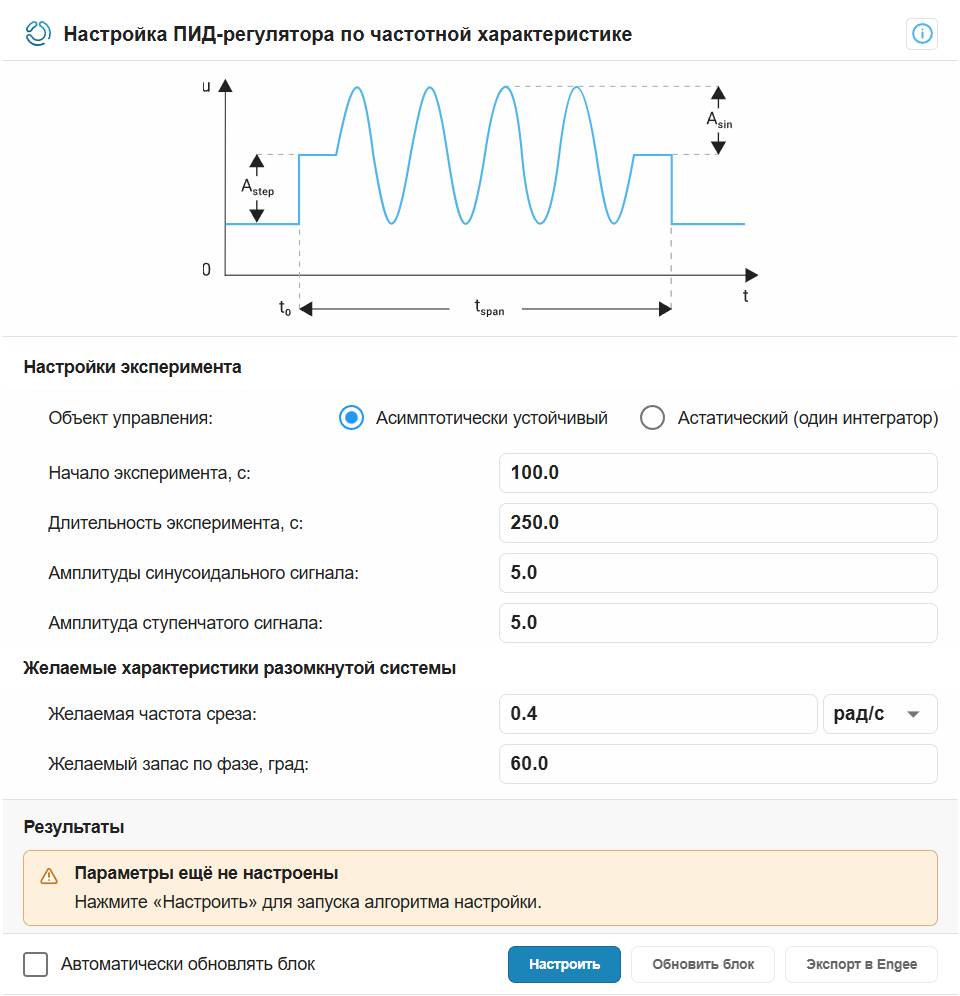
Management object
The transients show that the object Асимптотически устойчивый
The beginning of the experiment
The disturbance should be applied after the completion of the initial transient process. In this model, it ends around the time 100 с therefore, we will take this value for the start time of the experiment.
Duration of the experiment
The duration of the experiment can be estimated as ; where - the cutoff frequency that we determined earlier. Let's take the duration of the experiment 250 с
Amplitudes of the sinusoidal signal
The amplitudes of the disturbances should be large enough for the disturbance to cause a response above the noise level and small enough to keep the object in an approximately linear area near the nominal operating point and avoid saturation of the input or output of the object. Sufficient amplitudes are assumed to be equal 5.
The amplitude of the stepwise signals
The parameter is set if the object is asymptotically stable. Let's choose the same amplitude as for the sines.
Desired cutoff frequency:
The cutoff frequency was calculated earlier 0.4 рад/с
Desired phase margin
A 60° phase margin usually corresponds to an overshoot of about 10% or less.
After filling in the experimental settings fields, click Configure to run two simulations of the model and calculate the parameters of the PID controller.
After the setup is completed, the configured gain coefficients and the estimated phase margin are displayed in the application window in the Results section. Check that the calculated phase margin is close to The desired phase margin.
Checking the configured controller
Click the button Update the block to record the adjusted coefficients in the PID controller block, and then execute the cells below to study the behavior of the system after setting up the PID controller.
.png)
results2 = engee.run(m, verbose=true);
t = results2["tc_setpoint"].time;
tc_setpoint = results2["tc_setpoint"].value;
tc_temperature = results2["tc_temperature"].value;
tc_disturbance  = results2["tc_disturbance"].value;
tc_control = results2["tc_control"].value;
plot(layout=@layout([a; b; с]), legend=:outertopright)
plot!(t, tc_setpoint, subplot=1, ylabel="Temperature, °C", w = 2, label="Desired temperature", linecolor =:blue)
plot!(t, tc_temperature, subplot=1, ylabel="Temperature, °C", w = 2, label="Heating temperature", linecolor =:red)
plot!(t, tc_disturbance, subplot=2, ylabel="Temperature, °C", w = 2, label="External disturbances", linecolor =:green)
plot!(t, tc_control, subplot=3, xlabel="Time, c", ylabel="Temperature, °C", w = 2, label="Control signal", linecolor =:green)