Adjusting the frequency response of the PID controller for the Engee physical model
The model of the step-down converter
The model features a step–down DC-DC converter. The pulse converter converts a constant voltage of 30 V to an adjustable constant voltage. The converter model uses MOSFET transistors controlled by a PWM signal, so such a model cannot be directly linearized using the standard method.
This example discusses the control of a step-down converter using a PID controller. The coefficients of the PID controller will be calculated using the application Frequency response tuning of the PID controller.
Launching the model:
engee.addpath(@__DIR__)
if "pidtune_physmod" in [m.name for m in engee.get_all_models()]
    m = engee.open( "pidtune_physmod" ) # loading the model
else
    m = engee.load( "pidtune_physmod.engee" )
end
engee.set_param!("pidtune_physmod/Feedback Controller/PID Controller", "P"=>"1.0", "I"=>"1.0", "D"=>"0.0", "N"=>"100.0")
results1 = engee.run(m, verbose=true)
The set voltage changes from 15 to 25 V at a time of 0.004 s.
t = results1["Output voltage"].time;
output_voltage = results1["Output voltage"].value;
сontrol_signal  = results1["Control signal"].value;
reference_voltage  = results1["Reference voltage"].value;
plot(layout=@layout([a; b; с]), legend=:outertopright)
plot!(t, output_voltage, subplot=1, ylabel="Voltage, V", w = 2, label="Output voltage", linecolor =:blue)
plot!(t, reference_voltage, subplot=2, ylabel="Voltage, V", w = 2, label="Reference voltage", linecolor =:red)
plot!(t, сontrol_signal, subplot=3, xlabel="Time, c", ylabel="Filling coefficient", w = 2, label="Control signal", linecolor =:green)
The load current operates from 0.0025 to 0.005 C. At the initial coefficients of the regulator, the transient process has a noticeable overshoot and a long setup time. It is necessary to improve the bandwidth and phase margin of the system to increase its performance.
cyclic_load_current = results1["Cyclic load current"].value;
supply_current  = results1["Supply current"].value;
plot(layout=@layout([a; b]), legend=:outertopright)
plot!(t, cyclic_load_current, subplot=1, ylabel="Current, A", w = 2, label="Additional load current", linecolor =:blue)
plot!(t, supply_current, subplot=2, xlabel="Time, c", ylabel="Current, A", w = 2, label="Power supply current", linecolor =:green)
When setting up the controller, the following features of the model must be taken into account:
- no noise;
- the output of the controller sets the PWM fill factor;
- the PWM signal is limited to the range from 0 to 1;
- the nominal value of the steady-state control signal is 0.5.
For a step-down converter, it is desirable to provide a short rise time and a small overshoot. The target rise time in this example is 250 microseconds, and the overshoot should be less than 10%.
Setting up the PID controller
The PID controller that needs to be configured is located in the Feedback Controller subsystem. Open the settings of the PID controller unit and click the Configure button. After a while, the application opens ** Setting the PID controller by frequency response**. When opened, the application receives the block parameters: the type of PID controller (P, I, PI, PID, etc.), the shape of the PID controller (parallel, ideal), the sampling period, as well as the methods of integration and filtering of the derivative, if applicable.
The application automatically adjusts the PID controller based on the results of two simulations. During the first simulation, the basic response of the system is calculated. During the second simulation, the contour opens at the entrance of the control object. Sinusoidal effects and stepwise effects are applied to the object. The application then calculates the difference between the responses received in the two simulations. This eliminates the influence of perturbations acting in the model. The data obtained is used to evaluate the frequency response of the control object, which is used to calculate the coefficients of the PID controller.
Setting up an experiment
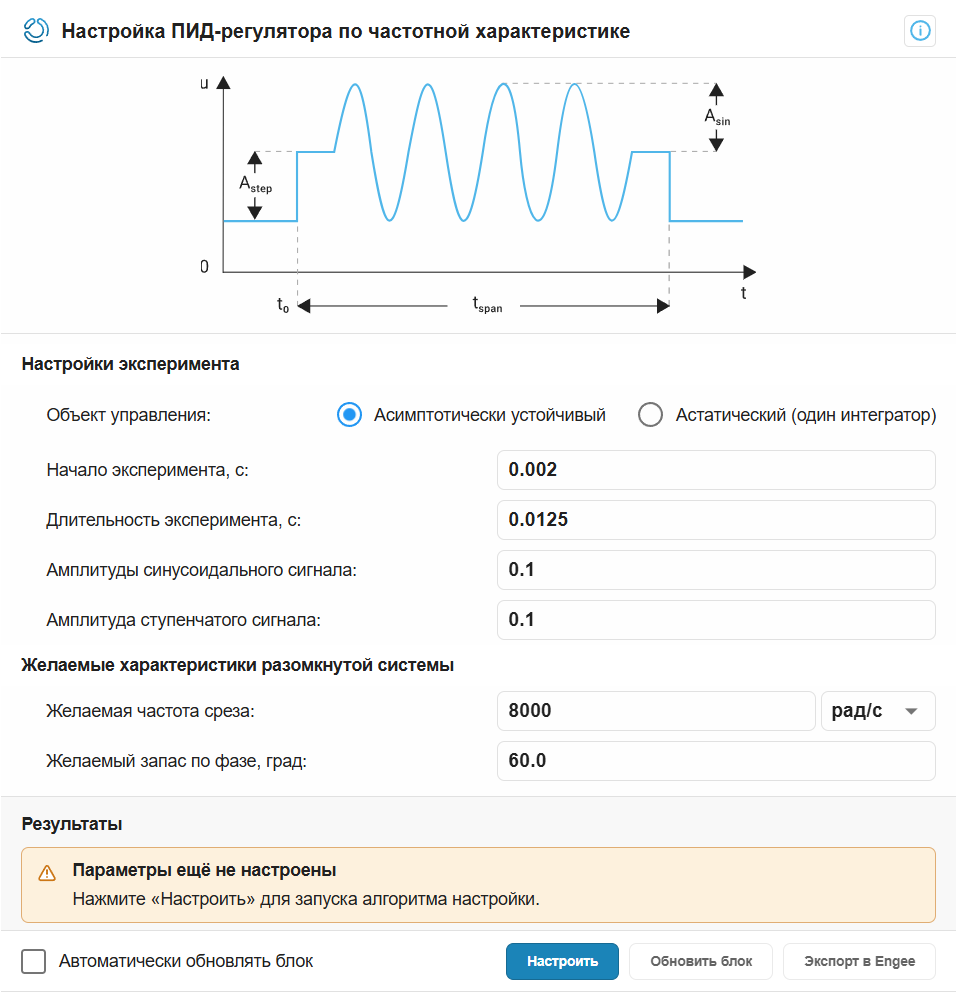
Desired cutoff frequency:
The target cutoff frequency is approximately estimated as . The desired rise time of 250 microseconds corresponds to a bandwidth of about 8000 рад/с.
Desired phase margin
A 60° phase margin usually corresponds to an overshoot of about 10% or less.
The beginning of the experiment
The disturbance should be applied after the completion of the initial transient process. In this model, it ends around the time 0.002 с therefore, we will take this value for the start time of the experiment.
Duration of the experiment
The duration of the experiment can be estimated as 100/ωc, therefore , the duration of the experiment is 0.0125 с.
Amplitudes of sinusoidal and stepwise signals
The tuner provides sinusoidal effects at frequencies [1/3, 1, 3, 10]ωc. The amplitudes of the sinusoidal and stepwise effects are equal 0.1. At the nominal value of the control signal 0.5 such impacts do not take it beyond the acceptable range.
After filling in the experimental settings fields, click Configure to run two simulations of the model and calculate the parameters of the PID controller.
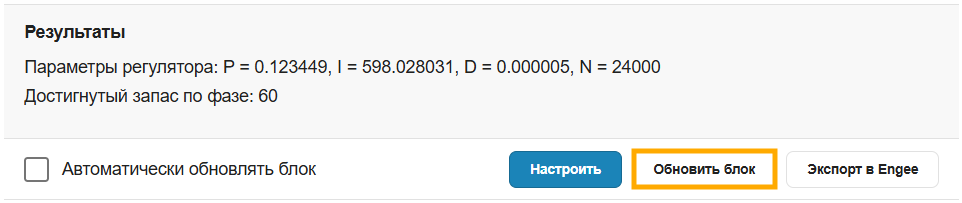
After the setup is completed, the configured gain coefficients and the estimated phase margin are displayed in the application window in the Results section. Check that the calculated phase margin is close to The desired phase margin.
Checking the configured controller
Click the button Update the block to record the adjusted coefficients in the PID controller block, and then run the cells below to study the behavior of the system after setting up the PID controller.
results2 = engee.run(m, verbose=true)
t = results2["Output voltage"].time;
output_voltage = results2["Output voltage"].value;
сontrol_signal  = results2["Control signal"].value;
reference_voltage = results2["Reference voltage"].value;
plot(layout=@layout([a; b; с]), legend=:outertopright)
plot!(t, output_voltage, subplot=1, ylabel="Voltage, V", w = 2, label="Output voltage", linecolor =:blue)
plot!(t, reference_voltage, subplot=2, ylabel="Voltage, V", w = 2, label="Reference voltage", linecolor =:red)
plot!(t, сontrol_signal, subplot=3, xlabel="Time, c", ylabel="Filling coefficient", w = 2, label="Control signal", linecolor =:green)
cyclic_load_current = results2["Cyclic load current"].value;
supply_current  = results2["Supply current"].value;
plot(layout=@layout([a; b]), legend=:outertopright)
plot!(t, cyclic_load_current, subplot=1, ylabel="Current, A", w = 2, label="Cyclic load current", linecolor =:blue)
plot!(t, supply_current, subplot=2, xlabel="Time, c", ylabel="Current, A", w = 2, label="Supply current", linecolor =:green)