A virtual training ground for ground vehicles
In this example, we show how to create a virtual polygon for processing algorithms for filtering commands from a remote control with the ability to monitor in real time not only according to graphs, but also according to a three-dimensional model.
Run an example
Select a startup script that is convenient for you and start the visualization server described in the file graphics_app.jl.
# Run the server with the dashboard in a separate window
app = engee.genie.start("$(@__DIR__)/graphics_app.jl", log_file="$(@__DIR__)/log.txt", open_url=true);

# Open the dashboard under the code cell
# app = engee.genie.start("$(@__DIR__)/app.jl", log_file="$(@__DIR__)/log.txt")
# display("text/html", """<iframe src="$(string(app.url))" width="650" height="320" style="border: none;"></iframe>""";)

# Get a link to send to another PC or launch in a separate window
# display("text/html", """<a href="$(string(app.url))" target="_blank" rel="noopener noreferrer">Open in a separate window</a>""")
To stop the application, run the command:
engee.genie.stop("$(@__DIR__)/graphics_app.jl");
App restart
We recommend restarting the server every few hours to avoid memory leaks, but it all depends on your requirements and the complexity of the model.
The standalone model
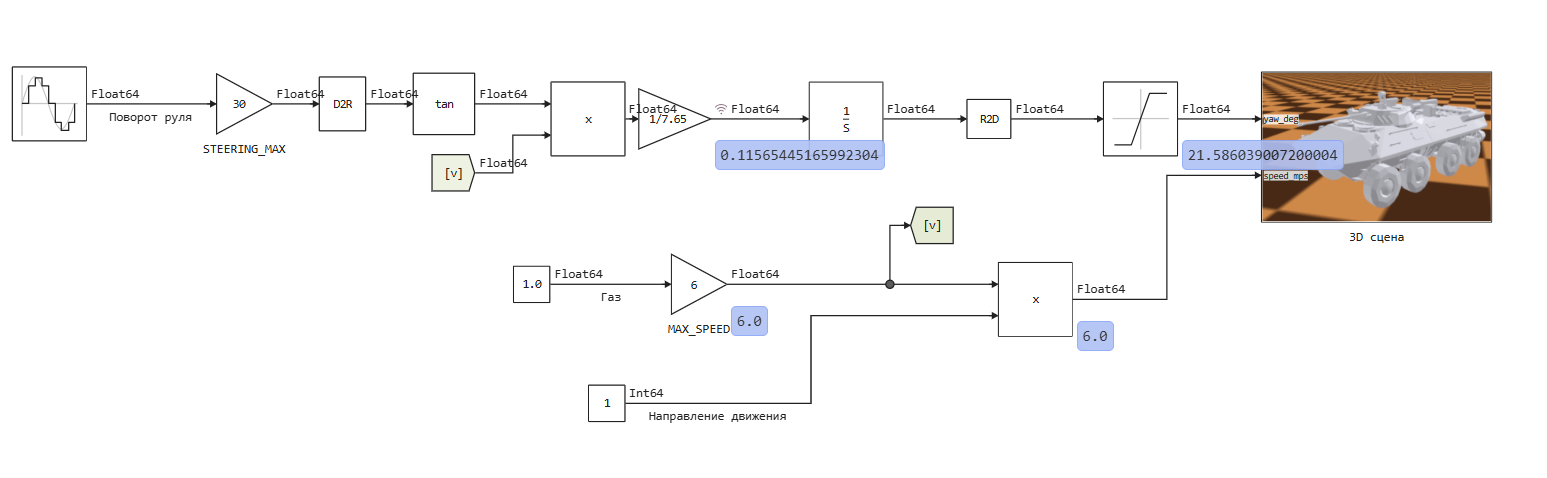
In the example, there is an autonomous model for testing cyclograms and, for example, creating feedback control algorithms.
To see how the model works in three-dimensional space, run the visualization server in parallel with the model.
If you run the model and the server for visualization, you will see how a three-dimensional model on a checkered background implements a control algorithm: the azimuth angle changes after turning the steering wheel, which passes through the equation , where - speed, - steering wheel turn, eh - the derivative of the azimuth of the vehicle in the global coordinate system. Through integration, we find the azimuth, convert it from radians to degrees, and limit the top and bottom to 30 degrees, after which it is sent for visualization.
The visualization server uses anti-aliasing, but only to facilitate perception (this eliminates jerky image output). All dynamics are calculated in the engee model.
Block sampling
If the sampling of the input blocks is set to 0 or Inf (for constants), there is a chance that UDP communication will be carried out at the same intervals, therefore we recommend setting the sampling of the input blocks manually (in this model it is 0.5 s).
This model receives signals of the same amplitude as when controlled from a joystick. Full throttle corresponds to zero on the thrust handle (it is inverted). The forward movement corresponds to zero input, which usually comes from the toggle switch on the joystick. The steering angle should be between 0 and 255
A model for working with a joystick
If you have a joystick configured to control this model, you can start the next model and control the vehicle manually.
Before launching the model
Be sure to launch and connect the Engee client program.Integration, otherwise only 0x00 values will be received from the joystick on all channels. How to do this - see Documentation.
Below you can see the model vehicle_control_app_with_usb_controller, which is designed to work with a specific USB controller:
.png)
The "thrust" handle is responsible for speed, the roll handle is responsible for turning the steering wheel. The toggle switch on the joystick is responsible for reversing the movement. The result of executing this model:
.gif)
Conclusion
Creating a three-dimensional simulation in Engee does not require additional software, unless you need advanced 3D object manipulation functions, CAD functions, calculation of mass and dimensional characteristics, or accounting for complex motion models. If you need a three-dimensional scene to display what is happening in the model, a server created using the [Engee-applications] toolkit (https://engee.com/helpcenter/stable/en/feature/genie-engee.html ) will be quite enough.