Automating code verification
I do a lot of code generation and checking that it works the same way with the model. This whole process takes a lot of manual labor, and at some point I realized that I was tired of doing the same job with my hands. Therefore, I automated it, and in this project we will look at automating the testing of the generated code in the IN-Loop (SIL) mode.
What is it all about?
The method of IN-Loop verification (SIL testing) is that we compare the results of the work of the code on the host relative to the work of the model using the same test vectors. Schematically, the testing looks like this:
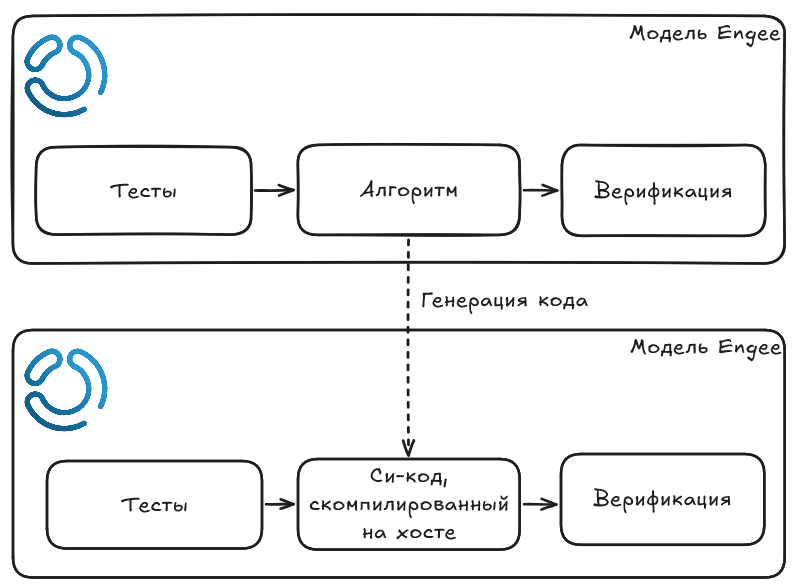
A code is generated from the algorithm model, and then the algorithm model is replaced by calls to the generated code. The code itself is compiled on the host. Thus, SIL testing allows you to check the behavior of the code relative to the model without switching to target computers (testing the code on the target computer is a separate testing stage called Processor-in-circuit, PIL).
Example
To show the automation of SIL testing, I took an example from this [publication] (https://engee.com/community/ru/catalogs/projects/integratsiia-c-koda-v-modeli-engee ). For ease of testing, I have integrated the Kalman filter model into a large model using the link model.:
.png)
The link model provides the following advantages::
- Isolation of the tested component in a separate model. When initializing the binding, the interfaces of the link model are initialized separately.
- Easy replacement of the tested component with a Si function unit for the SIL test via software control.
Test automation
To write automation, we will need to use software management. At the same time, I want to make my automation as reusable as possible. So I wrote my own module that automates most of the work. Moreover, the module was written taking into account that its functions will be used in tests that I will create in Test.jl.
Let's connect all the necessary packages and download the module!
import Pkg; Pkg.add("Test")
using Test

include("SILAutomation.jl");
MIL_Harness = "ABfilter_Harness";
SIL_Harness = "ABfilter_Harness_SIL";
CUT = "alphabetafilter";
Let's look at the module code.:
;cat SILAutomation.jl
Generating a verification Si function
To generate a verification Si function from a tested component, you must enable the appropriate setting in the model and generate the code. The buildCUT function in my module is responsible for this.:
function buildCUT(CUT::String)::Bool
    status = false;
    try
        abfilter = engee.load("$(CUT).engee")
        engee.set_param!(engee.gcm(),"CreateCFunction"=>true)
        engee.generate_code("$(CUT).engee", "$(CUT)_cg")
        include("$(CUT)_cg/$(CUT)_verification.jl")
        status = true;
    catch ex
        return status
    end
    return status
end
Для того чтобы эта функция была тестируема, будем возвращать статус как булеву переменную.
Автоматизация сборки SIL-обвязки
Я не хочу изменять обвязку для MIL-теста, но мне надо обеспечить эквивалентность тестовых векторов, поэтому я создам новую модель для SIL-теста. Посмотрим на код функции buildSILHarness:
function buildSILHarness(SIL_Harness::String,CUT::String,MIL_Harness::String)
# Create harness (copy contents)
# Guard for old harnesses
    model_names = [m.name for m in engee.get_all_models()];
    if any(model_names .== SIL_Harness)
        engee.close(SIL_Harness,force=true)
    end
    if isfile("$SIL_Harness.engee")
        rm("$SIL_Harness.engee")
    end

    SIL_mdl = engee.create("$SIL_Harness")
    engee.load("$(MIL_Harness).engee")
    engee.copy_contents(MIL_Harness,SIL_Harness)
    engee.delete_block("$SIL_Harness/$CUT")
    try
        engee.copy_block("$(CUT)_verification/C Function","$SIL_Harness/C Function")
    catch error
        show(error)
    end

    engee.open(SIL_Harness)
    #connect SIL Function And prepare simulation
    engee.add_line("ProcessNoiseVariance/1","C Function/1")
    engee.add_line("MeasurementNoiseVariance/1","C Function/2")
    engee.add_line("Add-1/1","C Function/3")
    engee.add_line("C Function/1","Add/2")
    engee.add_line("C Function/1","SysOut/1")
    engee.set_log("C Function/1")
    engee.set_param!(SIL_mdl,"FixedStep"=>engee.get_param(MIL_Harness,"FixedStep"))
    engee.arrange_model()
    engee.save("$SIL_Harness.engee")
end
First, using engee.create() I create a new empty model, and then copy the contents of the original model to the new one using engee.copy_contents(). Next, I delete the link model and substitute the verification C function using engee.delete_block() and engee.copy_block(). Then I restore the signals and specify which signal to record. Then I organize the model and save it. The final model will look like this:
.png)
How to compare signals correctly?
We are all used to comparing two numbers using the operator ==. For example:
1.0 == 1.0
But there are two problems here.:
- It is better not to compare floating-point numbers directly, but to compare the modulus of their difference with a certain margin of error.
- If we talk about signals, then again, we want to take into account that the signals may not be the same and we want to take into account a small error.
Additionally, it is necessary to check that the signals are synchronized.
Let's look at the code of the comparison function:
function compare_signals(sig_one,sig_two)
    Ds = collect(sig_one);
    Rs = collect(sig_two);
    Cmp = isapprox.(Ds, Rs)
    issynched = all(Cmp.time)
    issimilar = all(Cmp.value)
    return (issynched, issimilar)
end
We are comparing two signals, which are represented as a DataFrame with two columns: time and value. The comparison will be done through the isapprox() function. We will return two Boolean variables.:
- issynched - indicates that the signals are synchronized in time
- issimilar - shows that the signals are the same with a certain accuracy
Creating a test suite and running it
Now that we have everything we need to automate testing, let's create test suites using Test.jl. Moreover, I will post tests for the assembly of the verification model and the equivalence of the code and the model. Let's run the tests and see their results.:
@testset verbose = true "SIL" begin
    @testset "Code Generation" begin
        @test SILAutomation.buildCUT(CUT)==true
        @test isfile(CUT*"_verification.engee")
    end

    SILAutomation.buildCUT(CUT)
    SILAutomation.buildSILHarness(SIL_Harness,CUT, MIL_Harness)

    @testset "SIL Equality" begin
        (MR,SR) = SILAutomation.runSims(MIL_Harness,SIL_Harness)
        (sync,equal) = SILAutomation.compare_signals(MR["filtered"],SR["C Function.1"])
        @test sync==true
        @test equal==true
    end
end
It can be seen that all the tests have passed, and my automation is working!
Conclusions and next steps
Using software management, I managed to automate the routine. We can further develop this automation by extending it, for example, to PIL testing. Written using Test.jl tests can also be extended for deeper testing. And finally, you can organize testing within a single binding using [Variant Source] blocks (https://engee.com/helpcenter/stable/en/base-lib-signal-routing/variant-source.html )/Variant Sink. The latter requires a separate publication.