IEEE 9 Bus model with Synchronous machines
This demo project talks about ways to initialize synchronous machines, including for starting the model from steady state, using the example of calculating the IEEE 9 Bus model.
This work continues the theme started in "Calculation of the steady-state mode of the IEEE 9 model Bus". In the initial design, the initial state of the nine-node power system was determined using the Load Flow Source blocks and options Start simulation from steady state the Solver Configuration block. The next step is performed here: the Load Flow Source blocks representing generating nodes are replaced by synchronous machine models.
Ways to initialize synchronous machines
Before moving on to the model itself, you need to make a small digression. When adding a synchronous machine to the model, a practical problem arises: what effects must be applied to its input ports in order for the simulation to start from a preset mode? It is necessary to coordinate the electrical parameters of the machine, the excitation voltage and the mechanical torque.
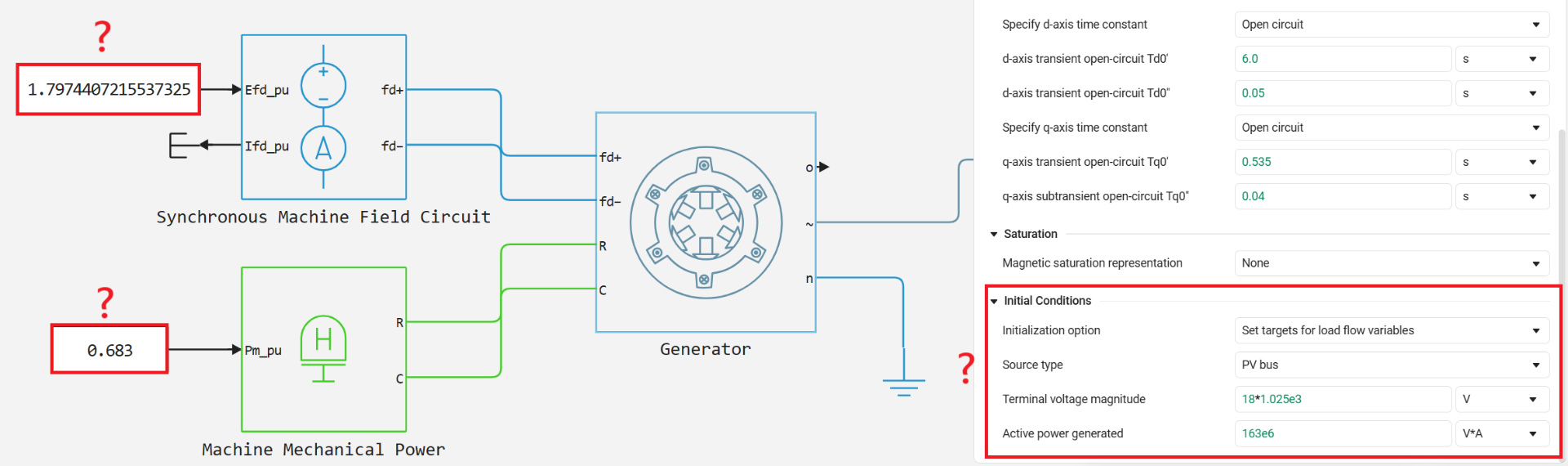
For example, in the block Synchronous Machine Round Rotor and in other machines, there are three initialization methods available in the options Initialization option.
Method No. 1. Through the angle of the rotor and the flow coupling (inconvenient)
Option Set targets for rotor angle and Park’s transform variables allows you to set priorities and initial target values for the rotor angle and Park conversion variables. In flow distribution tasks, this method is inconvenient, since the initial data is usually represented by capacities, voltages, and angles on the tires. Therefore, it is not considered further.
Method number 2. Through electrical parameters (fast, but not always accurate)
This method consists of three main steps:
- Set the machine parameters. In the machine settings, select
Set real power, reactive power, terminal voltage, and terminal phaseand set the required values:
-
active power
-
reactive power
-
the current line voltage at the terminals
-
voltage angle

- Press the button for calculating the initial values. Then on the tab
UtilitiesClick the buttonDisplay Associated Initial Conditions:

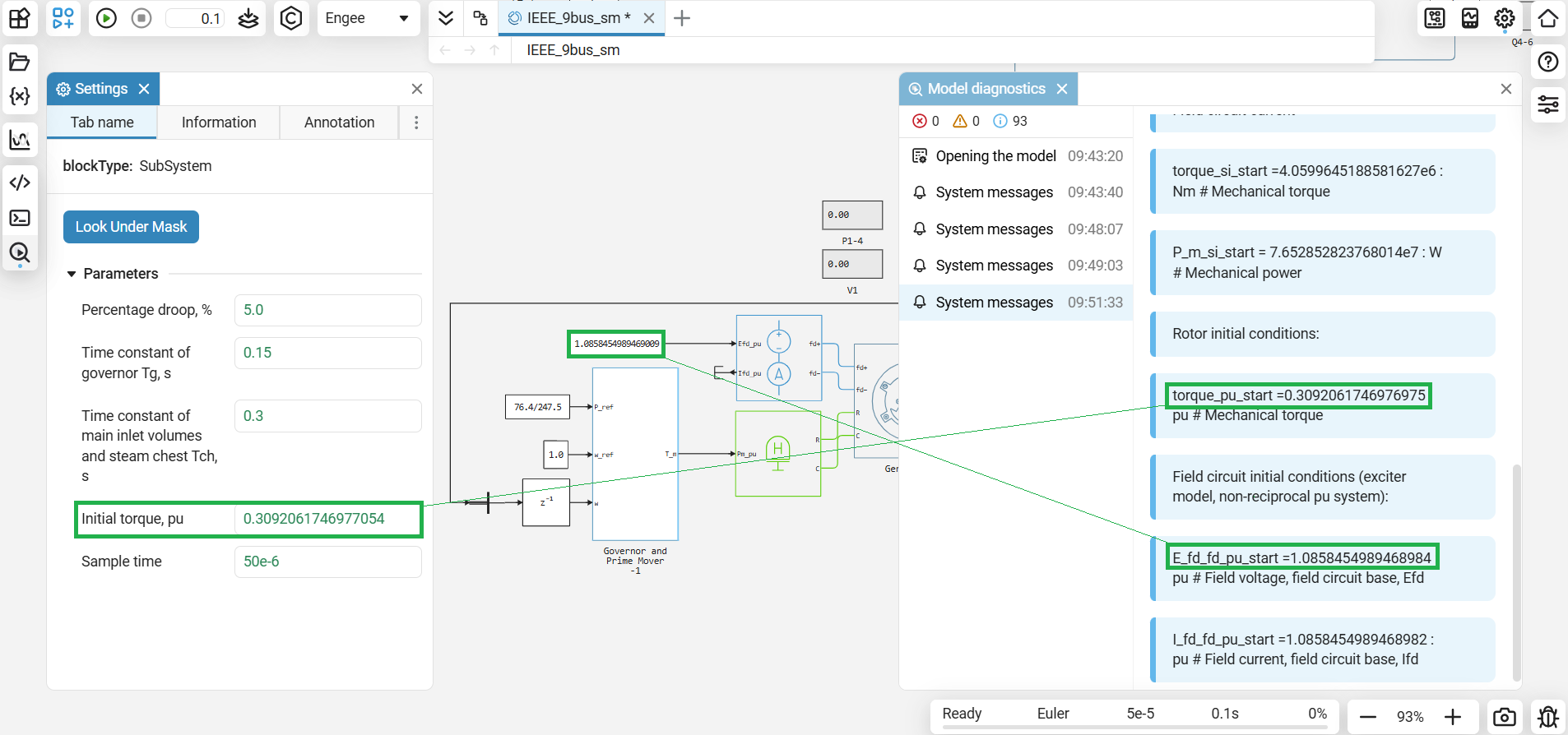
Based on the set parameters of the machine (based on them only!) Engee will calculate the associated initial conditions, including the required action in the excitation circuit (E_fd_fd_pu_start) and the mechanical moment (torque_pu_start), and displays them in the diagnostic window:
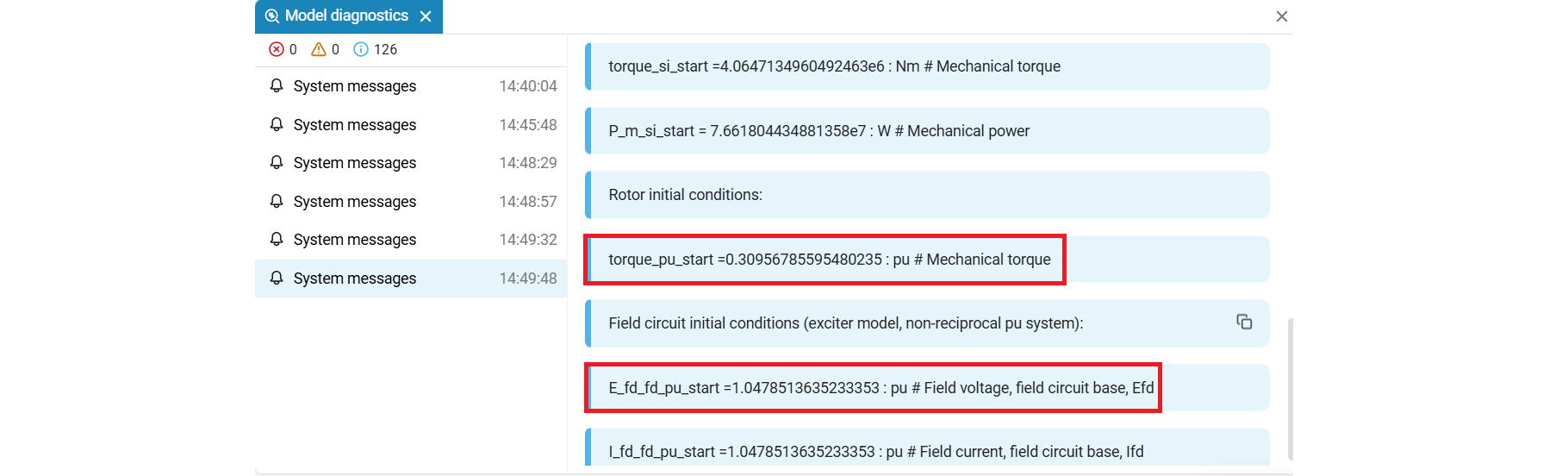
In the block card, we set the initial power value to 76.4 MW. At a given rated power of 247.5 MW, the initial moment torque_pu_start It is equal to 76.4 / 247.5 ≈ 0.3, which we eventually got in the diagnostic window. The initial voltage of the excitation winding was calculated in the same way. That is, we could perform these calculations "on a piece of paper".
- Insert the calculated initial moment of the machine and the EMF of the excitation winding into the corresponding blocks. The values obtained must be set in the Synchronous Machine Field Circuit and Machine Mechanical Power blocks connected to the excitation and rotation ports of the machine, respectively.
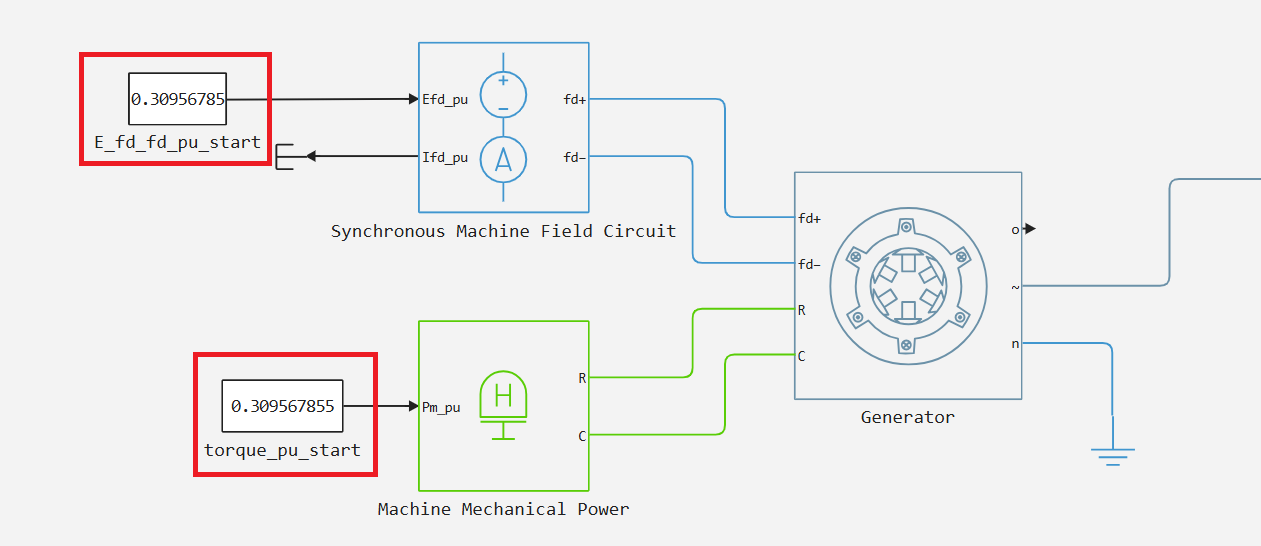
This method does not require a separate calculation of the steady—state mode of the entire network - and this is its main disadvantage. It is simple and convenient, and can work well on small models of the generator-power line-load type, but this method does not guarantee that the entire model will start the simulation exactly from the set mode: the initial conditions of an individual machine may not be consistent with the rest of the network.
Method number 3. With steady state calculation (accurate, but does not work for all blocks)
The workflow is almost identical to method 2.
- In the machine settings, select
Set targets for load flow variables, set the type of bus (Swing,PVorPQ) and specify the target values. - In the Solver Configuration block, enable the option
Start simulation from steady state. - Then on the tab
UtilitiesClick the buttonDisplay Associated Initial Conditions. - Insert the calculated initial moment of the machine and the EMF of the excitation winding into the corresponding blocks.
As you can see, an item has been added with the option enabled Start simulation from steady state. When the button is pressed Display Associated Initial ConditionsThe initial values will be calculated not only based on the parameters of a specific machine, but based on the initialization data (!) of the entire model. Engee will click the button to start initializing the model and calculate the associated initial conditions (required E_fd_fd_pu_startand torque_pu_start) and displays them in the diagnostic window.
Let's consider method #3 of initializing the machine in relation to the calculation of the IEEE 9 Bus circuit.
IEEE 9 Bus model with Synchronous machines
The main difference is IEEE_9bus.engee from IEEE_9bus_load_flow_in_time_domain.engee from the example «Расчет установившегося режима модели IEEE 9 Bus» It consists in replacing the Load Flow Source blocks in the generating nodes with synchronous machines with speed controls.
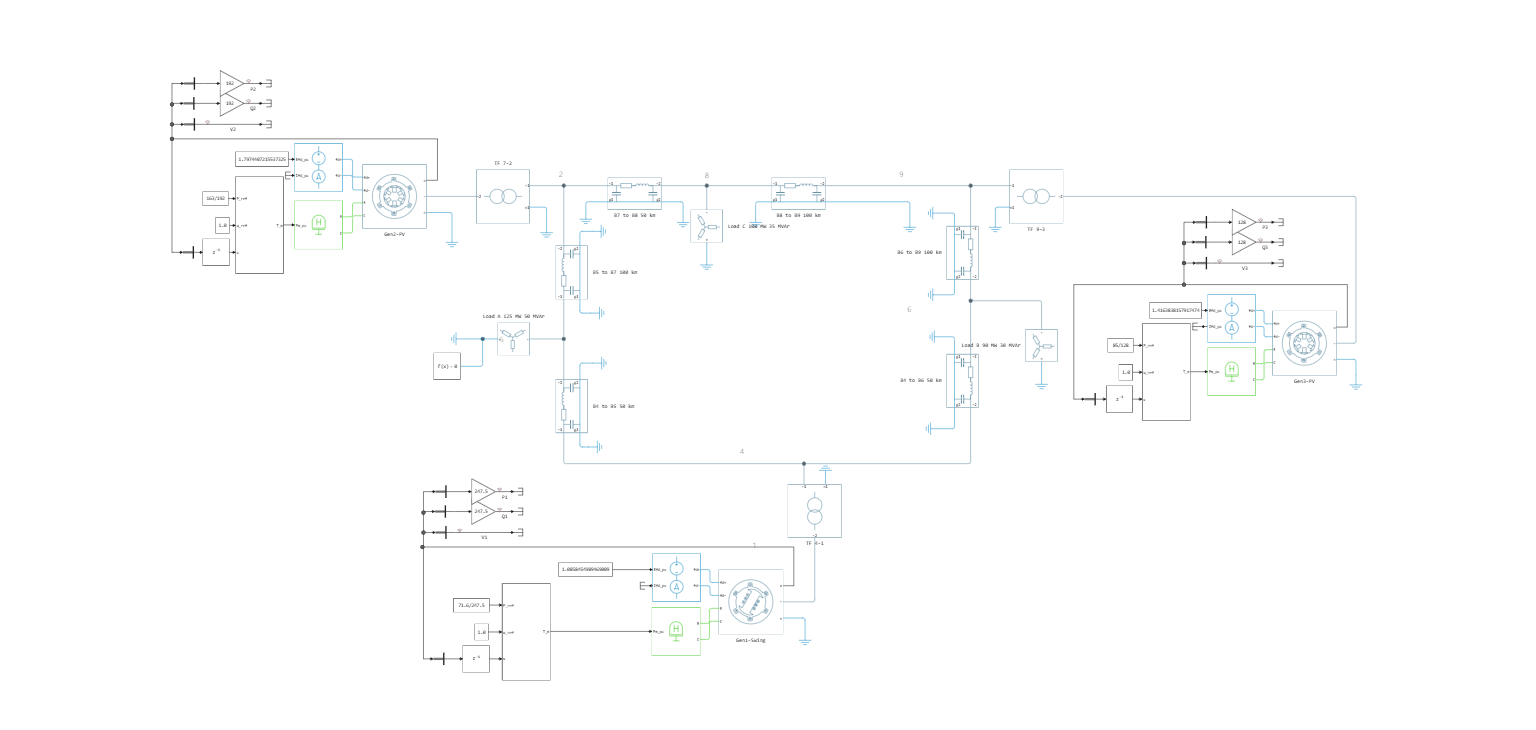
For each synchronous machine, we perform an automated calculation of the initial values described in method No. 3. As a result, we get:
- for Swing type 1 generator:
E_fd_fd_pu_start = 1.085andtorque_pu_start = 0.309.. - for type 2 PV generator:
E_fd_fd_pu_start = 1.797..andtorque_pu_start = 0.855.. - for 3 types of PV generator:
E_fd_fd_pu_start = 1.416..andtorque_pu_start = 0.668..
We insert the received values torque_pu_start in the speed controls, and E_fd_fd_pu_start at the entrance Synchronous Machine Field Circuit :
After that, we will run the simulation and get graphs for each generator.:
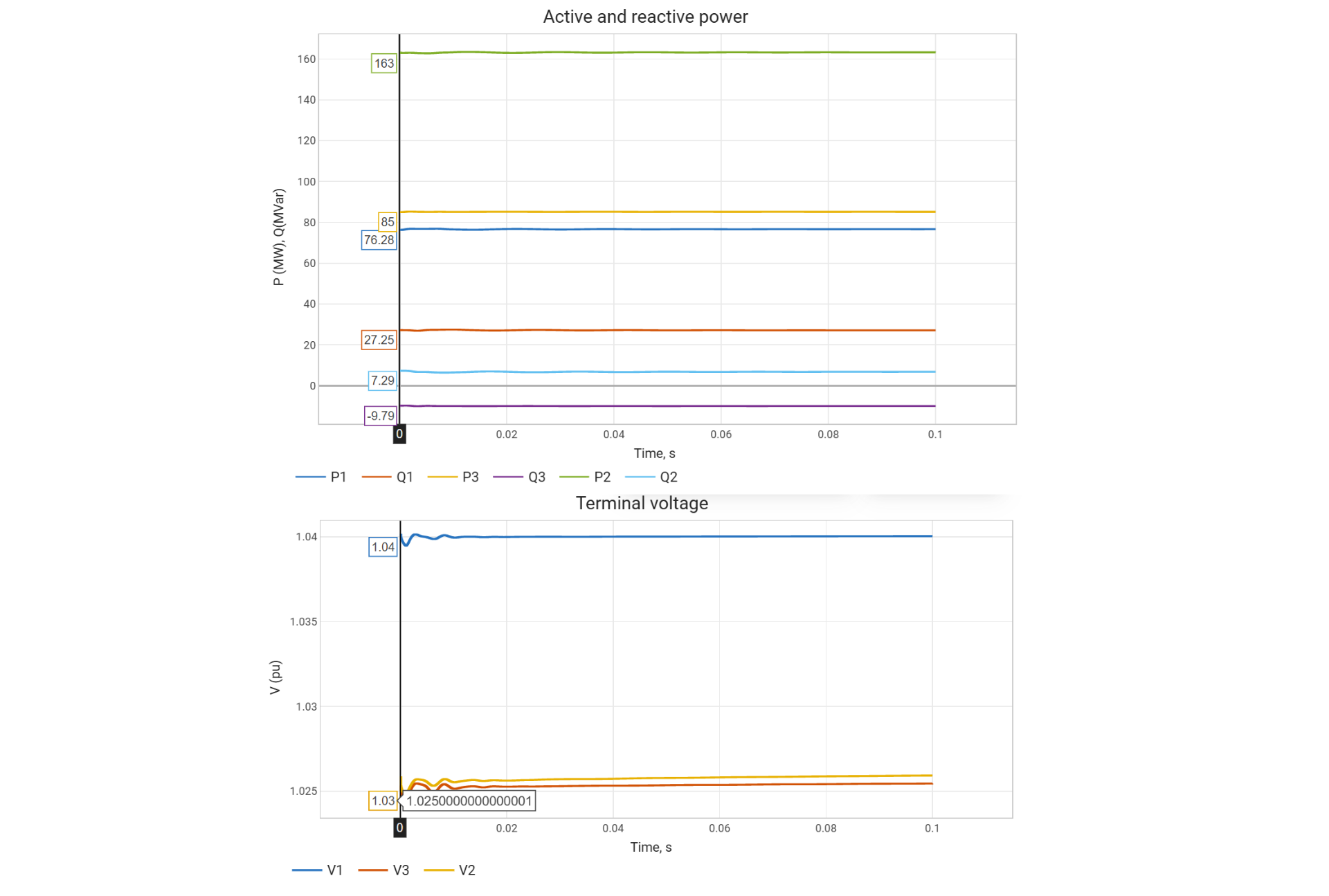
According to the graph, we will analyze the first point at time t=0 (for this point, the steady-state mode and the initial values for the machines were located). The simulation results obtained are quantitatively consistent with the results from the example «Расчет установившегося режима модели IEEE 9 Bus».
TODO: add ARV.
Conclusions
The demo project discusses ways to initialize synchronous machines using the IEEE 9 Bus model as an example. It shows how to switch from setting the initial parameters of an individual machine to the coordinated initialization of the entire power system from steady state.
Related documentation
-
Initialization of synchronous machines and regulators is the procedure for calculating the initial values of excitement and mechanical action.
-
Starting electrical models from a steady-state sinusoidal mode — purpose, algorithms, and limitations of the option
Start simulation from steady state. -
Calculation of flow distribution in three-phase electric networks using Engee — tire setup
Swing,PVandPQ, setting the parameters of the Load Flow Source blocks and calculating the steady-state mode.