Organizing the model using subsystems in the Engee environment
This article discusses the transition from an algorithmic description of a physical problem to a structural model in the Engee simulation environment. The main focus is on the use of various types of subsystems to enhance the visibility, modularity, and reuse of components.
The Julia source code simulates an electrical circuit consisting of three resistors: the resistors R₁ and r₂ are connected in parallel, and their equivalent resistance is connected in series with the resistor R₃. The calculation takes into account:
- manufacturing tolerance of resistances (random variation ±tol%);
- temperature dependence of the resistance through the temperature coefficient TKR.
The purpose of the simulation is to determine the power dissipated at each resistor and the total power consumed from the source.
R1_nom, R2_nom, R3_nom = 100.0, 200.0, 150.0
tol, TKR, T, T0, U = 5.0, 0.01, 40.0, 20.0, 12.0

rand_coef() = 1 + (rand() * 2 - 1) * tol / 100
temp_coef = 1 + (TKR / 100) * (T - T0)
R1 = R1_nom * rand_coef() * temp_coef
R2 = R2_nom * rand_coef() * temp_coef
R3 = R3_nom * rand_coef() * temp_coef

R_parallel = 1 / (1/R1 + 1/R2)
R_total = R_parallel + R3
I = U / R_total
U_parallel = I * R_parallel
U_R3 = I * R3

P1 = U_parallel^2 / R1
P2 = U_parallel^2 / R2
P3 = U_R3^2 / R3
P_total = U * I

println("Capacities:")
println("P1 = $P1 W")
println("P2 = $P2 W")
println("P3 = $P3 W")
println()
println("Total capacity:")
println("P_total = $P_total W")
Decoding variables:
| Variable | Description |
|---|---|
R1_nom, R2_nom, R3_nom |
Nominal resistances at reference temperature T₀, ohms |
tol |
Percentage tolerance (±%) |
TKR |
Temperature coefficient of resistance, %/°C |
T |
Current temperature, °C |
T0 |
Reference temperature, °C |
U |
Source voltage, V |
rand_coef() |
Random coefficient return function in the range [1–tol/100, 1+tol/100] |
temp_coef |
Temperature multiplier: 1+ (TKR/100)·(T–T₀) |
R1, R2, R3 |
Actual resistances based on tolerance and temperature |
R_parallel |
Equivalent resistance of the parallel section |
R_total |
Total circuit resistance |
I |
Current in the circuit |
U_parallel |
Voltage on the parallel section |
U_R3 |
Voltage across the resistor R3 |
P1, P2, P3 |
Power dissipation on resistors |
P_total |
Total power consumed from the source |
Building a model in the Engee environment
Transferring the algorithm to a graphical modeling environment allows you to visualize the structure of the system and simplifies its analysis. The initial model (0_System) contains all the blocks corresponding to the source code operations.
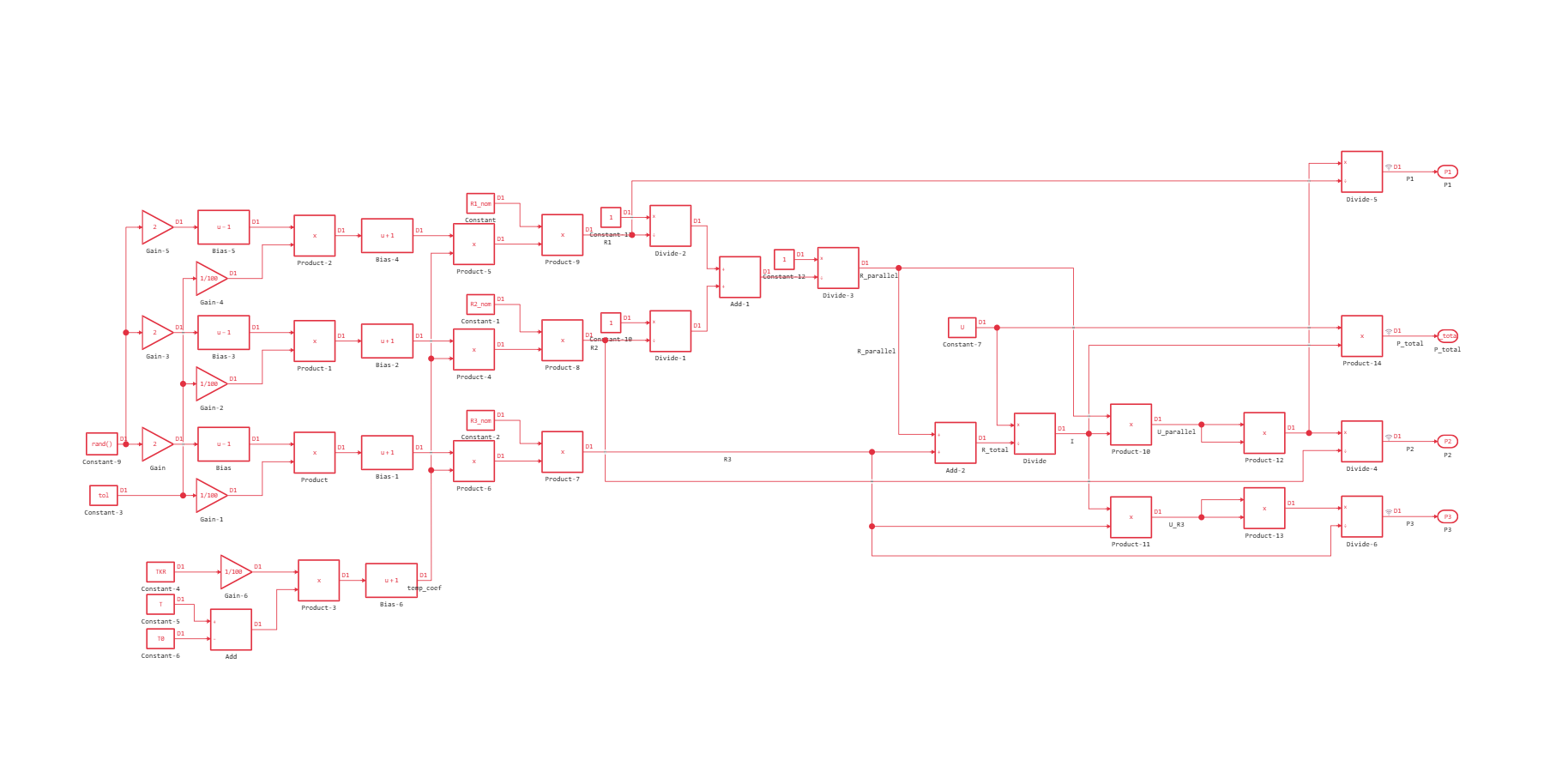
As can be seen from the figure, this implementation suffers from excessive connectivity and low readability. To overcome these disadvantages, subsystems are used — grouping blocks that combine logically related elements.
Creating subsystems
There are two ways to create a subsystem:
- select a group of blocks and use the merge function;
.png)
- add a ready-made Subsystem block from the library and fill it with the contents manually.
.png)
After grouping the model (2_Subsystem_and_Mask) becomes significantly more structured:
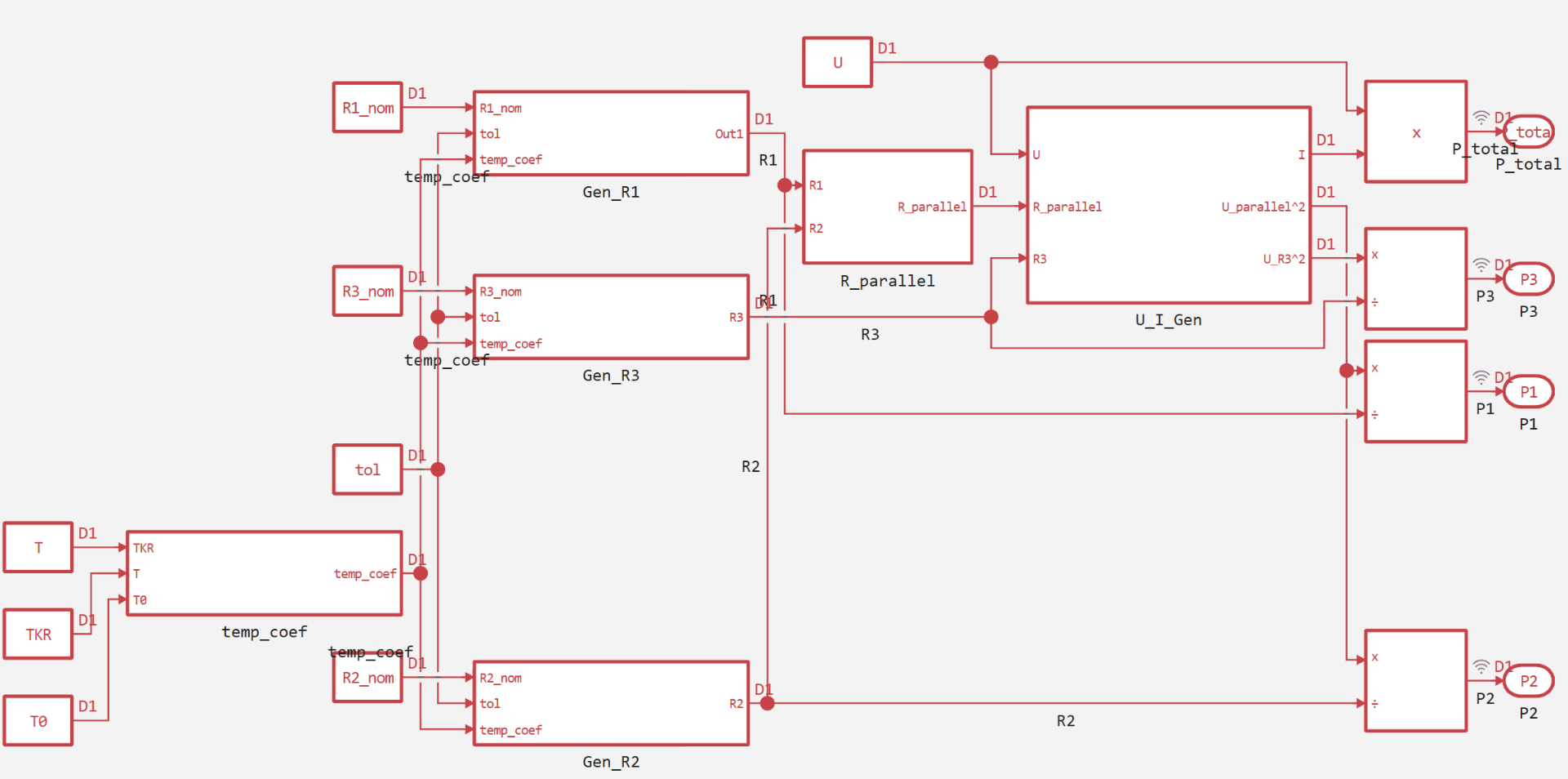
The following functional subsystems are identified in the model:
| Subsystem | Appointment | Formula |
|---|---|---|
| temp_coef | Calculation of the temperature coefficient | temp_coef = 1 + (TKR/100)·(T − T0) |
| Gen_R1 | R1 generation based on tolerance and temperature | R1 = R1_nom · rand_coef() · temp_coef |
| Gen_R2 | Generating R2 | R2 = R2_nom · rand_coef() · temp_coef |
| Gen_R3 | Generating R3 | R3 = R3_nom · rand_coef() · temp_coef |
| R_parallel | Calculation of the equivalent resistance of the parallel connection R1 and R2 | R_parallel = 1/(1/R1 + 1/R2) |
| U_I_Gen | Calculation of current, voltage and their squares for calculating capacities | R_total = R_parallel + R3, I = U/R_total, U_parallel = I·R_parallel, U_R3 = I·R3 |
Additional blocks (outside the subsystems):
| Block | Appointment |
|---|---|
| Divide-4, -5, -6 | Division to calculate P2, P1, P3 respectively |
| Product-14 | Calculating the total power of P_total = U·I |
| Constants | Setting the parameters R1_nom, R2_nom, R3_nom, tol, TKR, T, T0, U |
| Outport (P1, P2, P3, P_total) | Output of results |
Subsystems not only improve visual perception, but can also influence the logic of the model. For more information about the control ports of the subsystems, see [relevant example] (https://engee.com/community/ru/catalogs/projects/subsystems_1 ).
Block Masks
Masks* allow you to parameterize subsystems, hiding the internal implementation and providing a user-friendly interface for setting parameters. The mask is created through the subsystem's context menu.
.png)
.png)
In the model under consideration, masks are used to set:
- parameters
TKR,T,T0in the temp_coef subsystem;
.png)
- denominations
R1_nom,R2_nom,R3_nom, admissiontoland the temperature coefficient in the resistance generation units;
.png)
- voltage
U, resistancesR_parallelandR3in the U_I_Gen block.
.png)
The parameters can be set as numeric constants or as references to variables in the Engee workspace.
A detailed description of working with masks is provided in the examples.:
Atomic subsystems
*An Atomic subsystem is a subsystem that runs as a single indivisible unit with its own sampling step, independent of the step of the main model. This allows you to:
- set different sampling rates for different parts of the model;
- simplify code generation;
- isolate the logic inside the subsystem.
In the model 3_Atomic subsystems The resistance generation units are made atomic. The configuration is performed in the subsystem parameters.
.png)
For more information about atomic subsystems and their use in code generation, see this примере.
Reference subsystems (reference models)
The reference subsystem (Model Reference) allows you to use the same model in several places of the project, while maintaining a single source. Any changes to the source model are automatically propagated to all its instances. This is especially useful in the presence of repetitive functional nodes.
To create a reference subsystem, it is necessary:
- Create a separate model with declared inputs/outputs (for example,
Gen_R.engee).
.png)
- Use the block in the main model
Modeland specify the path to this model.
.png)
A detailed description can be found in an example of reference models.
Custom Block Libraries
For multiple use of subsystems in various projects, they can be saved in user libraries (files with the extension .nglib). The library works similarly to reference models, but is designed to store multiple independent blocks.
In this example, the subsystem Gen_R copied to the library R_Lib.nglib. After connecting the library folder in the Engee path, the block becomes available for insertion into any model.
.png)
Model 5_Subsystem_Lib uses a block call from this library.
.png)
For more information about creating libraries, see an example of custom block libraries.
Model verification
To verify the correctness of the model, it is enough to compare the simulation results of the latest version (5_Subsystem_Lib) with reference values obtained from the original Julia script.
function run_model(name)
    p, is_loaded = joinpath(@__DIR__, name * ".engee"), name ∉ [m.name for m in engee.get_all_models()]
    is_loaded && engee.load(p, force=true)
    out = engee.run(engee.open(name), verbose=true)
    is_loaded && engee.close(name, force=true)
    sleep(0.1); return out
end
run_model("5_Subsystem_Lib")
P_total_S = collect(simout["5_Subsystem_Lib/P_total"]).value[end]
P1_S = collect(simout["5_Subsystem_Lib/P1"]).value[end]
P2_S = collect(simout["5_Subsystem_Lib/P2"]).value[end]
P3_S = collect(simout["5_Subsystem_Lib/P3"]).value[end]
println("Capacities:")
println("P1 = $P1_S W")
println("P2 = $P2_S W")
println("P3 = $P3_S W")
println()
println("Total capacity:")
println("P_total = $P_total_S W")
Small discrepancies with the original script are due to the random nature of the coefficient rand_coef() at each launch. Thus, the model works correctly and reproduces algorithmic logic.
Conclusion
The paper consistently examines the main approaches to organizing models in the Engee environment using subsystems.:
- Common subsystems — for logical grouping of blocks and for increasing visibility.
- Block masks — for parameterization and creation of a user-friendly interface.
- Atomic subsystems — for independent control of the sampling step and simplification of code generation.
- Reference subsystems (Model Reference) — for multiple use of a single model.
- Custom libraries — for storing and reusing blocks in different projects.
Each of these tools solves a specific problem of modularity, reuse, and maintainability of models. The choice of a specific approach depends on the requirements of the project: the degree of detail, the need for collaboration, performance requirements and code generation.
It is recommended to further study the materials of the Engee community in each of the affected areas in order to gain a deeper understanding of the practical aspects of their application.