A custom block with a variable number of ports
In my posts earlier, I told you how to make your own block using the Engee Function. But we were talking about blocks in which the number of inputs and outputs is already known. In this post, I will show you how to make a block with a variable number of inputs using the example of an adder.
Implementation of the adder
Block structure
Our adder should be able to add up its inputs. As in the classic adder, each input has a + or - sign.
If the user has entered "+-", the adder will calculate the output as:
In other words, the formula of the adder is as follows:
Therefore, it is required to store a list of signs for the entrances somewhere.
Therefore, the Engee Function block will have a parameter: a vector of signs, and the block structure will be described as:
mutable struct Block <: AbstractCausalComponent

    port_values::Vector{Float64}
    function Block()
        vects_length = length(INPUT_SIGNAL_ATTRIBUTES)
        port_values = zeros(vects_length,)
        new(port_values)
    end

end
Note that since the number of inputs in the adder is variable, the length of the vector of signs will be calculated during block initialization based on the size of the internal variable. INPUT_SIGNAL_ATTRIBUTES.
Processing an unknown number of ports
The main problem I faced when developing a block with a variable number of ports is how to process them. The block's functor has the signature:
function (c::Block)(t::Real, in1, in2)
We need to get a list of inputs. To do this, use the macro Base.@locals, which returns a dictionary with the names and values of local variables, including inputs.
Important
The macro returns all local variables, so it must be called immediately after entering the functor.
This is what the code looks like to get all the inputs:
args_dict = Base.@locals

pat = r"^in(\d)";
i = 1;
for (name, value) in args_dict
    if occursin(pat, String(name))
        c.port_values[i] = value
        i = i+1
    end
end
Please note that I am searching for inputs by matching the string "in<N>" using regular expressions.
Tip
It is very difficult to write the required regular expression manually. Use any online construction kit!
The general view of the block functor code is as follows:
function (c::Block)(t::Real, in1, in2)
	args_dict = Base.@locals

	pat = r"^in(\d)";
	i = 1;
	for (name, value) in args_dict
		if occursin(pat, String(name))
			c.port_values[i] = value
			i = i+1
		end
	end

	r = (c.port_values .* sign_in)

	return sum(r)
end
Making a mask
If we hide our implementation from the user, we'll add a mask. Our mask should not only allow the user to enter a list of characters, but also:
- Validate the input
- Configure the Engee Function block
- Set the parameters
That is, the mask must be "smart" and you can't do without writing code.
Input validation
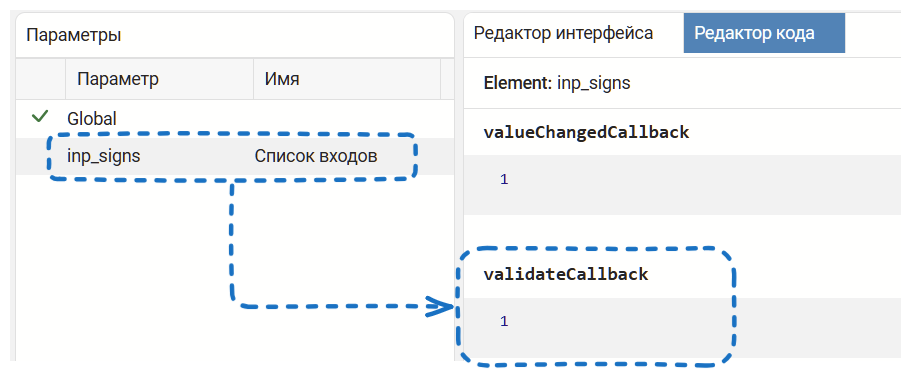
Two approaches can be used to validate the input:
-
Use the validateCallback callback for the parameter:
-
Use the blockChangedCallback callback of the mask itself:
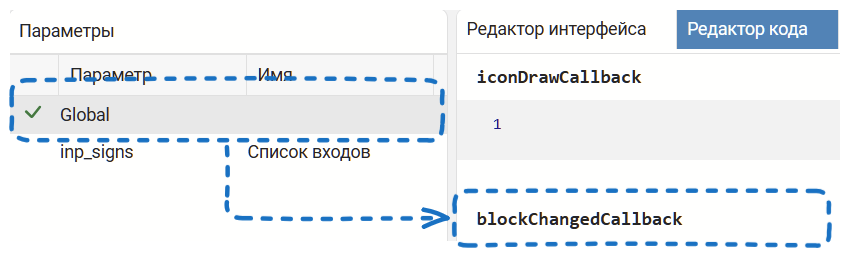
I will use the latter method for our task.
What are we going to check?:
- The user entered the line
- The minimum string length is 2
- The string contains only "+" and "-"
We will do the verification through the @assert macro.:
@assert typeof(inp_signs) == String
@assert length(inp_signs) >= 2
@assert occursin(r"^[+-]+$",inp_signs)
И опять мы столкнулись с регулярными выражениями!
Настройка блока
Вспомним как работает сумматор: пользователь вводит строку из + и - и блок меняет количество входов. Поэтому код маски должен уметь следующее:
- Настраивать количество входов Engee Function
- Разбирать пользовательский ввод
Делать это будем вот так:
blk = engee.gcb()

vec = Vector{Int64}();
engee.set_param!(blk,"Inputs"=>length(inp_signs))

for (ind,char) in enumerate(inp_signs)
    append!(vec,char == '+' ? 1 : -1)

end

engee.set_param!(blk,"Parameter1Value"=>vec)
for i in 1:length(inp_signs)
    engee.set_param!(blk,"InputPort$(i)Size"=>())
end
The main idea is to use command control to configure the Engee Function.
The parameter value of our Engee Function is dynamically set using the following code:
for (ind,char) in enumerate(inp_signs)
    append!(vec,char == '+' ? 1 : -1)

end

engee.set_param!(blk,"Parameter1Value"=>vec)
Let's check that the adder is working. Calculate the cosine from the sine, according to the well-known formula:
To do this, we will assemble such a model:
.png)
and let's run her simulation.:
mdl = engee.load(joinpath(@__DIR__,"ef_variadic.engee"))
res = engee.run(mdl)

sine = collect(res["sin_mod"])
cosine = collect(res["cos"])

plot(sine.time,sine.value,label="sine")
plot!(cosine.time,cosine.value,label="cosine")