Specialized subsystems in Engee
Various methods of dividing the model into semantic and functional blocks using subsystems and link models have already been discussed in the community. However, there are specialized subsystems in Engee that allow you to create and use programming constructs. The purpose of this publication is to get acquainted with them.
Action-Call subsystems
The task of these subsystems is to trigger according to the condition specified as a function call. Here, a function call is an event that is generated by the If-else or Switch-Case blocks. The use of such subsystems makes it possible to simulate the branching of algorithms. The If Operator and Switch Case Operator blocks are intended for this purpose. An example of using these blocks is found in the function_callers model.
Let's model such a construction using the If statement block.:
if u > 0
	y = foo()
else
	y = bar()
end
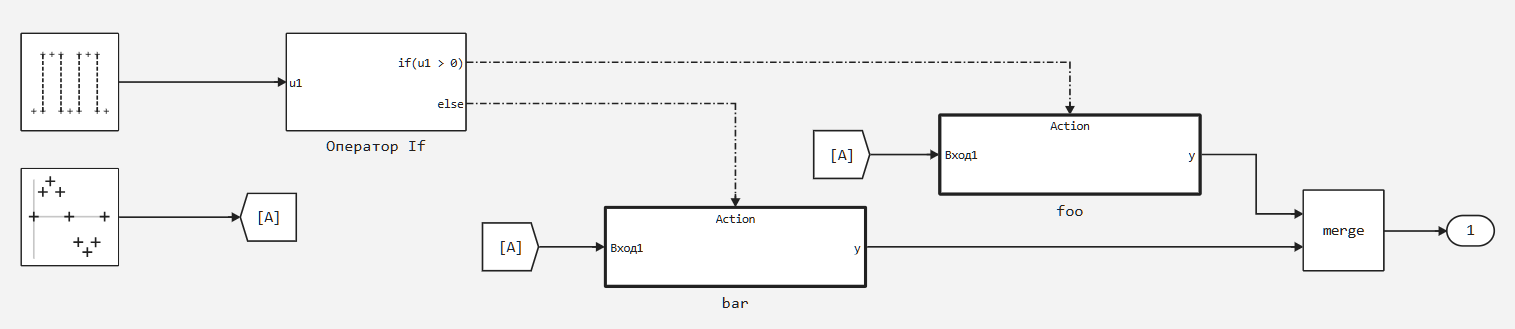
Similarly, using the Switch Case Statement block, you can simulate the construction:
switch u
	case 1:
		y = foo_case()
	default:
		y = bar_case()
end
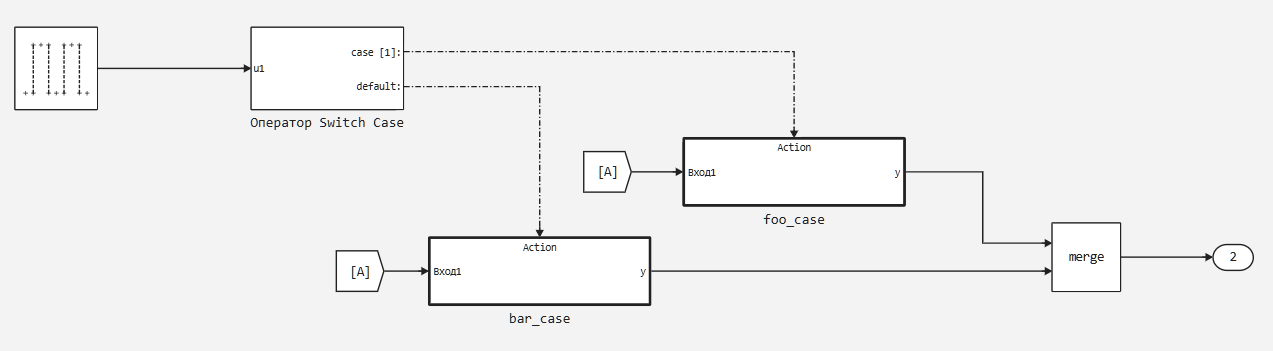
You probably noticed that the outputs of the subsystems are fed to the Merge block. This is a special block that combines several input signals into one. The main rule is that only one signal should be "active" at a particular time. "Activity" means that the signal has a valid value.
In practice, this works like this: when the subsystem foo() is called, a value appears at the output of this subsystem, while bar() is inactive and its output does not matter, and vice versa.
You should also pay attention to the fact that at the output of the if and switch case statement blocks, the signals are "calls" to functions. This is a special type of signal in Engee, designed to "activate" the subsystems containing the block The Action Port. As an example of using this block, consider the foo subsystem.:
.png)
Subsystems with iterators
These subsystems are designed to perform multiple iterations of their contents in a single simulation step. These subsystems are direct analogues of the for, while, and do...while cycles. Examples of such subsystems are found in the iterative_subs model.
Important!
Subsystems with iterators perform N iterations ** in one simulation step**. The output signal of such a subsystem is the result obtained ** after completing all iterations**.
For Iterator Subsystem
This subsystem implements the for loop using the For Iterator block. Let's look at its settings:
.png)
The settings of the iterator (variable iteration) are of interest to us. For example, you can set your own iterator by configuring the External Source of the Iteration variable. Next, we can use the value of the external signal as the source of the number of iterations, rather than entering it manually. This setting allows you to flexibly manage the number of iterations.:
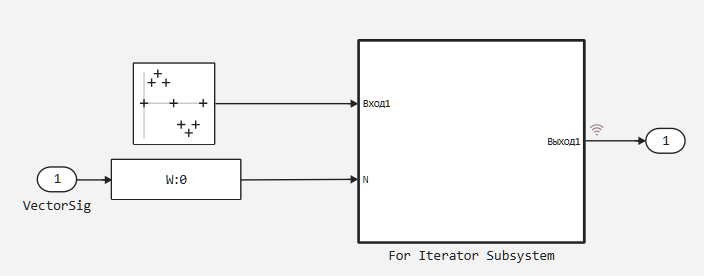
Here, a vector signal is sent to the VectorSig input, then it is sent to the input of the Probe block. The Probe block is a service block that extracts information about the signal, including the number of elements in the signal. Then, the number of elements is passed to the iterator block as the number of iterations.:
.png)
Additionally, we extract the value of our iterator by setting the Output of the Iteration variable.
While Iterator Subsystem
This subsystem implements a conditional while or do...while loop using the While Iterator block. Iterations will be performed until there is a positive non-zero signal at the cond input. As for For, you can output the value of the iterator.
As in conventional programming languages, when using such loops, there is always a danger of creating an infinite loop. To protect against an infinite loop, the While Iterator block has a setting for the maximum number of iterations.:
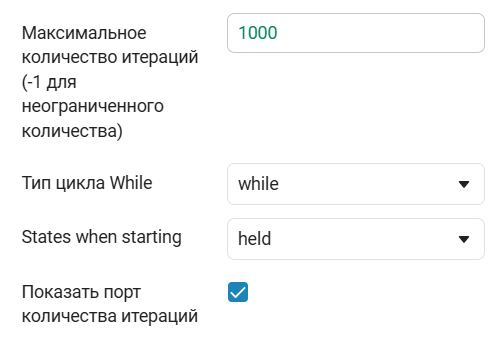
Let's consider the difference between the types of while and do loops...while:
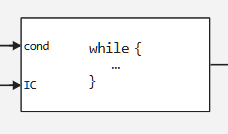
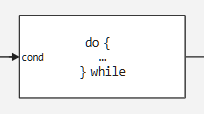
In the while case, the block has an additional IC input, which is the initial logical condition.
Subsystems For Each
Subsystems For Each are designed to work with multidimensional signals. Such a subsystem divides one or more input signals into elements and applies its contents to each element. The convenience lies in the fact that the calculation of the number of iterations is automatic.
Such a subsystem is a direct analogue of the foreach loop, which is found in many modern programming languages.
Important! In such subsystems, at least one input must have a Split setting:
.png)
The following three settings allow you to configure the separation of the input multidimensional signal.
Let's use the for_each_subsystem model as an example.:
.png)
A vector of two sinusoids will be sent to the input of this subsystem, and the following operation will be applied to each element of the vector inside:
.png)
Note that I additionally extract the iteration number. Let's see how this model works.:
fe_sub = engee.open(joinpath(@__DIR__,"for_each_subsystem.engee"))
res = engee.run(fe_sub)
orig_sig = collect(res["Sinusoid generator-1.1"])
proc_sig = collect(res["For Each Subsystem.Output -1"])
p1 = plot(orig_sig.time,stack(orig_sig.value,dims=1),label=["O1" "O2"])
p2 = plot(proc_sig.time,stack(proc_sig.value,dims=1),label=["O1" "O2"])
plot(p1,p2,layout = (2,1),link = :x)
The first graph is the original signal, and the lower one is the result of the For Each subsystem.
Conclusions
In this publication, we got acquainted with specialized subsystems that allow us to implement typical programming constructs and facilitate modeling tasks.