Drawing an image with epicycles: from contour to Fourier series
Introduction
In this project, the bitmap image turns into a closed trajectory, and then into the sum of rotating vectors. The beginning of each next vector is at the end of the previous one. The last end of the chain plays the role of a pen and gradually reproduces the drawing. The circles along which the ends of the vectors move relative to their beginnings are called epicycles.
The basis of the method is a complex Fourier series. Any sufficiently regular periodic trajectory can be described by harmonics with different radii, initial angles, and integer frequencies. A finite set of points is known, so the coefficients are obtained by the discrete Fourier transform (DFT). The geometric interpretation of rotating vectors is explained by [G. Sanderson, 2019](https://www.3blue1brown.com/lessons/fourier-series /); the complex transformation is described in S. W. Smith, ch. 31.
The main practical difficulty arises before the transformation: the pixels need to be turned into an ordered traversal, coordinate the individual parts of the drawing, and select a motion parameter. The DFT does not know how to find lines on its own or determine the order of their passage. The more harmonics stored, the better the approximation of the prepared trajectory and the richer the image of the chain.
The method is suitable for educational demonstrations of complex numbers and spectral analysis, animation of logos and inscriptions, as well as compact representation of flat curves. The application of Fourier coefficients to shape description and recognition has an independent history: see Zahn and Roskies, 1972. In their work, another curve descriptor is used; here the coordinates of its points are transformed directly.
After completing the work, you will be able to explain the relationship of amplitude with the length of the segment, frequency with the number of revolutions, phase with the initial angle, and also select the number of harmonics based on the measured error.
Setting the task
Entrance: One static PNG, JPEG or BMP image. PNG is preferred: black lines on a white background, white lines on a dark background, or an object on a transparent background. A color logo is also accepted: an opaque image is converted to grayscale, and with transparency, you can select a silhouette using the alpha channel. The source palette is not saved after the mask is selected.
It is already included in the package engee-poster.png an example of an image with the Engee logo and name. For the new image, upload the file via the Engee file browser to the project folder and specify the name in the mask. The path field selects the uploaded file; there is no separate widget for sending the file in the mask.
Result: Cyclic GIF animation of one complete crawl with selected FPS and pause on the finished drawing. In the folder output The binary mask, stage illustrations, the last frame, the coefficients in CSV, and the actual error report are also saved. The main parameters are summarized in Table 1.
Table 1 – Experimental parameters
#[PIPE]
[PIPE][PIPE] Group [PIPE] Parameters and meaning [PIPE][PIPE]
[PIPE][PIPE] Image [PIPE] Path; auto/dark/light/alpha; automatic or manual threshold; processing size; border or middle of stroke [PIPE][PIPE]
[PIPE][PIPE] Discretization [PIPE] N = 512, 1024, 2048 or 4096 points evenly distributed along the route length [PIPE][PIPE]
[PIPE][PIPE] The approach [PIPE] Precision mode: percentage from 1 to 100; Number of segments mode: K from 1 to 300. Only the selected mode is taken into account [PIPE][PIPE]
[PIPE][PIPE] Colors [PIPE] Background; rotating segments; drawn contour; initial trajectory on the background; circles. The values are given by the strings #RRGGBB [PIPE][PIPE]
[PIPE][PIPE] Animation [PIPE] FPS from 5 to 50; drawing duration from 2 to 30 seconds; pause from 0 to 3 seconds; showing circles [PIPE][PIPE]
[PIPE]#
To save reasonable calculation time, the file size (10 MiB), the number of decoded pixels (12 million), the side of the processed mask (800 pixels), the complexity of traversal (6000 vertices and 40 sections), the number of samples (4096), the number of segments (300) and the number of GIF frames (900) are limited. If the complexity is exceeded, it is suggested to reduce the image; if the accuracy is too high, the number of segments is limited and the actual percentage achieved is displayed.
Important mathematical operations are shown directly in the cells. Pixel boundary traversal, skeletonization, service visualization, and GIF recording are rendered in epicycles_functions.jl. The parameters are designed with native Engee code cell masks. After changing the mask, perform it and all subsequent cells; use "Run All" to recalculate it completely.
using Images, FileIO, FFTW, Plots, Statistics, Markdown
# @markdown Enabling lesson functions and preparing the results folder.
include(joinpath(@__DIR__, "epicycles_functions.jl"))
lesson_dir = @__DIR__
output_dir = joinpath(lesson_dir, "output")
mkpath(output_dir)
gr(format=:png)
nothing
Input image processing
Assumptions and obtaining a binary mask
The drawing should have a contrasting object and a relatively uniform background. To automatically detect a dark or light object, it is assumed that the edge of the image mainly belongs to the background. If the object touches most of the edge, select the mode manually.
In the first step, a binary mask is formed.: meaning true corresponds to the object, false – the background. If there is noticeable transparency, Auto mode uses an alpha channel with a threshold of 0.5. This is convenient for the attached logo: the color of its fill does not interfere with the silhouette extraction.
Brightness is used for an opaque image. The automatic threshold is found by the Otsu method: the histogram division is selected, maximizing the interclass variance. See Otsu, 1979. The manual threshold is set from 0 to 1. Small isolated groups containing less than 10 pixels are removed as noise.
# @markdown **Loading and selecting an object**
путь_изображения = "engee-poster.png" # @param {type:"string",placeholder:"input_logo.png"}
выделение_объекта = "Авто" # @param ["Auto","Dark","Light","Alpha"]
авто_порог = true # @param {type:"boolean"}
порог = 0.5 # @param {type:"slider",min:0.0,max:1.0,step:0.01}
размер_обработки = 608 # @param {type:"slider",min:128,max:800,step:16}
тип_контура = "Граница" # @param ["Border","Middle of stroke"]
nothing
In the next cell, the mask mode is converted to function parameters. The relative path is resolved relative to the project folder. The image is reduced only when the selected side is exceeded; the small source is not enlarged. The coordinates and errors are then measured in pixels of the processed image.
mode = Dict("Авто"=>:auto, "Тёмный"=>:dark, "Светлый"=>:light, "Альфа"=>:alpha)[выделение_объекта]
input_path = isabspath(путь_изображения) ? путь_изображения : joinpath(lesson_dir, путь_изображения)
mask, image_meta = EpicycleLesson.load_mask(input_path;
    foreground=mode, threshold=авто_порог ? nothing : порог,
    max_dimension=размер_обработки)
image_meta
Ordered contours and connection of sections
The "Border" mode bypasses the edges of pixel cells that are adjacent to the background. The external borders and the boundaries of the holes are preserved. A thick circled stroke can have two contours – this is the expected result of traversing its edges.
The "Middle Stroke" mode** first refines the mask using the algorithm Zhang–Suen, 1984, then traces the chains of pixels of the skeleton. It is useful for handwritten inscriptions and line drawings. The border bypass is selected for the provided logo. Very short sections of less than 12 pixels are excluded.
One end of the epicycle chain continuously draws one route. Therefore, individual sections are connected by bridges. We start with the longest contour, then select the nearest pair of vertices of the route we have already built and one of the remaining sections. We insert a transition, completely bypass the new section, and return along the same transition. The open stroke goes around to both ends and returns to the entry point. Repeat until all the sections are turned on.
This is a greedy way of connecting: it gives short local crossings, but does not guarantee the globally shortest route. The bridges pass twice and remain part of the target trajectory. They will be visible in the finished drawing; to crop them would mean changing the task of the connection.
using Plots, Markdown
paths, closed = тип_контура == "Граница" ? EpicycleLesson.boundary_paths(mask) : EpicycleLesson.centerline_paths(mask)
keep = [i for i in eachindex(paths) if length(paths[i]) >= 2 && EpicycleLesson.path_length(paths[i],closed[i]) >= 12]
paths, closed = paths[keep], closed[keep]
isempty(paths) && error("После выделения не осталось значимых контуров. Измените порог или размер обработки.")
center = complex(size(mask,2)/2, -size(mask,1)/2)
paths = [p .- center for p in paths]
route, bridges = EpicycleLesson.join_paths(paths,closed)
geometry_figure = EpicycleLesson.geometry_plot(mask,paths,closed,bridges)
savefig(geometry_figure,joinpath(output_dir,"01_contours.png")); display(geometry_figure)
Markdown.parse("*Рисунок 1 – Бинарная маска, выделенные контуры и соединительные мосты.*")
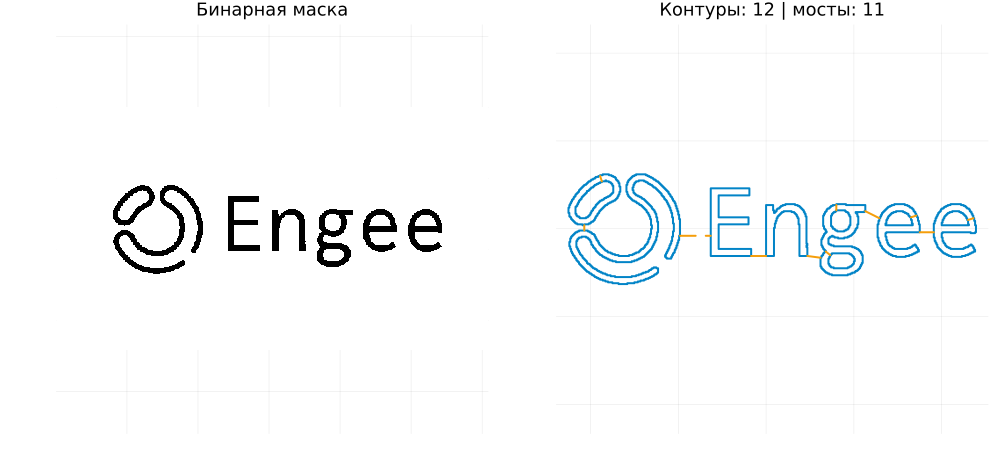
Figure 1 shows the mask in black, the borders found in blue, and the bridges dotted. For the attached PNG, automatic selection gives 12 contours and 11 bridges. If the background stands out instead of the recognizable silhouette, change the object mode or threshold before switching to the Fourier transform.
Length parameterization and uniform counts
Pixel vertices cannot simply be transferred to the DFT in any order. First, they form a continuous route, and then equidistant ** counts along the traveled length** are selected on the route. This eliminates the dependence of the pen speed on the density of the source vertices.
Let – consecutive vertices of a closed route, – accumulated length, – full length, and – the number of counts. The definition of the length and position of the samples is given in (1):
For the point is found by linear interpolation along the edge (2):
At the end of the route, the first vertex is repeated to describe the last edge. In the array there is no repeated endpoint: the period parameter lies on the half-interval . It will appear when the closure is visualized.
# @markdown **Number of target route counts**
число_отсчётов = 2048 # @param [512,1024,2048,4096] {type:"raw"}
nothing
A flat point is written as a complex number . The pixel vertical coordinate changes sign so that the axis it was pointing upwards. Shifting by half the width and height centers the image for graph convenience. The constant component of the DFT is still determined by the average position of the pen on the route.
Number sets the details of the representation of the target route. It does not specify the number of GIF frames. For a small logo, it is enough to start with 2048 dots; increase it makes sense when there are small details in the route.
z = EpicycleLesson.resample_path(route, число_отсчётов)
N = length(z)
(отсчётов=N, участков=length(paths), мостов=length(bridges),
    длина_маршрута_px=round(EpicycleLesson.path_length(route,false);digits=2))
Discrete Fourier transform
Analysis and restoration of a complex trajectory
For a continuous periodic trajectory, the complex Fourier series is written as (3). Here the parameter – the proportion of a complete bypass, and the frequency it is measured in revolutions per one period:
Our calculation uses discrete points. The forward transformation (4) calculates the coefficients, and the inverse sum (5) restores the values in the nodes.:
The exponent signs and the normalization must match each other. In Julia fft calculates the sum without dividing by , therefore , the cell explicitly uses fft(z) / N. Function ifft it already contains a division into ; therefore, for the normalization chosen here, the inverse calculation has the form ifft(C) * N. Definitions are checked by [AbstractFFTs documentation](https://juliamath.github.io/AbstractFFTs .jl/stable/api/); the complex form is analyzed in Smith, ch. 31.
FFT and DFT: DFT is the mathematical transformation itself (4), FFT is a fast way to calculate it. Direct summation requires order operations, FFT – order . The FFTW package is used here.
The Julia array is indexed starting from one: C[1] respond . The remaining elements need to be compared with the sign frequencies. With an even number We use the order . A negative frequency means clockwise rotation, and a positive frequency means counterclockwise rotation. The Nyquist frequency is assumed to be negative, as in fftfreq.
The signal It is complex, therefore, its coefficients generally do not have conjugate symmetry of the spectrum of a real signal. It is impossible to save only positive frequencies or artificially combine them in pairs.
using FFTW, Plots, Markdown
C = fft(z) / N
frequencies = [q <= (N-1)÷2 ? q : q-N for q in 0:N-1]
offset = C[1]
spectrum_figure = EpicycleLesson.spectrum_plot(C,frequencies)
savefig(spectrum_figure,joinpath(output_dir,"02_spectrum.png")); display(spectrum_figure)
Markdown.parse("*Рисунок 2 – Спектр комплексной траектории и гармоники, упорядоченные по амплитуде.*")
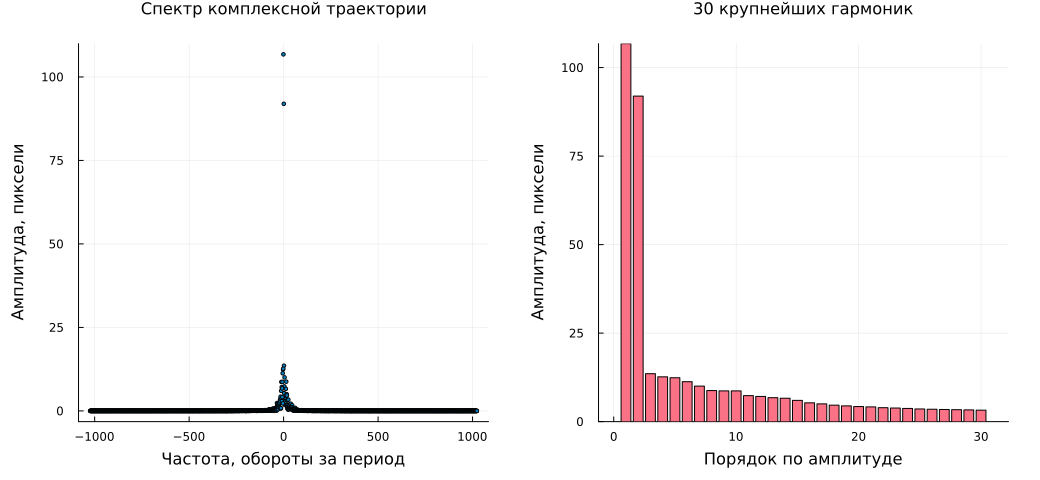
Figure 2 shows which frequencies are involved in the route description. The constant component excluded from the graph: it sets the beginning of the chain and is not a rotating segment. Its value is equal to the average , which may differ from the geometric center of the image.
The number of segments and the measured accuracy
Let contains indexes stored non-constant harmonics. The truncated trajectory is defined by (6):
We sort the harmonics in descending order . This choice saves the most energy and minimizes the RMS error in the initial discrete nodes at a fixed . At the same time, the frequencies remain their own: the order in the chain changes the position of its intermediate links, but the amount and the end of the pen do not depend on it.
Let's introduce an RMS error , route scale and the accuracy indicator by (7):
For example, 99% means an RMS error of no more than 1% of . This is an indicator of the accuracy of the coordinates of the prepared route, including bridges. It does not measure the proportion of matched pixels in the source and does not limit the maximum local error.
Orthogonality of harmonics and Parseval equality give (8); for an explanation of the principle, see Smith, ch. 10. Here, the normalization has already been reduced to complex coefficients (4):
Therefore, for the requested percentage it is enough to find the minimum , in which the tail of the spectrum satisfies condition (9):
The "Number of segments" mode directly sets ; the percentage is then only calculated. Offset It is not included in the number of segments. If more than 300 segments were needed for a given percentage, 300 are taken and the achieved accuracy is shown. A 100% request without such a restriction would require up to I would have reconstructed the nodal points with machine precision.
# @markdown **Harmonic selection**
режим_точности = "По точности" # @param ["By accuracy","By the number of segments"]
точность_процентов = 99.5 # @param {type:"slider",min:1.0,max:100.0,step:0.1}
число_отрезков = 89 # @param {type:"slider",min:1,max:300,step:1}
nothing
The next cell calls a short selection procedure according to (9), then performs an independent reverse calculation in the nodes. The report shows the actual percentage, RMS, and maximum error. The latter is useful for estimating angles and junctions: the average error may be small even with a noticeable local deviation.
using FFTW, Statistics
selection = EpicycleLesson.select_harmonics(C; accuracy_percent=точность_процентов,
    n_segments=режим_точности == "По числу отрезков" ? число_отрезков : nothing)
selected = selection.indices
C_kept = zeros(ComplexF64,N); C_kept[1] = offset; C_kept[selected] = C[selected]
node_errors = abs.(ifft(C_kept)*N .- z)
rms_error = sqrt(mean(abs2,node_errors))
scale = sqrt(mean(abs2,z .- offset))
actual_accuracy = clamp(100*(1-rms_error/scale),0,100)
model = (samples=z, offset=offset, coefficients=C[selected], frequencies=frequencies[selected],
    accuracy=actual_accuracy, rms_error=rms_error, max_error=maximum(node_errors), capped=selection.capped)
(отрезков=length(selected), нужно_для_запроса=selection.needed, предел_сработал=selection.capped,
    точность_процентов=actual_accuracy, RMS_px=rms_error, максимум_px=model.max_error)
Checking the restored route
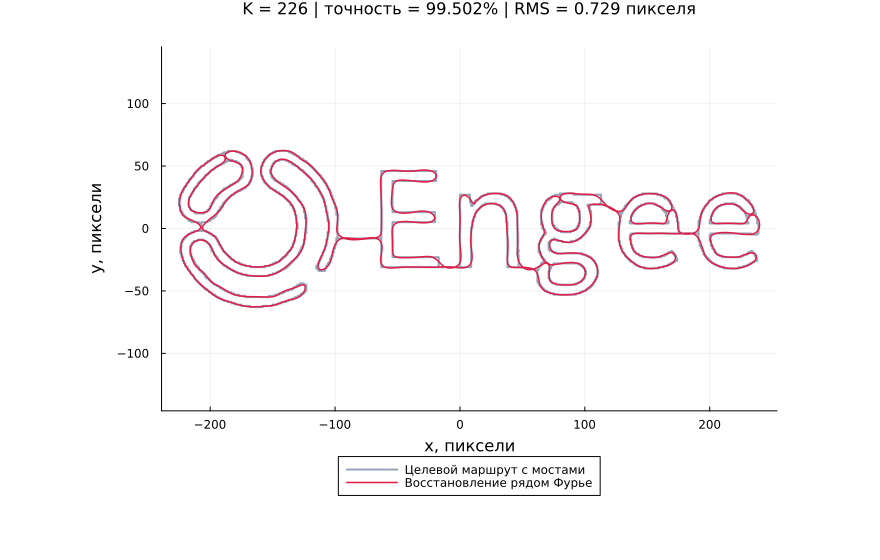
Let's compare the target route and the truncated sum (6) in Figure 3. For display, the sum is interpolated on a denser grid of 8192 points. With a small number of harmonics, the angles are smoothed out; outliers may appear near turns and bridges. Increasing the accuracy brings the selected route closer, but does not eliminate the error of highlighting it from the image.
The number of contour samples and the number of stored harmonics solve different problems: the first describes the initial data, the second limits the complexity of their spectral representation.
using Plots, Markdown
reconstructed = EpicycleLesson.reconstruct(model)
comparison_figure = EpicycleLesson.comparison_plot(route,reconstructed,model)
savefig(comparison_figure,joinpath(output_dir,"03_reconstruction.png")); display(comparison_figure)
Markdown.parse("*Рисунок 3 – Целевой маршрут с мостами и его восстановление выбранными гармониками.*")
Drawing epicycles
Rotating vectors and a chain of partial sums
Euler's formula turns each harmonic into a rotating vector. If – selected coefficient, – its frequency, radius, initial phase and vector are determined by (10):
The beginning of the chain is at . The remaining nodes are partial sums (11):
The circle It has a center and the radius . The center itself moves along with the previous links; the length of each link remains constant. cis(θ) in Julia, it calculates a complex number , and cumsum builds partial sums.
For the complete drawing of the segment with makes three counterclockwise turns, with – Five clockwise. For the duration of drawing seconds physical angular velocity is equal to radians per second.
Colors and single-phase viewing
Set five colors using six HEX digits, for example 101827. Symbol # a code is added before the color. The "outline" color is applied to the pen trace; the "trajectory on the background" color is applied to the prepared route, including bridges. When replacing a dark background with a light one, choose contrasting line colors. Hiding the circles affects the design; all selected segments continue to participate in the sum.
# @markdown **Drawing colors, HEX code**
цвет_фона = "f3f3f3" # @param {type:"string"}
цвет_отрезков = "87d1f1" # @param {type:"string"}
цвет_контура = "1b84b8" # @param {type:"string"}
цвет_траектории_на_фоне = "e5e5e5" # @param {type:"string"}
цвет_окружностей = "cccccc" # @param {type:"string"}
style = (background="#"*цвет_фона, segments="#"*цвет_отрезков, contour="#"*цвет_контура,
    reference="#"*цвет_траектории_на_фоне, circles="#"*цвет_окружностей)
nothing
# @markdown **Preview phase and GIF settings**
фаза = 0.35 # @param {type:"slider",min:0.0,max:1.0,step:0.01}
показать_окружности = true # @param {type:"boolean"}
fps = 25 # @param {type:"slider",min:5,max:50,step:1}
длительность_секунд = 12.0 # @param {type:"slider",min:2.0,max:30.0,step:0.5}
пауза_секунд = 1.0 # @param {type:"slider",min:0.0,max:3.0,step:0.5}
nothing
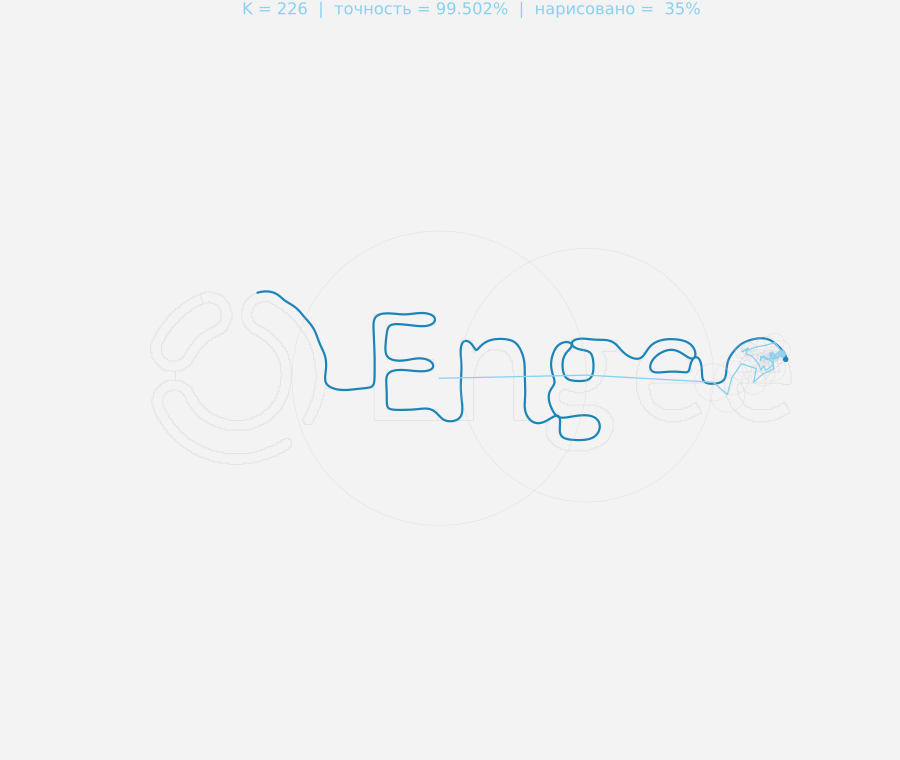
In the cell below, (10) and (11) are literally implemented. Array nodes It contains the beginning of the chain and the ends of all segments; the last element sets the position of the pen. Figure 4 allows you to review the selected phase before creating the entire animation.
using Plots, Markdown
vectors = model.coefficients .* cis.(2π .* model.frequencies .* фаза)
nodes = vcat(offset, offset .+ cumsum(vectors))
limits = EpicycleLesson.canvas_limits(model,route,reconstructed)
phase_figure = EpicycleLesson.frame_plot(model,route,reconstructed,фаза,style,limits;
    show_circles=показать_окружности)
savefig(phase_figure,joinpath(output_dir,"04_epicycles.png")); display(phase_figure)
Markdown.parse("*Рисунок 4 – Цепочка эпициклов и след пера в выбранной фазе.*")
Time sampling and GIF recording
Let – FPS, – the requested drawing time. Forming frames and include both ends of the period according to (12):
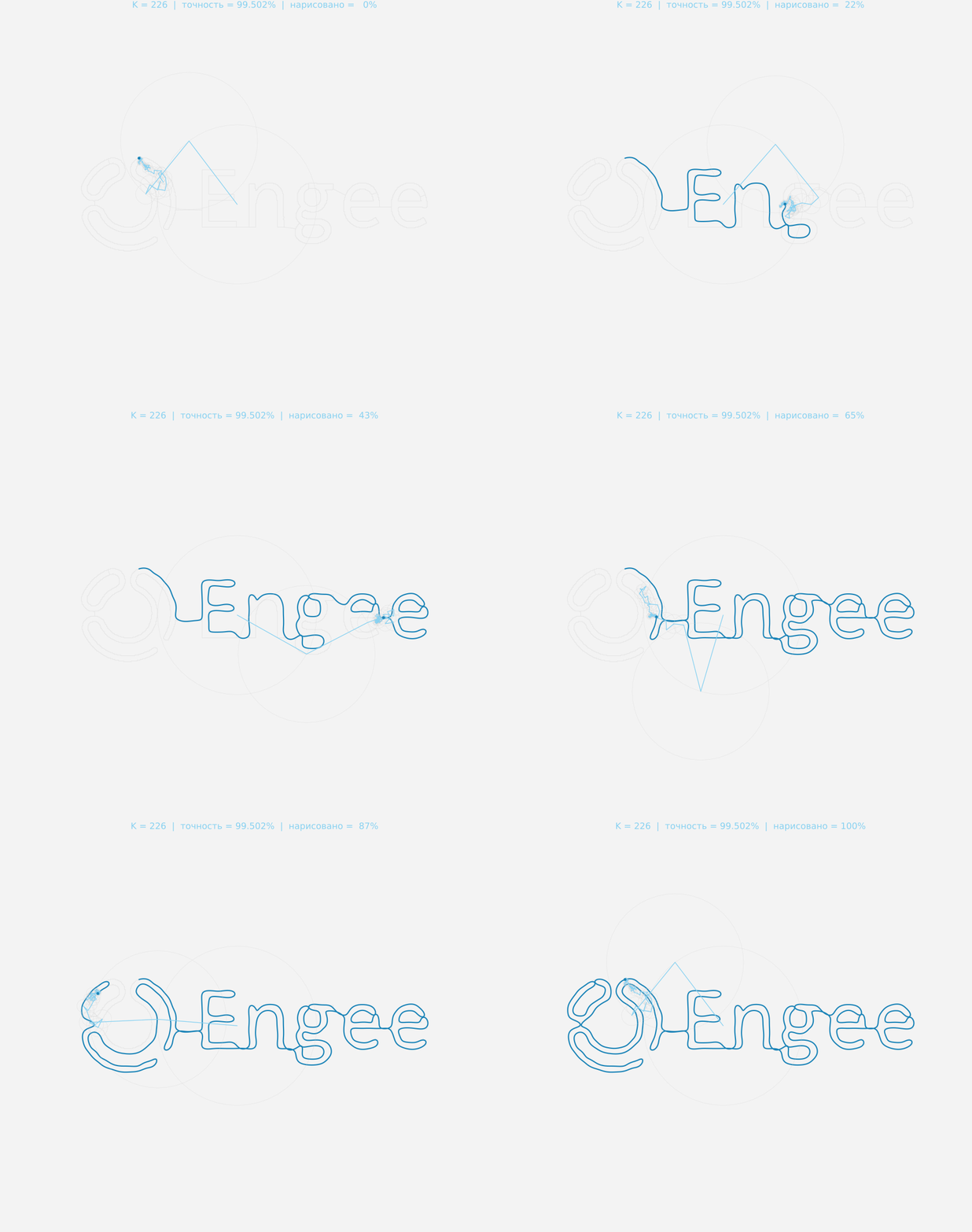
In the first frame The pen is located at the beginning of the route, at the last the drawing closes. Then repeat frames are added to pause. Epicycles are drawn for the current one , and the trace is taken from the dense interpolation of the series up to this phase. Due to this, the contour does not turn into a rough polyline at low FPS.
Recording is performed by means of Plots.Animation, frame and gif described in the [documentation Plots](https://docs.juliaplots.org/stable/animations /). The graphical backend GR is selected for the frames. Assessment of rendering performance is of the order with a fixed number of points on each circle; large increases the time and visual density of the chain.
GIF stores frame delays in 0.01 s increments. Therefore, an arbitrary set FPS can be approximated by alternating adjacent delays. The value 25 FPS gives exactly 0.04 seconds per frame and is selected by default. The browser player can also limit the playback speed.
Harmonics with a large frequency modulus rotate quickly. With a rare time sample, their movement may look abrupt or have a visible reverse direction due to the time overlap of frequencies. For smoothness, increase the drawing duration or FPS. This is a property of motion observation; the calculated pen positions follow formula (6).
With standard parameters, 300 drawing frames and 25 pause frames are created: a total of 325 frames, 13 seconds of playback. The preview phase does not affect the full bypass in GIF. The next cell saves the report, coefficients, and animations to a folder output.
using Plots, Markdown
EpicycleLesson.save_results(model,mask,image_meta,output_dir)
gif_result = EpicycleLesson.render_gif(model,route,joinpath(output_dir,"epicycles.gif");
    style, fps, duration=длительность_секунд, hold_seconds=пауза_секунд,
    show_circles=показать_окружности)
display(gif_result.animation)
Markdown.parse("*Рисунок 5 – GIF: $(gif_result.frames) кадров; задано $(fps) FPS; файл output/epicycles.gif.*")
Conclusion
The following sequence is constructed in the work: bitmap → binary mask → ordered contours → route with bridges → uniform counts → DFT → harmonic sampling → epicycle chain → GIF. The fast transformation is used after the geometry is prepared. The route search and its parameterization directly affect the resulting spectrum.
The basics studied are: complex representation of plane coordinates, Euler's formula, forward and reverse DFT, amplitude and phase, sign frequencies, constant component, harmonic orthogonality and Parseval equality, normalized RMS error, length parameterization and separate sampling of space and time.
Reuse. Upload a new PNG/JPEG/BMP next to the script, change the path in the mask and check Figure 1. Then select the number of counts and accuracy, check Figure 3, set the colors and FPS and record the GIF. Service file .jl it should stay next to the script. For multiple use of functions without a training text, you can connect the module EpicycleLesson from a regular Julia script.
Experiments to consolidate.
- For the attached logo, compare 90%, 95% and 99%: write down the number of segments, RMS and maximum error. Explain why increasing the number of segments by about 100% is becoming expensive.
- Fix the number of segments and increase N. Compare the errors and check how much the target trajectory itself has changed.
- Compare the "Border" and "Middle of the stroke" on a thick handwritten letter. Explain the difference between the border of the area and the pen line.
- Change the duration and FPS for a fixed spectrum. Evaluate the smoothness of the rotation and the shape of the already restored footprint.
Further development: select bridges based on the total length of the route; enter the pen lifting mode between sections; work directly with SVG; smooth the raster border to DFT; compare amplitude sampling while maintaining low frequencies; export MP4 for more flexible frame rate control.
Epicycles clearly show how complex motion is built from simple harmonics. For shape analysis tasks, the same coefficients can serve as features, and for trajectory generation, they can serve as a convenient periodic representation of coordinates.
List of sources
Literature and theory
- Smith S. W. The Scientist and Engineer’s Guide to Digital Signal Processing. California Technical Publishing, 1997. Chapter 31: The Complex Fourier Transform (PDF); Chapter 10: Parseval's Relation; Chapter 12: How the FFT Works. Comprehensive DFT, normalization, energy conservation, and fast algorithms.
- Zahn C. T., Roskies R. Z. Fourier Descriptors for Plane Closed Curves. IEEE Transactions on Computers, C-21(3), 269–281, 1972. DOI: 10.1109/TC.1972.5008949; [text of the article (PDF)](https://www.cs.jhu.edu /~misha/Papers/Zahn72.pdf). Application of spectral descriptors to flat closed curves.
- Otsu N. A Threshold Selection Method from Gray-Level Histograms. IEEE Transactions on Systems, Man, and Cybernetics, 9(1), 62–66, 1979. DOI: 10.1109/TSMC.1979.4310076. Automatic threshold selection based on the histogram.
- Zhang T. Y., Suen C. Y. A Fast Parallel Algorithm for Thinning Digital Patterns. Communications of the ACM, 27(3), 236–239, 1984. DOI: 10.1145/357994.358023. Skeletonization of binary strokes.
- Sanderson G. (3Blue1Brown). But what is a Fourier series? From heat flow to drawing with circles, 2019. [Author's illustrated lecture](https://www.3blue1brown.com/lessons/fourier-series /). Geometric interpretation of the Fourier series.
Implementation documentation
- Engee: code cell masks; text markup.
- AbstractFFTs.jl: [definitions of fft, ifft and fftfreq](https://juliamath.github.io/AbstractFFTs .jl/stable/api/).
- Plots.JL: creating animations.