Simulation of car braking
This example will demonstrate the simulation of car braking.
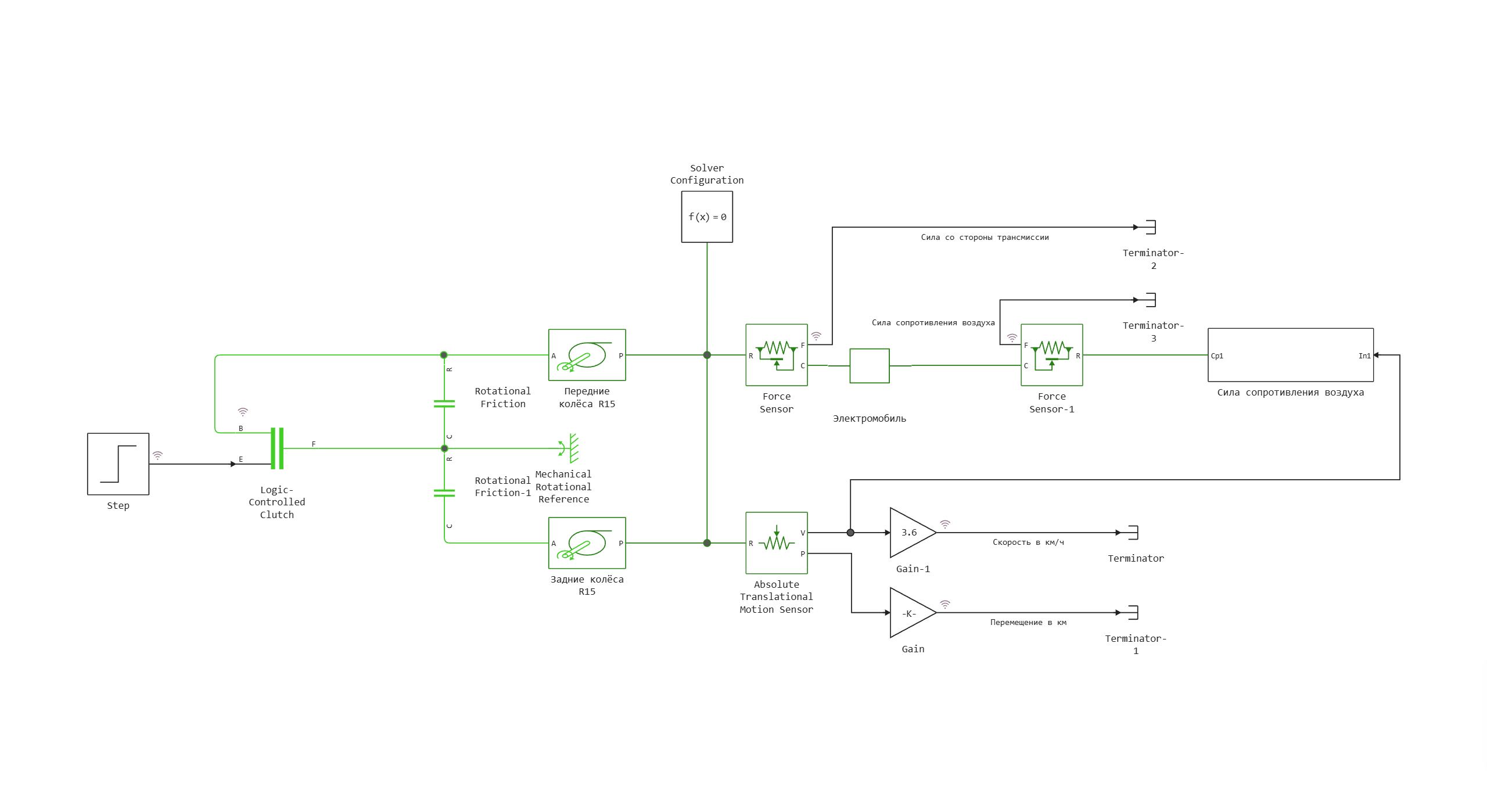
The movement of the car and its inertia are described by the Car block. The resulting force from two pairs of wheels connected to the braking mechanism comes to the left port of this unit. The air resistance force described by the subsystem of the same name is applied to the right port.
Model diagram:
Defining the function to load and run the model:
In [ ]:
function start_model_engee()
    try
        engee.close("braking_distance", force=true) # closing the model
        catch err # if there is no model to close and engee.close() is not executed, it will be loaded after catch.
            m = engee.load("$(@__DIR__)/braking_distance.engee") # loading the model
        end;

    try
        engee.run(m) # launching the model
        catch err # if the model is not loaded and engee.run() is not executed, the bottom two lines after catch will be executed.
            m = engee.load("$(@__DIR__)/braking_distance.engee") # loading the model
            engee.run(m) # launching the model
        end
end
Out[0]:
Running the simulation
In [ ]:
try
    start_model_engee() # running the simulation using the special function implemented above
    catch err
    end;
Recording speed, displacement, and force signals from simout to variables:
In [ ]:
t = simout["braking_distance/Speed in km/h"].time[:]
distance = simout["braking_distance/Movement in km"].value[:]
speed = simout["braking_distance/Speed in km/h"].value[:]
forces_left = simout["braking_distance/Power from the transmission side"].value[:]
forces_right = simout["braking_distance/Air resistance force"].value[:];
Visualization of simulation results
In [ ]:
using Plots
In [ ]:
plot(t, forces_left, label="Force from the transmission, N", linewidth=2)
plot!(t, forces_right, label="Air resistance, N", linewidth=2)
plot!(t, (forces_left+forces_right), label="The sum of forces, N", linewidth=2, title="Forces acting on the car")
Out[0]:
In [ ]:
plot(t, speed, label="Speed, km/h", linewidth=2)
plot!(t, distance*1000, label="Displacement, m", linewidth=2)
Out[0]:
Definition of a function for calculating the braking distance of a car and its application to movement data:
In [ ]:
function braking_distance(distance, t)
    index = findfirst(x -> x < 0.00001, distance)
    if index != nothing
        return println("Braking distance: ", round(maximum(distance)*1000, digits=2), " m")
    end
end

braking_distance(distance, t)
Conclusions:
In this example, a simulation of car braking was demonstrated. Using the function braking_distance The braking distance was calculated for a car with an initial speed of 100 km/h.