Creating complex components in the Engee physics modeling language
The Engee physical modeling language allows you not only to develop your own components, but also to combine different components into a single whole. Such components are called composite.
It's like a constructor, when there are parts (components) and our task is to connect them in the right order.
Why make composite components?
- "Packing" multiple components into one (as a subsystem in conventional modeling)
- Arrays of components
Example of a composite component
As an example of a composite component, consider a DC motor with an external shaft load.
To make sure that the component was assembled correctly, let's take a reference implementation on primitives from the library of non-directional blocks.:
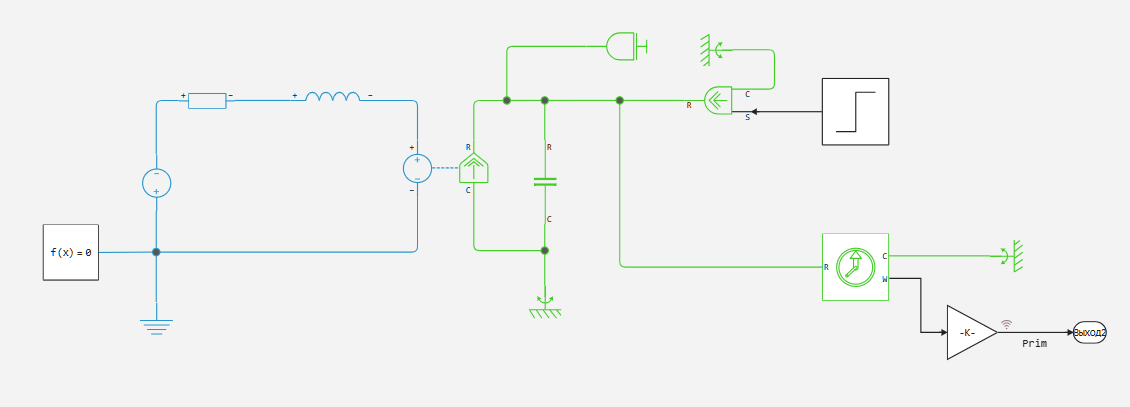
For testing, we will simulate the following scenario: in the first 0.1 seconds of operation, the engine runs without load on the shaft, and reaches maximum speed, and then a load occurs on the shaft.
Creating a composite component
Composite components are created in the same way as custom components using the Engee physics modeling language. Therefore, the component code must be contained in the *.ngpc file located along the Engee search path.
Let's look at the component code from the DCMotorComosite.ngpc file:
@engeemodel DCMotorComposite begin

    @components begin
        p = EngeePhysicalFoundation.Electrical.Pin(), [view = ("+", "left")]
        n = EngeePhysicalFoundation.Electrical.Pin(), [view = ("-", "left")]
        r = EngeePhysicalFoundation.Mechanical.Rotational.Flange(), [view = ("R", "right")]
        c = EngeePhysicalFoundation.Mechanical.Rotational.Flange(), [view = ("C", "right")]
    end

    @parameters begin
        rotor_resistance    = 3.9, 		[unit="Ohm"]
        rotor_inductance    = 12e-6, 	[unit="H"]
        motor_inertia       = 0.01, 	[unit="g*cm^2"]
        breakaway_torque    = 0.02e-3, 	[unit="N*m"]
        coulomb_torque      = 0.02e-3, 	[unit="N*m"]
        breakaway_velocity  = 0.03347, 	[unit="rad/s"]
        back_emf_constant   = 0.072e-3*60/(2*pi), [unit="V/(rad/s)"]
        viscous_coefficient = 0.0, [unit="N*m/(rad/s)"]
    end

    @components [gui = None] begin
        rotorResistor = EngeePhysicalFoundation.Electrical.Elements.Resistor(R=default(rotor_resistance))
        rotorInductor = EngeePhysicalFoundation.Electrical.Elements.Inductor(L=default(rotor_inductance))
        motorInertia = EngeePhysicalFoundation.Mechanical.Rotational.Elements.Inertia(I=default(motor_inertia))
        friction = EngeePhysicalFoundation.Mechanical.Rotational.Elements.Friction(w_breakaway=default(breakaway_velocity),T_breakaway=default(breakaway_torque),T_coulomb=default(coulomb_torque), viscous_coefficient=default(viscous_coefficient))
        rotEMechConverter = EngeePhysicalFoundation.Electrical.Elements.RotationalConverter(k=default(back_emf_constant))
    end

    @equations begin
        connect(p, rotorResistor.p)
        connect(rotorResistor.n, rotorInductor.p)
        connect(rotorInductor.n, rotEMechConverter.p)
        connect(rotEMechConverter.n, n)
        connect(rotEMechConverter.rod_flange, friction.rod_flange, motorInertia.flange, r)
        connect(rotEMechConverter.case_flange, friction.case_flange, c)
    end

end
Pay attention to how we create the sub-components - they are contained in the section @components. We initialize their parameters with values from the section @parameters
The assembly of the sub-components into a single component takes place in the section @equations using the function connect(). Please note that you can specify multiple connection ports at once!
Testing a composite component
Let's check the modeling results of our composite component relative to the same model, but using primitives.
demoroot = @__DIR__
engee.addpath(demoroot)
mdl = engee.open(joinpath(demoroot,"DCComposite.engee"))
sim_res = engee.run(mdl);
Let's plot the simulation results.:
using Plots

CustC = collect(sim_res["Cust"]);
Primitives = collect(sim_res["Prim"]);
plot(CustC.time,CustC.value, label = "Custom Component")
plot!(Primitives.time,Primitives.value, label = "The library of blocks")
plot!(legend=:outerbottom,legendcolumns=2)
Let's find the maximum absolute error:
err = CustC.value .- Primitives.value;
println("Maximum absolute error: $(maximum(err))")
The simulation results actually match, which means our component is working correctly!
Conclusions
The Engee physical modeling language is not just a language for writing custom components for 1-d modeling, but also a language for creating and describing complex physical systems. At the same time, the readability of the code was preserved, which is important for complex systems!