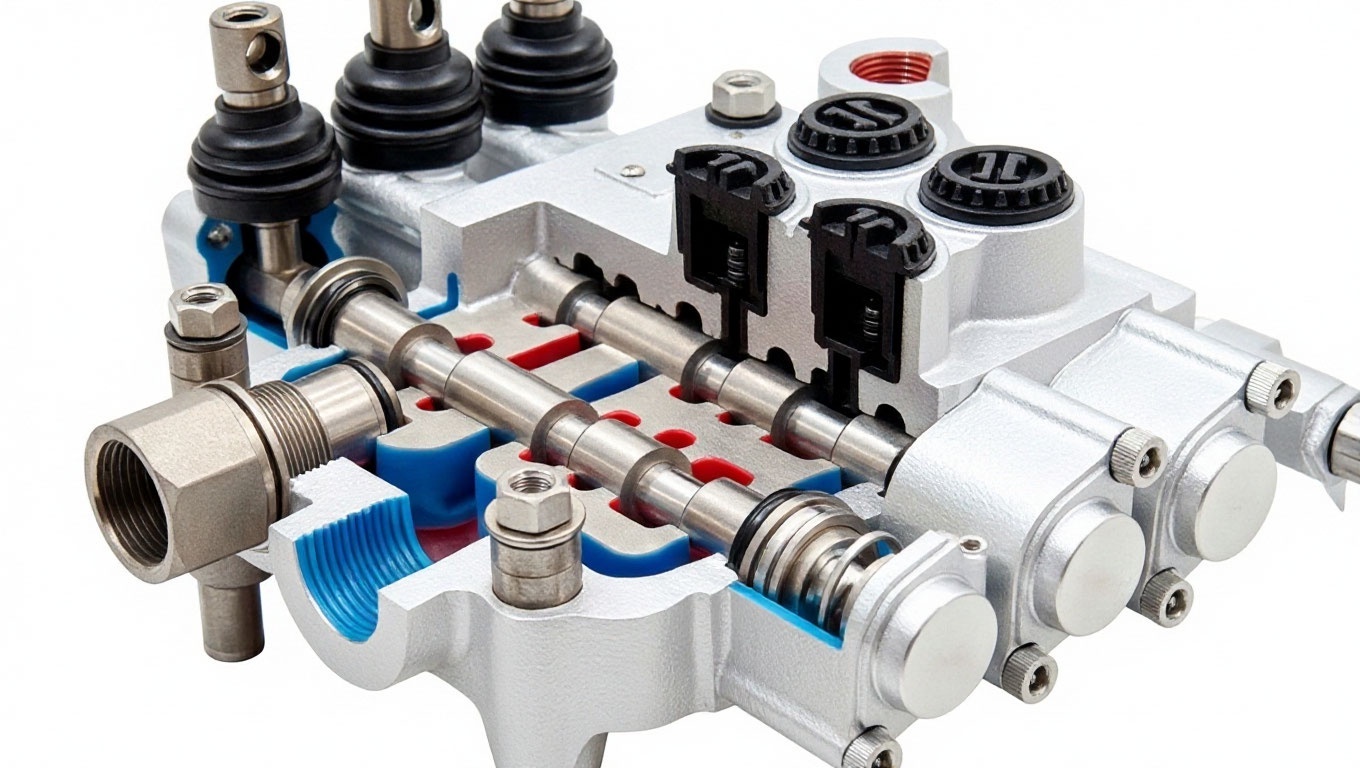
Design of distributors for special and road construction equipment
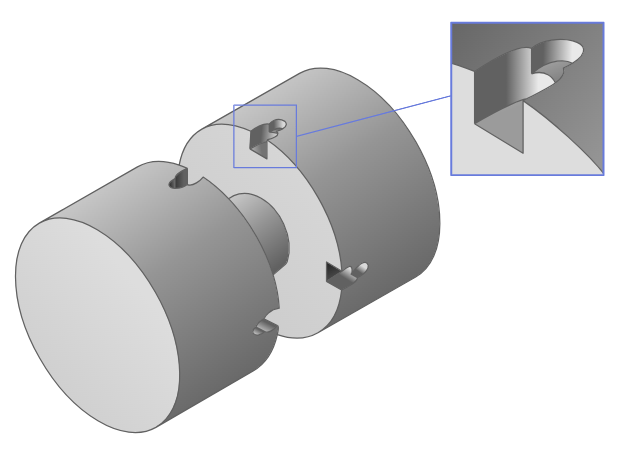
In this example, we will consider the design of an excavator sectional distributor, namely the geometry of the spool pair (spool and sleeve). Imagine that during the tests, the current distributor does not process the control signal from the hydraulic joystick - there is a zone where the required speed of the hydraulic cylinder extension of the working body is not reached when the joystick is deflected to the maximum. The adjustment and shedding are greatly influenced by the geometry of the grooves (Notch), which are milled on the spool belts. To remedy the situation, the designers developed a new groove geometry, and applied modeling in Engee, in order to conduct a virtual experiment on pouring the distributor section. An example of a spool with grooves is shown in the figure.

Open the model
include("geometry_core.jl")
include("parameters_exporter.jl")

modelName = "DCV_HCD"
if !(modelName in [m.name for m in engee.get_all_models()])
    engee.load("$(@__DIR__)/$(modelName).engee");
end
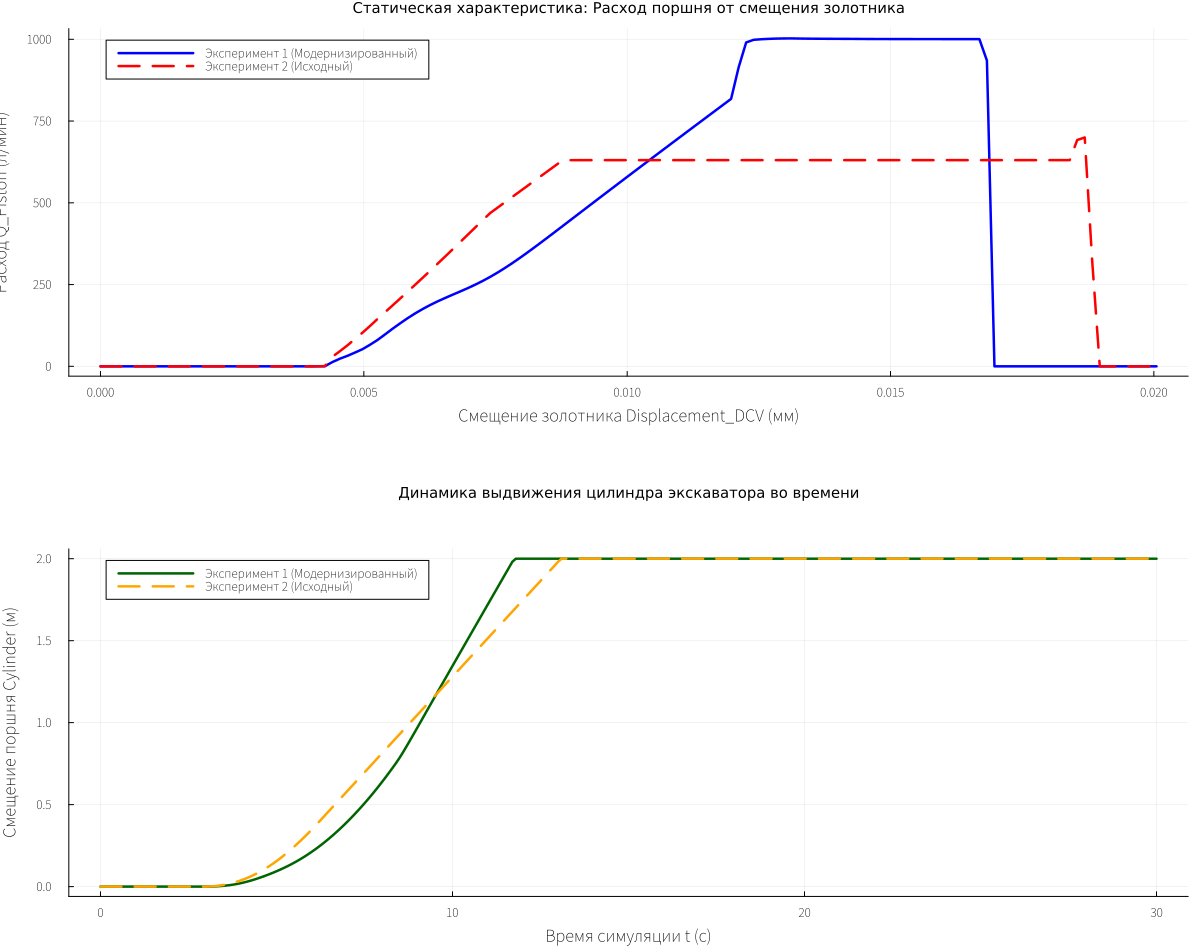
A hydraulically controlled spool distributor is modeled. To simplify the pouring procedure, the extension of the hydraulic cylinder is investigated, the distributor channels P-A and B-T are involved. A pressure control signal from 0 to 30 bar (excess) is applied to the right end of the spool, the distributor is shifted to the left, compressing the return spring and opening the corresponding channels. A constant flow source, 1000 l/min, is connected to the distributor's P channel. During spilling, the flow rate is checked in port A of the distributor (connection port to the piston cavity of the cylinder), depending on the movement of the spool.
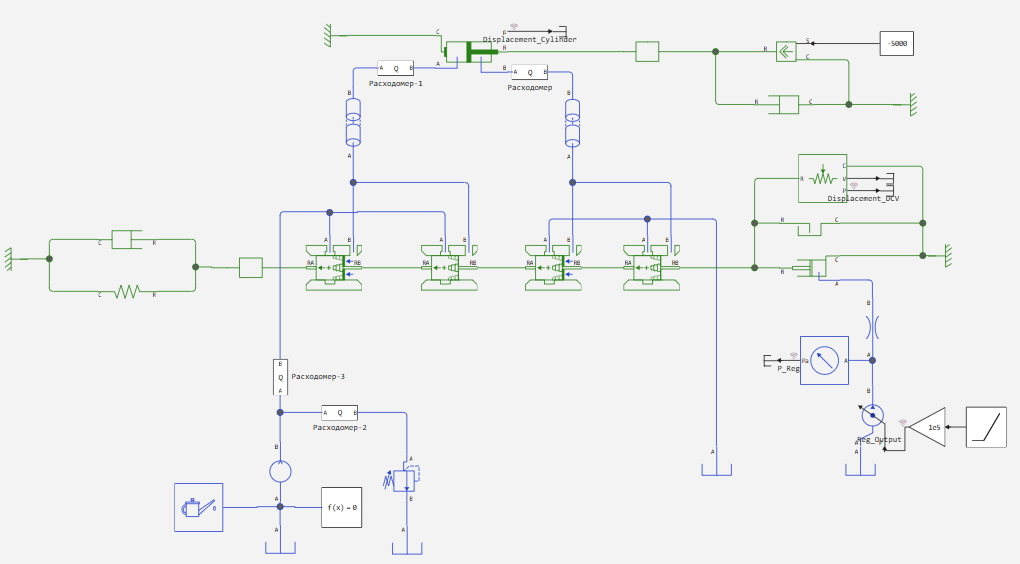
Parameterization of grooves
The complex shape of the grooves is set using several Regions. The user parameterizes the geometric parameters of each area and sets the number of grooves on one belt.
In the case when there are several different types of grooves on one belt (for example, 2 with one geometry and 2 with another), to model this belt, two blocks of belts with identical geometric parameters (the diameter of the belt and neck, but different prametrization of the grooves) are connected in parallel, the number of grooves in each block will be two. everyone has. To exclude the influence of the duplicate end of the spool from the power calculation (taking into account the effect of the liquid), appropriate flags are placed that disable the power calculation for one of the surfaces of the composite belt.
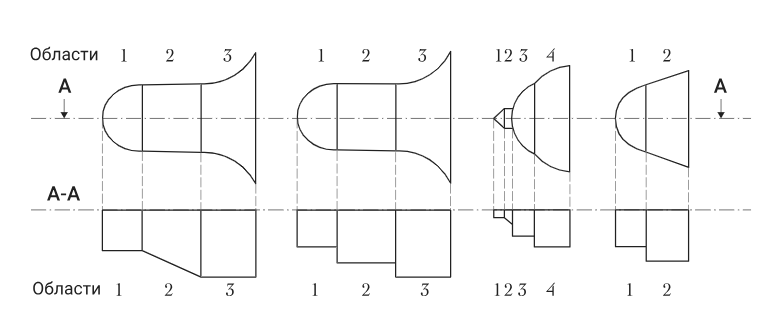
There are 5 types of area geometry (see the documentation for Spool Edge with Notches (IL)).
Explanations of the parameterization are given in the spool parameterization code below.
Setting the parameters of the spool belts
Upgraded geometry
Let's compare 2 sets of parameters that differ from each other in the configuration of the grooves - the first option is an upgraded one, the second is the original one.
# ==============================================================================
# PARAMETERIZATION OF AN ARBITRARY NUMBER OF SPOOL GROOVE BLOCKS IN THE MODEL
# ==============================================================================

# THE UNIVERSAL REGION STRUCTURE ARGUMENT ASSIGNMENT DICTIONARY FOR ALL TYPES OF FORMS:
#
# Arguments in order: (shape, length, radial_depth_start, radial_depth_end, width_start, width_end, r_edge)
#
# 1. shape = "circular" (Circular spout of the dead end of the distribution slot)
# - length: The physical axial length of the rounded spout (ΔZ), mm
# - radial_depth_start: Constant radial cutting depth of the milling cutter in this section (hRmin), mm
# - radial_depth_end: Not used (duplicates radial_depth_start value for continuity)
# - width_start: The initial width of the contour (always equal to 0.0 at the extreme point of the dead end), mm
# - width_end: The final circumferential width to which the circular arc of the nozzle smoothly extends, mm
# - r_edge: Not used for this type of form (always equal to 0.0)
#
# 2. shape = "triangular" (Triangular/ V-shaped control area)
# - length: The axial length of the cone opening section (ΔZ), mm
# - radial_depth_start: Constant radial cutting depth over the entire section (hRmin), mm
# - radial_depth_end: Not used (duplicates radial_depth_start value)
# - width_start: The initial circumferential width of the groove on the left border of the region, mm
# - width_end: The final circumferential width on the right border of the region (defines the opening angle), mm
# - r_edge: Not used for this type of form (always equal to 0.0)
#
# 3. shape = "rectangular" (Rectangular working area with the possibility of a bottom slope)
# - length: The physical axial length of the section (ΔZ), mm
# - radial_depth_start: Radial depth at the left edge of the region (the initial level of the bottom slope), mm
# - radial_depth_end: Radial depth at the right edge of the region (the final sunken level of the wedge), mm
# - width_start: The constant circumferential width of the groove (width_start must be strictly equal to width_end), mm
# - width_end: The constant circumferential width of the groove (width_start must be strictly equal to width_end), mm
# - r_edge: Not used for this type of form (always equal to 0.0)
#
# 4. shape = "trapezoidal" (Classic trapezoidal section with sharp side edges)
# - length: Axial length of the cheek linear expansion section (ΔZ), mm
# - radial_depth_start: Constant radial cutting depth over the entire section (hRmin), mm
# - radial_depth_end: Not used (duplicates radial_depth_start value)
# - width_start: The initial circumferential width of the contour at the left junction of the region, mm
# - width_end: The final circumferential width at the right exit of the region (maximum cone socket), mm
# - r_edge: Not used for this type of form (always equal to 0.0)
#
# 5. shape = "trapezoidal_rounded" (Trapezoidal section formed by the forming circle of the milling cutter)
# - length: The axial length of the area along the Z axis (lengthtrapr1), mm
# - radial_depth_start: Constant depth of the area (hRmin1), mm
# - radial_depth_end: Duplicates the radial_depth_start value to ensure continuity
# - width_start: The initial circumferential width at the spool edge (inwidthr1), mm
# - width_end: The final circumferential width at the point of junction with the next area (endwidthr1), mm
# - r_edge: RADIUS OF the CIRCLE forming the sides (dedger1 / 2.0), mm

# ==============================================================================
# EXPERIMENT No. 1: UPGRADED BLOCK PARAMETERS
# ==============================================================================
список_блоков_case1 = [

    # Block No. 1: Discharge Edge P-A Groove geometry 1
    SpoolComponent(
        "Кромка Нагнетания P-A_1",
        "DCV_HCD/Spool Edge with Notches (IL)",
        45.0,  # spool_diameter (Diameter of the spool), mm
        28.0,  # rod_diameter (Neck/stem diameter), mm
        2,     # nslots (Number of slots/slots)
        20.0,  # chamber_length_0 (Camera length at 0 offset), mm
        -4.0,  # underlap (Amount of overlap/displacement), mm
        16.0,  # underlap_max_area (Overlap at max. area), mm
        29.5,  # edge_to_edge (Distance between edges), mm
        0.003, # clearance (Diameter gap), mm
        0.0,   # eccentricity_ratio (Coefficient of eccentricity)
        true,  # enable_annular_area (Whether to take into account the area of the slots when opening)
        true,  # enable_pressure_force (Take into account pressure forces and volume variation)
        true,  # couette_effect (Consider the Couette effect for fluid friction)
        [
            UniversalRegion("circular", 4.0, 8.0, 8.0, 0.0, 4.0, 0.0),
            UniversalRegion("rectangular", 6.0, 8.0, 8.0, 4.0, 4.0, 0.0)
        ]
    ),

    # Block No. 2: Discharge Edge P-A Groove geometry 2
    SpoolComponent(
        "Кромка нагнетания P-A_2",
        "DCV_HCD/Spool Edge with Notches (IL)-1",
        45.0,  # spool_diameter (Diameter of the spool), mm
        28.0,  # rod_diameter (Neck/stem diameter), mm
        2,     # nslots (Number of slots/slots)
        20.0,  # chamber_length_0 (Camera length at 0 offset), mm
        -5.0,  # underlap (Amount of overlap/displacement), mm
        15.0,  # underlap_max_area (Overlap at max. area), mm
        29.5,  # edge_to_edge (Distance between edges), mm
        0.003, # clearance (Diameter gap), mm
        0.0,   # eccentricity_ratio (Coefficient of eccentricity)
        false, # enable_annular_area (Whether to take into account the area of the slots when opening)
        false, # enable_pressure_force (Take into account pressure forces and volume variation)
        false, # couette_effect (Consider the Couette effect for fluid friction)
        [
            UniversalRegion("circular", 4.0, 7.0, 7.0, 0.0, 4.0, 0.0),
            UniversalRegion("rectangular", 5.0, 7.0, 7.0, 4.0, 4.0, 0.0)
        ]
    ),

    # Block No. 3: Drain edge B-T Groove geometry 1
    SpoolComponent(
        "Кромка слива B-T_1",
        "DCV_HCD/Spool Edge with Notches (IL)-2",
        45.0,  # spool_diameter (Diameter of the spool), mm
        28.0,  # rod_diameter (Neck/stem diameter), mm
        2,     # nslots (Number of slots/slots)
        20.0,  # chamber_length_0 (Camera length at 0 offset), mm
        -12.0, # underlap (Amount of overlap/displacement), mm
        8.0,   # underlap_max_area (Overlap at max. area), mm
        96.0,  # edge_to_edge (Distance between edges), mm
        0.003, # clearance (Diameter gap), mm
        0.0,   # eccentricity_ratio (Coefficient of eccentricity)
        true,  # enable_annular_area (Whether to take into account the area of the slots when opening)
        true,  # enable_pressure_force (Take into account pressure forces and volume variation)
        true,  # couette_effect (Consider the Couette effect for fluid friction)
        [
            UniversalRegion("circular", 4.0, 5.0, 5.0, 0.0, 4.0, 0.0),
            UniversalRegion("rectangular", 3.0, 5.0, 5.0, 4.0, 4.0, 0.0)
        ]
    ),

   # Block No. 4: Drain edge B-T Groove geometry 2
    SpoolComponent(
        "Кромка Слива B-T_2",
        "DCV_HCD/Spool Edge with Notches (IL)-3",
        45.0,  # spool_diameter (Diameter of the spool), mm
        28.5,  # rod_diameter (Neck/stem diameter), mm
        2,     # nslots (Number of slots/slots)
        20.0,  # chamber_length_0 (Camera length at 0 offset), mm
        -5.0,  # underlap (Amount of overlap/displacement), mm
        15.0,  # underlap_max_area (Overlap at max. area), mm
        95.0,  # edge_to_edge (Distance between edges), mm
        0.003, # clearance (Diameter gap), mm
        0.0,   # eccentricity_ratio (Coefficient of eccentricity)
        false, # enable_annular_area (Whether to take into account the area of the slots when opening)
        false, # enable_pressure_force (Take into account pressure forces and volume variation)
        false, # couette_effect (Consider the Couette effect for fluid friction)
        [
            UniversalRegion("circular", 4.0, 8.0, 8.0, 0.0, 4.0, 0.0),
            UniversalRegion("rectangular", 11.0, 8.0, 8.0, 4.0, 4.0, 0.0)
        ]
    )
]
Parameterization of blocks for the spool being compared (initial geometry)
# ==============================================================================
# EXPERIMENT No. 2: THE INITIAL PARAMETERS OF THE BLOCKS (THE SET IS WRITTEN COMPLETELY FROM SCRATCH)
# ==============================================================================
# Here you can manually modify any parameters to perform a comparative analysis.
список_блоков_case2 = [

    # Block No. 1: Discharge Edge P-A Groove Geometry 1 (Modified)
    SpoolComponent(
        "Кромка Нагнетания P-A_1 (Мод)",
        "DCV_HCD/Spool Edge with Notches (IL)",
        45.0,  # spool_diameter (Diameter of the spool), mm
        25.0,  # rod_diameter (Neck/stem diameter), mm
        2,     # nslots (Number of slots/slots)
        20.0,  # chamber_length_0 (Camera length at 0 offset), mm
        -4.0,  # underlap (Amount of overlap/displacement), mm
        16.0,  # underlap_max_area (Overlap at max. area), mm
        36.0,  # edge_to_edge (Distance between edges), mm
        0.003, # clearance (Diameter gap), mm
        0.0,   # eccentricity_ratio (Coefficient of eccentricity)
        true,  # enable_annular_area (Whether to take into account the area of the slots when opening)
        true,  # enable_pressure_force (Take into account pressure forces and volume variation)
        true,  # couette_effect (Consider the Couette effect for fluid friction)
        [
            UniversalRegion("circular", 4.0, 4.0, 4.0, 0.0, 4.0, 0.0),
            UniversalRegion("rectangular", 12.5, 4.0, 4.0, 4.0, 4.0, 0.0)
        ]
    ),

     # Block No. 2 (Modified)
    SpoolComponent(
        "Кромка нагнетания P-A_2 (Мод)", "DCV_HCD/Spool Edge with Notches (IL)-1",
        45.0, 25.0, 2, 20.0, -4.0, 16.0, 36.0, 0.003, 0.0, false, false, false,
        [
            UniversalRegion("circular", 4.0, 4.0, 4.0, 0.0, 4.0, 0.0),
            UniversalRegion("rectangular", 12.5, 4.0, 4.0, 4.0, 4.0, 0.0)
        ]
    ),
    # Block No. 3 (Modified)
    SpoolComponent(
        "Кромка слива B-T_1 (Мод)", "DCV_HCD/Spool Edge with Notches (IL)-2",
        45.0, 25.0, 2, 20.0, -4.0, 16.0, 96.0, 0.003, 0.0, true, true, true,
        [
            UniversalRegion("circular", 4.0, 4.0, 4.0, 0.0, 4.0, 0.0),
            UniversalRegion("rectangular", 12.5, 4.0, 4.0, 4.0, 4.0, 0.0)
        ]
    ),
    # Block No. 4 (Modified)
    SpoolComponent(
        "Кромка Слива B-T_2 (Мод)", "DCV_HCD/Spool Edge with Notches (IL)-3",
        45.0, 25.0, 2, 20.0, -4.0, 16.0, 96.0, 0.003, 0.0, false, false, false,
        [
            UniversalRegion("circular", 4.0, 4.0, 4.0, 0.0, 4.0, 0.0),
            UniversalRegion("rectangular", 12.5, 4.0, 4.0, 4.0, 4.0, 0.0)
        ]
    )
]
Rendering the spool components
We visually check the geometry - the parameters and location of the grooves, the diameter of the spool, and the windows for each Notch Edge component
# Drawing the first component from an array to control the geometry (for example, from Case 1)
# Let's display the desired element in 3D and 2D projections.
draw_spool_component_3d(список_блоков_case1[1])
Model Launch Parameters
We choose which spool we want to check - the first, the second or both at once.
# ==============================================================================
# STARTUP SETUP: CHOOSE WHICH EXPERIMENT TO RUN NOW
# ==============================================================================
run_case1 = true   # Should I run the calculation for Experiment No. 1 (Upgraded)?
run_case2 = true   # Run the calculation for Experiment No. 2 (Initial)?
Launching an experiment and collecting data. Drawing graphs
# =============================================================================
# A FUNCTION FOR PERFORMING AND COLLECTING A SINGLE EXPERIMENT (ORIGINAL LOGIC)
# =============================================================================
function run_simulation_case(список_блоков_case)
    println("\n--> Шаг 1: Запись параметров в блоки Engee...")
    for блок in список_блоков_case
        send_params_to_engee(блок)
    end

    println("--> Шаг 2: Запуск расчета модели '$(modelName)'...")
    try
        engee.run("$(modelName)")
        println(", The calculation has been completed successfully!")
    catch e
        println(" Calculation error: ", e)
        return nothing
    end

    println("--> Step 3: Export the results and thin out the dots...")
    # Pumping out the WorkspaceArray directly from the structure of the Engee simulation results
    df_Disp_DCV      = collect(WorkspaceArray{Float64}("$(modelName)/Displacement_DCV"))
    df_Disp_Cylinder = collect(WorkspaceArray{Float64}("$(modelName)/Displacement_Cylinder"))
    df_q_Piston      = collect(WorkspaceArray{Float64}("$(modelName)/Расходомер-1/Q_Piston"))

    step_decim = 100

    # We separate the structures of time and values, converting them into pure Float64 vectors
    time_cylinder = df_Disp_Cylinder.time[1:step_decim:end]
    val_cylinder  = df_Disp_Cylinder.value[1:step_decim:end]
    val_disp_dcv  = df_Disp_DCV.value[1:step_decim:end]
    val_q_piston  = df_q_Piston.value[1:step_decim:end]

    return Dict(
        "time_cylinder" => time_cylinder,
        "val_cylinder"  => val_cylinder,
        "val_disp_dcv"  => val_disp_dcv,
        "val_q_piston"  => val_q_piston
    )
end

# =============================================================================
# RUNNING SIMULATIONS WHILE SAVING PREVIOUS DATA IN THE SESSION
# =============================================================================
if !@isdefined(res1) global res1 = nothing end
if !@isdefined(res2) global res2 = nothing end

if run_case1
    println("=== SIMULATION #1: LAUNCH ===")
    global res1 = run_simulation_case(список_блоков_case1)
else
    println("=== SIMULATION #1: SKIPPED (using data from memory) ===")
end

if run_case2
    println("=== SIMULATION #2: LAUNCH ===")
    global res2 = run_simulation_case(список_блоков_case2)
else
    println("=== SIMULATION #2: SKIPPED (using data from memory) ===")
end

# =============================================================================
# ADAPTIVE GRAPH CONSTRUCTION AND OVERLAY (LOCAL GR BACKEND)
# =============================================================================
using Plots.PlotMeasures

has_data1 = !isnothing(res1)
has_data2 = !isnothing(res2)

if !has_data1 && !has_data2
    println(" There is no data to display graphs. Run at least one experiment (set to true).")
else
    # Switching the backend to GR to generate a lightweight static PNG image.
    gr()

    println("\nКомпоновка графиков (Режим: ",
             (has_data1 && has_data2) ? "Сравнение двух комплектов" :
             (has_data1 ? "Только Эксперимент 1 (Исходный)" : "Только Эксперимент 2 (Модифицированный)"), ")...")

    # --- GRAPH 1: Q_Piston flow rate from displacement of the DISLEMENT_DCV spool ---
    p1 = plot(
        title = "Static characteristic: Piston flow rate due to spool displacement",
        xlabel = "Displacement of the spool DISLEMENT_DCV (mm)",
        ylabel = "Расход Q_Piston (л/мин)",
        grid = true,
        titlefont = font(10),
        bottom_margin = 15mm
    )

    if has_data1
        p_idx1 = sortperm(res1["val_disp_dcv"])
        plot!(p1, res1["val_disp_dcv"][p_idx1], res1["val_q_piston"][p_idx1],
              label="Experiment 1 (Upgraded)", lw=2.5, color=:blue)
    end

    if has_data2
        p_idx2 = sortperm(res2["val_disp_dcv"])
        plot!(p1, res2["val_disp_dcv"][p_idx2], res2["val_q_piston"][p_idx2],
              label="Experiment 2 (Initial)", lw=2.5, color=:red, style=:dash)
    end

    # --- GRAPH 2: Displacement of the hydraulic cylinder dislement_cylinder from time t ---
    p2 = plot(
        title = "Dynamics of excavator cylinder extension over time",
        xlabel = "Simulation time t (s)",
        ylabel = "Cylinder piston displacement (m)",
        grid = true,
        titlefont = font(10),
        top_margin = 10mm
    )

    if has_data1
        plot!(p2, res1["time_cylinder"], res1["val_cylinder"],
              label="Experiment 1 (Upgraded)", lw=2.5, color=:darkgreen)
    end

    if has_data2
        plot!(p2, res2["time_cylinder"], res2["val_cylinder"],
              label="Experiment 2 (Initial)", lw=2.5, color=:orange, style=:dash)
    end

    # Combining both canvases into a single vertical report (2 rows, 1 column)
    combined_canvas = plot(p1, p2, layout=(2, 1), leg=true, size=(1200, 950))

    # Force export the result to a file and render it as a static PNG
    savefig(combined_canvas, "final_simulation_report.png")
    display("image/png", read("final_simulation_report.png"))

    # We are returning the interactive PlotlyJS backend for comfortable 3D work in the remaining cells.
    plotlyjs()
end
Conclusion
As can be seen from the graphs, the use of asymmetric grooves gave a positive result in the design of the distributor spool - when the control signal was applied from 0 to 30 bar, the dead zone disappeared, the distributor regulates the flow rate to the hydraulic cylinder over the entire flow range from 0 to 1000 liters per minute.
The components of the library of structural and geometric design of hydraulic valve equipment greatly simplify the development of valves, and speed up design time, significantly reducing developer costs.
The toolkit and approach can be useful in the development of hydraulic distributors and valves for a huge range of special equipment products - hydraulic excavators, cranes, loaders, manipulators, drilling platform leveling systems, and special-purpose self-propelled vehicles. The components of the library of structural and geometric design of hydraulic valve equipment greatly simplify valve development and speed up design time.